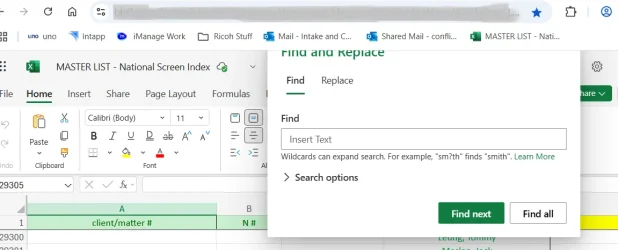
I use the find and replace (Ctrl F) feature in Excel a lot. Often it will start drifting off screen, mostly starting to disappear its top edge underneath the ribbon -- and I don't know how to move it back without restarting Excel.
I know how to move back a lost window, but it doesn't seem to work with a small dialogue box (find and replace doesn't have its own icon in the task bar)
One way is to use the show-desktops tab (Windows + Tab). This should show the app. Right click on the image of the app and click "snap right" or "snap left" in the drop down menu. This works in all cases for me. Older methods no longer work.
Press Ctrl + F (Find) or Ctrl + H (Replace) to bring up the dialog box. If it's off-screen, follow the steps below.
Activate the System Menu: With the dialog box (or any window) off-screen, press Alt + Spacebar. This will open the system menu for that window.
Select Move: Press the M key. This activates the "Move" command on the system menu.
Move the Window: Use the arrow keys (Up, Down, Left, Right) to move the dialog box. The box will move in the direction of the arrow key you press. Watch the screen as you move the dialog box, and stop when it becomes visible.
Confirm: Press Enter to confirm the new position of the dialog box.
P.S., when the box or window in question becomes visible (or partially visible) in Step 3 above, normally you should also be able to move it with your mouse by simply moving your mouse (not drag-and-drop). Then confirm the new position with just a single left-click.
Neither of those suggestions seemed to work. They move the window but not the dialogue box. I should say, they move the window WITH the dialogue box which is still stuck in its position.
I can't seem to replicate the situation on my home computer using Excel 2021 (Professional Plus). The find and replace dialogue box doesn't get stuck underneath the ribbon. It always stays on top of the background and floats free, unless I move it completely off the screen.
The problem arises at work when using Excel 365 on Sharepoint. You can see how it creeps up behind the ribbon. Whichever method I employ to pry it loose, it moves the whole Excel window, not the dialogue box.
Thought there might be an easy fix, but maybe not.


 Apple 13" Macbook Pro 2020 (m1)