JavaScript is disabled. For a better experience, please enable JavaScript in your browser before proceeding.
You are using an out of date browser. It may not display this or other websites correctly.
You should upgrade or use an
alternative browser .
Solved How do I restore an accidentally deleted off the Word ribbon?
Well-known member
Member
VIP
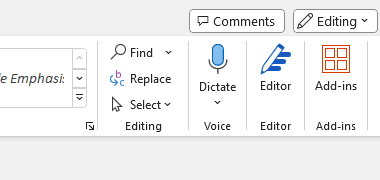
Through a series of unfortunate brain cell events, I accidentally deleted the 'Editing' section (Find/Replace/Select) of my Word ribbon in Office 365. See attached screenshot.
How do I put it back? I tried resetting Word to its default settings but no go. I also tried reinstalling Office 365 - still nothing.
Any assistance would be appreciated.
Word365_missing-section.png
3.3 KB
· Views: 1
OS
Microsoft Windows 11 Home x64, version 24H2 build 22631.3810
Computer type
PC/Desktop
Manufacturer/Model
Dell Inspiron 7700 AIO
CPU
11th Gen Intel(R) Core(TM) i7-1165G7 @ 2.80GHz
Motherboard
Dell Inc. 0VY7G1
Memory
16.00 GB SODIMM
Graphics Card(s)
Intel(R) Iris(R) Xe Graphics
Sound Card
(1) Realtek Audio (2) Intel® Smart Sound Technology for USB Audio (3) Intel® Smart Sound Technology for Bluetooth® Audio (4) Voice Changer Virtual Audio Device (WDM)
Monitor(s) Displays
Generic PnP Monitor (17.1")
Screen Resolution
1920x1080
Hard Drives
C:/ 500 GB
D:/ Seagate (External) 2TB
F:/ Toshiba (External) 4TB
Keyboard
Dell wireless
Mouse
Logitech M220
Internet Speed
Down: 35.53Mbps; Up: 26.19 Mbps
Browser
Chrome, Edge, Firefox, Firefox Developer, SRWare Iron, Vivaldi
Antivirus
Defender
Administrator
Staff member
Try right click on the ribbon -> customise
then reset
OS
Windows 11 Workstation
Computer type
PC/Desktop
Manufacturer/Model
doofenshmirtz evil incorporated
CPU
Ryzen 9 5950X
Motherboard
Asus ROG Crosshair VIII Formula
Memory
Corsair Vengeance RGB PRO Black 64GB (4x16GB) 3600MHz AMD Ryzen Tuned DDR4
Graphics Card(s)
ASUS AMD Radeon RX 6900 XT 16GB ROG Strix LC OC
Sound Card
Sound BlasterX Katana
Monitor(s) Displays
3 x27" Dell U2724D & 1 x 34" Dell U3415W
Hard Drives
Samsung 980 Pro 1TB M.2 2280 PCI-e 4.0 x4 NVMe Solid State
Drive
PSU
ASUS ROG THOR 850W 80 Plus Platinum
Case
ASUS ROG Strix Helios Midi-Tower ARGB Gaming Case
Cooling
ASUS ROG Strix LC Performance RGB AIO CPU Liquid Cooler - 360mm
Keyboard
Logi Ergo
Mouse
Logitech MX Vertical
Internet Speed
900/100 Mbps
Browser
Chrome
Antivirus
Windows Defender, Malwarebytes Pro
Other Info
HP M281 Printer
Logitech Brio Stream webcam
Yeti X mic
Operating System
Windows 10
Computer type
Laptop
Manufacturer/Model
Surface Laptop
CPU
i7
Well-known member
Member
VIP
Thread Starter
Try right click on the ribbon -> customise
then reset
I actually did try that, but it didn't work.
OS
Microsoft Windows 11 Home x64, version 24H2 build 22631.3810
Computer type
PC/Desktop
Manufacturer/Model
Dell Inspiron 7700 AIO
CPU
11th Gen Intel(R) Core(TM) i7-1165G7 @ 2.80GHz
Motherboard
Dell Inc. 0VY7G1
Memory
16.00 GB SODIMM
Graphics Card(s)
Intel(R) Iris(R) Xe Graphics
Sound Card
(1) Realtek Audio (2) Intel® Smart Sound Technology for USB Audio (3) Intel® Smart Sound Technology for Bluetooth® Audio (4) Voice Changer Virtual Audio Device (WDM)
Monitor(s) Displays
Generic PnP Monitor (17.1")
Screen Resolution
1920x1080
Hard Drives
C:/ 500 GB
D:/ Seagate (External) 2TB
F:/ Toshiba (External) 4TB
Keyboard
Dell wireless
Mouse
Logitech M220
Internet Speed
Down: 35.53Mbps; Up: 26.19 Mbps
Browser
Chrome, Edge, Firefox, Firefox Developer, SRWare Iron, Vivaldi
Antivirus
Defender
Administrator
Staff member
I actually did try that, but it didn't work.
Can you do a screenshot of the customize box set as the following.
OS
Windows 11 Workstation
Computer type
PC/Desktop
Manufacturer/Model
doofenshmirtz evil incorporated
CPU
Ryzen 9 5950X
Motherboard
Asus ROG Crosshair VIII Formula
Memory
Corsair Vengeance RGB PRO Black 64GB (4x16GB) 3600MHz AMD Ryzen Tuned DDR4
Graphics Card(s)
ASUS AMD Radeon RX 6900 XT 16GB ROG Strix LC OC
Sound Card
Sound BlasterX Katana
Monitor(s) Displays
3 x27" Dell U2724D & 1 x 34" Dell U3415W
Hard Drives
Samsung 980 Pro 1TB M.2 2280 PCI-e 4.0 x4 NVMe Solid State
Drive
PSU
ASUS ROG THOR 850W 80 Plus Platinum
Case
ASUS ROG Strix Helios Midi-Tower ARGB Gaming Case
Cooling
ASUS ROG Strix LC Performance RGB AIO CPU Liquid Cooler - 360mm
Keyboard
Logi Ergo
Mouse
Logitech MX Vertical
Internet Speed
900/100 Mbps
Browser
Chrome
Antivirus
Windows Defender, Malwarebytes Pro
Other Info
HP M281 Printer
Logitech Brio Stream webcam
Yeti X mic
Operating System
Windows 10
Computer type
Laptop
Manufacturer/Model
Surface Laptop
CPU
i7
Well-known member
Member
VIP
Thread Starter
Can you do a screenshot of the customize box set as the following.
Aha! I see the issue. I was looking at the "All Commands" menu and trying to add each element of 'Editing', which wasn't working as I expected.
Never thought of looking at the "Main Tabs > Home" menu.
All sorted now. Thank you!
OS
Microsoft Windows 11 Home x64, version 24H2 build 22631.3810
Computer type
PC/Desktop
Manufacturer/Model
Dell Inspiron 7700 AIO
CPU
11th Gen Intel(R) Core(TM) i7-1165G7 @ 2.80GHz
Motherboard
Dell Inc. 0VY7G1
Memory
16.00 GB SODIMM
Graphics Card(s)
Intel(R) Iris(R) Xe Graphics
Sound Card
(1) Realtek Audio (2) Intel® Smart Sound Technology for USB Audio (3) Intel® Smart Sound Technology for Bluetooth® Audio (4) Voice Changer Virtual Audio Device (WDM)
Monitor(s) Displays
Generic PnP Monitor (17.1")
Screen Resolution
1920x1080
Hard Drives
C:/ 500 GB
D:/ Seagate (External) 2TB
F:/ Toshiba (External) 4TB
Keyboard
Dell wireless
Mouse
Logitech M220
Internet Speed
Down: 35.53Mbps; Up: 26.19 Mbps
Browser
Chrome, Edge, Firefox, Firefox Developer, SRWare Iron, Vivaldi
Antivirus
Defender