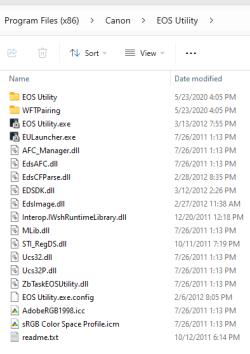
I have installed the Canon software for my Canon 5D, which opens when I attach the camera and prepares to download new files. However, on top of that Microsoft Pictures always opens, wanting to itself view/download files from the camera. I can't find a setting anywhere to prevent Pictures from opening and just let the Canon correctly handle the camera. How do I stop the MSP autorun?
windows 11 64 bit => Samsung 970 EVO Plus 500GB m2 drive
Steam: Client on drive I (1tb Samsung m2-ssd 960 pro 1tb M2 SSD)
steamlibrary 01 on drive G (500gb samsung 850 EVO 500gb SataSSD)
steamlibrary 02 on drive J (3tb western digital wd30ezrx-00azb0 Sata)
steamlibrary 03 on drive H (2tb samsung 850 EVO SataSSD)
steamlibrary 04 on drive F (2tb samsung 850 EVO SataSSD)
steamlibrary 05 on drive E (1tb samsung 860 EVO MSataSSD)
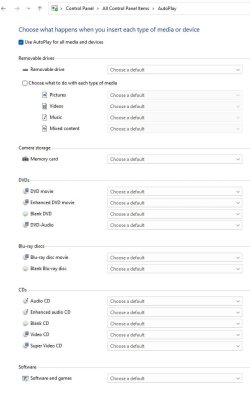
I believe that setting is in autoplay. It depends on how your system recognizes your camera as to which setting in Autoplay will apply.
Go to Control Panel>Autoplay> at the bottom you will see DEVICES. Click the drop arrow and select your app for handling your photos. Your Canon app should be one of the choices. In my case it's an iphone rather than a camera, but you can see what I'm referring to. See screenshot.
While on that same page. under "camera storage-memory card," select your app there as well using the drop arrow..
Thanks for reminding me of the schizophrenia of Windows 11. I'd gone through "Settings" repeatedly without success; removing MS Photos from all the extensions in CP fixed the problem. There are some references to the Canon camera and EOS Utility in the registry, but they are cryptic to me. I couldn't find any reference to the camera in Settings or CP, so I wouldn't know how to add/modify/remove autorun entries. (This autorun obscurity has bugged me since Windows 3.)