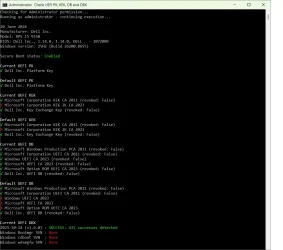
How to check if your Secure Boot certs are updated. (three methods)


They're not true "failures", you should ask the script's dev why it reports the DBX discrepancy this way or if there's a newer script.

My own script will correctly report these 154 missing signatures were retired by MS in later versions of dbxupdate.bin. The fancy word is "superseded": MS removed them from later file versions since banning PCA 2011 does the same thing as the 151 missing EFI signatures. 3 of them belong to Canonical (owners of Ubuntu).

151 + 3 = 154

But your Secure Boot updates are successful (since it was factory supported by a recent BIOS release).
 

My Computer

System One

  • OS
    Windows 7
They're not true "failures", you should ask the script's dev why it reports the DBX discrepancy this way or if there's a newer script.

My own script will correctly report these 154 missing signatures were retired by MS in later versions of dbxupdate.bin. The fancy word is "superseded": MS removed them from later file versions since banning PCA 2011 does the same thing as the 151 missing EFI signatures. 3 of them belong to Canonical (owners of Ubuntu).

151 + 3 = 154

But your Secure Boot updates are successful (since it was factory supported by a recent BIOS release).
Thank you for the reply, this is for cjee21's repo on github - i have several versions of that tool and they all do the same thing.

I just want to see the whole output green but none the less, nothings broken so I wont break things anymore :) I just used your script to check and confirmed im all good
 
Last edited:

My Computer

System One

  • OS
    Windows 11
    Computer type
    PC/Desktop
    Manufacturer/Model
    Homemade
    CPU
    AMD 5800X3D
    Motherboard
    gigabyte x470 ultra gaming rev 1.0
    Memory
    32gb 3600mhz corsair vengance ddr4
    Graphics Card(s)
    gigabyte rtx 4090 gaming oc
    Sound Card
    n/a
    Monitor(s) Displays
    2
    Screen Resolution
    2k
    Hard Drives
    samsung 870, 960, 990 pro
    PSU
    rm1000x
I'm not sure why he keeps older versions of the DBX update bin file on the repo. The only one that matters is the latest version currently sitting in the "\Windows\System32\SecureBootUpdates" folder.

Everyone can get a different number of total EFI signatures. The DBX variable works mostly on appended writes. If you wish to add a new EFI signature (to ban a known file), you request to the API to add it. Assuming it's not a duplicate entry, the new entry gets added and the list grows longer.

Unless you've wiped out the Secure Boot variables, your final DBX signature count will be:
- Starting with whatever list was pre-installed by the BIOS firmware you have​
- Added non-dupe entries from the SecureBootUpdates folder version of dbxupdate.bin
- Added by applying DBXUpdateSVN.bin to boost the SVN numbers​

Depending on your starting count (from the BIOS defaults) + how many non-dupe DBX entries (added when Windows Update installed a newer DBX file) + how many SVN entries were added (Windows Update installing a newer file again).

There is no "correct" count, all you can do is check if the current DBXupdate file has entries you're missing in the DBX variable. Some people applied the older version and now have 154 more than you. Not that you need those signatures, but MS was trying to conserve valuable NVRAM space by not permanently eating away bytes in the fixed-size NVRAM memory.
 

My Computer

System One

  • OS
    Windows 7

Latest Support Threads

Back
Top Bottom