How to fix the error "your it admin has limited access to some areas of this app and the item you tried to access to sme areas of this app ..."


Update.

-I tried a recovery via windows settings by keeping only my files.
The problem solved. But while i install my apps , drivers and tweaks and doing restarts , it crashes again ........

-After that i tried a recovery via windows settings and windows update by keeping my apps and my files. The problem persists.

-Tried at Safe Mode , the problem persists.

I believe that even i do a clean install , while install my apps and tweaks , there will happens the same.

Now i will return the system to the last image backup in order to have all my apps , settings , tweaks , and files back ,
and the crashed Defender. In real i dont need Defender , but i want always my system to show no problems.

I note that before it crashes again , it download and try to install this update and it fails to install :

1762942203596.webp


Also i tried a repair install via ISO. It goes at 98% , then it says "Restart" , then shows an error "Windows install failed" ,
and reverts to my current installation.

Any suggestions are welcome. Thx
 

My Computer My Computer

At a glance

Windows 11 ProIntel 113700H16GBNVIDIA RTX 3050 ti
OS
Windows 11 Pro
Computer type
Laptop
Manufacturer/Model
HP Pavilion 17 cd2205nw
CPU
Intel 113700H
Memory
16GB
Graphics Card(s)
NVIDIA RTX 3050 ti
Screen Resolution
1980x1020
Hard Drives
Micron 512GB
Mouse
Logitech
Internet Speed
100Mbs
Browser
Vivaldi , Edge
Antivirus
Windows defender
Update.
I did this expirement.
-I restored the image backup that created just a month ago.
-This image doesnt have the problem when i disable completely the Windows Update.
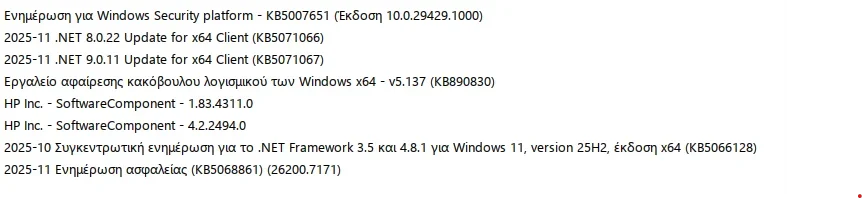
So , now the problem doesnt exist and i can confirm that one or more from the following updates causes the problem :

1.webp
 

My Computer My Computer

At a glance

Windows 11 ProIntel 113700H16GBNVIDIA RTX 3050 ti
OS
Windows 11 Pro
Computer type
Laptop
Manufacturer/Model
HP Pavilion 17 cd2205nw
CPU
Intel 113700H
Memory
16GB
Graphics Card(s)
NVIDIA RTX 3050 ti
Screen Resolution
1980x1020
Hard Drives
Micron 512GB
Mouse
Logitech
Internet Speed
100Mbs
Browser
Vivaldi , Edge
Antivirus
Windows defender
Update.
While debugging one by one the updates , i can confirm that one or more from these updates causes the problem :

1762970494948.webp
 

My Computer My Computer

At a glance

Windows 11 ProIntel 113700H16GBNVIDIA RTX 3050 ti
OS
Windows 11 Pro
Computer type
Laptop
Manufacturer/Model
HP Pavilion 17 cd2205nw
CPU
Intel 113700H
Memory
16GB
Graphics Card(s)
NVIDIA RTX 3050 ti
Screen Resolution
1980x1020
Hard Drives
Micron 512GB
Mouse
Logitech
Internet Speed
100Mbs
Browser
Vivaldi , Edge
Antivirus
Windows defender
So , its solved at least the last 24 hours.
I m not sure how. What i did :

1) I return to the image without the problem
2) At the 1st boot i disabled the Windows Update
3) I search the windows settings. I found only a setting "Programmers mode" enabled , and i disabled it and reboot
3) I install each update , one by one with a restart after , to check which update causes the problem
4) After the install of all updates the problem doesnt represent
 

My Computer My Computer

At a glance

Windows 11 ProIntel 113700H16GBNVIDIA RTX 3050 ti
OS
Windows 11 Pro
Computer type
Laptop
Manufacturer/Model
HP Pavilion 17 cd2205nw
CPU
Intel 113700H
Memory
16GB
Graphics Card(s)
NVIDIA RTX 3050 ti
Screen Resolution
1980x1020
Hard Drives
Micron 512GB
Mouse
Logitech
Internet Speed
100Mbs
Browser
Vivaldi , Edge
Antivirus
Windows defender
So , its solved at least the last 24 hours.
I m not sure how. What i did :

1) I return to the image without the problem
2) At the 1st boot i disabled the Windows Update
3) I search the windows settings. I found only a setting "Programmers mode" enabled , and i disabled it and reboot
3) I install each update , one by one with a restart after , to check which update causes the problem
4) After the install of all updates the problem doesnt represent
 

My Computer My Computer

At a glance

Windows 11 ProIntel 113700H16GBNVIDIA RTX 3050 ti
OS
Windows 11 Pro
Computer type
Laptop
Manufacturer/Model
HP Pavilion 17 cd2205nw
CPU
Intel 113700H
Memory
16GB
Graphics Card(s)
NVIDIA RTX 3050 ti
Screen Resolution
1980x1020
Hard Drives
Micron 512GB
Mouse
Logitech
Internet Speed
100Mbs
Browser
Vivaldi , Edge
Antivirus
Windows defender
The issue is back.
So , if there are new suggestions are welcomed.
 

My Computer My Computer

At a glance

Windows 11 ProIntel 113700H16GBNVIDIA RTX 3050 ti
OS
Windows 11 Pro
Computer type
Laptop
Manufacturer/Model
HP Pavilion 17 cd2205nw
CPU
Intel 113700H
Memory
16GB
Graphics Card(s)
NVIDIA RTX 3050 ti
Screen Resolution
1980x1020
Hard Drives
Micron 512GB
Mouse
Logitech
Internet Speed
100Mbs
Browser
Vivaldi , Edge
Antivirus
Windows defender

My Computer My Computer

At a glance

Windows 11 ProIntel 113700H16GBNVIDIA RTX 3050 ti
OS
Windows 11 Pro
Computer type
Laptop
Manufacturer/Model
HP Pavilion 17 cd2205nw
CPU
Intel 113700H
Memory
16GB
Graphics Card(s)
NVIDIA RTX 3050 ti
Screen Resolution
1980x1020
Hard Drives
Micron 512GB
Mouse
Logitech
Internet Speed
100Mbs
Browser
Vivaldi , Edge
Antivirus
Windows defender
The UI for Defender is the Security Center app, which is separate from the actual Defender services.

Sometimes when re-registering the SecHealthUI does nothing, re-installing from SecurityHealthSetup.exe may fix it. Worse case, you may have to perform a repair re-install.
 

My Computer My Computer

At a glance

Windows 7
OS
Windows 7
The UI for Defender is the Security Center app, which is separate from the actual Defender services.

Sometimes when re-registering the SecHealthUI does nothing, re-installing from SecurityHealthSetup.exe may fix it. Worse case, you may have to perform a repair re-install.
I tried repair install and when it goes at 100% it reboots and then had the error "Installation failed" (note that my disk needs its driver loaded to work).
Also i tried a reset (settings>system>recovery>fix with the use of windows update. It worked OK for about 1 hour and then defender crashed again.
Also i tried a reset ((settings>system>recovery>Recover this PC). It works OK but i didnt keep it because i believe that when i setup my apps and tweaks ,
it will crash again.
 

My Computer My Computer

At a glance

Windows 11 ProIntel 113700H16GBNVIDIA RTX 3050 ti
OS
Windows 11 Pro
Computer type
Laptop
Manufacturer/Model
HP Pavilion 17 cd2205nw
CPU
Intel 113700H
Memory
16GB
Graphics Card(s)
NVIDIA RTX 3050 ti
Screen Resolution
1980x1020
Hard Drives
Micron 512GB
Mouse
Logitech
Internet Speed
100Mbs
Browser
Vivaldi , Edge
Antivirus
Windows defender

Latest Support Threads

Back
Top Bottom