How to get File Explorer title?


rdwray

Well-known member
Member
VIP
Local time
7:32 AM
Posts
223
OS
Windows 11 Pro; 21H2, Build 22000.1281
How do I get File Explorer title with a batch file?
 

My Computer

System One

  • OS
    Windows 11 Pro; 21H2, Build 22000.1281
    Computer type
    Laptop
    Manufacturer/Model
    Dell 3525
    CPU
    AMD Ryzen 3 3250 with Radeon Graphics
    Memory
    8gb
    Graphics Card(s)
    AMD Graphics
    Sound Card
    AMD high definition audio device; Realtek audio
    Screen Resolution
    1980x1020

My Computers

System One System Two

  • OS
    Windows 11 Pro
    Computer type
    PC/Desktop
    Manufacturer/Model
    ASUS ROG Strix
  • Operating System
    Windows 11 Pro
    Computer type
    Laptop
    Manufacturer/Model
    ASUS VivoBook

My Computer

System One

  • OS
    Windows 11 Pro; 21H2, Build 22000.1281
    Computer type
    Laptop
    Manufacturer/Model
    Dell 3525
    CPU
    AMD Ryzen 3 3250 with Radeon Graphics
    Memory
    8gb
    Graphics Card(s)
    AMD Graphics
    Sound Card
    AMD high definition audio device; Realtek audio
    Screen Resolution
    1980x1020

My Computer

System One

  • OS
    Windows 11 Pro; 21H2, Build 22000.1281
    Computer type
    Laptop
    Manufacturer/Model
    Dell 3525
    CPU
    AMD Ryzen 3 3250 with Radeon Graphics
    Memory
    8gb
    Graphics Card(s)
    AMD Graphics
    Sound Card
    AMD high definition audio device; Realtek audio
    Screen Resolution
    1980x1020
Let try to figure this out...
You will probably find that easier to do if you first decide what you want to do with the data after you've found it.


Denis
 

My Computer

System One

  • OS
    Windows 11 Home x64 Version 25H2 Build 26200.8037
You will probably find that easier to do if you first decide what you want to do with the data after you've found it.


Denis
Just checking to see if Explorer is running by trying to get it's title if it is.
 

My Computer

System One

  • OS
    Windows 11 Pro; 21H2, Build 22000.1281
    Computer type
    Laptop
    Manufacturer/Model
    Dell 3525
    CPU
    AMD Ryzen 3 3250 with Radeon Graphics
    Memory
    8gb
    Graphics Card(s)
    AMD Graphics
    Sound Card
    AMD high definition audio device; Realtek audio
    Screen Resolution
    1980x1020

My Computers

System One System Two

  • OS
    Windows 11 Pro
    Computer type
    PC/Desktop
    Manufacturer/Model
    ASUS ROG Strix
  • Operating System
    Windows 11 Pro
    Computer type
    Laptop
    Manufacturer/Model
    ASUS VivoBook
So you do not want the window title.
Use the command TaskList.


Denis
I can't finish with this code until I know how to get the title.

Code:
REM If Explorer is running, close it manually not with taskkill

Get title

Pause

reg delete HKCU\SOFTWARE\Microsoft\Windows\CurrentVersion\Explorer\TypedPaths /F
 

My Computer

System One

  • OS
    Windows 11 Pro; 21H2, Build 22000.1281
    Computer type
    Laptop
    Manufacturer/Model
    Dell 3525
    CPU
    AMD Ryzen 3 3250 with Radeon Graphics
    Memory
    8gb
    Graphics Card(s)
    AMD Graphics
    Sound Card
    AMD high definition audio device; Realtek audio
    Screen Resolution
    1980x1020
Explorer is a tabbed process which means the main explorer process has no title. I doubt this is doable strictly with batch. Powershell could since it can leverage dotNET which further would require pinvoke and calls to Windows DLLs (aka a lot of work).

Explorer tab "titles" are always just the current directory so in batch

Batch:
FOR /F %%VAR IN ( 'CD' ) DO (
   SET CUR_DIR = %%VAR
)

TITLE %CUR_DIR%
 

My Computer

System One

  • OS
    Linux Mint
    Computer type
    Laptop
    Manufacturer/Model
    System76 Lemur Pro
The process explorer.exe used by File explorer is also used by Windows so TaskList will not be able to tell you if File explorer is running or not.
I was clearly too slow in deleting my reference to TaskList. It can be used for other processes but not for explorer.exe.

Denis
 

My Computer

System One

  • OS
    Windows 11 Home x64 Version 25H2 Build 26200.8037
Explorer is a tabbed process which means the main explorer process has no title. I doubt this is doable strictly with batch. Powershell could since it can leverage dotNET which further would require pinvoke and calls to Windows DLLs (aka a lot of work).

Explorer tab "titles" are always just the current directory so in batch

Batch:
FOR /F %%VAR IN ( 'CD' ) DO (
   SET CUR_DIR = %%VAR
)

TITLE %CUR_DIR%
That is what I was afraid of; think I will drop this idea and move on - thanks for all your help (y)
 

My Computer

System One

  • OS
    Windows 11 Pro; 21H2, Build 22000.1281
    Computer type
    Laptop
    Manufacturer/Model
    Dell 3525
    CPU
    AMD Ryzen 3 3250 with Radeon Graphics
    Memory
    8gb
    Graphics Card(s)
    AMD Graphics
    Sound Card
    AMD high definition audio device; Realtek audio
    Screen Resolution
    1980x1020
Yes, delete the url value in the registry under TypedPath then restart Explorer. Explorer caches a lot of content so it has to be restarted or you have to reboot
 

My Computer

System One

  • OS
    Linux Mint
    Computer type
    Laptop
    Manufacturer/Model
    System76 Lemur Pro
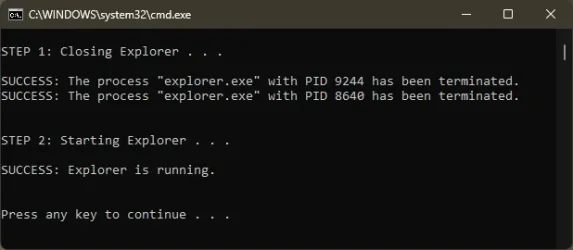
Either that, or restart Explorer to see what Explorer PID was running. It's a batch process.

12863.webp
 

My Computers

System One System Two

  • OS
    Windows 11 Pro
    Computer type
    PC/Desktop
    Manufacturer/Model
    ASUS ROG Strix
  • Operating System
    Windows 11 Pro
    Computer type
    Laptop
    Manufacturer/Model
    ASUS VivoBook
1. Multiple instances of File Explorer (or folder tabs) can be open at any time. Be prepared to scan a list of returned folder paths.

2. You can't get the folder paths using a native Windows command, but PowerShell can help.

3. We need to replace any path GUID's with a proper name, like "Home" or "Gallery".

4. A special folder like "Videos" will appear as the actual folder path, and not "Videos" as displayed by Explorer.

Code:
@echo off
for /f "delims=," %%f in ('powershell -nop -C "(New-Object -ComObject Shell.Application).Windows()|foreach{switch -Wildcard ($_.Document.Folder.Self.Path){'*{F874310E*}'{'Home'}'*{E88865EA*}'{'Gallery'}'*{20D04FE0*}'{'ThisPC'}'*{F02C1A0D*}'{'Network'}default{$_}}}"') do (
    @echo %%f
)

In this example, I have two File Explorer processes open and the first one has multiple tabs.
Code:
C:\Users\GARLIN\Downloads>NEW.bat
Home
C:\Users\GARLIN\Downloads
Gallery
C:\Users\GARLIN\Desktop
C:\Users\GARLIN\Videos
\\vmware-host\Shared Folders\Downloads\Check_UEFI
 

My Computer

System One

  • OS
    Windows 7
One more note: If you update a reg key which impacts Explorer, you'll need to terminate the already running Explorer processes. Otherwise they don't pick up your recent changes.

Code:
taskkill /f /im explorer.exe
start explorer
 

My Computer

System One

  • OS
    Windows 7
One more note: If you update a reg key which impacts Explorer, you'll need to terminate the already running Explorer processes. Otherwise they don't pick up your recent changes.
Some of the settings are picked up via a shell refresh. Anyhow, dealing with Explorer windows and tabs is much easier in C#.
 

My Computer

System One

  • OS
    Windows 10/11
    Computer type
    Laptop
    Manufacturer/Model
    Acer
Back
Top Bottom