is there a way to get File Explorer to retain memory of previously used meta data?


bobhalverson

Well-known member
Member
Local time
1:17 PM
Posts
46
OS
Windows 11
I used Windows 10 File Explorer to enter genres for my 17,000 mp3 files (meta-data).
Windows 10 remembered previously used genres, from which I could select.
This was very convenient - it reduced my data entry and ensured consistency.
Windows 11 fails to do this. AI said to make sure the files are indexed, which they are.
Is there a way to restore this capability?
One of the Windhawk options?

25H2 ---- Version 10.0.26200 Build 26200
 

My Computers

System One System Two

  • OS
    Windows 11
    Computer type
    PC/Desktop
    Manufacturer/Model
    HP ProDesk 600 G4 MT
    CPU
    Intel Core i5-8500 CPU @ 3.00GHz [6 Cores]
    Motherboard
    HP 83EC - KBC Version 07.D4.00
    Memory
    64 Gb
    Graphics Card(s)
    Intel UHD Graphics 630
    Sound Card
    Synaptics HD Audio
    Monitor(s) Displays
    24" LG
    Screen Resolution
    1920 x 1080
    Hard Drives
    (2) 1 TB
    Internet Speed
    25 Mb/s
    Browser
    Chrome
    Antivirus
    MS Defender
  • Operating System
    Windows 11 Pro
    Computer type
    Laptop
    Manufacturer/Model
    HP Laptop 17-cp3005dx
    CPU
    AMD Ryzen 5 7430U with Radeon Graphics, 2.3 Ghz, 6 Core(s), 12 Logical Processor(s)
    Motherboard
    HP 8D6B ver. 5908
    Memory
    32 GB
    Graphics card(s)
    Radeon Graphics (integrated in mother board)
    Sound Card
    AMD High Definition Audio Device
    Monitor(s) Displays
    HP Internal Display
    Screen Resolution
    1920x1080 60 Hz
    Hard Drives
    USB Attached SCSI (USAS) Mass Storage Device (1 TB)
    Browser
    Chrome
    Antivirus
    Defender
With Precision File Search, you can use LLM to index your directory path. It takes a long time. When done, you can look up your files using natural language, not just keywords.

That's the benefit of performing a semantic search.
 

My Computers

System One System Two

  • OS
    Windows 11 Education For 25H2
    Computer type
    Laptop
    Manufacturer/Model
    HP ZBook G2
    CPU
    Intel® Core i7 5500u
    Motherboard
    HP
    Memory
    8 GB
    Graphics Card(s)
    Intel HD Family Graphics 5500 AMD Firepro 4150M
    Sound Card
    Realtek High Audio
    Hard Drives
    1 TB SSD
    Mouse
    HP USB Mouse
    Antivirus
    Windows Defender
  • Operating System
    Windows 11 Pro For Workstations 25H2
    Computer type
    Laptop
    Manufacturer/Model
    HP Zbook G4
    CPU
    Xeon 1535m v6
    Motherboard
    HP
    Memory
    32 GB
    Graphics card(s)
    AMD Quadro Pro 4100
    Sound Card
    Bang and Olufson Audio
    Hard Drives
    1TB SSD
    Mouse
    HP USB Mouse
    Antivirus
    Windows Defender
Not understanding.
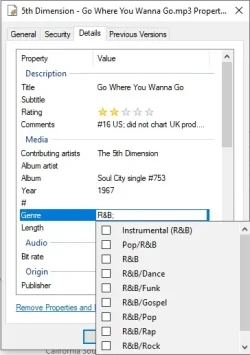
I want to see what is on the attachment when I go to File Explorer > Properties > Details
Windows 10 did that -- would tell me what my previously established options were.
Windows 11 won't do that -- I am making errors by incorrectly entering non-consistent data.
 

Attachments

  • File Explorer - properties - details.webp
    File Explorer - properties - details.webp
    22.4 KB · Views: 2

My Computers

System One System Two

  • OS
    Windows 11
    Computer type
    PC/Desktop
    Manufacturer/Model
    HP ProDesk 600 G4 MT
    CPU
    Intel Core i5-8500 CPU @ 3.00GHz [6 Cores]
    Motherboard
    HP 83EC - KBC Version 07.D4.00
    Memory
    64 Gb
    Graphics Card(s)
    Intel UHD Graphics 630
    Sound Card
    Synaptics HD Audio
    Monitor(s) Displays
    24" LG
    Screen Resolution
    1920 x 1080
    Hard Drives
    (2) 1 TB
    Internet Speed
    25 Mb/s
    Browser
    Chrome
    Antivirus
    MS Defender
  • Operating System
    Windows 11 Pro
    Computer type
    Laptop
    Manufacturer/Model
    HP Laptop 17-cp3005dx
    CPU
    AMD Ryzen 5 7430U with Radeon Graphics, 2.3 Ghz, 6 Core(s), 12 Logical Processor(s)
    Motherboard
    HP 8D6B ver. 5908
    Memory
    32 GB
    Graphics card(s)
    Radeon Graphics (integrated in mother board)
    Sound Card
    AMD High Definition Audio Device
    Monitor(s) Displays
    HP Internal Display
    Screen Resolution
    1920x1080 60 Hz
    Hard Drives
    USB Attached SCSI (USAS) Mass Storage Device (1 TB)
    Browser
    Chrome
    Antivirus
    Defender
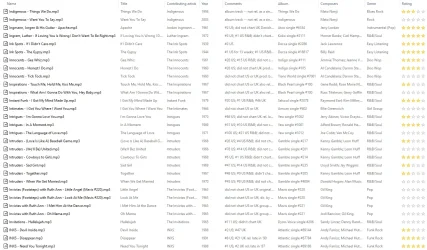
Here is what the File Explorer view of my mp3's looks like.
By filling in the meta-data, I can quickly sort by song title, year, composer, genre, rating, etc.
For proper sorts, it is critical that the meta-data is consistent...
 

Attachments

  • Example of File Explorer view of mp3's.webp
    Example of File Explorer view of mp3's.webp
    152 KB · Views: 1

My Computers

System One System Two

  • OS
    Windows 11
    Computer type
    PC/Desktop
    Manufacturer/Model
    HP ProDesk 600 G4 MT
    CPU
    Intel Core i5-8500 CPU @ 3.00GHz [6 Cores]
    Motherboard
    HP 83EC - KBC Version 07.D4.00
    Memory
    64 Gb
    Graphics Card(s)
    Intel UHD Graphics 630
    Sound Card
    Synaptics HD Audio
    Monitor(s) Displays
    24" LG
    Screen Resolution
    1920 x 1080
    Hard Drives
    (2) 1 TB
    Internet Speed
    25 Mb/s
    Browser
    Chrome
    Antivirus
    MS Defender
  • Operating System
    Windows 11 Pro
    Computer type
    Laptop
    Manufacturer/Model
    HP Laptop 17-cp3005dx
    CPU
    AMD Ryzen 5 7430U with Radeon Graphics, 2.3 Ghz, 6 Core(s), 12 Logical Processor(s)
    Motherboard
    HP 8D6B ver. 5908
    Memory
    32 GB
    Graphics card(s)
    Radeon Graphics (integrated in mother board)
    Sound Card
    AMD High Definition Audio Device
    Monitor(s) Displays
    HP Internal Display
    Screen Resolution
    1920x1080 60 Hz
    Hard Drives
    USB Attached SCSI (USAS) Mass Storage Device (1 TB)
    Browser
    Chrome
    Antivirus
    Defender
are you stating that you CAN edit them on windows 11 but it doesn't save the changes, or that you CANNOT edit them on windows 11?
 

My Computer

System One

  • OS
    Windows 11 Pro
I can edit them and the edit saves -- my issue is that I want to be consistent in *how* they're edited.
In Windows 10, when I started to enter data, I would get a drop-down menu of previous similar data.
I could pick the one I wanted -- not just randomly enter something and hope I did it like the others.
Windows 11 won't do that -- I'm flying blind.
So my question is, is there a way to get that drop-down list in Windows 11?
(my 1st attachment shows the list to which I'm referring)
 

My Computers

System One System Two

  • OS
    Windows 11
    Computer type
    PC/Desktop
    Manufacturer/Model
    HP ProDesk 600 G4 MT
    CPU
    Intel Core i5-8500 CPU @ 3.00GHz [6 Cores]
    Motherboard
    HP 83EC - KBC Version 07.D4.00
    Memory
    64 Gb
    Graphics Card(s)
    Intel UHD Graphics 630
    Sound Card
    Synaptics HD Audio
    Monitor(s) Displays
    24" LG
    Screen Resolution
    1920 x 1080
    Hard Drives
    (2) 1 TB
    Internet Speed
    25 Mb/s
    Browser
    Chrome
    Antivirus
    MS Defender
  • Operating System
    Windows 11 Pro
    Computer type
    Laptop
    Manufacturer/Model
    HP Laptop 17-cp3005dx
    CPU
    AMD Ryzen 5 7430U with Radeon Graphics, 2.3 Ghz, 6 Core(s), 12 Logical Processor(s)
    Motherboard
    HP 8D6B ver. 5908
    Memory
    32 GB
    Graphics card(s)
    Radeon Graphics (integrated in mother board)
    Sound Card
    AMD High Definition Audio Device
    Monitor(s) Displays
    HP Internal Display
    Screen Resolution
    1920x1080 60 Hz
    Hard Drives
    USB Attached SCSI (USAS) Mass Storage Device (1 TB)
    Browser
    Chrome
    Antivirus
    Defender
In case you're wondering why I'm doing this, I use it to create playlists.
Having a party -- I ask what kind of music they'd like to hear.

* R&B Hits from the 70's
* Pop Rock from 1966 -- but skip the overplayed Top 10 stuff
* Classic Country
* Folk Rock from the late 60's & early 70's

Using File Explorer, I can sort by my various fields and quickly create on-demand playlists.
 

My Computers

System One System Two

  • OS
    Windows 11
    Computer type
    PC/Desktop
    Manufacturer/Model
    HP ProDesk 600 G4 MT
    CPU
    Intel Core i5-8500 CPU @ 3.00GHz [6 Cores]
    Motherboard
    HP 83EC - KBC Version 07.D4.00
    Memory
    64 Gb
    Graphics Card(s)
    Intel UHD Graphics 630
    Sound Card
    Synaptics HD Audio
    Monitor(s) Displays
    24" LG
    Screen Resolution
    1920 x 1080
    Hard Drives
    (2) 1 TB
    Internet Speed
    25 Mb/s
    Browser
    Chrome
    Antivirus
    MS Defender
  • Operating System
    Windows 11 Pro
    Computer type
    Laptop
    Manufacturer/Model
    HP Laptop 17-cp3005dx
    CPU
    AMD Ryzen 5 7430U with Radeon Graphics, 2.3 Ghz, 6 Core(s), 12 Logical Processor(s)
    Motherboard
    HP 8D6B ver. 5908
    Memory
    32 GB
    Graphics card(s)
    Radeon Graphics (integrated in mother board)
    Sound Card
    AMD High Definition Audio Device
    Monitor(s) Displays
    HP Internal Display
    Screen Resolution
    1920x1080 60 Hz
    Hard Drives
    USB Attached SCSI (USAS) Mass Storage Device (1 TB)
    Browser
    Chrome
    Antivirus
    Defender
If you're talking about the drop-down auto-suggest list (when you type the first letter in a field such as Tags) Microsoft broke that a while back with KB5044285. As usual, no explanation and no replies to the Feedback Hub reports. See:


My Computer

System One

  • OS
    Windows 10/11
    Computer type
    Laptop
    Manufacturer/Model
    Acer
There are many things that Microsoft has broken that have been restored with Explorer Patcher or Windhawk.
I guess my question is -- has a work-around been developed?
I use Windows for work, and this is really hampering my ability to be effective in my job.
 

My Computers

System One System Two

  • OS
    Windows 11
    Computer type
    PC/Desktop
    Manufacturer/Model
    HP ProDesk 600 G4 MT
    CPU
    Intel Core i5-8500 CPU @ 3.00GHz [6 Cores]
    Motherboard
    HP 83EC - KBC Version 07.D4.00
    Memory
    64 Gb
    Graphics Card(s)
    Intel UHD Graphics 630
    Sound Card
    Synaptics HD Audio
    Monitor(s) Displays
    24" LG
    Screen Resolution
    1920 x 1080
    Hard Drives
    (2) 1 TB
    Internet Speed
    25 Mb/s
    Browser
    Chrome
    Antivirus
    MS Defender
  • Operating System
    Windows 11 Pro
    Computer type
    Laptop
    Manufacturer/Model
    HP Laptop 17-cp3005dx
    CPU
    AMD Ryzen 5 7430U with Radeon Graphics, 2.3 Ghz, 6 Core(s), 12 Logical Processor(s)
    Motherboard
    HP 8D6B ver. 5908
    Memory
    32 GB
    Graphics card(s)
    Radeon Graphics (integrated in mother board)
    Sound Card
    AMD High Definition Audio Device
    Monitor(s) Displays
    HP Internal Display
    Screen Resolution
    1920x1080 60 Hz
    Hard Drives
    USB Attached SCSI (USAS) Mass Storage Device (1 TB)
    Browser
    Chrome
    Antivirus
    Defender
I am not aware of any patch that restores the auto-suggest functionality.

The only workaround I can suggest is to use one of the many great MP3 tag editors that are available for Windows. I use Tage&Rename (bought a lifetime license ages ago) but MP3Tag is probably the best known tagger.

Here's an alphabetical list (that's probably not complete):

AudioRanger
AutomaTag
Kid3
MediaMonkey
Metatogger
MP3Tag
Music Tag
MusicBrainz Picard
SongKong
Tag&Rename
TagScanner
 

My Computer

System One

  • OS
    Windows 10/11
    Computer type
    Laptop
    Manufacturer/Model
    Acer

Latest Support Threads

Back
Top Bottom