How to get visual caps lock notification on Windows 11?


retexan599

Well-known member
Member
Local time
6:28 PM
Posts
125
Location
Houston TX USA
OS
Windows 11 25H2 26200.8246
New to Windows 11. With my Windows 10 system (now decommissioned), I would get a visual notification on screen (a popup) when pressing caps lock; either caps lock on or caps lock off. For the life of me, I don't remember how I came to have that with my Windows 10. Would like to have the same thing on my Windows 11 desktop. I do have the 'Toggle keys' turned on so I do get the audible chirp, but would like the confirming screen popup. Appreciate any thoughts.

Windows 11 22H2
 

My Computer

System One

  • OS
    Windows 11 25H2 26200.8246
    Computer type
    PC/Desktop
    Manufacturer/Model
    HP Envy Desktop TE02-0xxx
    CPU
    2.10GHz Intel 12th Gen Core i7-12700
    Motherboard
    HP 'BlizzardU' 894B 10; Chipset Intel ADL Z690
    Memory
    16GB
    Graphics Card(s)
    NVIDIA GeForce 3050
    Sound Card
    Realtek Audio
    Monitor(s) Displays
    HP27er
    Screen Resolution
    1920x1080
    Hard Drives
    256GB NVMe SSD
    2TB HDD
    PSU
    600W
    Case
    Desktop Tower
    Cooling
    Air
    Keyboard
    Logitech K350
    Mouse
    Logitech M510
    Internet Speed
    25Mps (Max)
    Browser
    Chrome
    Antivirus
    Windows native security
    Other Info
    HP replaced SSD under warranty in November, 2023.
    No VPN.
 

My Computers

System One System Two

  • OS
    Win 11 Pro 25H2 26200.8524
    Computer type
    PC/Desktop
    Manufacturer/Model
    Self Built
    CPU
    Intel® Core™ i7-14700K
    Motherboard
    ASUS TUF Z690-PLUS WIFI BIOS 4505 11/29/25
    Memory
    G.SKILL Ripjaws S5 Series 64GB (2 x 32GB) DDR5
    Graphics Card(s)
    ASUS GeForce RTX 4070 Super 12GB
    Sound Card
    Sound Blaster AE-5 Plus
    Monitor(s) Displays
    ASUS TUF Gaming 27" 2K HDR Gaming
    Screen Resolution
    2560 x 1440
    Hard Drives
    Samsung 990 Pro 1TB NVMe (Win 11 25H2)
    SK hynix P41 500GB NVMe 25H2 DEV/Games
    SK hynix P41 2TB NVMe (x3)
    Crucial P3 Plus 4TB
    PSU
    Corsair RM850x Shift
    Case
    Antec Dark Phantom DP502 FLUX
    Cooling
    Corsair Nautilus 360 RS AIO
    Keyboard
    Logitech MK 320
    Mouse
    Razer Basilisk V3
    Internet Speed
    350Mbs
    Browser
    Firefox
    Antivirus
    Winows Security
    Other Info
    MR 8.1 Home

    System 3 Specs
    Win 11 Pro 25H2 26200.8524
    ASUS PRIME Z370-P II BIOS 3004 7/12/21
    Intel Core i7-8700 CPU @ 3.20GHz
    32GB DDR4 RAM (4x8)
    iGPU Intel UHD Graphics 630
  • Operating System
    Win 11 Pro 25H2 26200.8524
    Computer type
    PC/Desktop
    Manufacturer/Model
    Self Built
    CPU
    Intel Core i7-11700F
    Motherboard
    Asus TUF Gaming Z590 Plus WiFi (BIOS 2803)
    Memory
    64 GB DDR4
    Graphics card(s)
    MSI GeForce RTX 3060 Ventus 2X 12GB
    Sound Card
    SoundBlaster Audigy Fx V2
    Monitor(s) Displays
    Samsung F27T350
    Screen Resolution
    1920x1080
    Hard Drives
    Samsung 980 Pro 1TB
    Samsung 970 EVO Plus 2TB
    Samsung 870 EVO 500GB SSD
    PSU
    Corsair HX750
    Case
    Cougar MX330-G Window
    Cooling
    Thermalright Frozen Edge 240 Black AIO
    Internet Speed
    350Mbps
    Browser
    Firefox
    Antivirus
    Windows Security

My Computers

System One System Two

  • OS
    Windows 11 (25H2)
    Computer type
    PC/Desktop
    Manufacturer/Model
    HP Pavilion 577B5AA#ABA
    CPU
    Core(TM) i5-12400T
    Motherboard
    HP 89E9
    Memory
    12.0 GB (11.7 GB usable)
    Graphics Card(s)
    Intel(R) UHD Graphics 730
    Sound Card
    DFX Audio
    Monitor(s) Displays
    HO Generic PnP Monitor
    Screen Resolution
    1920 x 1080
    Hard Drives
    SAMSUNG MZVLQ10HBLB00BH1 SSD 1TB
    PSU
    HP Std. for this product
    Case
    All-in-One
    Cooling
    Fan
    Keyboard
    HP Wireless / Bluetooth
    Mouse
    HP Wireless / Bluetooth
    Internet Speed
    Link speed (Receive/Transmit): 1000/1000 (Mbps)
    Browser
    Firefox
    Antivirus
    Malwarebytes Pro / Windows Security
    Other Info
    Retired IT professional.
  • Operating System
    Windows 11 (25H2)
    Computer type
    Laptop
    Manufacturer/Model
    HP 15tegooo [HP Pavilion Laptop Intel I-7]
    CPU
    Intel I-7-1165G7
    Motherboard
    HP
    Memory
    8 GB DDR4-3200 SDRAM
    Graphics card(s)
    Intel Iris Xe Graphics
    Sound Card
    Realtek
    Monitor(s) Displays
    HP HD micro edge, Bright View, 250 nits
    Screen Resolution
    1366 x768
    Hard Drives
    256 GB DD4-3200 SDRAM
    PSU
    HP
    Case
    Std HP Laptop
    Cooling
    Fan
    Keyboard
    std
    Mouse
    Logi M585
    Browser
    Edge
    Antivirus
    Windows Security
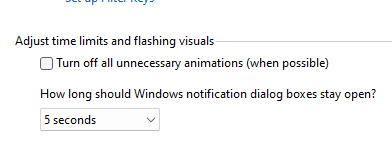
Thanks for the reference, but it did not work for me. The presenter directs me to this: Control Panel\All Control Panel Items\Ease of Access Center\Make it easier to focus on tasks. There is a line with a box:
Turn off animations.png
The presenter wants me to check this box. In the first place, that seems counter-intuitive; why turn off animations when my goal is to create a popup for caps lock on/off? In any case, I did check the box and it made no difference, whether checked or unchecked, there is no screen message/animation for the caps lock. Maybe I am missing something, but it didn't work.
 

My Computer

System One

  • OS
    Windows 11 25H2 26200.8246
    Computer type
    PC/Desktop
    Manufacturer/Model
    HP Envy Desktop TE02-0xxx
    CPU
    2.10GHz Intel 12th Gen Core i7-12700
    Motherboard
    HP 'BlizzardU' 894B 10; Chipset Intel ADL Z690
    Memory
    16GB
    Graphics Card(s)
    NVIDIA GeForce 3050
    Sound Card
    Realtek Audio
    Monitor(s) Displays
    HP27er
    Screen Resolution
    1920x1080
    Hard Drives
    256GB NVMe SSD
    2TB HDD
    PSU
    600W
    Case
    Desktop Tower
    Cooling
    Air
    Keyboard
    Logitech K350
    Mouse
    Logitech M510
    Internet Speed
    25Mps (Max)
    Browser
    Chrome
    Antivirus
    Windows native security
    Other Info
    HP replaced SSD under warranty in November, 2023.
    No VPN.
I use Tray Status Pro
 

My Computers

System One System Two

  • OS
    Windows 11 Pro
    Computer type
    PC/Desktop
    Manufacturer/Model
    Intel NUC 10i5FNH - Lenovo A510 desktop -- Lenovo Laptop -- Acer laptop
    CPU
    i510210u
    Motherboard
    Intel
    Memory
    16g - 16g - 8g -8g
    Graphics Card(s)
    CPU
    Monitor(s) Displays
    acer 21 inch
    Screen Resolution
    1920x1080
    Hard Drives
    500g ssd
    500g spinner
    Keyboard
    cheap from Walmart
    Mouse
    cheap from Walmart
    Internet Speed
    109mbs
    Browser
    Chrome + FireFox+Waterfox+Brave+Edge
    Antivirus
    Emsisoft + Malwarebytes
  • Operating System
    Win 10 Pro
    Computer type
    PC/Desktop
    Manufacturer/Model
    Lenovo 510
    CPU
    I5
    Motherboard
    Lenovo
    Memory
    16g
    Graphics card(s)
    cpu
    Monitor(s) Displays
    20 inch
    Hard Drives
    SSD
    Internet Speed
    109mbs
    Antivirus
    Emsisoft + Malwarebytes Free
Back
Top Bottom