
fontawesomer
New member
- Local time
- 7:11 PM
- Posts
- 1
- OS
- Windows 11
Hii. On Paint, basically all fonts have this rainbow-colored anti-aliasing and I really like that. However, for this one font... it's just monochrome and that's really weird. Picture:
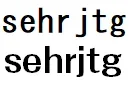
(MS Gothic [top] and A-OTF フォーク Pro B [bottom; the monochrome one]) (it's really hard to see but MS Gothic has a slight colored tinge on its edges, while the bottom text is grayscale)
Idk if it's the font file type or whatever but, I'd really like my custom font to have the rainbow anti-aliasing like the rest of the fonts on Paint.
(MS Gothic [top] and A-OTF フォーク Pro B [bottom; the monochrome one]) (it's really hard to see but MS Gothic has a slight colored tinge on its edges, while the bottom text is grayscale)
Idk if it's the font file type or whatever but, I'd really like my custom font to have the rainbow anti-aliasing like the rest of the fonts on Paint.
- Windows Build/Version
- Windows 11
My Computer
At a glance
Windows 11
- OS
- Windows 11
- Computer type
- Laptop






