
How To Make Printer Device Icon Image Realistic instead of Generic?


AllenChicago

Well-known member
Member
Local time
7:33 AM
Posts
84
OS
Windows 11 64-bit
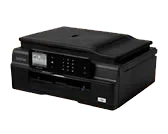
On this new WIN-11 PC, my HP PRINTER ICON looks just like the Printer itself (HP Officejet 8600-Pro) in Devices and Printers. But my Brother printer ICON image is just a generic printer. Both printers were installed using the software from the HP and BROTHER website. How do I make the Brother MFC-J875DW look like that machine? It did on my prior Windows-10 P.C.. Thanks in advance for any guidance. (y)
-Allen
 

My Computer My Computer

At a glance

Windows 11 64-bitIntel® Core™ i7-1065G7 CPU @ 1.30GHz12GBIntel Iris Graphics
OS
Windows 11 64-bit
Computer type
Laptop
Manufacturer/Model
Samsung
CPU
Intel® Core™ i7-1065G7 CPU @ 1.30GHz
Motherboard
SAMSUNG ELECTRONICS CO., LTD. Model NP950QCG-K01US
Memory
12GB
Graphics Card(s)
Intel Iris Graphics
Hard Drives
SAMSUNG MZVLB512HBJQ-000 SSD 476.94 GB
Mouse
Logitech MX Mobile BlueTooth
Internet Speed
686.6 Mbps download 23.6 Mbps upload Latency: 8 ms Server: Chicago
Browser
Edge (Default) and FireFox installed.
In order to have a model-specific printer icon, your printer's setup software needs to register it. Do you remember if you installed the full setup, or just the basic drivers?
 

My Computer My Computer

At a glance

Windows 7
OS
Windows 7
You can also look for an icon you like using Google and download it.
 

My Computer My Computer

At a glance

W11
OS
W11
Computer type
PC/Desktop
Manufacturer/Model
2 HP Desktops, 1 Dell Desktop, 2 Dell XPS Laptops, 1 HP Laptop
Keyboard
Logitech
Mouse
Logitech MX Master 4 & 3
Internet Speed
500 mps
Browser
Firefox
Antivirus
Bitdefender
In order to have a model-specific printer icon, your printer's setup software needs to register it. Do you remember if you installed the full setup, or just the basic drivers?
I used the full Brother MFC-J875DW installation package. The printer was purchased new in 2013, and the software was last updated in 2015....but is compatible with Windows11, according to the Brother support page for this printer. (I had to turn off something called "core memory protection" on this PC to get the printer software to fully install, due to a driver Win-11 thinks is dangerous.)
 

My Computer My Computer

At a glance

Windows 11 64-bitIntel® Core™ i7-1065G7 CPU @ 1.30GHz12GBIntel Iris Graphics
OS
Windows 11 64-bit
Computer type
Laptop
Manufacturer/Model
Samsung
CPU
Intel® Core™ i7-1065G7 CPU @ 1.30GHz
Motherboard
SAMSUNG ELECTRONICS CO., LTD. Model NP950QCG-K01US
Memory
12GB
Graphics Card(s)
Intel Iris Graphics
Hard Drives
SAMSUNG MZVLB512HBJQ-000 SSD 476.94 GB
Mouse
Logitech MX Mobile BlueTooth
Internet Speed
686.6 Mbps download 23.6 Mbps upload Latency: 8 ms Server: Chicago
Browser
Edge (Default) and FireFox installed.
You can also look for an icon you like using Google and download it.
I see there are tons of Printer ICON's available. One of the things that bugs me about the hype over "Artificial Intelligence", is how useless it is in so many real life situations like this. You'd think there would be an A.I. program that could look over my CBS.log and tell me what DISM repair operation fixed this morning. THAT WOULD BE USEFUL...but I can't find one that can look over the 1,200 lines of entries and tell me what was wrong, and what the repair was. :confused:
 

My Computer My Computer

At a glance

Windows 11 64-bitIntel® Core™ i7-1065G7 CPU @ 1.30GHz12GBIntel Iris Graphics
OS
Windows 11 64-bit
Computer type
Laptop
Manufacturer/Model
Samsung
CPU
Intel® Core™ i7-1065G7 CPU @ 1.30GHz
Motherboard
SAMSUNG ELECTRONICS CO., LTD. Model NP950QCG-K01US
Memory
12GB
Graphics Card(s)
Intel Iris Graphics
Hard Drives
SAMSUNG MZVLB512HBJQ-000 SSD 476.94 GB
Mouse
Logitech MX Mobile BlueTooth
Internet Speed
686.6 Mbps download 23.6 Mbps upload Latency: 8 ms Server: Chicago
Browser
Edge (Default) and FireFox installed.
But my Brother printer ICON image is just a generic printer
(I had to turn off something called "core memory protection" on this PC to get the printer software to fully install, due to a driver Win-11 thinks is dangerous.)
This is just reflective of the quality of the program writing from the manufacturer

I see there are tons of Printer ICON's available.
You need to either refine your search parameters, and/or do some perusing of the options to make a decision
 

My Computers My Computers

  • At a glance

    Windows 11 2xH2 (latest update ... forever anal)Intel i5-124008GBNVIDIA GeForce GT730
    OS
    Windows 11 2xH2 (latest update ... forever anal)
    Computer type
    PC/Desktop
    Manufacturer/Model
    HP Slim S01
    CPU
    Intel i5-12400
    Memory
    8GB
    Graphics Card(s)
    NVIDIA GeForce GT730
    Sound Card
    OOBE
    Monitor(s) Displays
    Acer 32"
    Screen Resolution
    1920x1080
    Hard Drives
    512GB KIOXIA NVMe
    1TB SATA SSD
    PSU
    OOBE
    Case
    OOBE
    Cooling
    OOBE
    Keyboard
    BT
    Mouse
    BT
    Browser
    Brave FFox Chrome Opera
    Antivirus
    KIS
  • At a glance

    Windows 11 Pro 2xH2 (latest update ... 4ever ...i7-1165G7 @ 2.80GHzIntel Iris Xe Graphics
    Operating System
    Windows 11 Pro 2xH2 (latest update ... 4ever anal)
    Computer type
    Laptop
    Manufacturer/Model
    HP Pavillion 15
    CPU
    i7-1165G7 @ 2.80GHz
    Graphics card(s)
    Intel Iris Xe Graphics
    Hard Drives
    Samsung NVMe 512GB
    + numerous/multiple SSD Type C USB enclosures
    Internet Speed
    NBN FTTN 50
    Browser
    Brave
    Antivirus
    KIS
This is just reflective of the quality of the program writing from the manufacturer
That's an unfair assessment. The standards for what Windows considers a "secure" driver changed over the years. Especially if the original driver was written when the printer first debuted back in 2013.

With an outdated printer, no vendor is going back to redo the drivers.
 

My Computer My Computer

At a glance

Windows 7
OS
Windows 7

Attachments

My Computer My Computer

At a glance

Windows 11 Pro
OS
Windows 11 Pro
OK, I agree you download a more realistic icon or create it yourself with utilities like BMP2ICO. How do you apply it then?
 

My Computers My Computers

  • At a glance

    Windows 11 Pro 23H2 (5699), 25H2 (8655)Mobile DualCore Intel Core 2 Duo T7250, 2000 MHz4GBMobile Intel(R) GMA 4500M (Mobile 4 series)
    OS
    Windows 11 Pro 23H2 (5699), 25H2 (8655)
    Computer type
    Laptop
    Manufacturer/Model
    Acer Extensa 5630EZ
    CPU
    Mobile DualCore Intel Core 2 Duo T7250, 2000 MHz
    Motherboard
    Acer Extensa 5630
    Memory
    4GB
    Graphics Card(s)
    Mobile Intel(R) GMA 4500M (Mobile 4 series)
    Sound Card
    Realtek ALC268 @ Intel 82801IB ICH9 - High Definition Audio Controller
    Monitor(s) Displays
    1
    Screen Resolution
    1280x800
    Hard Drives
    Samsung SSD 850 EVO 250GB SATA Device (250 GB, SATA-III)
    Internet Speed
    VDSL 50 Mbps
    Browser
    MICROSOFT EDGE
    Antivirus
    WINDOWS DEFENDER
    Other Info
    Legacy MBR installation, no TPM, no Secure Boot, no WDDM 2.0 graphics drivers, no SSE4.2, cannot get more unsupported ;) This is only my test laptop. I had installed Windows 11 here before upgrading my main PC. For my main PC I use everyday see my 2nd system specs.
  • At a glance

    Windows 11 Pro v25H2 (build 26200.8655)Intel Core-i7 3770 3.40GHz s1155 (3rd generat...2x Kingston Hyper-X Blu 8GB DDR3-1600GIGABYTE GeForce RTX 3050 WINDFORCE OC V2 6GB...
    Operating System
    Windows 11 Pro v25H2 (build 26200.8655)
    Computer type
    PC/Desktop
    Manufacturer/Model
    Custom-built PC
    CPU
    Intel Core-i7 3770 3.40GHz s1155 (3rd generation)
    Motherboard
    Asus P8H61 s1155 ATX
    Memory
    2x Kingston Hyper-X Blu 8GB DDR3-1600
    Graphics card(s)
    GIGABYTE GeForce RTX 3050 WINDFORCE OC V2 6GB (GV-N3050WF2OCV2-6GD)
    Sound Card
    Realtek HD audio (ALC887)
    Monitor(s) Displays
    Sony Bravia KDL-19L4000 19" LCD TV via VGA
    Screen Resolution
    1440x900 32-bit 60Hz
    Hard Drives
    WD Blue SA510 2.5 1000GB SSD as system disk, Western Digital Caviar Purple 4TB SATA III (WD40PURZ) as second
    PSU
    Thermaltake Litepower RGB 550W Full Wired
    Case
    SUPERCASE MIDI-TOWER
    Cooling
    Deepcool Gamma Archer CPU cooler, 1x 8cm fan at the back
    Keyboard
    Mitsumi 101-key PS/2
    Mouse
    Sunnyline OptiEye PS/2
    Internet Speed
    100Mbps
    Browser
    Microsoft Edge, Mozilla Firefox
    Antivirus
    Microsoft Windows Defender
    Other Info
    Legacy BIOS (MBR) installation, no TPM, no Secure Boot, WDDM 3.0 graphics drivers, WEI score 7.4
Right-click on the desktop shortcut - properties - change icon - navigate to where you downloaded the icon and select it - APPLY
 

My Computer My Computer

At a glance

W11
OS
W11
Computer type
PC/Desktop
Manufacturer/Model
2 HP Desktops, 1 Dell Desktop, 2 Dell XPS Laptops, 1 HP Laptop
Keyboard
Logitech
Mouse
Logitech MX Master 4 & 3
Internet Speed
500 mps
Browser
Firefox
Antivirus
Bitdefender
I know how to change the icon of a shortcut. I meant how to change the generic printer icon with a custom one in Devices and Printers. Thanks.
 

My Computers My Computers

  • At a glance

    Windows 11 Pro 23H2 (5699), 25H2 (8655)Mobile DualCore Intel Core 2 Duo T7250, 2000 MHz4GBMobile Intel(R) GMA 4500M (Mobile 4 series)
    OS
    Windows 11 Pro 23H2 (5699), 25H2 (8655)
    Computer type
    Laptop
    Manufacturer/Model
    Acer Extensa 5630EZ
    CPU
    Mobile DualCore Intel Core 2 Duo T7250, 2000 MHz
    Motherboard
    Acer Extensa 5630
    Memory
    4GB
    Graphics Card(s)
    Mobile Intel(R) GMA 4500M (Mobile 4 series)
    Sound Card
    Realtek ALC268 @ Intel 82801IB ICH9 - High Definition Audio Controller
    Monitor(s) Displays
    1
    Screen Resolution
    1280x800
    Hard Drives
    Samsung SSD 850 EVO 250GB SATA Device (250 GB, SATA-III)
    Internet Speed
    VDSL 50 Mbps
    Browser
    MICROSOFT EDGE
    Antivirus
    WINDOWS DEFENDER
    Other Info
    Legacy MBR installation, no TPM, no Secure Boot, no WDDM 2.0 graphics drivers, no SSE4.2, cannot get more unsupported ;) This is only my test laptop. I had installed Windows 11 here before upgrading my main PC. For my main PC I use everyday see my 2nd system specs.
  • At a glance

    Windows 11 Pro v25H2 (build 26200.8655)Intel Core-i7 3770 3.40GHz s1155 (3rd generat...2x Kingston Hyper-X Blu 8GB DDR3-1600GIGABYTE GeForce RTX 3050 WINDFORCE OC V2 6GB...
    Operating System
    Windows 11 Pro v25H2 (build 26200.8655)
    Computer type
    PC/Desktop
    Manufacturer/Model
    Custom-built PC
    CPU
    Intel Core-i7 3770 3.40GHz s1155 (3rd generation)
    Motherboard
    Asus P8H61 s1155 ATX
    Memory
    2x Kingston Hyper-X Blu 8GB DDR3-1600
    Graphics card(s)
    GIGABYTE GeForce RTX 3050 WINDFORCE OC V2 6GB (GV-N3050WF2OCV2-6GD)
    Sound Card
    Realtek HD audio (ALC887)
    Monitor(s) Displays
    Sony Bravia KDL-19L4000 19" LCD TV via VGA
    Screen Resolution
    1440x900 32-bit 60Hz
    Hard Drives
    WD Blue SA510 2.5 1000GB SSD as system disk, Western Digital Caviar Purple 4TB SATA III (WD40PURZ) as second
    PSU
    Thermaltake Litepower RGB 550W Full Wired
    Case
    SUPERCASE MIDI-TOWER
    Cooling
    Deepcool Gamma Archer CPU cooler, 1x 8cm fan at the back
    Keyboard
    Mitsumi 101-key PS/2
    Mouse
    Sunnyline OptiEye PS/2
    Internet Speed
    100Mbps
    Browser
    Microsoft Edge, Mozilla Firefox
    Antivirus
    Microsoft Windows Defender
    Other Info
    Legacy BIOS (MBR) installation, no TPM, no Secure Boot, WDDM 3.0 graphics drivers, WEI score 7.4
OK, I agree you download a more realistic icon or create it yourself with utilities like BMP2ICO. How do you apply it then?
Creating a metadata xml and using powershell to apply it
 

My Computer My Computer

At a glance

Windows 11 Pro
OS
Windows 11 Pro
I don't know how to do these. Can you give instructions? Thanks.
 

My Computers My Computers

  • At a glance

    Windows 11 Pro 23H2 (5699), 25H2 (8655)Mobile DualCore Intel Core 2 Duo T7250, 2000 MHz4GBMobile Intel(R) GMA 4500M (Mobile 4 series)
    OS
    Windows 11 Pro 23H2 (5699), 25H2 (8655)
    Computer type
    Laptop
    Manufacturer/Model
    Acer Extensa 5630EZ
    CPU
    Mobile DualCore Intel Core 2 Duo T7250, 2000 MHz
    Motherboard
    Acer Extensa 5630
    Memory
    4GB
    Graphics Card(s)
    Mobile Intel(R) GMA 4500M (Mobile 4 series)
    Sound Card
    Realtek ALC268 @ Intel 82801IB ICH9 - High Definition Audio Controller
    Monitor(s) Displays
    1
    Screen Resolution
    1280x800
    Hard Drives
    Samsung SSD 850 EVO 250GB SATA Device (250 GB, SATA-III)
    Internet Speed
    VDSL 50 Mbps
    Browser
    MICROSOFT EDGE
    Antivirus
    WINDOWS DEFENDER
    Other Info
    Legacy MBR installation, no TPM, no Secure Boot, no WDDM 2.0 graphics drivers, no SSE4.2, cannot get more unsupported ;) This is only my test laptop. I had installed Windows 11 here before upgrading my main PC. For my main PC I use everyday see my 2nd system specs.
  • At a glance

    Windows 11 Pro v25H2 (build 26200.8655)Intel Core-i7 3770 3.40GHz s1155 (3rd generat...2x Kingston Hyper-X Blu 8GB DDR3-1600GIGABYTE GeForce RTX 3050 WINDFORCE OC V2 6GB...
    Operating System
    Windows 11 Pro v25H2 (build 26200.8655)
    Computer type
    PC/Desktop
    Manufacturer/Model
    Custom-built PC
    CPU
    Intel Core-i7 3770 3.40GHz s1155 (3rd generation)
    Motherboard
    Asus P8H61 s1155 ATX
    Memory
    2x Kingston Hyper-X Blu 8GB DDR3-1600
    Graphics card(s)
    GIGABYTE GeForce RTX 3050 WINDFORCE OC V2 6GB (GV-N3050WF2OCV2-6GD)
    Sound Card
    Realtek HD audio (ALC887)
    Monitor(s) Displays
    Sony Bravia KDL-19L4000 19" LCD TV via VGA
    Screen Resolution
    1440x900 32-bit 60Hz
    Hard Drives
    WD Blue SA510 2.5 1000GB SSD as system disk, Western Digital Caviar Purple 4TB SATA III (WD40PURZ) as second
    PSU
    Thermaltake Litepower RGB 550W Full Wired
    Case
    SUPERCASE MIDI-TOWER
    Cooling
    Deepcool Gamma Archer CPU cooler, 1x 8cm fan at the back
    Keyboard
    Mitsumi 101-key PS/2
    Mouse
    Sunnyline OptiEye PS/2
    Internet Speed
    100Mbps
    Browser
    Microsoft Edge, Mozilla Firefox
    Antivirus
    Microsoft Windows Defender
    Other Info
    Legacy BIOS (MBR) installation, no TPM, no Secure Boot, WDDM 3.0 graphics drivers, WEI score 7.4
1. Get your .ico and place it somewhere permanent

2. Device Manager > Right-click your printer > Properties > Details > Find your printer's hardware ID via dropdown

3. Copy the first line

4. Create a folder with these in it:

DeviceInformation. xml
Your .ico file

5. Open Devicelnformation.xml with notepad and paste:

Code:
<? xml version="1.0" encoding="utf-8"?>
<DeviceInfo xmlns="http://
schemas.microsoft.com/windows/2010/08/
deviceinfo">
<DeviceCategory>Printers</DeviceCategory>
<Hardwareld>YOUR_HARDWARE_ID_HERE</
Hardwareld>
<DevicelconFile>MyPrinter.ico</
DevicelconFile>
</Devicelnfo>

(use your Hardware ID and Printer .ico in the above)

6. Open PowerShell as Administrator and run:

Code:
pnputil /add-device-metadata C:\CustomPrinterMetadata

(use .xml path in the above)

7. Restart Windows
 

My Computer My Computer

At a glance

Windows 11 Pro
OS
Windows 11 Pro
This is just reflective of the quality of the program writing from the manufacturer


You need to either refine your search parameters, and/or do some perusing of the options to make a decision
It's probably because the Brother MFC-J875dw printer software download is dated 2015. The comments say it's also good for Windows 10 and Windows 11, but none of the drivers the software installs is newer than 2015... In Device Manager, it looks like Windows-11 replaced a couple of the original Brother drivers with newer Brother drivers produced by Microsoft.

I'm just thankful to get this printer finally working right. The last challenge was getting it to go to sleep/idle, like it has done with all prior Window builds. That is now finally fixed, so I'll not concern myself with the Printer icon being generic any longer. THANKYOU for your feedback IDGAT! -ac
 

My Computer My Computer

At a glance

Windows 11 64-bitIntel® Core™ i7-1065G7 CPU @ 1.30GHz12GBIntel Iris Graphics
OS
Windows 11 64-bit
Computer type
Laptop
Manufacturer/Model
Samsung
CPU
Intel® Core™ i7-1065G7 CPU @ 1.30GHz
Motherboard
SAMSUNG ELECTRONICS CO., LTD. Model NP950QCG-K01US
Memory
12GB
Graphics Card(s)
Intel Iris Graphics
Hard Drives
SAMSUNG MZVLB512HBJQ-000 SSD 476.94 GB
Mouse
Logitech MX Mobile BlueTooth
Internet Speed
686.6 Mbps download 23.6 Mbps upload Latency: 8 ms Server: Chicago
Browser
Edge (Default) and FireFox installed.
That's an unfair assessment. The standards for what Windows considers a "secure" driver changed over the years. Especially if the original driver was written when the printer first debuted back in 2013.

With an outdated printer, no vendor is going back to redo the drivers.
In Windows-10, it had an exact replica of Brother MFC-J875dw. But, not Win-11. Oh well. I'll just let it go.
 

My Computer My Computer

At a glance

Windows 11 64-bitIntel® Core™ i7-1065G7 CPU @ 1.30GHz12GBIntel Iris Graphics
OS
Windows 11 64-bit
Computer type
Laptop
Manufacturer/Model
Samsung
CPU
Intel® Core™ i7-1065G7 CPU @ 1.30GHz
Motherboard
SAMSUNG ELECTRONICS CO., LTD. Model NP950QCG-K01US
Memory
12GB
Graphics Card(s)
Intel Iris Graphics
Hard Drives
SAMSUNG MZVLB512HBJQ-000 SSD 476.94 GB
Mouse
Logitech MX Mobile BlueTooth
Internet Speed
686.6 Mbps download 23.6 Mbps upload Latency: 8 ms Server: Chicago
Browser
Edge (Default) and FireFox installed.

My Computer My Computer

At a glance

Windows 11 64-bitIntel® Core™ i7-1065G7 CPU @ 1.30GHz12GBIntel Iris Graphics
OS
Windows 11 64-bit
Computer type
Laptop
Manufacturer/Model
Samsung
CPU
Intel® Core™ i7-1065G7 CPU @ 1.30GHz
Motherboard
SAMSUNG ELECTRONICS CO., LTD. Model NP950QCG-K01US
Memory
12GB
Graphics Card(s)
Intel Iris Graphics
Hard Drives
SAMSUNG MZVLB512HBJQ-000 SSD 476.94 GB
Mouse
Logitech MX Mobile BlueTooth
Internet Speed
686.6 Mbps download 23.6 Mbps upload Latency: 8 ms Server: Chicago
Browser
Edge (Default) and FireFox installed.

Latest Support Threads

Back
Top Bottom




