
How to manually add a new location to be indexed (Registry or Powershell)


irwiin161

New member
Local time
8:42 AM
Posts
6
OS
Saoirse1.618eaG
Hello Everyone,

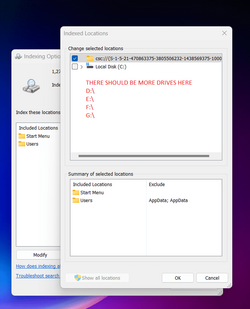
I have tons of files on different partitions that needs to be indexed but strangely when I go to " Indexing Options" then " Modify" then " Show all Locations" The only drive that is showing is the C:\ Drive

I have the latest Windows 11 Pro 22H2.

Basically,I' m looking for a workaround to manually add the D:\, H:\, E:\, etc drives to the indexed locations.
All the partitions are marked as active

Thanks for the help
 

Attachments
  • Screenshot_2.png
    Screenshot_2.png
    44.8 KB · Views: 3

My Computer My Computer

At a glance

Saoirse1.618eaG200GE2 x 8GB DDR4 2.400mhz
OS
Saoirse1.618eaG
Computer type
PC/Desktop
Manufacturer/Model
AMD
CPU
200GE
Motherboard
A320M-S2H V2
Memory
2 x 8GB DDR4 2.400mhz
Hard Drives
1 x 256 GB SSD
4 x 12 TB HDD
PSU
EVGA 500 GD
A question, are the drives Internally connected or are they External USB or eSATA drives or NAS drives?
 

My Computers My Computers

  • At a glance

    Win11 Pro RTM Version 24H2 Build 26100.4202Intel Core i5 11th Gen. 2.40GHz12GB
    OS
    Win11 Pro RTM Version 24H2 Build 26100.4202
    Computer type
    Laptop
    Manufacturer/Model
    Dell Vostro 3400
    CPU
    Intel Core i5 11th Gen. 2.40GHz
    Memory
    12GB
    Hard Drives
    256GB SSD NVMe M.2
  • At a glance

    Win11 Pro RTM Version 24H2 Build 26100.4202Intel Core i5 10th Gen. 2.90GHz16GBOnboard, no VGA, using a DisplayPort-to-VGA a...
    Operating System
    Win11 Pro RTM Version 24H2 Build 26100.4202
    Computer type
    PC/Desktop
    Manufacturer/Model
    Dell Vostro 5890
    CPU
    Intel Core i5 10th Gen. 2.90GHz
    Memory
    16GB
    Graphics card(s)
    Onboard, no VGA, using a DisplayPort-to-VGA adapter
    Monitor(s) Displays
    24" Dell
    Hard Drives
    512GB SSD NVMe, 4TB Seagate HDD
    Browser
    Firefox, Edge
    Antivirus
    Windows Defender/Microsoft Security
A question, are the drives Internally connected or are they External USB or eSATA drives or NAS drives?
Internally SATA, it works just fine with the old 21H2 but security wise I can't rollback
 

My Computer My Computer

At a glance

Saoirse1.618eaG200GE2 x 8GB DDR4 2.400mhz
OS
Saoirse1.618eaG
Computer type
PC/Desktop
Manufacturer/Model
AMD
CPU
200GE
Motherboard
A320M-S2H V2
Memory
2 x 8GB DDR4 2.400mhz
Hard Drives
1 x 256 GB SSD
4 x 12 TB HDD
PSU
EVGA 500 GD
If there is something wrong with Search Index, the usual procedure is to Delete and Rebuild the Search Index, although never tried the remedy for detecting nonindexed locations > "Indexing Options", "Advanced", "Rebuild".
 

My Computers My Computers

  • At a glance

    Windows 11AMD Ryzen 5 560016 GBSapphire Radeon RX 6500XT (8 GB version)
    OS
    Windows 11
    Computer type
    PC/Desktop
    CPU
    AMD Ryzen 5 5600
    Motherboard
    MSI B550-A Pro
    Memory
    16 GB
    Graphics Card(s)
    Sapphire Radeon RX 6500XT (8 GB version)
    Monitor(s) Displays
    BenQ Mobuiz EX2710Q QHD, Iiyama ProLite X23377HDS
    Hard Drives
    MSI Spatium M461 4TB
  • At a glance

    Windows 11Intel Celeron N4020
    Operating System
    Windows 11
    Computer type
    Laptop
    Manufacturer/Model
    Acer A114
    CPU
    Intel Celeron N4020
If there is something wrong with Search Index, the usual procedure is to Delete and Rebuild the Search Index, although never tried the remedy for detecting nonindexed locations > "Indexing Options", "Advanced", "Rebuild".
Already tried that, >.<
 

My Computer My Computer

At a glance

Saoirse1.618eaG200GE2 x 8GB DDR4 2.400mhz
OS
Saoirse1.618eaG
Computer type
PC/Desktop
Manufacturer/Model
AMD
CPU
200GE
Motherboard
A320M-S2H V2
Memory
2 x 8GB DDR4 2.400mhz
Hard Drives
1 x 256 GB SSD
4 x 12 TB HDD
PSU
EVGA 500 GD
What happens if you click on modify - and then click on 'Start menu' in the bottom box?
(For some reason I have the user folder missing and can't get it to show 🤷‍♂️)


2022-09-04 12_39_55-Indexed Locations.png
 

My Computers My Computers

  • At a glance

    Win 11 ProAMD Ryzen™ 7 7730U24GB Dual-Channel DDR4 @ 1596MHz (22-22-22-52)512MB ATI AMD Radeon Graphics (ASUStek Comput...
    OS
    Win 11 Pro
    Computer type
    Laptop
    Manufacturer/Model
    ASUS Vivobook
    CPU
    AMD Ryzen™ 7 7730U
    Motherboard
    M1605YA
    Memory
    24GB Dual-Channel DDR4 @ 1596MHz (22-22-22-52)
    Graphics Card(s)
    512MB ATI AMD Radeon Graphics (ASUStek Computer Inc)
    Monitor(s) Displays
    Generic PnP Monitor (1920x1200@60Hz) - P1 PLUS (1920x1080@59Hz)
    Screen Resolution
    1920 X 1200
    Hard Drives
    953GB Western Digital WD
    PSU
    45 Watts
    Mouse
    Lenovo Bluetooth.
    Internet Speed
    500 Mbps
    Browser
    Edge
    Antivirus
    Defender
  • At a glance

    Windows 11AMD Ryzen 7 5800H / 3.2 GHz32 GB DDR4 SDRAM 3200 MHzNVIDIA GeForce RTX 3060 6 GB GDDR6 SDRAM
    Operating System
    Windows 11
    Computer type
    Laptop
    Manufacturer/Model
    ACER NITRO
    CPU
    AMD Ryzen 7 5800H / 3.2 GHz
    Motherboard
    CZ Scala_CAS (FP6)
    Memory
    32 GB DDR4 SDRAM 3200 MHz
    Graphics card(s)
    NVIDIA GeForce RTX 3060 6 GB GDDR6 SDRAM
    Sound Card
    Realtek Audio. NVIDIA High Definition Audio
    Monitor(s) Displays
    15.6" LED backlight 1920 x 1080 (Full HD) 144 Hz
    Screen Resolution
    1920 x 1080 (Full HD)
    Hard Drives
    Samsung 970 Evo Plus 2TB NVMe M.2
    PSU
    180 Watt, 19.5 V
    Mouse
    Lenovo Bluetooth
    Internet Speed
    500 Mbps
    Browser
    Edge
    Antivirus
    Defender
What happens if you click on modify - and then click on 'Start menu' in the bottom box?
(For some reason I have the user folder missing and can't get it to show 🤷‍♂️)


View attachment 38315
It shouws every folder on the C:\ drive.
 

My Computer My Computer

At a glance

Saoirse1.618eaG200GE2 x 8GB DDR4 2.400mhz
OS
Saoirse1.618eaG
Computer type
PC/Desktop
Manufacturer/Model
AMD
CPU
200GE
Motherboard
A320M-S2H V2
Memory
2 x 8GB DDR4 2.400mhz
Hard Drives
1 x 256 GB SSD
4 x 12 TB HDD
PSU
EVGA 500 GD
The only drive that is showing is the C:\ Drive
Sorry, I can't reproduce the issue -

Navigating from Control Panel => Indexing Options => Modify I get the following result

1.png

Drives C: => J: are partitions on my internal hard drive;
Drives V: => Z: are partitions on USB-connected external drives.
 

My Computer My Computer

At a glance

Windows 11 Pro 25H2 (Build 26200.9267)Intel Core Ultra 9 285 5.6 GHz32.00 GBIntel Integrated Graphics (128 MB)
OS
Windows 11 Pro 25H2 (Build 26200.9267)
Computer type
PC/Desktop
Manufacturer/Model
Dell Pro Max Tower T2 FCT2250
CPU
Intel Core Ultra 9 285 5.6 GHz
Motherboard
64-bit operating system, x64-based processor
Memory
32.00 GB
Graphics Card(s)
Intel Integrated Graphics (128 MB)
Sound Card
Realtek Audio
Monitor(s) Displays
Dell P2714H Monitor
Screen Resolution
1920 x 1080
Hard Drives
1 x 512GB M.2 XG10d SED KIOXIA PCIe solid state drive (Internal)
1 x 2TB Seagate ST2000DM008-2UB102 HDD (Internal)
1 x 4TB Seagate STGX4000400 External HDD
1 x 6TB WD Elements AE 2689 External HDD
PSU
500 Watts
Cooling
Air
Keyboard
Microsoft Wired Keyboard 600
Mouse
Microsoft USB Basic Optical Mouse v2.0
Browser
Firefox
Antivirus
Windows Defender + Malwarebytes Premium
Other Info
BaseBoard Manufacturer Dell Inc.
BaseBoard Product 022RY57
BaseBoard Version A01
Open file explorer -This PC and right click one of the drives, select properties and tick the box to 'Allow files on this drive to have contents indexed in addition to file properties.'

1662485730877.png
 

My Computers My Computers

  • At a glance

    Win 11 ProAMD Ryzen™ 7 7730U24GB Dual-Channel DDR4 @ 1596MHz (22-22-22-52)512MB ATI AMD Radeon Graphics (ASUStek Comput...
    OS
    Win 11 Pro
    Computer type
    Laptop
    Manufacturer/Model
    ASUS Vivobook
    CPU
    AMD Ryzen™ 7 7730U
    Motherboard
    M1605YA
    Memory
    24GB Dual-Channel DDR4 @ 1596MHz (22-22-22-52)
    Graphics Card(s)
    512MB ATI AMD Radeon Graphics (ASUStek Computer Inc)
    Monitor(s) Displays
    Generic PnP Monitor (1920x1200@60Hz) - P1 PLUS (1920x1080@59Hz)
    Screen Resolution
    1920 X 1200
    Hard Drives
    953GB Western Digital WD
    PSU
    45 Watts
    Mouse
    Lenovo Bluetooth.
    Internet Speed
    500 Mbps
    Browser
    Edge
    Antivirus
    Defender
  • At a glance

    Windows 11AMD Ryzen 7 5800H / 3.2 GHz32 GB DDR4 SDRAM 3200 MHzNVIDIA GeForce RTX 3060 6 GB GDDR6 SDRAM
    Operating System
    Windows 11
    Computer type
    Laptop
    Manufacturer/Model
    ACER NITRO
    CPU
    AMD Ryzen 7 5800H / 3.2 GHz
    Motherboard
    CZ Scala_CAS (FP6)
    Memory
    32 GB DDR4 SDRAM 3200 MHz
    Graphics card(s)
    NVIDIA GeForce RTX 3060 6 GB GDDR6 SDRAM
    Sound Card
    Realtek Audio. NVIDIA High Definition Audio
    Monitor(s) Displays
    15.6" LED backlight 1920 x 1080 (Full HD) 144 Hz
    Screen Resolution
    1920 x 1080 (Full HD)
    Hard Drives
    Samsung 970 Evo Plus 2TB NVMe M.2
    PSU
    180 Watt, 19.5 V
    Mouse
    Lenovo Bluetooth
    Internet Speed
    500 Mbps
    Browser
    Edge
    Antivirus
    Defender
Irwiin,

Have you perhaps re-partitioned the disk since Indexing was first set up by Windows?
If so then rebuilding the search index from scratch [= reset & rebuild rather than just rebuild] might well sort the problem out for you.
Reset and Rebuild Search Index - ElevenForumTutorials
I mention this because I once had an oddly labelled entry like yours after I had repartitioned a disk [in Windows 7] and I found that rebuilding the index fixed it for me.
I appreciate that you seem to have tried this already but the tutorial does describe several methods for doing it & perhaps its Option 3 will work in your case.


Best of luck,
Denis
 

My Computer My Computer

At a glance

Windows 11 Home x64 Version 25H2 Build 26200....
OS
Windows 11 Home x64 Version 25H2 Build 26200.9168
Sorry, I can't reproduce the issue -

Navigating from Control Panel => Indexing Options => Modify I get the following result

View attachment 38511

Drives C: => J: are partitions on my internal hard drive;
Drives V: => Z: are partitions on USB-connected external drives.
Tried that too and clicked the "Show all locations" option
 

My Computer My Computer

At a glance

Saoirse1.618eaG200GE2 x 8GB DDR4 2.400mhz
OS
Saoirse1.618eaG
Computer type
PC/Desktop
Manufacturer/Model
AMD
CPU
200GE
Motherboard
A320M-S2H V2
Memory
2 x 8GB DDR4 2.400mhz
Hard Drives
1 x 256 GB SSD
4 x 12 TB HDD
PSU
EVGA 500 GD
Open file explorer -This PC and right click one of the drives, select properties and tick the box to 'Allow files on this drive to have contents indexed in addition to file properties.'

View attachment 38522
By default, this option is activated.
 

My Computer My Computer

At a glance

Saoirse1.618eaG200GE2 x 8GB DDR4 2.400mhz
OS
Saoirse1.618eaG
Computer type
PC/Desktop
Manufacturer/Model
AMD
CPU
200GE
Motherboard
A320M-S2H V2
Memory
2 x 8GB DDR4 2.400mhz
Hard Drives
1 x 256 GB SSD
4 x 12 TB HDD
PSU
EVGA 500 GD

Latest Support Threads

Back
Top Bottom




