- Local time
- 3:38 PM
- Posts
- 455
- OS
- Windows 11 Home, ver 25H2 build 26200.8894
How to Remove the Window Layout Selection Bar When Moving an Active Window Between Monitors?
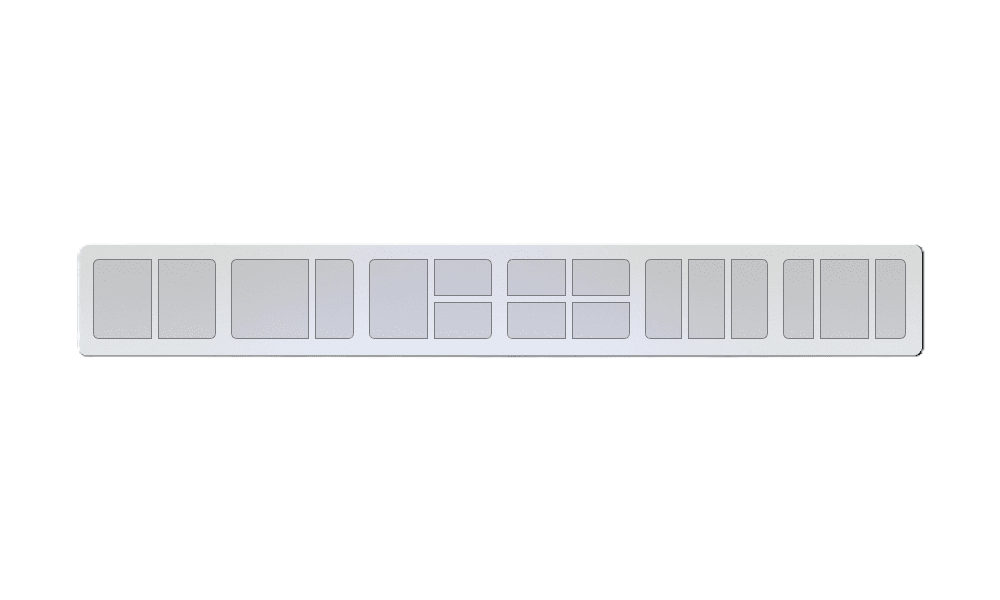
This annoyance is kinda getting to me. Is there a way to remove this Window function when I'm moving an active Window from one monitor's screen to another that contains an open Window? See image below. When this appears I have no use for it, I'm just trying to relocate a window and don't want Microsoft to give me a choice of which layout to select.

This annoyance is kinda getting to me. Is there a way to remove this Window function when I'm moving an active Window from one monitor's screen to another that contains an open Window? See image below. When this appears I have no use for it, I'm just trying to relocate a window and don't want Microsoft to give me a choice of which layout to select.
My Computers
-
At a glance
Windows 11 Home, ver 25H2 build 26200.8894Intel Core i5 5200U @ 2.20GH4 GBIntel HD Graphics 5500 on board- OS
- Windows 11 Home, ver 25H2 build 26200.8894
- Computer type
- Laptop
- Manufacturer/Model
- Hewlett-Packard Spectre 13-4001 x360 convertable
- CPU
- Intel Core i5 5200U @ 2.20GH
- Motherboard
- Hewlett-Packard 802D
- Memory
- 4 GB
- Graphics Card(s)
- Intel HD Graphics 5500 on board
- Sound Card
- Intel Smart Sound Technology (Intel SST)
- Hard Drives
- Micron 256GB M.2 2280 NGFF SSD MTFDDAV256TBN, (SATA 6.0 Gb/s)
- Keyboard
- Model # G01KB
- Antivirus
- Microsoft Defender
- Other Info
- born on date: 25 Feb 2016
-
At a glance
Win 11 Home 25H2 build 26200.8894Intel Core i7 4th Gen 4790 (3.60GHz), Haswell...Samsung 16 GB DDR3 (8GB in 2 modules)NVIDIA GeForce GTX 760, 3GB, and on-board Int...- Operating System
- Win 11 Home 25H2 build 26200.8894
- Computer type
- PC/Desktop
- Manufacturer/Model
- Asus Desktop model M32AD-US019S (DOM: 6/9/2014 )
- CPU
- Intel Core i7 4th Gen 4790 (3.60GHz), Haswell 22nm Technology, SOCKET 1150
- Motherboard
- H81M-E/M51AD/DP_MB
- Memory
- Samsung 16 GB DDR3 (8GB in 2 modules)
- Graphics card(s)
- NVIDIA GeForce GTX 760, 3GB, and on-board Intel HD Graphics 4600 Rev 6
- Monitor(s) Displays
- HP EliteDisplay E241i LED; HP EliteDisplay E243
- Hard Drives
- Samsung 500GB SSD, 870 EVO (SATA 6.0 )
Micron 250GB SSD, CT250MX500
Toshiba HDD, 3GB (original drive w/PC)
- Case
- ASUS
- Keyboard
- ASUS-------------------------
- Antivirus
- MS Defender
- Other Info
- purchased 8/28/2015 from Newegg.
-
HEWLETT PACKARD
HP OmniBook X Flip NGAI (Next Gen AI),
Model: 16-as0023dx
PT# B5UH1UA#ABA Product #: B5UH1UA
delivered and setup 7/25/25
16" 2K Touch-Screen Laptop
Intel Core Ultra 7 256V '24 Series 2 - CPU
Boost Clock Frequency 4.8 gigahertz; Neural Processing Unit (NPU) Yes;
16GB Memory, LPDDR5X
1TB SSD PCIe 4.0
Graphics: Intel Arc 140V
1 x HDMI 2.1
1 x Thunderbolt 4
2K Touch-Screen display, LED, IPS; 1920 x 1200 (Full HD+)
USB Ports: 1 x USB-C 3.1, 2 x USB-A 3.1
Wi-Fi 6E
DELL
Model:I7591-7483BLK-PUS 2-in-1 (7000 Series)
purchased new 12/3/2019,
15.6 inch 2-IN-1;
4K Ultra HD Touch-Screen, 3840 x 2160,
Intel Core i7 10510U CPU 1.80GHz,
16GB RAM DDR4 SDRAM 2400 megahert (2 slots),
dedicated graphics Nvidia GeForce MX250 2 GB Graphics,
PCIe 512GB Intel SSD + 32GB Optane Memory (Intel Optane Memory H10 with solid-state storage),
wireless-AX & Bluetooth
Battery: 68wh, Type 4VGMP 4 cell