How to stop Office 2010 install pop up.


Trapperr

Well-known member
Member
Local time
4:27 PM
Posts
34
Location
Hertfordshire UK
OS
Win 11Pro 24H2
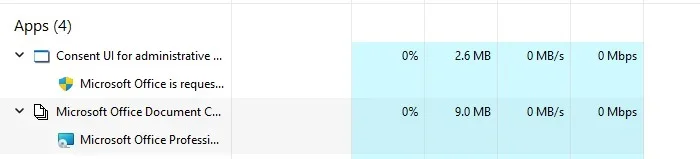
My Office 2010 Pro is still functioning as it did the day it was installed. However I often see the attached pop up so I don't want to risk installing it again.
My wife sometimes uses my PC as she networks in to Money 2005 on my PC through her PC.

She would not know what to do if this pops up when I am not around.

Is there a way to turn it off? I don't wnat to play and guess what to do, delete something wrong and totally screw it up.

Many thanks
 

Attachments
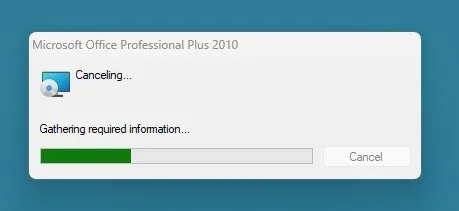
  • Office 2010 install Screenshot 2026-02-14 124858.webp
    Office 2010 install Screenshot 2026-02-14 124858.webp
    4.9 KB · Views: 3
  • Office 2010 Task Mngr Screenshot 2026-02-14 125221.webp
    Office 2010 Task Mngr Screenshot 2026-02-14 125221.webp
    8.7 KB · Views: 2

My Computer

System One

  • OS
    Win 11Pro 24H2
    Computer type
    PC/Desktop
    Manufacturer/Model
    Self Build 2025
    CPU
    AMD Ryzensets 5 7600X
    Motherboard
    MSI Pro B850-P WIFI
    Memory
    32GB
    Graphics Card(s)
    Gforce RTX 360
    Sound Card
    On Board
    Monitor(s) Displays
    AOC 2460 [Monitor] (24.0"vis, October 2019)
    Hard Drives
    1 Internal 5 External
    PSU
    ENERMAX REvolution 850W
    Case
    Be quiet Pure Base 600
    Cooling
    Thermalright Assassin X 120R
    Keyboard
    Logi K540
    Mouse
    Logi M310
    Browser
    Firefox
    Antivirus
    Bitdefender
I also am still using Office Pro 2010, and I occasionally see a similar popup about installing something for Excel. I believe it happens with certain applications that are using overlapping facilities or conflicts with shared DLL's from other applications. It's happened for years with multiple versions of Windows, so I have learned to simply ignore it.
 

My Computers

System One System Two

  • OS
    Win 11 Pro 25H2, Build 26200.8524
    Computer type
    PC/Desktop
    Manufacturer/Model
    Home Brew
    CPU
    Intel Core i5 14500
    Motherboard
    Gigabyte B760M G P WIFI
    Memory
    64GB DDR4
    Graphics Card(s)
    GeForce RTX 4060
    Sound Card
    Chipset Realtek
    Monitor(s) Displays
    LG 45" Ultragear, Acer 24" 1080p
    Screen Resolution
    5120x1440, 1920x1080
    Hard Drives
    Crucial P310 2TB 2280 PCIe Gen4 3D NAND NVMe M.2 SSD (O/S)
    Silicon Power 2TB US75 NVMe PCIe Gen4 M.2 2280 SSD (backup)
    Crucial BX500 2TB 3D NAND (2nd backup)
    Seagate 4TB Ironwolf, rotating HDD archive files
    External off-line backup Drives: 2 NVMe 4TB drives in external enclosures
    PSU
    Thermaltake Toughpower GF3 750W
    Case
    LIAN LI LANCOOL 216 E-ATX PC Case
    Cooling
    Lots of fans!
    Keyboard
    Microsoft Comfort Curve 2000
    Mouse
    Logitech G305
    Internet Speed
    Verizon FiOS 1GB
    Browser
    Firefox
    Antivirus
    Malware Bytes & Windows Defender Security
  • Operating System
    Win 11 Pro 25H2, Build 26200.8524
    Computer type
    PC/Desktop
    Manufacturer/Model
    Home Brew
    CPU
    Intel Core i5 14400
    Motherboard
    Gigabyte B760M DS3H AX
    Memory
    32GB DDR5
    Graphics card(s)
    Intel 700 Embedded GPU
    Sound Card
    Realtek Embedded
    Monitor(s) Displays
    27" HP 1080p
    Screen Resolution
    1920x1080
    Hard Drives
    Crucial P310 2TB 2280 PCIe Gen4 eD NAND PCIe SSD
    Samsung EVO 990 2TB NVMe Gen4 SSD
    Samsung 2TB SATA SSD
    PSU
    Thermaltake Smart BM3 650W
    Case
    Okinos Micro ATX Case
    Cooling
    Fans
    Keyboard
    Microsoft Comfort Curve 2000
    Mouse
    Logitech G305
    Internet Speed
    Verizon FiOS 1GB
    Browser
    Firefox
    Antivirus
    Malware Bytes & Windows Defender Security
Another 2010 user here. I wonder how many of us there are left? For me, they will get my Outlook 2010 away from me when they pry it from my cold, dead, hands.

I have not seen that one for years. Used to get it fairly often. Sorry, but I don't remember exactly what I did that made it stop. Google AI has two suggestions that seem reasonable, but I can't test since I don't see it any more.

[AI Generated]

Run the Office App as Admin. ONCE.

Add the registry value NoReReg DWORD to HKCU\Software\Microsoft\Office\14.0\Word\Options, and Excel\Options, etc.
 

My Computer

System One

  • OS
    Windows 10, Windows 11
    Computer type
    PC/Desktop
Thanks guys. I am still seeing the popup. I do not want to risk screwing up my 2010 programs or the registry so will leave as is. Hopefully I will find a resolution.
 

My Computer

System One

  • OS
    Win 11Pro 24H2
    Computer type
    PC/Desktop
    Manufacturer/Model
    Self Build 2025
    CPU
    AMD Ryzensets 5 7600X
    Motherboard
    MSI Pro B850-P WIFI
    Memory
    32GB
    Graphics Card(s)
    Gforce RTX 360
    Sound Card
    On Board
    Monitor(s) Displays
    AOC 2460 [Monitor] (24.0"vis, October 2019)
    Hard Drives
    1 Internal 5 External
    PSU
    ENERMAX REvolution 850W
    Case
    Be quiet Pure Base 600
    Cooling
    Thermalright Assassin X 120R
    Keyboard
    Logi K540
    Mouse
    Logi M310
    Browser
    Firefox
    Antivirus
    Bitdefender

Latest Support Threads

Back
Top Bottom