Solved How to turn on dell fans 7530 for a test?


sdowney717

Well-known member
Member
VIP
Local time
3:49 AM
Posts
1,335
OS
windows 11
I just oiled them.
 

My Computer My Computer

At a glance

windows 11old AMD B958gb
OS
windows 11
Computer type
PC/Desktop
Manufacturer/Model
some kind of old ASUS MB
CPU
old AMD B95
Motherboard
ASUS
Memory
8gb
Hard Drives
ssd WD 500 gb
I use this fan control on my two desktop PCs:


My Computers My Computers

  • At a glance

    Win 10 Pro / Win 11 Pro & Home, Linux MintAMD Ryzen 7 5700X / A10-7860K32GB / 16GBAMD RX 6650 XT / RX 580
    OS
    Win 10 Pro / Win 11 Pro & Home, Linux Mint
    Computer type
    PC/Desktop
    Manufacturer/Model
    Custom builds
    CPU
    AMD Ryzen 7 5700X / A10-7860K
    Motherboard
    MSI PRO B550-VC / ASRock A88M-G/3.1
    Memory
    32GB / 16GB
    Graphics Card(s)
    AMD RX 6650 XT / RX 580
    Monitor(s) Displays
    Samsung 27" / LG 24"
    Screen Resolution
    1920x1080
    Hard Drives
    Toshiba 2 TB
    Toshiba 1 TB
    Toshiba 1 TB
    WD Black SN770 1TB

    PNY 1 TB
    PNY 500 GB
    WD Black SN770 200 GB
    Inland 500 GB
    Inland 256 GB
    Case
    NZXT / Lian LI
    Keyboard
    ROCCAT PYRO / Logitech 148
    Mouse
    Logitech
    Browser
    Firefox, Opera, Waterfox, Tor
  • At a glance

    Windows 11 HomeIntel i516GB
    Operating System
    Windows 11 Home
    Computer type
    Laptop
    Manufacturer/Model
    HP 17
    CPU
    Intel i5
    Memory
    16GB
    Screen Resolution
    1920 x 1080
    Hard Drives
    512 GB
    Browser
    Firefox
I use this fan control on my two desktop PCs:

I installed burnin test. Fans are good and quiet. I used synthetic engine oil 5w-30.
Peel back tape on fan
put oil on center slots, each fan has 2 slots close to center on this dual fan 7530

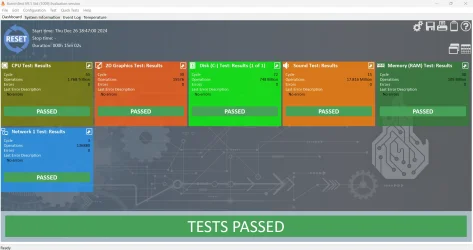
Ran stress test.
 

My Computer My Computer

At a glance

windows 11old AMD B958gb
OS
windows 11
Computer type
PC/Desktop
Manufacturer/Model
some kind of old ASUS MB
CPU
old AMD B95
Motherboard
ASUS
Memory
8gb
Hard Drives
ssd WD 500 gb
That program tells me this error

1735257117294.webp
 

My Computer My Computer

At a glance

windows 11old AMD B958gb
OS
windows 11
Computer type
PC/Desktop
Manufacturer/Model
some kind of old ASUS MB
CPU
old AMD B95
Motherboard
ASUS
Memory
8gb
Hard Drives
ssd WD 500 gb

My Computer My Computer

At a glance

windows 11old AMD B958gb
OS
windows 11
Computer type
PC/Desktop
Manufacturer/Model
some kind of old ASUS MB
CPU
old AMD B95
Motherboard
ASUS
Memory
8gb
Hard Drives
ssd WD 500 gb
Fans should start spinning as soon as you turn the computer on.
On startup, press F2 to enter Setup (Bios) you may be able to control fan speed from here.
You can also use this tool


Or you can download SpeedFan
 

My Computer My Computer

At a glance

Windows 11 Pro Insider 64 bit 25H2 26200.5742Intel Core i7 9700K 3.6016 GBnVidia GEForce RTX 2060 Super
OS
Windows 11 Pro Insider 64 bit 25H2 26200.5742
Computer type
PC/Desktop
Manufacturer/Model
Gigabyte Z390 UD
CPU
Intel Core i7 9700K 3.60
Motherboard
Gigabyte Z390 UD
Memory
16 GB
Graphics Card(s)
nVidia GEForce RTX 2060 Super
Sound Card
onboard
Monitor(s) Displays
Two 27" Dell 4K monitors
Screen Resolution
3840 x 2160
Hard Drives
M.2 NVME SSD, 500 GB; Two 2TB Mechanical HDD's
PSU
850w PSU
Case
Cyberpower PC
Cooling
Water cooled
Keyboard
Backlit Cyberpower gaming keyboard
Mouse
Backlit Cyberpower gaming mouse
Internet Speed
1 GB mbps
Browser
Brave
Antivirus
Windows Security
It is fine just, ignor Mother Microsoft.
 

My Computers My Computers

  • At a glance

    Win 10 Pro / Win 11 Pro & Home, Linux MintAMD Ryzen 7 5700X / A10-7860K32GB / 16GBAMD RX 6650 XT / RX 580
    OS
    Win 10 Pro / Win 11 Pro & Home, Linux Mint
    Computer type
    PC/Desktop
    Manufacturer/Model
    Custom builds
    CPU
    AMD Ryzen 7 5700X / A10-7860K
    Motherboard
    MSI PRO B550-VC / ASRock A88M-G/3.1
    Memory
    32GB / 16GB
    Graphics Card(s)
    AMD RX 6650 XT / RX 580
    Monitor(s) Displays
    Samsung 27" / LG 24"
    Screen Resolution
    1920x1080
    Hard Drives
    Toshiba 2 TB
    Toshiba 1 TB
    Toshiba 1 TB
    WD Black SN770 1TB

    PNY 1 TB
    PNY 500 GB
    WD Black SN770 200 GB
    Inland 500 GB
    Inland 256 GB
    Case
    NZXT / Lian LI
    Keyboard
    ROCCAT PYRO / Logitech 148
    Mouse
    Logitech
    Browser
    Firefox, Opera, Waterfox, Tor
  • At a glance

    Windows 11 HomeIntel i516GB
    Operating System
    Windows 11 Home
    Computer type
    Laptop
    Manufacturer/Model
    HP 17
    CPU
    Intel i5
    Memory
    16GB
    Screen Resolution
    1920 x 1080
    Hard Drives
    512 GB
    Browser
    Firefox
full pass, running great, PC fully upto date on the OS win 11 pro
1735257793023.webp
 

My Computer My Computer

At a glance

windows 11old AMD B958gb
OS
windows 11
Computer type
PC/Desktop
Manufacturer/Model
some kind of old ASUS MB
CPU
old AMD B95
Motherboard
ASUS
Memory
8gb
Hard Drives
ssd WD 500 gb
I have a Dell and I agree with @Spunk. As soon as I turn my system on all fans start spinning. If things are working as they are supposed to, all fansr speed will stay the same until the temperature sensors reach whatever threshhold Dell uses at which time they will speed up. You can test your fans by entering uefi bios and using the built in diagnostics. I can't remember exactly what it says but I believe it's under maintenance category. I do remember It's at the very bottom of the list in bios.

Good luck on getting any 3rd party fan control to work in a Dell. A bios update broke my automatic fan control so I tried several 3rd party apps hoping one could deal with it but none worked, If you manage it, please report back how you did it.
I am left with having to manually monitor my temps using Coretemp in the system tray.
 

My Computers My Computers

  • At a glance

    Windows 11 Pro 25H2 26200.8655i9-10900 10 core 20 threads32 gbnone-Intel UHD Graphics 630
    OS
    Windows 11 Pro 25H2 26200.8655
    Computer type
    PC/Desktop
    Manufacturer/Model
    Dell Optiplex 7080
    CPU
    i9-10900 10 core 20 threads
    Motherboard
    DELL 0J37VM
    Memory
    32 gb
    Graphics Card(s)
    none-Intel UHD Graphics 630
    Sound Card
    Integrated Realtek
    Monitor(s) Displays
    Benq 27
    Screen Resolution
    2560x1440
    Hard Drives
    2x1tb Solidigm m.2 nvme /External drives 512gb Samsung m.2 sata+2tb Kingston m2.nvme
    PSU
    500w
    Case
    MT
    Cooling
    Dell Premium
    Keyboard
    Logitech wired
    Mouse
    Logitech wireless
    Internet Speed
    so slow I'm too embarrassed to tell
    Browser
    #1 Edge #2 Firefox
    Antivirus
    Defender+MWB Premium
  • At a glance

    Windows 11 Pro 24H2 26200.8457AMD Ryzen 7 6800U32 gbintegrated
    Operating System
    Windows 11 Pro 24H2 26200.8457
    Computer type
    PC/Desktop
    Manufacturer/Model
    Beelink Mini PC SER5
    CPU
    AMD Ryzen 7 6800U
    Memory
    32 gb
    Graphics card(s)
    integrated
    Sound Card
    integrated
    Monitor(s) Displays
    Benq 27
    Screen Resolution
    2560x1440
    Hard Drives
    1TB Crucial nvme
    Keyboard
    Logitech wired
    Mouse
    Logitech wireless
    Internet Speed
    still too embarrassed to tell
    Browser
    Firefox
    Antivirus
    Defender
    Other Info
    System 3 is non compliant Dell 9020 i7-4770/24gb ram Win11 PRO 26200.8457
On a Dell, BIOS for sure. Best test.
 

My Computers My Computers

  • At a glance

    Windows 11 Pro 25H2 (OS Build 26200.8246)Intel(R) Xeon(R) CPU E3-1535M v5 @ 2.90 Max T...64GB DDR4 ECC (Error-Correcting Code memory)NVIDIA Quadro M2000M 4GB GDDR5 & Intel(R) HD ...
    OS
    Windows 11 Pro 25H2 (OS Build 26200.8246)
    Computer type
    Laptop
    Manufacturer/Model
    Dell Precision Mobile Workstation
    CPU
    Intel(R) Xeon(R) CPU E3-1535M v5 @ 2.90 Max Turbo 3.80
    Motherboard
    00V5FJ
    Memory
    64GB DDR4 ECC (Error-Correcting Code memory)
    Graphics Card(s)
    NVIDIA Quadro M2000M 4GB GDDR5 & Intel(R) HD Graphics P530
    Sound Card
    Realtek Audio
    Monitor(s) Displays
    15.6" 4K UltraHD
    Screen Resolution
    4K UHD 3840x2160
    Hard Drives
    2TB Crucial NVMe & 2TB Seagate SATA
    PSU
    Dell 180W 19.5V-9.23A
    Keyboard
    Backlit
    Mouse
    Logitech G703 & Logitech G305
    Internet Speed
    WIFI: Intel(R) Wi-Fi 6E AX210NGW(Gig+) 160MHz Bands 2.4GHz(574Mbps), 5GHz 2.4Gbps, 6 GHz (160MHz) 2.4Gbps
    Browser
    Mozilla Firefox
    Antivirus
    Windows Defender/Microsoft Security + additional Anti Spyware, Anti Malware, etc.
    Other Info
    Thunderbolt 3
  • At a glance

    Windows 11 Pro 24H2 (OS Build 26100.6725)Dual (X2) Intel(R) Xeon(R) CPU E5-2690 0 @ 2....64GB DDR3 ECC (Error-Correcting Code memory)NVIDIA GeForce GTX 970 4GB of GDDR5
    Operating System
    Windows 11 Pro 24H2 (OS Build 26100.6725)
    Computer type
    PC/Desktop
    Manufacturer/Model
    Dell Precision Workstation T5610
    CPU
    Dual (X2) Intel(R) Xeon(R) CPU E5-2690 0 @ 2.90GHz Max Turbo 3.80
    Motherboard
    0WN7Y6
    Memory
    64GB DDR3 ECC (Error-Correcting Code memory)
    Graphics card(s)
    NVIDIA GeForce GTX 970 4GB of GDDR5
    Sound Card
    Realtek Audio & NVIDIA High Definition Audio
    Monitor(s) Displays
    3 Acer Monitors
    Screen Resolution
    1920x1080
    Hard Drives
    2 Seagate Barracuda ST2000DM008-2UB102 (RAID)
    Mouse
    Logitech G305
The OPs post is very ambiguous and can be interpreted several ways.
The title says How to turn on dell fans 7530 for a test? Well, you don't turn them on. If the computer is on, the fans are on unless one of them is faulty or not connected correctly. That be the case the computer gives a fan error on boot.

While the proper way to test the fans is using the Dell diagnostics in bios which will run them thru the paces until top speed is reached and report back that all tests passed or give a failure, I think what the OP wants is to see whether his fan control app will work to control the fans. That app only works from within the OS.

Maybe in my first answer I should have asked @sdowney717 exactly what he means in his question. What exactly are you wanting to do.?You need to understand that unlike custom machines, Dell's bios (as well as other OEMs I have dealt with)control the speed of the fans and as far as I've found in both the 2 Dells sitting on my desk there is no way to turn that control off in order to use your own fan control app. Dell does have Dell Power Manager which allows manual fan control but it is for Dell Laptops only (but not all of them). It will not work in PCs.
 

My Computers My Computers

  • At a glance

    Windows 11 Pro 25H2 26200.8655i9-10900 10 core 20 threads32 gbnone-Intel UHD Graphics 630
    OS
    Windows 11 Pro 25H2 26200.8655
    Computer type
    PC/Desktop
    Manufacturer/Model
    Dell Optiplex 7080
    CPU
    i9-10900 10 core 20 threads
    Motherboard
    DELL 0J37VM
    Memory
    32 gb
    Graphics Card(s)
    none-Intel UHD Graphics 630
    Sound Card
    Integrated Realtek
    Monitor(s) Displays
    Benq 27
    Screen Resolution
    2560x1440
    Hard Drives
    2x1tb Solidigm m.2 nvme /External drives 512gb Samsung m.2 sata+2tb Kingston m2.nvme
    PSU
    500w
    Case
    MT
    Cooling
    Dell Premium
    Keyboard
    Logitech wired
    Mouse
    Logitech wireless
    Internet Speed
    so slow I'm too embarrassed to tell
    Browser
    #1 Edge #2 Firefox
    Antivirus
    Defender+MWB Premium
  • At a glance

    Windows 11 Pro 24H2 26200.8457AMD Ryzen 7 6800U32 gbintegrated
    Operating System
    Windows 11 Pro 24H2 26200.8457
    Computer type
    PC/Desktop
    Manufacturer/Model
    Beelink Mini PC SER5
    CPU
    AMD Ryzen 7 6800U
    Memory
    32 gb
    Graphics card(s)
    integrated
    Sound Card
    integrated
    Monitor(s) Displays
    Benq 27
    Screen Resolution
    2560x1440
    Hard Drives
    1TB Crucial nvme
    Keyboard
    Logitech wired
    Mouse
    Logitech wireless
    Internet Speed
    still too embarrassed to tell
    Browser
    Firefox
    Antivirus
    Defender
    Other Info
    System 3 is non compliant Dell 9020 i7-4770/24gb ram Win11 PRO 26200.8457
I know it does a very short test, but they dont spin up audible on boot up.
It is quite silent.
In fact after reconnecting battery, it showed a Dell screen I have never seen, and then said fans were ok
And I never noticed them spin even once. So maybe just a short electrical test.

One fan was very noisy, grabbing, shrieking, catching on it's shaft. growling. I realized once I was hearing it spin up and then shrieking to an instant stop and then spinning again noisily, I had to oil them. It had been loud for maybe a month., but yesterday it got really bad.

So I wanted a long test of them spinning fast, and the stress test verified they are good. Still good today. I saw a vid on youtube of this very laptop and how to do it.
Here it is. I have same laptop he has. And had started taking out many screws, then thought better to oil fan without total disassembly, so went looking and found out how.

 

My Computer My Computer

At a glance

windows 11old AMD B958gb
OS
windows 11
Computer type
PC/Desktop
Manufacturer/Model
some kind of old ASUS MB
CPU
old AMD B95
Motherboard
ASUS
Memory
8gb
Hard Drives
ssd WD 500 gb

Latest Support Threads

Back
Top Bottom