
Hi, just wanting to get Hyper-V running and overcome the uphill battle of VMware Workstation on Windows 11 Pro x64 24H2.
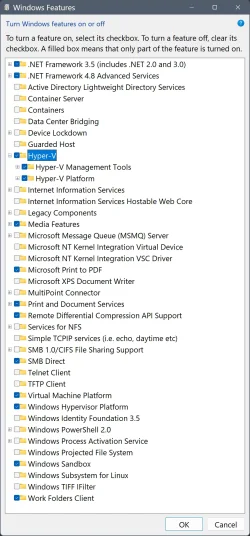
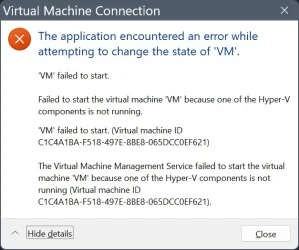
I have unisntalled VMware 17, rebooted. However after installing Windows Features: VM, Sandbxo, WSL2, Hyper-V (Mgmt & Tools) - see screenshot, creating a VM and trying to start it, I am getting an error. Will not boot or launch the VM.
See diagnostics and ouput I have performed below. Would appreciate input of a guru, expert or magician.
I will update to 25H2 after resolving issues.
Thanks for your time, Cheers!
SystemInfo output:
Query VMMS service:
Query Hypervisor launch type (auto/off):
Query Hypervisor launch type (again):
When I run "bcdedit | findstr -i vsmlaunch" = blank. Perhaps is the issue? I don't know enough about Hyper-V...
Query VM I created but cannot run:
Confirm Windows Features / See Screenshot:
Confirm Hyper V services:
Windows Event Log:
Strange error about not supported on client operating systems??
Nothing since adding roles, VM, etc:
Would greatly appreciate any insight, troubleshooting and guidance.
Cheers!
I have unisntalled VMware 17, rebooted. However after installing Windows Features: VM, Sandbxo, WSL2, Hyper-V (Mgmt & Tools) - see screenshot, creating a VM and trying to start it, I am getting an error. Will not boot or launch the VM.
See diagnostics and ouput I have performed below. Would appreciate input of a guru, expert or magician.
I will update to 25H2 after resolving issues.
Thanks for your time, Cheers!
SystemInfo output:
Code:
OS Version:                    10.0.26100 N/A Build 26100
...
Virtualization-based security: Status: Running
                               Required Security Properties:
                               Available Security Properties:
                                     Base Virtualization Support
                                     DMA Protection
                                     Secure Memory Overwrite
                                     UEFI Code Readonly
                                     Mode Based Execution Control
                                     APIC Virtualization
                               Services Configured:
                               Services Running:
                               App Control for Business policy: Enforced
                               App Control for Business user mode policy: Off
                               Security Features Enabled:
Hyper-V Requirements:          A hypervisor has been detected. Features required for Hyper-V will not be displayed.
Query VMMS service:
Code:
PS C:\> Get-Service vmms

Status   Name               DisplayName
------   ----               -----------
Running  vmms               Hyper-V Virtual Machine Management
Query Hypervisor launch type (auto/off):
Code:
PS C:\> bcdedit | findstr -i hypervisor
hypervisorlaunchtype    Auto
Query Hypervisor launch type (again):
Code:
PS C:\> bcdedit /enum

Windows Boot Loader
-------------------
identifier              {current}
device                  partition=C:
path                    \WINDOWS\system32\winload.efi
description             Windows 11
locale                  en-us
inherit                 {bootloadersettings}
isolatedcontext         Yes
allowedinmemorysettings 0x15000075
osdevice                partition=C:
systemroot              \WINDOWS
resumeobject            {a156ff76-68e3-11f1-b28f-c8b27cd193b0}
nx                      OptIn
bootmenupolicy          Standard
hypervisorlaunchtype AutoQuery VM I created but cannot run:
Code:
PS C:\> get-vm

Name State CPUUsage(%) MemoryAssigned(M) Uptime   Status             Version
---- ----- ----------- ----------------- ------   ------             -------
VM   Off   0           0                 00:00:00 Operating normally 12.0
Confirm Windows Features / See Screenshot:
Code:
PS C:\> Get-WindowsOptionalFeature -Online | Where-Object FeatureName -like "*Hyper*" | Select-Object FeatureName, State

FeatureName                                State
-----------                                -----
HypervisorPlatform                       Enabled
Microsoft-Hyper-V-All                    Enabled
Microsoft-Hyper-V                        Enabled
Microsoft-Hyper-V-Tools-All              Enabled
Microsoft-Hyper-V-Management-PowerShell  Enabled
Microsoft-Hyper-V-Hypervisor             Enabled
Microsoft-Hyper-V-Services               Enabled
Microsoft-Hyper-V-Management-Clients     Enabled
HyperV-KernelInt-VirtualDevice          Disabled
HyperV-Guest-KernelInt                  Disabled
Confirm Hyper V services:
Code:
PS C:\> Get-Service vmms,hvhost,vmcompute | Select Name, Status, StartType

Name       Status StartType
----       ------ ---------
hvhost    Running    Manual
vmcompute Running    Manual
vmms      Running Automatic
Windows Event Log:
Code:
PS C:\> Get-WinEvent -LogName "Microsoft-Windows-Hyper-V-VMMS-Admin" -MaxEvents 20 |>> Select-Object TimeCreated, Id, LevelDisplayName, Message |>> Format-List
TimeCreated  : 21/06/2026 11:11:25 AMId     : 10130LevelDisplayName : InformationMessage    : Hyper-V VSS is not supported on client operating systems.

TimeCreated  : 20/06/2026 11:01:27 PMId     : 15130LevelDisplayName : ErrorMessage          : 'VM' failed to start. (Virtual machine ID C1C4A1BA-F518-497E-8BE8-ABCDEFABCDEF)

TimeCreated  : 20/06/2026 11:01:27 PMId     : 20144LevelDisplayName : ErrorMessage          : The Virtual Machine Management Service failed to start the virtual machine 'VM' because one of the Hyper-V                   components is not running (Virtual machine ID C1C4A1BA-F518-497E-8BE8-ABCDEFABCDEF)

TimeCreated  : 20/06/2026 11:01:15 PMId     : 13002LevelDisplayName : InformationMessage    : A new virtual machine 'VM' was created. (Virtual machine ID C1C4A1BA-F518-497E-8BE8-ABCDEFABCDEF)

TimeCreated  : 20/06/2026 11:01:15 PMId     : 36000LevelDisplayName : InformationMessage    : 'VM' The runtime repository has logged performance summary (Virtual machine ID                   {C1C4A1BA-F518-497E-8BE8-ABCDEFABCDEF}) [Completed                   WmiMsvmVirtualSystemManagementService::DefineVirtualSystemInternal]:

TimeCreated : 20/06/2026 11:01:15 PMId : 18304LevelDisplayName : InformationMessage : The virtual machine 'VM' was realized. (VMID C1C4A1BA-F518-497E-8BE8-ABCDEFABCDEF).Nothing since adding roles, VM, etc:
Code:
PS C:\> Get-WinEvent -LogName "Microsoft-Windows-Hyper-V-Hypervisor-Admin" -MaxEvents 20 |
>> Select-Object TimeCreated, Id, LevelDisplayName, Message |
>> Format-List

TimeCreated      : 20/06/2026 8:51:00 PM
Id               : 155
LevelDisplayName : Information
Message          : Host processor features mask:

                   Host xsave features mask: 0x4058381F

                   Host cache line flush size: 64 bytes

TimeCreated      : 20/06/2026 8:50:58 PM
Id               : 156
LevelDisplayName : Information
Message          : Hypervisor initial page allocation NUMA policy: Proportional NUMA distribution

TimeCreated      : 20/06/2026 8:50:58 PM
Id               : 39
LevelDisplayName : Information
Message          : Hypervisor Load Options -  IGNOREMEMPART=1 ..
Would greatly appreciate any insight, troubleshooting and guidance.
Cheers!
My Computers
-
At a glance
w11i7-12700H64GB DDR4Something big I will never take advantage of!- OS
- w11
- Computer type
- Laptop
- Manufacturer/Model
- Gigabyte Aero 17
- CPU
- i7-12700H
- Memory
- 64GB DDR4
- Graphics Card(s)
- Something big I will never take advantage of!
- Monitor(s) Displays
- 17.3" 4K UHD
- Browser
- Yandex Browser (10x better than Chrome!) or Brave
- Antivirus
- MBAM + ESET + WFC + KTS
-
At a glance
W7- Operating System
- W7






