kwgagel
Member
- Local time
- 5:07 PM
- Posts
- 20
- OS
- Windows 11 Pro
I am running Windows 11 Pro and have the Hyper-V role installed with one guest. The guest is Redhat Enterprise v9 linux. My host uses WiFi for all networking and it is setup to share the internet connection with the guest. The guest can access the internet.
I'm having difficulty getting either a share on the host or a share on the guest to be seen by the other.
I do have ExpressVPN on both the host and the guest. While trying to setup a share that the other can see I turn off the VPN.
I also have firewalls on both the host and the guest. While trying to setup a share that the other can see I turn off both firewalls.
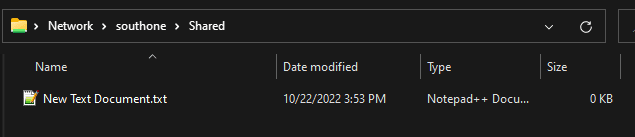
On the Windows host I setup a share called "Share". It is visible in Network. No hint of the linux share is visible from the Windows network.
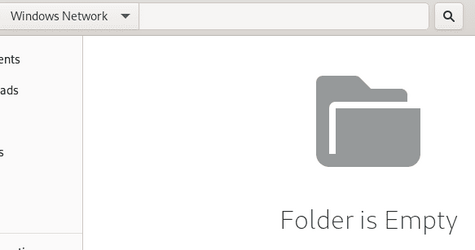
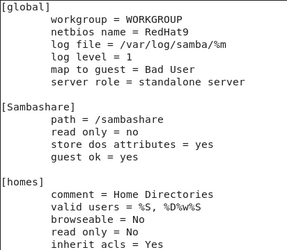
On the Linux guest I setup a share called "Sambashare". It is visible in its network. Also visible in the linux network is a "Windows Network". However, when I go into it, it is empty. I have put a file into the windows share so it should be there...
I don't care which one shares. I just want to be able to share files between the two of them. How do I do this?
I'm having difficulty getting either a share on the host or a share on the guest to be seen by the other.
I do have ExpressVPN on both the host and the guest. While trying to setup a share that the other can see I turn off the VPN.
I also have firewalls on both the host and the guest. While trying to setup a share that the other can see I turn off both firewalls.
On the Windows host I setup a share called "Share". It is visible in Network. No hint of the linux share is visible from the Windows network.
On the Linux guest I setup a share called "Sambashare". It is visible in its network. Also visible in the linux network is a "Windows Network". However, when I go into it, it is empty. I have put a file into the windows share so it should be there...
I don't care which one shares. I just want to be able to share files between the two of them. How do I do this?
- Windows Build/Version
- Windows 11, Version 21H2 (OS Build 22000.1098)
My Computer
At a glance
Windows 11 ProIntel i7-8700K @ 3.70GHz64GBNvidia Quadro K2200
- OS
- Windows 11 Pro
- Computer type
- PC/Desktop
- Manufacturer/Model
- N/A
- CPU
- Intel i7-8700K @ 3.70GHz
- Motherboard
- Gigabyte Z370 AORUS Gaming 5 (rev. 1.0)
- Memory
- 64GB
- Graphics Card(s)
- Nvidia Quadro K2200
- Sound Card
- Realtek® ALC1220 codec
- Monitor(s) Displays
- Samsung
- Screen Resolution
- 1920*1080
- Hard Drives
- Samsung SSD 970 EVO 2TB
- Browser
- MS Edge
- Antivirus
- MS Defender