I cannot set a password in Windows 11 26H1 Build 28000.1 in Hyper-V VM


suatcini54

Well-known member
Power User
VIP
Local time
9:32 PM
Posts
600
OS
Windows 11 Pro build 26200.8524
Hi.

I installed W11 26H1 in Hyper-V VM.

I want to use the Enhanced Mode features of Hyper-V, e.g. to use USB drives, etc.. But W11 26H1 does not let me use a password. It forces me to use Windows Hello PIN, fingerprint, face. I turn off "Use-PIN" radio button in Accounts section but it turns back on by itself. There is no way to bypass usage of Windows Hello sign-in methods and use a password in this version 26H1. Actually I want to use no password in Hyper-V VM.

Is there a way to bypass all security measures, i.e. no PIN, no password ? Am I missing something ?
 

My Computers

System One System Two

  • OS
    Windows 11 Pro build 26200.8524
    Computer type
    PC/Desktop
    Manufacturer/Model
    Home Built
    CPU
    Intel i7-4790
    Motherboard
    Asus H97 Pro Gamer with add-on TPM1.2 module
    Memory
    Teams DDR3-1600 4x4 GB
    Graphics Card(s)
    MSI Nvidia GeForce GTX 1050Ti
    Sound Card
    Realtek ALC1150
    Monitor(s) Displays
    Dell P2425D
    Screen Resolution
    2560 by 1440 pixels
    Hard Drives
    Corsair NVMe M.2 Core XT 1000 GB (Windows 11 v.25H2); Samsung SATA Evo 870 500 GB (Windows 11 v.25H2);
    PSU
    Corsair HX850
    Case
    Gigabyte Solo 210
    Cooling
    Zalman CNPS7X Tower
    Keyboard
    Microsoft AIO Wireless (includes touchpad)
    Mouse
    HP S1000 Plus Wireless
    Internet Speed
    500 Mb fiber optic
    Browser
    Chrome; MS Edge
    Antivirus
    Windows Defender
  • Operating System
    MacOS 12 Monterey
    Computer type
    Laptop
    Manufacturer/Model
    Apple Macbook Air
    CPU
    Intel Core i5
    Memory
    8 GB
    Graphics card(s)
    Intel integrated
    Screen Resolution
    1440 by 900 pixels
    Hard Drives
    128 GB
    Keyboard
    Built-in
    Mouse
    Microsoft Wireless
    Internet Speed
    802.11 ac
    Browser
    Chrome; Safari
    Antivirus
    N/A
Local user account can be set with login password, Microsoft account require PIN.
 

My Computer

System One

  • OS
    Windows 11
    Computer type
    PC/Desktop
    Manufacturer/Model
    HP Pavilion
    CPU
    AMD Ryzen 7 5700G
    Motherboard
    Erica6
    Memory
    Micron Technology DDR4-3200 16GB
    Graphics Card(s)
    NVIDIA GeForce RTX 3060
    Sound Card
    Realtek ALC671
    Monitor(s) Displays
    Samsung SyncMaster U28E590
    Screen Resolution
    3840 x 2160
    Hard Drives
    SAMSUNG MZVLQ1T0HALB-000H1
Thanks.
 

My Computers

System One System Two

  • OS
    Windows 11 Pro build 26200.8524
    Computer type
    PC/Desktop
    Manufacturer/Model
    Home Built
    CPU
    Intel i7-4790
    Motherboard
    Asus H97 Pro Gamer with add-on TPM1.2 module
    Memory
    Teams DDR3-1600 4x4 GB
    Graphics Card(s)
    MSI Nvidia GeForce GTX 1050Ti
    Sound Card
    Realtek ALC1150
    Monitor(s) Displays
    Dell P2425D
    Screen Resolution
    2560 by 1440 pixels
    Hard Drives
    Corsair NVMe M.2 Core XT 1000 GB (Windows 11 v.25H2); Samsung SATA Evo 870 500 GB (Windows 11 v.25H2);
    PSU
    Corsair HX850
    Case
    Gigabyte Solo 210
    Cooling
    Zalman CNPS7X Tower
    Keyboard
    Microsoft AIO Wireless (includes touchpad)
    Mouse
    HP S1000 Plus Wireless
    Internet Speed
    500 Mb fiber optic
    Browser
    Chrome; MS Edge
    Antivirus
    Windows Defender
  • Operating System
    MacOS 12 Monterey
    Computer type
    Laptop
    Manufacturer/Model
    Apple Macbook Air
    CPU
    Intel Core i5
    Memory
    8 GB
    Graphics card(s)
    Intel integrated
    Screen Resolution
    1440 by 900 pixels
    Hard Drives
    128 GB
    Keyboard
    Built-in
    Mouse
    Microsoft Wireless
    Internet Speed
    802.11 ac
    Browser
    Chrome; Safari
    Antivirus
    N/A
Hi.

I installed W11 26H1 in Hyper-V VM.

I want to use the Enhanced Mode features of Hyper-V, e.g. to use USB drives, etc.. But W11 26H1 does not let me use a password. It forces me to use Windows Hello PIN, fingerprint, face. I turn off "Use-PIN" radio button in Accounts section but it turns back on by itself. There is no way to bypass usage of Windows Hello sign-in methods and use a password in this version 26H1. Actually I want to use no password in Hyper-V VM.

Is there a way to bypass all security measures, i.e. no PIN, no password ? Am I missing something ?
I can't remember exactly because its not intuitive and a bit fiddly but eventually you get at the bottomof that screen "Login another way" when you can set a password.

After setting a password you can login to the account and then in user account settings change to what you need.

Cheers
jimbo
 

My Computer

System One

  • OS
    Windows XP,11 Linux Fedora Rawhide pre-release 45
    Computer type
    PC/Desktop
    CPU
    2 X Intel i7
    Screen Resolution
    4KUHD X 2
I can't remember exactly because its not intuitive and a bit fiddly but eventually you get at the bottomof that screen "Login another way" when you can set a password.

After setting a password you can login to the account and then in user account settings change to what you need.

Cheers
jimbo
After Windows was installed with an MS account and PIN, I couldn't find a way to set a blank password other than create another user without a password.

With MS account and PIN, I cannot use enhanced mode. I cannot set native resolution of my monitor, which is 2560 by 1440. This makes VM run in windowed mode.

Thanks anyway.
 

My Computers

System One System Two

  • OS
    Windows 11 Pro build 26200.8524
    Computer type
    PC/Desktop
    Manufacturer/Model
    Home Built
    CPU
    Intel i7-4790
    Motherboard
    Asus H97 Pro Gamer with add-on TPM1.2 module
    Memory
    Teams DDR3-1600 4x4 GB
    Graphics Card(s)
    MSI Nvidia GeForce GTX 1050Ti
    Sound Card
    Realtek ALC1150
    Monitor(s) Displays
    Dell P2425D
    Screen Resolution
    2560 by 1440 pixels
    Hard Drives
    Corsair NVMe M.2 Core XT 1000 GB (Windows 11 v.25H2); Samsung SATA Evo 870 500 GB (Windows 11 v.25H2);
    PSU
    Corsair HX850
    Case
    Gigabyte Solo 210
    Cooling
    Zalman CNPS7X Tower
    Keyboard
    Microsoft AIO Wireless (includes touchpad)
    Mouse
    HP S1000 Plus Wireless
    Internet Speed
    500 Mb fiber optic
    Browser
    Chrome; MS Edge
    Antivirus
    Windows Defender
  • Operating System
    MacOS 12 Monterey
    Computer type
    Laptop
    Manufacturer/Model
    Apple Macbook Air
    CPU
    Intel Core i5
    Memory
    8 GB
    Graphics card(s)
    Intel integrated
    Screen Resolution
    1440 by 900 pixels
    Hard Drives
    128 GB
    Keyboard
    Built-in
    Mouse
    Microsoft Wireless
    Internet Speed
    802.11 ac
    Browser
    Chrome; Safari
    Antivirus
    N/A
Hi.

I installed W11 26H1 in Hyper-V VM.

I want to use the Enhanced Mode features of Hyper-V, e.g. to use USB drives, etc.. But W11 26H1 does not let me use a password. It forces me to use Windows Hello PIN, fingerprint, face. I turn off "Use-PIN" radio button in Accounts section but it turns back on by itself. There is no way to bypass usage of Windows Hello sign-in methods and use a password in this version 26H1. Actually I want to use no password in Hyper-V VM.

Is there a way to bypass all security measures, i.e. no PIN, no password ? Am I missing something ?
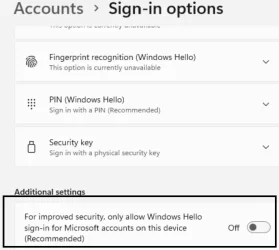
Login in to vm in basic mode (deselect enhanced mode), then go to account options and turn off windows hello.

VM will now login to use password.

Then run NETPLWIZ, uncheck user needs a password, press ok, then at next screen enter your MS password twice, ok.

Then shutdown vm completely and reboot into enhanced mode.

PC will auto login with no need to enter password

This works on 26H1 Canary - just tested it.

Note: if guest VM is Home, it can only run in Basic Mode.


1763576844379.webp
 

Attachments

  • 1763579539579.webp
    1763579539579.webp
    24.6 KB · Views: 0

My Computer

System One

  • OS
    Windows 11 Pro + Win11 Canary VM.
    Computer type
    Laptop
    Manufacturer/Model
    ASUS Zenbook 14
    CPU
    I9 13th gen i9-13900H 2.60 GHZ
    Motherboard
    Yep, Laptop has one.
    Memory
    16 GB soldered
    Graphics Card(s)
    Integrated Intel Iris XE
    Sound Card
    Realtek built in
    Monitor(s) Displays
    laptop OLED screen
    Screen Resolution
    2880x1800 touchscreen
    Hard Drives
    1 TB NVME SSD (only weakness is only one slot)
    PSU
    Internal + 65W thunderbolt USB4 charger
    Case
    Yep, got one
    Cooling
    Stella Artois (UK pint cans - 568 ml) - extra cost.
    Keyboard
    Built in UK keybd
    Mouse
    Bluetooth , wireless dongled, wired
    Internet Speed
    900 mbs (ethernet), wifi 6 typical 350-450 mb/s both up and down
    Browser
    Edge
    Antivirus
    Defender
    Other Info
    TPM 2.0, 2xUSB4 thunderbolt, 1xUsb3 (usb a), 1xUsb-c, hdmi out, 3.5 mm audio out/in combo, ASUS backlit trackpad (inc. switchable number pad)

    Macrium Reflect Home V8
    Office 365 Family (6 users each 1TB onedrive space)
    Hyper-V (a vm runs almost as fast as my older laptop)
@cereberus Thank you for your detailed procedure. It is much appreciated.

My Hyper-V VM is activated Pro edition. It was created when I was using Windows 10 with no TPM. Therefore, it was not running when I turned on TPM to install Windows 11. I looked over the internet to find a solution to TPM problem and I came across a post of yours several years ago regarding exporting and importing of certificates from/into VM. The password you used was "SuperDuperPassword!".

Coming to your procedure, I tried to follow your post but things were a little different in my system.

Enhanced Mode was already deselected because with PIN sign-in method, I could not enter into my account.

I turned off Windows Hello (PIN).

I ran Netplwiz but in netplwiz console there is no option as to "User needs a password" checkbox to uncheck. Therefore, at netplwiz screen, I created a local admin user.

Now I am using this admin user account in Enhanced Mode.

Thanks once again.

Edit: If I remove my password to log in my account, Windows starts in windowed mode, not full screen. My screen resolution is 2560 by 1440. I cannot set my resolution. It is grayed out. Therefore, I have to use a password, a simple one.
 
Last edited:

My Computers

System One System Two

  • OS
    Windows 11 Pro build 26200.8524
    Computer type
    PC/Desktop
    Manufacturer/Model
    Home Built
    CPU
    Intel i7-4790
    Motherboard
    Asus H97 Pro Gamer with add-on TPM1.2 module
    Memory
    Teams DDR3-1600 4x4 GB
    Graphics Card(s)
    MSI Nvidia GeForce GTX 1050Ti
    Sound Card
    Realtek ALC1150
    Monitor(s) Displays
    Dell P2425D
    Screen Resolution
    2560 by 1440 pixels
    Hard Drives
    Corsair NVMe M.2 Core XT 1000 GB (Windows 11 v.25H2); Samsung SATA Evo 870 500 GB (Windows 11 v.25H2);
    PSU
    Corsair HX850
    Case
    Gigabyte Solo 210
    Cooling
    Zalman CNPS7X Tower
    Keyboard
    Microsoft AIO Wireless (includes touchpad)
    Mouse
    HP S1000 Plus Wireless
    Internet Speed
    500 Mb fiber optic
    Browser
    Chrome; MS Edge
    Antivirus
    Windows Defender
  • Operating System
    MacOS 12 Monterey
    Computer type
    Laptop
    Manufacturer/Model
    Apple Macbook Air
    CPU
    Intel Core i5
    Memory
    8 GB
    Graphics card(s)
    Intel integrated
    Screen Resolution
    1440 by 900 pixels
    Hard Drives
    128 GB
    Keyboard
    Built-in
    Mouse
    Microsoft Wireless
    Internet Speed
    802.11 ac
    Browser
    Chrome; Safari
    Antivirus
    N/A

Latest Support Threads

Back
Top Bottom