- Local time
- 9:16 PM
- Posts
- 101
- OS
- Windows 11 Pro for Workstations 25H2 26200.9445
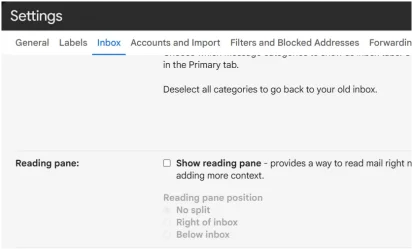
I used to be able to get a panel next to the selected message but it seems that something has changed in Edge,
When I try it, I see the panel that says one message is selected. But no data is shown.
Out of curiosity, I just tried it with Chromium, I got the same panel but it asks me to make an account and login to cloudHQ before the message preview is enabled.
Is that a new fruit(cake) or what? And why Edge doesn't show the data but never refers to cloudHQ?
Thanks in advance for any clarification.
When I try it, I see the panel that says one message is selected. But no data is shown.
Out of curiosity, I just tried it with Chromium, I got the same panel but it asks me to make an account and login to cloudHQ before the message preview is enabled.
Is that a new fruit(cake) or what? And why Edge doesn't show the data but never refers to cloudHQ?
Thanks in advance for any clarification.
My Computer
At a glance
Windows 11 Pro for Workstations 25H2 26200.94456C+4c Intel 13th Gen Intel(R) Core(TM) i5-134...64 GBNVIDIA GeForce RTX 4060, Intel UHD Graphics 730
- OS
- Windows 11 Pro for Workstations 25H2 26200.9445
- Computer type
- PC/Desktop
- Manufacturer/Model
- ASRock
- CPU
- 6C+4c Intel 13th Gen Intel(R) Core(TM) i5-13400, 4100 M
- Motherboard
- ASRock B660M-HDV
- Memory
- 64 GB
- Graphics Card(s)
- NVIDIA GeForce RTX 4060, Intel UHD Graphics 730
- Sound Card
- Realtek
- Monitor(s) Displays
- AOC 24V2W1G5
- Screen Resolution
- 1920x1080
- Hard Drives
- Samsung SSD 990 Pro with Heatsink
- Keyboard
- Logitech
- Mouse
- Logitech
- Internet Speed
- 1GB
- Antivirus
- Windows Defender