
Navigation
Install the app
How to install the app on iOS
Follow along with the video below to see how to install our site as a web app on your home screen.
Note: This feature may not be available in some browsers.
More options
Style variation
System
Light
Dark
You are using an out of date browser. It may not display this or other websites correctly.
You should upgrade or use an alternative browser.
You should upgrade or use an alternative browser.
I have a dell 7010
- Thread starter vaahid
- Start date

could you please provide the complete specs for your system.
best of luck Steve ..
best of luck Steve ..
My Computers
-
At a glance
Windows 11 HomeRyzen 7 5825u64GB DDR4 3200Ryzen 7 5825u- OS
- Windows 11 Home
- Computer type
- PC/Desktop
- Manufacturer/Model
- HP 24" AiO
- CPU
- Ryzen 7 5825u
- Motherboard
- HP
- Memory
- 64GB DDR4 3200
- Graphics Card(s)
- Ryzen 7 5825u
- Sound Card
- RealTek
- Monitor(s) Displays
- 24" HP AiO
- Screen Resolution
- 1920 x 1080 @60 Hz
- Hard Drives
- 1TB WD Blue SN580 M2 SSD Partitioned.
2x 1TB USB HDD External Backup/Storage.
- PSU
- 90W external power brick
- Case
- 24" All in One
- Cooling
- Default Air Cooling
- Keyboard
- HP WiFi UK extended
- Mouse
- HP WiFi 3 Button
- Internet Speed
- 1GB full fibre
- Browser
- Edge & Firefox
- Antivirus
- AVG Internet Security/Windows Defender
- Other Info
- Mainly Open Source Software
-
At a glance
Ubuntu 22.04.5 LTSi5 7200u16GB DDR4Intel- Operating System
- Ubuntu 22.04.5 LTS
- Computer type
- Laptop
- Manufacturer/Model
- Dell 13" Latitude 2017
- CPU
- i5 7200u
- Motherboard
- Dell
- Memory
- 16GB DDR4
- Graphics card(s)
- Intel
- Sound Card
- Intel
- Monitor(s) Displays
- 13" Dell Laptop
- Hard Drives
- 250GB Crucial 2.5" SSD
- Mouse
- Generic WiFi 3 button
- Internet Speed
- WiFi only
- Browser
- Firefox
- Antivirus
- ClamAV TK
- Other Info
- Mainly Open Source Software

- Local time
- 6:12 PM
- Posts
- 3,091
- OS
- Win7,Win11
presumably it is one of these optiplex intel 3rd gen things no idea what form factor the op has there are lot of sff around
this is the mt 9010/7010
sff
this is the mt 9010/7010
sff
Last edited:
My Computers
-
At a glance
Win7,Win11i7-97002x16gb 3600mhz- OS
- Win7,Win11
- Computer type
- PC/Desktop
- CPU
- i7-9700
- Motherboard
- gigabyte b365m ds3h
- Memory
- 2x16gb 3600mhz
- Monitor(s) Displays
- benq gw2480
- PSU
- bequiet pure power 11 400CM
- Cooling
- cryorig m9i
-
At a glance
win7,win11i5-84002x8gb 3200- Operating System
- win7,win11
- Computer type
- PC/Desktop
- CPU
- i5-8400
- Motherboard
- gigabyte b365m ds3h
- Memory
- 2x8gb 3200
- PSU
- xfx pro 450

- Local time
- 3:12 AM
- Posts
- 3,283
- OS
- Windows 11 Pro
This is the go-to thread for this.
All the best.
 www.elevenforum.com
All the best.
Let's install Windows 11 on incompatible hardware
Inspired on this thread: Let's run Win10 on really really old hardware - Windows 10 Help Forums Most of our machines are unsupported on Windows 11, why not force it? --------- Run Windows 11 on unsupported machines --------- 1. How to Bypass Windows 11's TPM, CPU and RAM Requirements 2...
www.elevenforum.com
My Computers
-
At a glance
Windows 11 ProIntel Core i9-10900XCorsair 64 GB (4 x 16 GB) CMW64GX4M4C3000C15 ...GIGABYTE GeForce GTX 1660 Super Mini ITX 6 GB OC- OS
- Windows 11 Pro
- Computer type
- PC/Desktop
- Manufacturer/Model
- Stigg's Build
- CPU
- Intel Core i9-10900X
- Motherboard
- GIGABYTE X299X DESIGNARE 10G
- Memory
- Corsair 64 GB (4 x 16 GB) CMW64GX4M4C3000C15 Vengeance RGB Pro 3000Mhz DDR4
- Graphics Card(s)
- GIGABYTE GeForce GTX 1660 Super Mini ITX 6 GB OC
- Sound Card
- Realtek ALC1220
- Monitor(s) Displays
- Samsung 27" FHD LED FreeSync Gaming Monitor (LS27F350FHEXXY)
- Screen Resolution
- 1920 x 1080
- Hard Drives
- Samsung 970 Pro Series 1TB M.2 2280 NVMe SSD
Western Digital Red Pro WD8003FFBX-68B9AN0 8 TB, 7200 RPM, SATA-III
Western Digital Red Pro WD8003FFBX-68B9AN0 8 TB, 7200 RPM, SATA-III
- PSU
- Corsair HX1200 1200W 80 Plus Platinum
- Case
- Fractal Design Define 7 Black Solid Case
- Cooling
- Noctua NH-D15 Chromax Black
- Keyboard
- Razer Ornata V2
- Mouse
- Razer DeathAdder Essential
- Internet Speed
- FTTN 100Mbps / 40Mbps
- Browser
- Mozilla Firefox
- Antivirus
- N/A
- Other Info
- Logitech BRIO 4k Ultra HD USB-C Webcam
-
At a glance
Windows 10 ProCore i7-8750HSK Hynix 32 GB (2 x 16 GB) HMA82GS6CJR8N-VK 1...NVIDIA GeForce GTX 1070- Operating System
- Windows 10 Pro
- Computer type
- Laptop
- Manufacturer/Model
- ASUS ROG Zephyrus M GM501GS
- CPU
- Core i7-8750H
- Motherboard
- Zephyrus M GM501GS
- Memory
- SK Hynix 32 GB (2 x 16 GB) HMA82GS6CJR8N-VK 16 GB DDR4-2666 DDR4 SDRAM
- Graphics card(s)
- NVIDIA GeForce GTX 1070
- Sound Card
- Realtek ALC294
- Monitor(s) Displays
- AU Optronics B156HAN07.1 [15.6" LCD]
- Screen Resolution
- 1920 x 1080
- Hard Drives
- Samsung MZVKW512HMJP-00000 512 GB, PCI-E 3.0 x4
Samsung SSD 860 QVO 4TB 4 TB, SATA-III
- PSU
- N/A
- Case
- N/A
- Cooling
- N/A
- Keyboard
- PC/AT Enhanced PS2 Keyboard (101/102-Key)
- Mouse
- Razer DeathAdder Essential
- Internet Speed
- FTTN 100Mbps / 40Mbps
- Browser
- Mozilla Firefox
- Antivirus
- N/A
- Other Info
- USB2.0 HD UVC Webcam
Download and run WhyNotWin11. It will give you (and us) information about why your computer is not eligible for the Windows 11 upgrade.

 www.whynotwin11.com
WhyNotWin11 - Windows 11 PC Health Check
WhyNotWin11 is a Windows 11 PC Health Check Tool that allows us to check whatever our Computer or Laptop can run Windows 11 or not. Unlike Microsoft's Health Check Tool, This WhyNotWin11 Windows 11 Check Tool gives accurate information and if your PC can't run Windows 11 then this tool will show...
www.whynotwin11.com
My Computers
-
At a glance
Windows 11 ProAMD Ryzen 9 9950X3DKingston FURY Beast 64GB (2x32GB) DDR5 6000MT/sASUS TUF Gaming Radeon RX 9070 OC Edition 16G...- OS
- Windows 11 Pro
- Computer type
- PC/Desktop
- CPU
- AMD Ryzen 9 9950X3D
- Motherboard
- ASRock B650E Taichi Lite
- Memory
- Kingston FURY Beast 64GB (2x32GB) DDR5 6000MT/s
- Graphics Card(s)
- ASUS TUF Gaming Radeon RX 9070 OC Edition 16GB GDDR6
- Hard Drives
- Solidigm P44 Pro 2TB M.2 NVMe SSD
-
At a glance
Windows 11 HomeIntel Core Ultra 9 275HX64GB (2x 32GB) DDR5-6400NVIDIA GeForce RTX 5080 16GB GDDR7 Laptop GPU- Operating System
- Windows 11 Home
- Computer type
- Laptop
- Manufacturer/Model
- Lenovo Legion Pro 7i Gen 10 16"
- CPU
- Intel Core Ultra 9 275HX
- Memory
- 64GB (2x 32GB) DDR5-6400
- Graphics card(s)
- NVIDIA GeForce RTX 5080 16GB GDDR7 Laptop GPU
- Hard Drives
- 2x 1TB M.2 NVMe SSD (SK Hynix)

I installed Windows 11 25H2 on my 2014 'unsupported' Dell Inspiron 7000. Just download the Windows 11 ISO file for your region, mount it then run setup.exe /product server from an admin command prompt. This bypasses all the compatibility checks. I turn off the options for upgrades and turn off the internet during the upgrade.
My Computer
At a glance
Windows 11 ProCore i7-13700K64 GB Kingston Fury Beast DDR5Gigabyte GeForce RTX 2060 Super Gaming OC 8G
- OS
- Windows 11 Pro
- Computer type
- PC/Desktop
- Manufacturer/Model
- Self build
- CPU
- Core i7-13700K
- Motherboard
- Asus TUF Gaming Plus WiFi Z790
- Memory
- 64 GB Kingston Fury Beast DDR5
- Graphics Card(s)
- Gigabyte GeForce RTX 2060 Super Gaming OC 8G
- Sound Card
- Realtek S1200A
- Monitor(s) Displays
- Viewsonic VP2770 & Dell (secondary)
- Screen Resolution
- 2560 x 1440
- Hard Drives
- Kingston KC3000 2TB NVME SSD & SATA HDDs & SSD
- PSU
- EVGA SuperNova G2 850W
- Case
- Nanoxia Deep Silence 1
- Cooling
- Noctua NH-D14
- Keyboard
- Microsoft Digital Media Pro
- Mouse
- Logitech Wireless
- Internet Speed
- 80 Mb / s
- Browser
- Chrome
- Antivirus
- Defender, Malwarebytes Free & AdwCleaner
I installed Windows 11 25H2 on my 2014 'unsupported' Dell Inspiron 7000. Just download the Windows 11 ISO file for your region, mount it then run setup.exe /product server from an admin command prompt. This bypasses all the compatibility checks. I turn off the options for upgrades and turn off the internet during the upgrade.
How do you mount it?
Thanks
My Computers
-
At a glance
Windows 11 Pro 25H2 build: (26200.7623)32GB- OS
- Windows 11 Pro 25H2 build: (26200.7623)
- Computer type
- Laptop
- Manufacturer/Model
- Microsoft Surface Pro
- Memory
- 32GB
-
At a glance
Microsoft 25H2 ProIntel Core Ultra 764GBIntel Integrated Graphics- Operating System
- Microsoft 25H2 Pro
- Computer type
- Laptop
- Manufacturer/Model
- Dell Pro 14 - PC14250
- CPU
- Intel Core Ultra 7
- Memory
- 64GB
- Graphics card(s)
- Intel Integrated Graphics
- Hard Drives
- Micron 1TB SSD
Right click the ISO file and select Mount as any Power User should know!How do you mount it?
Thanks
My Computer
At a glance
Windows 11 ProCore i7-13700K64 GB Kingston Fury Beast DDR5Gigabyte GeForce RTX 2060 Super Gaming OC 8G
- OS
- Windows 11 Pro
- Computer type
- PC/Desktop
- Manufacturer/Model
- Self build
- CPU
- Core i7-13700K
- Motherboard
- Asus TUF Gaming Plus WiFi Z790
- Memory
- 64 GB Kingston Fury Beast DDR5
- Graphics Card(s)
- Gigabyte GeForce RTX 2060 Super Gaming OC 8G
- Sound Card
- Realtek S1200A
- Monitor(s) Displays
- Viewsonic VP2770 & Dell (secondary)
- Screen Resolution
- 2560 x 1440
- Hard Drives
- Kingston KC3000 2TB NVME SSD & SATA HDDs & SSD
- PSU
- EVGA SuperNova G2 850W
- Case
- Nanoxia Deep Silence 1
- Cooling
- Noctua NH-D14
- Keyboard
- Microsoft Digital Media Pro
- Mouse
- Logitech Wireless
- Internet Speed
- 80 Mb / s
- Browser
- Chrome
- Antivirus
- Defender, Malwarebytes Free & AdwCleaner
Please check your installed Windows 10 (I have presumed you have Win10 installed) version. You need to upgrade to the same Windows 11 version. Like if you have Win 10 Pro, then you need to upgrade to Win 11 Pro, Home for Home and so on. Otherwise you won't be able to keep your programs and files. And of course your Win 10 license will work on newer Win 11. Check online on how to use the "setup /product server" procedure to upgrade your Windows OS
My Computer
At a glance
Windows 11Intel(R) Core(TM) i5-4570 CPU @ 3.20GHz8.00 GB DDR3AMD Radeon R5 430
- OS
- Windows 11
- Computer type
- PC/Desktop
- Manufacturer/Model
- HP ProDesk 600 G1 SFF
- CPU
- Intel(R) Core(TM) i5-4570 CPU @ 3.20GHz
- Motherboard
- Hewlett-Packard 18E7
- Memory
- 8.00 GB DDR3
- Graphics Card(s)
- AMD Radeon R5 430
- Sound Card
- Realtek High Definition Audio Driver for Hewlett-Packard
- Hard Drives
- KINGSTON SUV500240G
How do you mount it?
This link may be useful:

Mount or Unmount ISO and IMG File in Windows 11
This tutorial will show you how to natively mount or unmount ISO and IMG image files in Windows 11. An ISO or IMG file is a DVD disk image file. When you mount an .ISO or .IMG file, it will be added as a DVD drive in File Explorer > This PC. ISO and IMG files cannot be mounted on removable...
www.elevenforum.com
My Computer
At a glance
Windows 10Intel(R) Core(TM) i7-4800MQ CPU @ 2.70GHz16 GB Total: Manufacturer : Samsung MemoryTyp...NVIDIA Quadro K3100M; Intel(R) HD Graphics 4600
- OS
- Windows 10
- Computer type
- Laptop
- Manufacturer/Model
- HP
- CPU
- Intel(R) Core(TM) i7-4800MQ CPU @ 2.70GHz
- Motherboard
- Product : 190A Version : KBC Version 94.56
- Memory
- 16 GB Total: Manufacturer : Samsung MemoryType : DDR3 FormFactor : SODIMM Capacity : 8GB Speed : 1600
- Graphics Card(s)
- NVIDIA Quadro K3100M; Intel(R) HD Graphics 4600
- Sound Card
- IDT High Definition Audio CODEC; PNP Device ID HDAUDIO\FUNC_01&VEN_111D&DEV_76E0
- Hard Drives
- Model Hitachi HTS727575A9E364
- Antivirus
- Microsoft Defender
- Other Info
- Mobile Workstation
Mounting an ISO file means that the Windows installation media appears as a virtual drive, allowing you to access the files as if it were a physical disc.
You can then, for example, run the command:
D:\setup.exe /product server
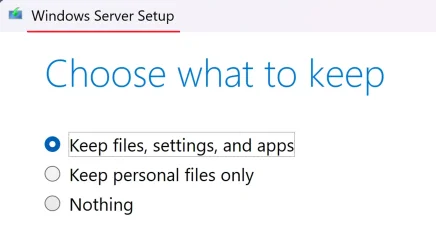
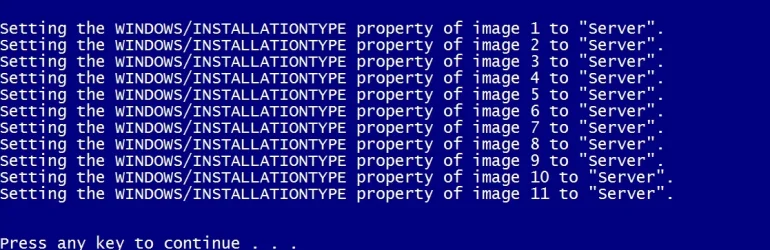
In this mode, the Windows 11 installer thinks it’s installing Windows Server Edition (see image below) and therefore bypasses the Windows 11 system requirements check.
You can then, for example, run the command:
D:\setup.exe /product server
In this mode, the Windows 11 installer thinks it’s installing Windows Server Edition (see image below) and therefore bypasses the Windows 11 system requirements check.
My Computers
-
At a glance
Windows 11 ProAMD Ryzen 9 9950X3DKingston FURY Beast 64GB (2x32GB) DDR5 6000MT/sASUS TUF Gaming Radeon RX 9070 OC Edition 16G...- OS
- Windows 11 Pro
- Computer type
- PC/Desktop
- CPU
- AMD Ryzen 9 9950X3D
- Motherboard
- ASRock B650E Taichi Lite
- Memory
- Kingston FURY Beast 64GB (2x32GB) DDR5 6000MT/s
- Graphics Card(s)
- ASUS TUF Gaming Radeon RX 9070 OC Edition 16GB GDDR6
- Hard Drives
- Solidigm P44 Pro 2TB M.2 NVMe SSD
-
At a glance
Windows 11 HomeIntel Core Ultra 9 275HX64GB (2x 32GB) DDR5-6400NVIDIA GeForce RTX 5080 16GB GDDR7 Laptop GPU- Operating System
- Windows 11 Home
- Computer type
- Laptop
- Manufacturer/Model
- Lenovo Legion Pro 7i Gen 10 16"
- CPU
- Intel Core Ultra 9 275HX
- Memory
- 64GB (2x 32GB) DDR5-6400
- Graphics card(s)
- NVIDIA GeForce RTX 5080 16GB GDDR7 Laptop GPU
- Hard Drives
- 2x 1TB M.2 NVMe SSD (SK Hynix)

And what would that program be?
My Computer
At a glance
Win 10 Pro 19045.6937 Win 11 25H2 VMXeon W-10885M64GB ECC DDR4 128GB maxIntel 1080p + Quadro RTX 5000 Max-Q 16GB 4K
- OS
- Win 10 Pro 19045.6937 Win 11 25H2 VM
- Computer type
- Laptop
- Manufacturer/Model
- Dell Precicion 15 Workstation
- CPU
- Xeon W-10885M
- Motherboard
- Dell
- Memory
- 64GB ECC DDR4 128GB max
- Graphics Card(s)
- Intel 1080p + Quadro RTX 5000 Max-Q 16GB 4K
- Sound Card
- onboard Realtec
- Monitor(s) Displays
- NA
- Screen Resolution
- 1080p to 4k
- Hard Drives
- 1 TB Samsung 9100 M2 SSD main
2 TB Samsung 9100 M2 SSD storage
500 GB Corsair T500 storage M2 SSD (6 TB max)
- PSU
- NA
- Case
- NA
- Cooling
- NA
- Keyboard
- backlit
- Mouse
- Logitec M720 Bluetooth Free scroll
- Internet Speed
- slow
- Browser
- Pale Moon 33.9.x.x - x64 AVX2 build
- Antivirus
- Windows Defender
Pretty sure it was Flyby11. For basic Windows users, opening (mounting) an ISO file and running the D:\setup.exe /product server command is too difficult.And what would that program be?
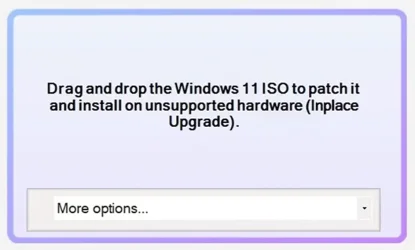
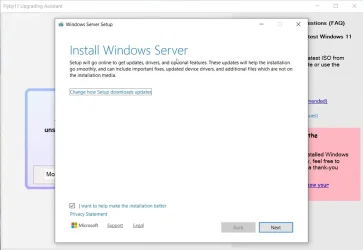
There are YouTube videos that give detailed instructions on how to use Flyby11 to upgrade to Windows 11 by simply dragging and dropping the Windows 11 ISO file into the Flyby11 window.
edit:
Download Flyby11, not FlyOOBE.
Getting Flyby11 from GitHub
Navigate to the official Flyby11 GitHub repository and scroll down until you find the releases section. Click on the latest release to access the download page.
Last edited:
My Computers
-
At a glance
Windows 11 ProAMD Ryzen 9 9950X3DKingston FURY Beast 64GB (2x32GB) DDR5 6000MT/sASUS TUF Gaming Radeon RX 9070 OC Edition 16G...- OS
- Windows 11 Pro
- Computer type
- PC/Desktop
- CPU
- AMD Ryzen 9 9950X3D
- Motherboard
- ASRock B650E Taichi Lite
- Memory
- Kingston FURY Beast 64GB (2x32GB) DDR5 6000MT/s
- Graphics Card(s)
- ASUS TUF Gaming Radeon RX 9070 OC Edition 16GB GDDR6
- Hard Drives
- Solidigm P44 Pro 2TB M.2 NVMe SSD
-
At a glance
Windows 11 HomeIntel Core Ultra 9 275HX64GB (2x 32GB) DDR5-6400NVIDIA GeForce RTX 5080 16GB GDDR7 Laptop GPU- Operating System
- Windows 11 Home
- Computer type
- Laptop
- Manufacturer/Model
- Lenovo Legion Pro 7i Gen 10 16"
- CPU
- Intel Core Ultra 9 275HX
- Memory
- 64GB (2x 32GB) DDR5-6400
- Graphics card(s)
- NVIDIA GeForce RTX 5080 16GB GDDR7 Laptop GPU
- Hard Drives
- 2x 1TB M.2 NVMe SSD (SK Hynix)

- Local time
- 1:12 PM
- Posts
- 8
- OS
- 10 window
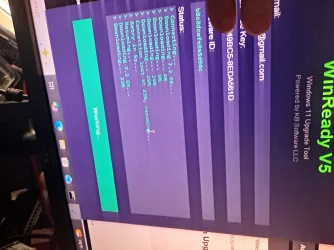
I used this company's product www.kbsoftware.org ...just two clicks doing my son's now.....I was skeptical I had to research the parent company.
Attachments
My Computer
At a glance
10 window
- OS
- 10 window
- Computer type
- PC/Desktop
- Manufacturer/Model
- Dell 7010
No need. As I said above, just download the Windows 11 ISO file for your region, mount it then run setup.exe /product server from an admin command prompt.I used this company's product www.kbsoftware.org ...just two clicks doing my son's now.....I was skeptical I had to research the parent company.
My Computer
At a glance
Windows 11 ProCore i7-13700K64 GB Kingston Fury Beast DDR5Gigabyte GeForce RTX 2060 Super Gaming OC 8G
- OS
- Windows 11 Pro
- Computer type
- PC/Desktop
- Manufacturer/Model
- Self build
- CPU
- Core i7-13700K
- Motherboard
- Asus TUF Gaming Plus WiFi Z790
- Memory
- 64 GB Kingston Fury Beast DDR5
- Graphics Card(s)
- Gigabyte GeForce RTX 2060 Super Gaming OC 8G
- Sound Card
- Realtek S1200A
- Monitor(s) Displays
- Viewsonic VP2770 & Dell (secondary)
- Screen Resolution
- 2560 x 1440
- Hard Drives
- Kingston KC3000 2TB NVME SSD & SATA HDDs & SSD
- PSU
- EVGA SuperNova G2 850W
- Case
- Nanoxia Deep Silence 1
- Cooling
- Noctua NH-D14
- Keyboard
- Microsoft Digital Media Pro
- Mouse
- Logitech Wireless
- Internet Speed
- 80 Mb / s
- Browser
- Chrome
- Antivirus
- Defender, Malwarebytes Free & AdwCleaner
- Local time
- 6:12 PM
- Posts
- 3,091
- OS
- Win7,Win11
I did a little batch that does it but needs to point at the wim/esd file can't drag and drop the iso. It just changes the wim/esd property. So flyby is probably easier for many punters
the little batch file does this. It is pretty much instantaneous
the little batch file does this. It is pretty much instantaneous
Last edited:
My Computers
-
At a glance
Win7,Win11i7-97002x16gb 3600mhz- OS
- Win7,Win11
- Computer type
- PC/Desktop
- CPU
- i7-9700
- Motherboard
- gigabyte b365m ds3h
- Memory
- 2x16gb 3600mhz
- Monitor(s) Displays
- benq gw2480
- PSU
- bequiet pure power 11 400CM
- Cooling
- cryorig m9i
-
At a glance
win7,win11i5-84002x8gb 3200- Operating System
- win7,win11
- Computer type
- PC/Desktop
- CPU
- i5-8400
- Motherboard
- gigabyte b365m ds3h
- Memory
- 2x8gb 3200
- PSU
- xfx pro 450

- Local time
- 3:12 AM
- Posts
- 17,849
- Location
- Gold Coast, Australia
- OS
- Windows 11 Pro 25H2 Build 26200.9168
I used this company's product www.kbsoftware.org ...just two clicks doing my son's now.....I was skeptical I had to research the parent company.
From that website…
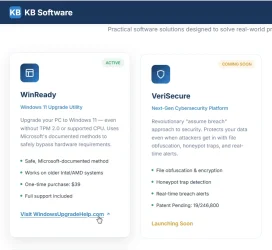
Upgrade your PC to Windows 11 — even without TPM 2.0 or supported CPU. Uses Microsoft's documented methods to safely bypass hardware requirements.
I’d love to know what black magic this company uses that allows the install of 25H2 without SSE4.2 support.
My Computers
-
At a glance
Windows 11 Pro 25H2 Build 26200.9168Intel(R) Core(TM) i7-4770K CPU @ 3.50GHz32.0 GB of I forget and the box is in storage.Gigabyte nVidia GeForce GTX 1660 Super OC 6GB- OS
- Windows 11 Pro 25H2 Build 26200.9168
- Computer type
- PC/Desktop
- Manufacturer/Model
- Sin-built 2013
- CPU
- Intel(R) Core(TM) i7-4770K CPU @ 3.50GHz
- Motherboard
- ASUS ROG Maximus VI Formula
- Memory
- 32.0 GB of I forget and the box is in storage.
- Graphics Card(s)
- Gigabyte nVidia GeForce GTX 1660 Super OC 6GB
- Sound Card
- ROG SupremeFX Formula 8-Channel High Definition Audio
- Monitor(s) Displays
- 5 x LG 25MS500-B - 1 x 24MK430H-B - 1 x Wacom Pro 22" Touch Screen Tablet
- Screen Resolution
- All over the place
- Hard Drives
- Too many to list. OS on Samsung 1TB 870 QVO SATA
- PSU
- Silverstone 1500
- Case
- NZXT Phantom 820 Full-Tower Case
- Cooling
- Noctua NH-D15 Elite Class Dual Tower CPU Cooler / 6 x EziDIY 120mm / 2 x Corsair 140mm somethings / 1 x 140mm Thermaltake something / 2 x 200mm Corsair.
- Keyboard
- Corsair K95 / Logitech diNovo Edge Wireless
- Mouse
- Logitech: G402 / G502 / Mx Masters / Mx Air Cordless
- Internet Speed
- 2000/500Mbps
- Browser
- All sorts
- Antivirus
- Kaspersky Premium
- Other Info
- ㅤㅤㅤㅤㅤㅤㅤㅤㅤㅤㅤㅤㅤㅤㅤㅤㅤㅤㅤㅤㅤㅤㅤㅤㅤㅤㅤㅤㅤㅤㅤㅤㅤㅤㅤㅤㅤㅤㅤㅤ⠀⠀⠀⠀⠀⠀⠀⠀⠀⠀
TP-Link BE9300 WiFi 7 Bluetooth 5.4 (Archer TBE550E)
TP-Link TX201 V1 2.5GB Lan
Grandstream HT812 - VoIP
ASUS DSL-AX82U - Mesh
ASUS RT-AC68U - Mesh
ASUS RT-BE88U Router
Brother MFC-L2880DW Printer
I’m on a horse.
-
At a glance
Windows 11 Pro 25H2 Build 26200.9168 (Wifes)13th Generation Intel® Core™ i5-1340P Process...16GB LPDDR5-52001x Intel® Iris® Xe Graphics- Operating System
- Windows 11 Pro 25H2 Build 26200.9168 (Wifes)
- Computer type
- Laptop
- Manufacturer/Model
- LENOVO Yoga 7 14IRL8 - Type 82YL
- CPU
- 13th Generation Intel® Core™ i5-1340P Processor(Core™ i5-1340P)
- Memory
- 16GB LPDDR5-5200
- Graphics card(s)
- 1x Intel® Iris® Xe Graphics
- Sound Card
- Optimized with Dolby Atmos®
- Screen Resolution
- QHD 2880 x 1800 OLED
- Hard Drives
- M.2 512 GB SSD PCIe
- Mouse
- Logiteck MX Master 3S
- Internet Speed
- 2000/500
- Antivirus
- Defender / Malwarebytes
- Other Info
- …still on a horse.
Wireless Network: Wi-Fi 6E 2x2 AX; Bluetooth® 5.1 or above
Ports: 1x 1 Novo button; 2 in 1 Audio Combo jack; Micro SD Card Reader; HDMI 1.4b; 2 x USB Type-C (TBT4)
USB 3.2 Gen 2 DP 1.4a
PD 3.0); 1 x USB 3.2 Gen1 Type A
Camera
1x 1080P FHD IR/RGB Hybrid with Privacy Shutter and Dual Array Microphone
Graphics
1x Intel® Iris® Xe Graphics
Monitor
14" WUXGA
Form Factor
Convertible Notebook
-
Windows 11 Pro 25H2 Build 26200.9168 (Wifes)
Yoga 7 2-in-1 14IML9 - Type 83DJ
Processor: Intel® Core™ Ultra 7 155H Processor(Core™ Ultra 7 155H)
Memory: 32GB LPD5X-7467
Hard Drive: 1 TB SSD PCIe
Wireless Network: 1x Wi-Fi 6E 2x2 AX; Bluetooth® 5.1 or above
Ports: 1 x HDMI 2.1 TMDS; 1 x Novo Button; 1 x Combo Audio Jack
2 x USB-C (USB 4.0)
1 x USB-A 3.2 Gen 1
Camera: 1080P FHD IR Hybrid with Dual Microphone
Graphics: Intel® Arc™ Graphics
Monitor: 14" 2.8K
...Where's my horse?
- Local time
- 6:12 PM
- Posts
- 3,091
- OS
- Win7,Win11
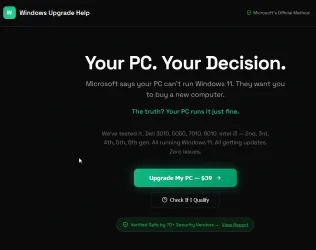
the post looks sus to meI’d love to know what black magic this company..
If you click on the thing it wants you to shell out
My Computers
-
At a glance
Win7,Win11i7-97002x16gb 3600mhz- OS
- Win7,Win11
- Computer type
- PC/Desktop
- CPU
- i7-9700
- Motherboard
- gigabyte b365m ds3h
- Memory
- 2x16gb 3600mhz
- Monitor(s) Displays
- benq gw2480
- PSU
- bequiet pure power 11 400CM
- Cooling
- cryorig m9i
-
At a glance
win7,win11i5-84002x8gb 3200- Operating System
- win7,win11
- Computer type
- PC/Desktop
- CPU
- i5-8400
- Motherboard
- gigabyte b365m ds3h
- Memory
- 2x8gb 3200
- PSU
- xfx pro 450
- Local time
- 3:12 AM
- Posts
- 17,849
- Location
- Gold Coast, Australia
- OS
- Windows 11 Pro 25H2 Build 26200.9168
I call bullcrap on the unsupported CPU issue. But you paid for software that is available for free. RUFUS is free and used by tens of thousands… Millions?
My Computers
-
At a glance
Windows 11 Pro 25H2 Build 26200.9168Intel(R) Core(TM) i7-4770K CPU @ 3.50GHz32.0 GB of I forget and the box is in storage.Gigabyte nVidia GeForce GTX 1660 Super OC 6GB- OS
- Windows 11 Pro 25H2 Build 26200.9168
- Computer type
- PC/Desktop
- Manufacturer/Model
- Sin-built 2013
- CPU
- Intel(R) Core(TM) i7-4770K CPU @ 3.50GHz
- Motherboard
- ASUS ROG Maximus VI Formula
- Memory
- 32.0 GB of I forget and the box is in storage.
- Graphics Card(s)
- Gigabyte nVidia GeForce GTX 1660 Super OC 6GB
- Sound Card
- ROG SupremeFX Formula 8-Channel High Definition Audio
- Monitor(s) Displays
- 5 x LG 25MS500-B - 1 x 24MK430H-B - 1 x Wacom Pro 22" Touch Screen Tablet
- Screen Resolution
- All over the place
- Hard Drives
- Too many to list. OS on Samsung 1TB 870 QVO SATA
- PSU
- Silverstone 1500
- Case
- NZXT Phantom 820 Full-Tower Case
- Cooling
- Noctua NH-D15 Elite Class Dual Tower CPU Cooler / 6 x EziDIY 120mm / 2 x Corsair 140mm somethings / 1 x 140mm Thermaltake something / 2 x 200mm Corsair.
- Keyboard
- Corsair K95 / Logitech diNovo Edge Wireless
- Mouse
- Logitech: G402 / G502 / Mx Masters / Mx Air Cordless
- Internet Speed
- 2000/500Mbps
- Browser
- All sorts
- Antivirus
- Kaspersky Premium
- Other Info
- ㅤㅤㅤㅤㅤㅤㅤㅤㅤㅤㅤㅤㅤㅤㅤㅤㅤㅤㅤㅤㅤㅤㅤㅤㅤㅤㅤㅤㅤㅤㅤㅤㅤㅤㅤㅤㅤㅤㅤㅤ⠀⠀⠀⠀⠀⠀⠀⠀⠀⠀
TP-Link BE9300 WiFi 7 Bluetooth 5.4 (Archer TBE550E)
TP-Link TX201 V1 2.5GB Lan
Grandstream HT812 - VoIP
ASUS DSL-AX82U - Mesh
ASUS RT-AC68U - Mesh
ASUS RT-BE88U Router
Brother MFC-L2880DW Printer
I’m on a horse.
-
At a glance
Windows 11 Pro 25H2 Build 26200.9168 (Wifes)13th Generation Intel® Core™ i5-1340P Process...16GB LPDDR5-52001x Intel® Iris® Xe Graphics- Operating System
- Windows 11 Pro 25H2 Build 26200.9168 (Wifes)
- Computer type
- Laptop
- Manufacturer/Model
- LENOVO Yoga 7 14IRL8 - Type 82YL
- CPU
- 13th Generation Intel® Core™ i5-1340P Processor(Core™ i5-1340P)
- Memory
- 16GB LPDDR5-5200
- Graphics card(s)
- 1x Intel® Iris® Xe Graphics
- Sound Card
- Optimized with Dolby Atmos®
- Screen Resolution
- QHD 2880 x 1800 OLED
- Hard Drives
- M.2 512 GB SSD PCIe
- Mouse
- Logiteck MX Master 3S
- Internet Speed
- 2000/500
- Antivirus
- Defender / Malwarebytes
- Other Info
- …still on a horse.
Wireless Network: Wi-Fi 6E 2x2 AX; Bluetooth® 5.1 or above
Ports: 1x 1 Novo button; 2 in 1 Audio Combo jack; Micro SD Card Reader; HDMI 1.4b; 2 x USB Type-C (TBT4)
USB 3.2 Gen 2 DP 1.4a
PD 3.0); 1 x USB 3.2 Gen1 Type A
Camera
1x 1080P FHD IR/RGB Hybrid with Privacy Shutter and Dual Array Microphone
Graphics
1x Intel® Iris® Xe Graphics
Monitor
14" WUXGA
Form Factor
Convertible Notebook
-
Windows 11 Pro 25H2 Build 26200.9168 (Wifes)
Yoga 7 2-in-1 14IML9 - Type 83DJ
Processor: Intel® Core™ Ultra 7 155H Processor(Core™ Ultra 7 155H)
Memory: 32GB LPD5X-7467
Hard Drive: 1 TB SSD PCIe
Wireless Network: 1x Wi-Fi 6E 2x2 AX; Bluetooth® 5.1 or above
Ports: 1 x HDMI 2.1 TMDS; 1 x Novo Button; 1 x Combo Audio Jack
2 x USB-C (USB 4.0)
1 x USB-A 3.2 Gen 1
Camera: 1080P FHD IR Hybrid with Dual Microphone
Graphics: Intel® Arc™ Graphics
Monitor: 14" 2.8K
...Where's my horse?
Similar threads

- Replies
- 9
- Views
- 496

- Replies
- 7
- Views
- 577

- Replies
- 35
- Views
- 2K


Latest Support Threads
-
MS File Recovery does not locate recently deleted file
- Started by RicardoMS
- Replies: 1
-
-
-
 ShieldBreak: A Full Bypass of Microsoft’s Defender Patch
- Started by A Guy
- Replies: 0
-
Latest Tutorials
-
 Accessibility Enable or Disable Keep Mouse Indicator Visible until Dismissed in Windows 11
- Started by Brink
- Replies: 0
-
 Windows Update Reset Windows Insider Program Settings to Default in Windows 11
- Started by Brink
- Replies: 0
-
 System Change Schedule Settings to Automatically Optimize Drives in Windows 11
- Started by Brink
- Replies: 0
-
 Privacy and Security Remove All Automatically Added Search Index Locations in Windows 11
- Started by Brink
- Replies: 4
-
 Personalization Add or Remove App Extensions on Context Menu in Windows 11
- Started by Brink
- Replies: 1