I need to create a D:\ Drive


Not Myself

Well-known member
Member
VIP
Local time
11:00 PM
Posts
370
OS
Windows 11 PRO 25H2 (OS Build 26200.6725)
I am lost, will try to keep this short: Suffice to state that I have had a long stretch of computer problems. With the assist of my support person,I was able to restore the brand-new Dell desktop Windows computer and to use Macrium X to at least use the program to restore a C:\ drive with a Macrium backup that was known to be good.

Using the Macrium rescue program was not viable, and I had been informed that restoring the drive directly from Macrium could cause problems. After getting much of the C:\ drive back to usable condition, I turned to Macrium to restore the D:\ drive, only to find that there is no such location, but the files that belong there exist. That engendered my search for help in creating a new D:\ drive. This was meaningless to me in some cases, such as changing the drive in whatever location I was sent to, a change that could not be made and other useless so-caed assistance.

That led me to my restored Windows 11 Forum, or perhaps more to the point, my finding that my Tab Bar entry works, which allowed me to ask here for the class of expert assistance that has helped me in the past.
 

My Computer My Computer

At a glance

Windows 11 PRO 25H2 (OS Build 26200.6725)Intel Core i7-13700 2.10GHz32 GBNVidia GetForce RTX 4060 Ti
OS
Windows 11 PRO 25H2 (OS Build 26200.6725)
Computer type
PC/Desktop
Manufacturer/Model
Dell XPS 8960
CPU
Intel Core i7-13700 2.10GHz
Motherboard
Dell
Memory
32 GB
Graphics Card(s)
NVidia GetForce RTX 4060 Ti
Sound Card
Realtec
Monitor(s) Displays
Dell U2722D
Screen Resolution
2560 x 1440
Hard Drives
1024GB SSD boot drive; 2TB Internal Mechanical Hard Disc; WD My Passport (1Tb) external; My Passport Ultra (2Tb) external
Keyboard
Dell
Mouse
MX Master 3
Internet Speed
40Mbps (Bonded DSL)
Browser
Firefox (default)
Antivirus
Malwarebytes, MS Defender AV
@Not Myself

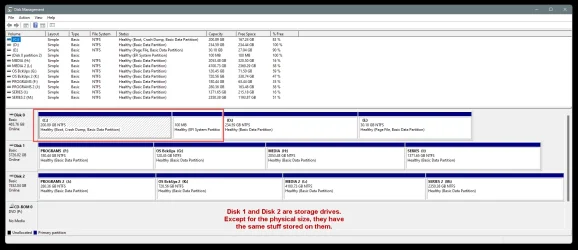
Please post a screenshot of Disk Management, stretched out so we can read everything.
Like so...

000000 Disk Management 2.webp


To post a screenshot on this forum...​

1. Take the screenshot, (or camera pic), edit it as desired, save to your desktop as .png or .jpg (max. size = 2MB)
2. Left click in your post, where you want to place the screenshot.
3. Click the Attach Files button at lower left, browse to your image and select it.
4. Then click Insert, I usually choose the Thumbnail (smaller) option, or there is a Full Image (larger) option.

If the "new" PrtSc key function is not to your liking... here is how to set it back to it's classic function...

 
Last edited:

My Computers My Computers

  • At a glance

    Win 11 Home ♦♦♦26200.9168 ♦♦♦♦♦♦♦25H2AMD Ryzen 7 3700XG.Skill (F4-3200C14D-16GTZKW)EVGA RTX 2070 (08G-P4-2171-KR)
    OS
    Win 11 Home ♦♦♦26200.9168 ♦♦♦♦♦♦♦25H2
    Computer type
    PC/Desktop
    Manufacturer/Model
    Built by Ghot® [May 2020]
    CPU
    AMD Ryzen 7 3700X
    Motherboard
    Asus Pro WS X570-ACE (BIOS 5302)
    Memory
    G.Skill (F4-3200C14D-16GTZKW)
    Graphics Card(s)
    EVGA RTX 2070 (08G-P4-2171-KR)
    Sound Card
    Realtek ALC1220P / ALC S1220A
    Monitor(s) Displays
    Dell U3011 30"
    Screen Resolution
    2560 x 1600
    Hard Drives
    2x Samsung 860 EVO 500GB,
    WD 4TB Black FZBX - SATA III,
    WD 8TB Black FZBX - SATA III,
    DRW-24B1ST CD/DVD Burner
    PSU
    PC Power & Cooling 750W Quad EPS12V
    Case
    Cooler Master ATCS 840 Tower
    Cooling
    CM Hyper 212 EVO (push/pull)
    Keyboard
    Ducky DK9008 Shine II Blue LED
    Mouse
    Logitech Optical M-100
    Internet Speed
    300/300
    Browser
    Firefox (latest)
    Antivirus
    Bitdefender Total Security
    Other Info
    Speakers: Klipsch Pro Media 2.1
  • At a glance

    Windows XP Pro 32bit w/SP3AMD Athlon 64 X2 5000+ (OC'd @ 3.2Ghz)TWIN2X2048-6400C4DHX (2 x 1GB, DDR2 800)EVGA 256-P2-N758-TR GeForce 8600GT SSC
    Operating System
    Windows XP Pro 32bit w/SP3
    Computer type
    PC/Desktop
    Manufacturer/Model
    Built by Ghot® (not in use)
    CPU
    AMD Athlon 64 X2 5000+ (OC'd @ 3.2Ghz)
    Motherboard
    ASUS M2N32-SLI Deluxe Wireless Edition
    Memory
    TWIN2X2048-6400C4DHX (2 x 1GB, DDR2 800)
    Graphics card(s)
    EVGA 256-P2-N758-TR GeForce 8600GT SSC
    Sound Card
    Onboard
    Monitor(s) Displays
    ViewSonic G90FB Black 19" Professional (CRT)
    Screen Resolution
    up to 2048 x 1536
    Hard Drives
    WD 36GB 10,000rpm Raptor SATA
    Seagate 80GB 7200rpm SATA
    Lite-On LTR-52246S CD/RW
    Lite-On LH-18A1P CD/DVD Burner
    PSU
    PC Power & Cooling Silencer 750 Quad EPS12V
    Case
    Generic Beige case, 80mm fans
    Cooling
    ZALMAN 9500A 92mm CPU Cooler
    Keyboard
    Logitech Classic Keybooard 200
    Mouse
    Logitech Optical M-BT96a
    Internet Speed
    300/300
    Browser
    Firefox 3.x ??
    Antivirus
    Symantec (Norton)
    Other Info
    Still assembled, still runs. Haven't turned it on for 15 years?
TBH, with the info given, I do not understand the question.
 

My Computers My Computers

  • At a glance

    Windows 11 Pro 25H2 26200.9168i9-10900 10 core 20 threads32 gbnone-Intel UHD Graphics 630
    OS
    Windows 11 Pro 25H2 26200.9168
    Computer type
    PC/Desktop
    Manufacturer/Model
    Dell Optiplex 7080
    CPU
    i9-10900 10 core 20 threads
    Motherboard
    DELL 0J37VM
    Memory
    32 gb
    Graphics Card(s)
    none-Intel UHD Graphics 630
    Sound Card
    Integrated Realtek
    Monitor(s) Displays
    Benq 27
    Screen Resolution
    2560x1440
    Hard Drives
    2x1tb Solidigm m.2 nvme /External drives 512gb Samsung m.2 sata+2tb Kingston m2.nvme
    PSU
    500w
    Case
    MT
    Cooling
    Dell Premium
    Keyboard
    Logitech wired
    Mouse
    Logitech wireless
    Internet Speed
    so slow I'm too embarrassed to tell
    Browser
    #1 Edge #2 Firefox
    Antivirus
    Defender+MWB Premium
  • At a glance

    Windows 11 Pro 24H2 26200.9168AMD Ryzen 7 6800U32 gbintegrated
    Operating System
    Windows 11 Pro 24H2 26200.9168
    Computer type
    PC/Desktop
    Manufacturer/Model
    Beelink Mini PC SER5
    CPU
    AMD Ryzen 7 6800U
    Memory
    32 gb
    Graphics card(s)
    integrated
    Sound Card
    integrated
    Monitor(s) Displays
    Benq 27
    Screen Resolution
    2560x1440
    Hard Drives
    1TB Crucial nvme
    Keyboard
    Logitech wired
    Mouse
    Logitech wireless
    Internet Speed
    still too embarrassed to tell
    Browser
    Firefox
    Antivirus
    Defender
  • System 3 is non compliant Dell 9020 i7-4770/24gb ram Win11 PRO 26200.9168
Okay, I will try. Before I do that, just an explanation of what happened: My Dell XPS 8960 was sent to Level Three to fix a problem which was handled promptly using FedEx. Upon return, I used a Macrium Rescue program to restore first the C:\ drive, then the D:\ drive. All seemed okay for perhaps an hour, whereupon the monitor was filled with notifications that all of the troubleshooting entries were no longer available and the computer was locked up. I decided that there was nothing to do but retire the XPS. I ordered a Dell ECT150, as I no longer need anything as complex as the discarded XPS. The order form seemed to indicate that there were two memory slots, both of which were full; I assumed that meant two separate drives. There was a problem in that the order form used abstruse abbreviations rather that text. I installed the ECT, but could not use the recovery program. My tech, doing things that I could never know to do got the ECT to restore my C:\ drive file; somehow, wile it was doing that, it also somehow restored, on the new C:/ drive my data from the separate D:/ drive. I need tolearn how to use the new computer, which does not, of course, work the way I was used to through three oe four XPS machines.

I did manage to take a full-width screen shot, which I will now try to attach to this message.Missing Drive.webp
 

My Computer My Computer

At a glance

Windows 11 PRO 25H2 (OS Build 26200.6725)Intel Core i7-13700 2.10GHz32 GBNVidia GetForce RTX 4060 Ti
OS
Windows 11 PRO 25H2 (OS Build 26200.6725)
Computer type
PC/Desktop
Manufacturer/Model
Dell XPS 8960
CPU
Intel Core i7-13700 2.10GHz
Motherboard
Dell
Memory
32 GB
Graphics Card(s)
NVidia GetForce RTX 4060 Ti
Sound Card
Realtec
Monitor(s) Displays
Dell U2722D
Screen Resolution
2560 x 1440
Hard Drives
1024GB SSD boot drive; 2TB Internal Mechanical Hard Disc; WD My Passport (1Tb) external; My Passport Ultra (2Tb) external
Keyboard
Dell
Mouse
MX Master 3
Internet Speed
40Mbps (Bonded DSL)
Browser
Firefox (default)
Antivirus
Malwarebytes, MS Defender AV

Latest Support Threads

Back
Top Bottom