Tracey2032
New member
- Local time
- 4:13 AM
- Posts
- 14
- OS
- Windows 11
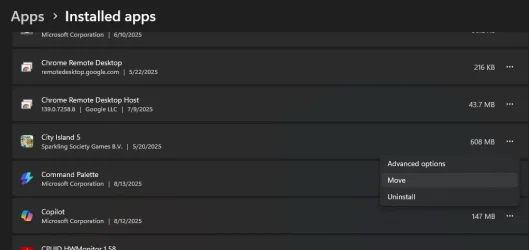
Newbie to Windows 11: Is there an application that moves programs from the C drive to the D drive?
It seems that newer programs now just install on the C drive (no option for another drive).
In times past (previous version of Windows) I have been:
#1 Manually copying programs from C to D then
#2 Save each branch/folder of the registry (one at a time) to a file and modify path locations in notepad then apply registry changes.
#3 Reboot
#4 Delete the program from the C drive.
I hear that the permissions are much relevant since Windows 7
Please advise.
Thanks
It seems that newer programs now just install on the C drive (no option for another drive).
In times past (previous version of Windows) I have been:
#1 Manually copying programs from C to D then
#2 Save each branch/folder of the registry (one at a time) to a file and modify path locations in notepad then apply registry changes.
#3 Reboot
#4 Delete the program from the C drive.
I hear that the permissions are much relevant since Windows 7
Please advise.
Thanks
- Windows Build/Version
- 21H2 (10.0.22000)
My Computers
-
At a glance
Windows 11intel core 7- OS
- Windows 11
- Computer type
- Laptop
- Manufacturer/Model
- HP Laptop 17-cn3xxx
- CPU
- intel core 7
-
At a glance
Windows 11 21H2 (10.0.22000)- Operating System
- Windows 11 21H2 (10.0.22000)
- Computer type
- Laptop
- Manufacturer/Model
- HP Laptop 17-cp1xxx