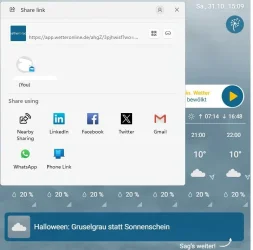
'Share link' pop-up. How to disable?


twelve11

Member
Local time
5:36 PM
Posts
16
OS
Windows 11
Hello,
I'd like to disable this "Share link" pop-up window. Tried a lot of available hints like winaero and threads here including registry and fsmgmt.msc. Does anyone know how to achieve this?
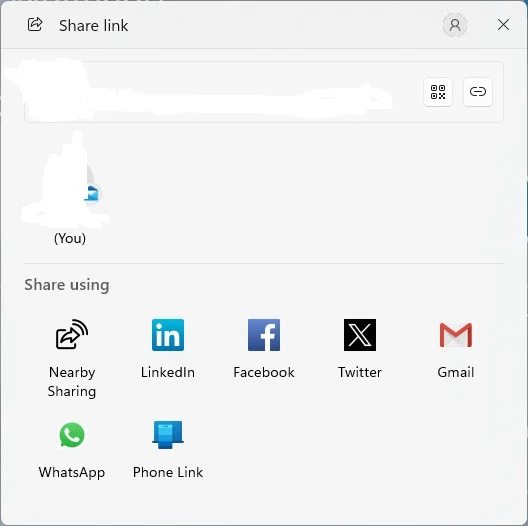

Share Link-edit - Copy.webp
 

My Computer My Computer

At a glance

Windows 11
OS
Windows 11
Computer type
PC/Desktop
Are you logged into an account? If so, it could be linked to pop-up ads that are tailored to your profile.

Log out and see if that pop-up goes away.
 

My Computers My Computers

  • At a glance

    Windows 11 Pro 25H232GB
    OS
    Windows 11 Pro 25H2
    Computer type
    Laptop
    Manufacturer/Model
    Microsoft Surface Pro
    Memory
    32GB
  • At a glance

    Windows 11 Pro 25H2 Pro (OS Build 262000.9711)Intel Core Ultra 764GBIntel Integrated Graphics
    Operating System
    Windows 11 Pro 25H2 Pro (OS Build 262000.9711)
    Computer type
    Laptop
    Manufacturer/Model
    Dell Pro 14 - PC14250
    CPU
    Intel Core Ultra 7
    Memory
    64GB
    Graphics card(s)
    Intel Integrated Graphics
    Hard Drives
    SanDisk PC_SN500S NVMe 1TB
    Browser
    Firefox, Brave
    Antivirus
    ESET
Hi,
thank you. I'm not signed in my MS account or anything. It happens while clicking a button in Vivaldi.
The trigger seems to be in the source code of the website something like
Code:
mailto:

Code:
div class="mail-share wrapper">
    <span><a href="mailto:?subject=


Update: Having thankfully used this Enable or Disable Share in Microsoft Edge on Windows 11
indeed disables the pop-up in Edge.

Adding ConfigureShare Dword =1 to Firefox in registry disabled the pop-up as well.


Now I'd like to disable the pop-up in Vivaldi and Chromium.
 
Last edited:

My Computer My Computer

At a glance

Windows 11
OS
Windows 11
Computer type
PC/Desktop
It happens while clicking a button in Vivaldi.
What button? Are you clicking the QR code generator icon? If so disable it. In Vivaldi go to settings>address bar>address field options>disable "Enable QR code Generator"
 

My Computers My Computers

  • At a glance

    Windows 11 Pro 26H2 26300.9457i9-10900 10 core 20 threads32 gbnone-Intel UHD Graphics 630
    OS
    Windows 11 Pro 26H2 26300.9457
    Computer type
    PC/Desktop
    Manufacturer/Model
    Dell Optiplex 7080
    CPU
    i9-10900 10 core 20 threads
    Motherboard
    DELL 0J37VM
    Memory
    32 gb
    Graphics Card(s)
    none-Intel UHD Graphics 630
    Sound Card
    Integrated Realtek
    Monitor(s) Displays
    Benq 27
    Screen Resolution
    2560x1440
    Hard Drives
    2x1tb Solidigm m.2 nvme /External drives 512gb Samsung m.2 sata+2tb Kingston m2.nvme
    PSU
    500w
    Case
    MT
    Cooling
    Dell Premium
    Keyboard
    Logitech wired
    Mouse
    Logitech wireless
    Internet Speed
    so slow I'm too embarrassed to tell
    Browser
    #1 Edge #2 Firefox
    Antivirus
    Defender+MWB Premium
  • At a glance

    Windows 11 Pro 24H2 26200.9457AMD Ryzen 7 6800U32 gbintegrated
    Operating System
    Windows 11 Pro 24H2 26200.9457
    Computer type
    PC/Desktop
    Manufacturer/Model
    Beelink Mini PC SER5
    CPU
    AMD Ryzen 7 6800U
    Memory
    32 gb
    Graphics card(s)
    integrated
    Sound Card
    integrated
    Monitor(s) Displays
    Benq 27
    Screen Resolution
    2560x1440
    Hard Drives
    1TB Crucial nvme
    Keyboard
    Logitech wired
    Mouse
    Logitech wireless
    Internet Speed
    still too embarrassed to tell
    Browser
    Firefox
    Antivirus
    Defender
  • System 3 is non compliant Dell 9020 i7-4770/24gb ram Win11 PRO 26200.9457
No, not enabled in Vivaldi. It happens when clicking the button: "Sag's weiter" at the bottom right.
Like I I've posted "ConfigureShare Dword =1" suppressed the pop-up in Firefox and Edge. But not in Vivaldi standalone and not in Chromium.
For example:
https://www.wetteronline.de/wetter/lueneburg
 

Attachments

  • sag-weiter-edit - Copy.webp
    sag-weiter-edit - Copy.webp
    31.9 KB · Views: 1

My Computer My Computer

At a glance

Windows 11
OS
Windows 11
Computer type
PC/Desktop
The way I see it that is a "share" button built into that web page....a website sharing widget. It is completely controlled by the website, not your browser nor the OS.
 

My Computers My Computers

  • At a glance

    Windows 11 Pro 26H2 26300.9457i9-10900 10 core 20 threads32 gbnone-Intel UHD Graphics 630
    OS
    Windows 11 Pro 26H2 26300.9457
    Computer type
    PC/Desktop
    Manufacturer/Model
    Dell Optiplex 7080
    CPU
    i9-10900 10 core 20 threads
    Motherboard
    DELL 0J37VM
    Memory
    32 gb
    Graphics Card(s)
    none-Intel UHD Graphics 630
    Sound Card
    Integrated Realtek
    Monitor(s) Displays
    Benq 27
    Screen Resolution
    2560x1440
    Hard Drives
    2x1tb Solidigm m.2 nvme /External drives 512gb Samsung m.2 sata+2tb Kingston m2.nvme
    PSU
    500w
    Case
    MT
    Cooling
    Dell Premium
    Keyboard
    Logitech wired
    Mouse
    Logitech wireless
    Internet Speed
    so slow I'm too embarrassed to tell
    Browser
    #1 Edge #2 Firefox
    Antivirus
    Defender+MWB Premium
  • At a glance

    Windows 11 Pro 24H2 26200.9457AMD Ryzen 7 6800U32 gbintegrated
    Operating System
    Windows 11 Pro 24H2 26200.9457
    Computer type
    PC/Desktop
    Manufacturer/Model
    Beelink Mini PC SER5
    CPU
    AMD Ryzen 7 6800U
    Memory
    32 gb
    Graphics card(s)
    integrated
    Sound Card
    integrated
    Monitor(s) Displays
    Benq 27
    Screen Resolution
    2560x1440
    Hard Drives
    1TB Crucial nvme
    Keyboard
    Logitech wired
    Mouse
    Logitech wireless
    Internet Speed
    still too embarrassed to tell
    Browser
    Firefox
    Antivirus
    Defender
  • System 3 is non compliant Dell 9020 i7-4770/24gb ram Win11 PRO 26200.9457
Back
Top Bottom