Solved I reinstalled Windows 11 Pro from an iso file and it went perfectly, except...


I just saw your post. I glanced at it and thought this is not the solution I need. The retailer must have sold me an unauthorized copy of Windows, at least that is what Microsoft is telling me. Since I was given no product code or digital license, and there's no OEM code embedded into the motherboard's firmware, I can only assume that either the retailer simply forgot to give me the necessary documentation or something is up.

Not if it's not a chain-store computer, no.
On chain-store computers like DELL or HP, etc., they code the product key in the BIOS.
You have yours listed as a miniPC... that may have the key in the BIOS.
There's a command you can run within Windows that will tell you what it is.
I don't remember what the command is.


@Jerry Gerber

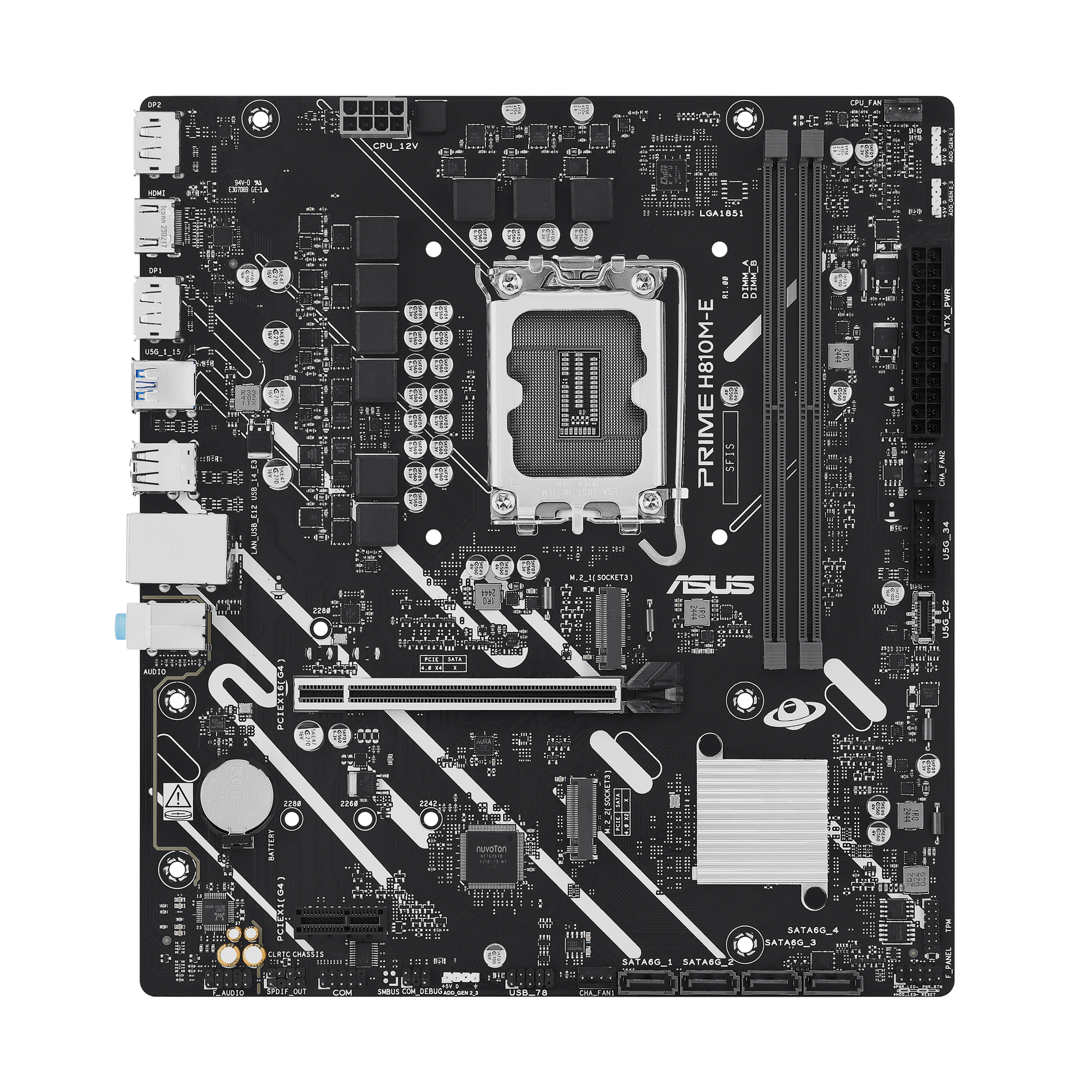
Below is a pic of your motherboard. If there is no "module" plugged into the connector (in the RED box), your TPM is virtual and is in the CPU itself.

View attachment 167822


I only build AMD computers. I found the BIOS manual for your computer, but if there's a virtual TPM setting in there, I can't find it.

You can find the PRIME PROART TUF GAMING INTEL 800 Series BIOS Manual (which is also for your board (ASUS does that), at the link below...


AMD's TPM setting is much simpler...
Discreet TPM = a separate module
Firmware TPM is in the CPU.

View attachment 167823


Long story short... if you're NOT using a discreet TPM module, then you also have firmware TPM, and a BIOS update will look to Microsoft, like you changed the CPU. That would be a hardware change, and would break your activation.

In 2 or 3 years, ASUS and MS will probably get on the same page. :/

The Geekom computer is a different computer from the one I am having activation problems with. That one is custom built by a local computer shop. Thye are closed on Saturday and I'm hoping this will be resolve by Monday.
 

My Computer

System One

  • OS
    Windows 11 Pro 25H2
    Computer type
    PC/Desktop
    Manufacturer/Model
    Custom
    CPU
    Intel Core Ultra 7 265K, 32GB memory
    Motherboard
    Asus Prime H810-E-CSM
    Memory
    Kingston 32GB
    Graphics Card(s)
    Intel
    Sound Card
    RME Fireface UFX II
    Monitor(s) Displays
    Asus ProArt
    Screen Resolution
    1920x1200
    Hard Drives
    3 SSD drives
    PSU
    Be Quiet! 750watt
    Case
    ?
    Cooling
    Be Quiet cooler
    Keyboard
    Rii
    Mouse
    Logitech
    Internet Speed
    Fiber optic 1gigabit
    Browser
    Firefox
    Antivirus
    Windows Defender
    Other Info
    This computer is dedicated solely to run the Vienna Symphonic Library Orchestral Cube. It has no other purpose other than to frustrate me from time to time.
The Geekom computer is a different computer from the one I am having activation problems with. That one is custom built by a local computer shop. Thye are closed on Saturday and I'm hoping this will be resolve by Monday.

Well, then you might want to list your other computer in your specs.
 

My Computers

System One System Two

  • OS
    Win 11 Home ♦♦♦26200.8457 ♦♦♦♦♦♦♦25H2
    Computer type
    PC/Desktop
    Manufacturer/Model
    Built by Ghot® [May 2020]
    CPU
    AMD Ryzen 7 3700X
    Motherboard
    Asus Pro WS X570-ACE (BIOS 5302)
    Memory
    G.Skill (F4-3200C14D-16GTZKW)
    Graphics Card(s)
    EVGA RTX 2070 (08G-P4-2171-KR)
    Sound Card
    Realtek ALC1220P / ALC S1220A
    Monitor(s) Displays
    Dell U3011 30"
    Screen Resolution
    2560 x 1600
    Hard Drives
    2x Samsung 860 EVO 500GB,
    WD 4TB Black FZBX - SATA III,
    WD 8TB Black FZBX - SATA III,
    DRW-24B1ST CD/DVD Burner
    PSU
    PC Power & Cooling 750W Quad EPS12V
    Case
    Cooler Master ATCS 840 Tower
    Cooling
    CM Hyper 212 EVO (push/pull)
    Keyboard
    Ducky DK9008 Shine II Blue LED
    Mouse
    Logitech Optical M-100
    Internet Speed
    300/300
    Browser
    Firefox (latest)
    Antivirus
    Bitdefender Total Security
    Other Info
    Speakers: Klipsch Pro Media 2.1
  • Operating System
    Windows XP Pro 32bit w/SP3
    Computer type
    PC/Desktop
    Manufacturer/Model
    Built by Ghot® (not in use)
    CPU
    AMD Athlon 64 X2 5000+ (OC'd @ 3.2Ghz)
    Motherboard
    ASUS M2N32-SLI Deluxe Wireless Edition
    Memory
    TWIN2X2048-6400C4DHX (2 x 1GB, DDR2 800)
    Graphics card(s)
    EVGA 256-P2-N758-TR GeForce 8600GT SSC
    Sound Card
    Onboard
    Monitor(s) Displays
    ViewSonic G90FB Black 19" Professional (CRT)
    Screen Resolution
    up to 2048 x 1536
    Hard Drives
    WD 36GB 10,000rpm Raptor SATA
    Seagate 80GB 7200rpm SATA
    Lite-On LTR-52246S CD/RW
    Lite-On LH-18A1P CD/DVD Burner
    PSU
    PC Power & Cooling Silencer 750 Quad EPS12V
    Case
    Generic Beige case, 80mm fans
    Cooling
    ZALMAN 9500A 92mm CPU Cooler
    Keyboard
    Logitech Classic Keybooard 200
    Mouse
    Logitech Optical M-BT96a
    Internet Speed
    300/300
    Browser
    Firefox 3.x ??
    Antivirus
    Symantec (Norton)
    Other Info
    Still assembled, still runs. Haven't turned it on for 15 years?
The event viewer reports, dxdiag, msinfo32 (errors, warnings, etc.) may add some information.

They are easy to view in the V2 collected files.
 

My Computer

System One

  • OS
    Windows 10
    Computer type
    Laptop
    Manufacturer/Model
    HP
    CPU
    Intel(R) Core(TM) i7-4800MQ CPU @ 2.70GHz
    Motherboard
    Product : 190A Version : KBC Version 94.56
    Memory
    16 GB Total: Manufacturer : Samsung MemoryType : DDR3 FormFactor : SODIMM Capacity : 8GB Speed : 1600
    Graphics Card(s)
    NVIDIA Quadro K3100M; Intel(R) HD Graphics 4600
    Sound Card
    IDT High Definition Audio CODEC; PNP Device ID HDAUDIO\FUNC_01&VEN_111D&DEV_76E0
    Hard Drives
    Model Hitachi HTS727575A9E364
    Antivirus
    Microsoft Defender
    Other Info
    Mobile Workstation
That might be it. I remember upgrading, I think, the TPM a few weeks ago. But if that were the case, I doubt the Windows 11 Pro iso file would have allowed a repair install?

Is there any place in the BIOS I can see the Windows Product Code?

Thanks!
Jerry
The Command to Find the BIOS Key

Open the Start Menu, type cmd or PowerShell.

Right-click on the result and select Run as administrator.

Type or paste the following command and press Enter:

wmic path softwarelicensingservice get OA3xOriginalProductKey
 

My Computer

System One

  • OS
    Win11 Pro
    Computer type
    PC/Desktop
    Manufacturer/Model
    HP Elite Mini G9
    CPU
    I7-14700
    Motherboard
    Hp Elitedesk 800 G9
    Memory
    64GB DDR5 RAM
    Graphics Card(s)
    Intel UHD 770 Graphics
    Sound Card
    Realtek
    Monitor(s) Displays
    Acer 24"
    Screen Resolution
    1920 x 1080
    Hard Drives
    1TB PCIe SSD, several other back up

My Computer

System One

  • Computer type
    PC/Desktop
    Manufacturer/Model
    MSI
    CPU
    Ryzen 5800X
    Motherboard
    MSI X570S Carbon Pro
    Memory
    64GB GSkill DDR4
    Graphics Card(s)
    MSI RX6750 XT OC
    Monitor(s) Displays
    Dell U2711
    Screen Resolution
    1920 x 1080
    Hard Drives
    Nexstorage NN4LE 2TB2C
    PSU
    850 watt
    Cooling
    Corsair H100i
Type or paste the following command and press Enter:

wmic path softwarelicensingservice get OA3xOriginalProductKey

Nope. That command will not work. WMIC has been deprecated and now removed. WMIC was no longer installed in fresh installs of 24H2 but in 25H2 Windows goes even further and actively removes WMIC.
 

My Computers

System One System Two

  • OS
    Win11 Pro 25H2 (RTM+)
    Computer type
    PC/Desktop
    Manufacturer/Model
    Acemagic
    CPU
    Intel i7-14650HX
    Memory
    32 GB
    Graphics Card(s)
    No GPU - Built-in Intel Graphics
    Sound Card
    Integrated
    Monitor(s) Displays
    Varies as machine will often be moved to locations with different monitors
    Screen Resolution
    Varies
    Hard Drives
    1 x 1TB Gen 4 NVMe SSD
    PSU
    120W Power Brick
    Keyboard
    Corsair K70 Max RGB Magnetic Keyboard
    Mouse
    Logitech MX Master 3
    Internet Speed
    1Gb Up / 1 Gb Down
    Browser
    Edge
    Antivirus
    Windows Defender
  • Operating System
    Win11 Pro 25H2 (RTM+)
    Computer type
    Laptop
    Manufacturer/Model
    Lenovo ThinkBook 13x Gen 2
    CPU
    Intel i7-1255U
    Memory
    16 GB
    Graphics card(s)
    Intel Iris Xe Graphics
    Sound Card
    Realtek® ALC3306-CG codec
    Monitor(s) Displays
    13.3-inch IPS Display
    Screen Resolution
    WQXGA (2560 x 1600)
    Hard Drives
    2 TB 4 x 4 NVMe SSD
    PSU
    USB-C / Thunderbolt 4 Power / Charging
    Keyboard
    Backlit, spill resistant keyboard
    Mouse
    Buttonless Glass Precision Touchpad
    Internet Speed
    1Gb Up / 1Gb Down
    Browser
    Edge
    Antivirus
    Windows Defender
    Other Info
    WiFi 6e / Bluetooth 5.1 / Facial Recognition / Fingerprint Sensor / ToF (Time of Flight) Human Presence Sensor
wmic path softwarelicensingservice get OA3xOriginalProductKey
Powershell:
(Get-CimInstance -ClassName 'SoftwareLicensingService').OA3xOriginalProductKey
 
Last edited:

My Computer

System One

  • OS
    Windows 11 Pro 25H2
    Computer type
    PC/Desktop
    Manufacturer/Model
    Intel NUC12WSHi7
    CPU
    12th Gen Core i7-1260P
    Motherboard
    NUC12WSBi7
    Memory
    64 GB Micron PC4-25600
    Graphics Card(s)
    Intel Iris Xe Graphics
    Sound Card
    on-board Realtek HD Audio
    Monitor(s) Displays
    Dell U3219Q
    Screen Resolution
    3840 x 2160
    Hard Drives
    Samsung SSD 990 PRO 1TB
    Crucial MX500 2 TB
    Antivirus
    Microsoft Defender
But if that were the case, I doubt the Windows 11 Pro iso file would have allowed a repair install?


After I flashed the BIOS, it took about a week for MS to decide to break my activation.
 

My Computers

System One System Two

  • OS
    Win 11 Home ♦♦♦26200.8457 ♦♦♦♦♦♦♦25H2
    Computer type
    PC/Desktop
    Manufacturer/Model
    Built by Ghot® [May 2020]
    CPU
    AMD Ryzen 7 3700X
    Motherboard
    Asus Pro WS X570-ACE (BIOS 5302)
    Memory
    G.Skill (F4-3200C14D-16GTZKW)
    Graphics Card(s)
    EVGA RTX 2070 (08G-P4-2171-KR)
    Sound Card
    Realtek ALC1220P / ALC S1220A
    Monitor(s) Displays
    Dell U3011 30"
    Screen Resolution
    2560 x 1600
    Hard Drives
    2x Samsung 860 EVO 500GB,
    WD 4TB Black FZBX - SATA III,
    WD 8TB Black FZBX - SATA III,
    DRW-24B1ST CD/DVD Burner
    PSU
    PC Power & Cooling 750W Quad EPS12V
    Case
    Cooler Master ATCS 840 Tower
    Cooling
    CM Hyper 212 EVO (push/pull)
    Keyboard
    Ducky DK9008 Shine II Blue LED
    Mouse
    Logitech Optical M-100
    Internet Speed
    300/300
    Browser
    Firefox (latest)
    Antivirus
    Bitdefender Total Security
    Other Info
    Speakers: Klipsch Pro Media 2.1
  • Operating System
    Windows XP Pro 32bit w/SP3
    Computer type
    PC/Desktop
    Manufacturer/Model
    Built by Ghot® (not in use)
    CPU
    AMD Athlon 64 X2 5000+ (OC'd @ 3.2Ghz)
    Motherboard
    ASUS M2N32-SLI Deluxe Wireless Edition
    Memory
    TWIN2X2048-6400C4DHX (2 x 1GB, DDR2 800)
    Graphics card(s)
    EVGA 256-P2-N758-TR GeForce 8600GT SSC
    Sound Card
    Onboard
    Monitor(s) Displays
    ViewSonic G90FB Black 19" Professional (CRT)
    Screen Resolution
    up to 2048 x 1536
    Hard Drives
    WD 36GB 10,000rpm Raptor SATA
    Seagate 80GB 7200rpm SATA
    Lite-On LTR-52246S CD/RW
    Lite-On LH-18A1P CD/DVD Burner
    PSU
    PC Power & Cooling Silencer 750 Quad EPS12V
    Case
    Generic Beige case, 80mm fans
    Cooling
    ZALMAN 9500A 92mm CPU Cooler
    Keyboard
    Logitech Classic Keybooard 200
    Mouse
    Logitech Optical M-BT96a
    Internet Speed
    300/300
    Browser
    Firefox 3.x ??
    Antivirus
    Symantec (Norton)
    Other Info
    Still assembled, still runs. Haven't turned it on for 15 years?
After I flashed the BIOS, it took about a week for MS to decide to break my activation.
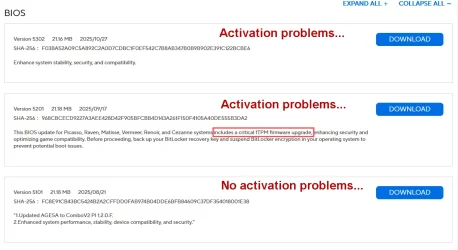
Some firmware updates can change the attributes used to determine your HW signature that's used for licensing. Windows thinks you've changed machines.
 

My Computer

System One

  • OS
    Windows 7
Some firmware updates can change the attributes used to determine your HW signature that's used for licensing. Windows thinks you've changed machines.


Yep. That's what happened.


These are the 3 latest BIOS for my motherboard...

Image1.webp
 

My Computers

System One System Two

  • OS
    Win 11 Home ♦♦♦26200.8457 ♦♦♦♦♦♦♦25H2
    Computer type
    PC/Desktop
    Manufacturer/Model
    Built by Ghot® [May 2020]
    CPU
    AMD Ryzen 7 3700X
    Motherboard
    Asus Pro WS X570-ACE (BIOS 5302)
    Memory
    G.Skill (F4-3200C14D-16GTZKW)
    Graphics Card(s)
    EVGA RTX 2070 (08G-P4-2171-KR)
    Sound Card
    Realtek ALC1220P / ALC S1220A
    Monitor(s) Displays
    Dell U3011 30"
    Screen Resolution
    2560 x 1600
    Hard Drives
    2x Samsung 860 EVO 500GB,
    WD 4TB Black FZBX - SATA III,
    WD 8TB Black FZBX - SATA III,
    DRW-24B1ST CD/DVD Burner
    PSU
    PC Power & Cooling 750W Quad EPS12V
    Case
    Cooler Master ATCS 840 Tower
    Cooling
    CM Hyper 212 EVO (push/pull)
    Keyboard
    Ducky DK9008 Shine II Blue LED
    Mouse
    Logitech Optical M-100
    Internet Speed
    300/300
    Browser
    Firefox (latest)
    Antivirus
    Bitdefender Total Security
    Other Info
    Speakers: Klipsch Pro Media 2.1
  • Operating System
    Windows XP Pro 32bit w/SP3
    Computer type
    PC/Desktop
    Manufacturer/Model
    Built by Ghot® (not in use)
    CPU
    AMD Athlon 64 X2 5000+ (OC'd @ 3.2Ghz)
    Motherboard
    ASUS M2N32-SLI Deluxe Wireless Edition
    Memory
    TWIN2X2048-6400C4DHX (2 x 1GB, DDR2 800)
    Graphics card(s)
    EVGA 256-P2-N758-TR GeForce 8600GT SSC
    Sound Card
    Onboard
    Monitor(s) Displays
    ViewSonic G90FB Black 19" Professional (CRT)
    Screen Resolution
    up to 2048 x 1536
    Hard Drives
    WD 36GB 10,000rpm Raptor SATA
    Seagate 80GB 7200rpm SATA
    Lite-On LTR-52246S CD/RW
    Lite-On LH-18A1P CD/DVD Burner
    PSU
    PC Power & Cooling Silencer 750 Quad EPS12V
    Case
    Generic Beige case, 80mm fans
    Cooling
    ZALMAN 9500A 92mm CPU Cooler
    Keyboard
    Logitech Classic Keybooard 200
    Mouse
    Logitech Optical M-BT96a
    Internet Speed
    300/300
    Browser
    Firefox 3.x ??
    Antivirus
    Symantec (Norton)
    Other Info
    Still assembled, still runs. Haven't turned it on for 15 years?
You can buy MS365 and get in touch with a real person to get a proper support, then cancel the subscription within 30 days.

Windows 11 Pro licenceI cost 50 cents, I would just buy another, time is money. I have sent you the key.
@TairikuOkami

50 cents!!! That doesn't even buy you a cup of coffee any longer. Which website?
 

My Computer

System One

  • OS
    Windows 11 2H25
    Computer type
    PC/Desktop
    Manufacturer/Model
    DIY
    CPU
    AMD 9900X
    Motherboard
    MSI X870E Carbon
    Memory
    64 GB
    Graphics Card(s)
    AMD 9070 XT
    Sound Card
    built-in
    Monitor(s) Displays
    Dell 24"
    Hard Drives
    Sabrent 1 TB NVMe, 4 x SSD (need to check models), 4 x 3.5" HDD, 8-16 TB, all WD
    PSU
    Seasonic 850
    Case
    Fractal Design North XL (which I likw)
    Cooling
    Corsair AIO for CPU, fans for case
    Keyboard
    Das Keyboard 4
    Mouse
    Corsair M65 (white)
    Internet Speed
    1 TB download
    Browser
    Firefox
    Antivirus
    Bitdefender
    Other Info
    Also have Lenovo T14S laptop (me) and Lenovo Slim 71 (wife)
I certainly don't want to make unfair accusations, but I am now wondering about the dealer who sold me 2 custom systems. As I mentioned earlier, I had to reinstall Windows 11 Pro from an official Microsoft iso file on one of the machines and installation went fine. But I cannot activate the computer.

The other machine, identical motherboard, CPU and RAM, is activated, but when I use the Activation Tool Zbook posted for me in this thread to check the Installed Key, it reads BBBBB-BBBBB-BBBBB-BBBBB-BBBBB. Though it says that validation status is "genuine" there is no OEM Key attached to this machine, I ran both

(Get-WmiObject -query 'select * from SoftwareLicensingService').OA3xOriginalProductKey

and

(Get-CimInstance -Query "select * from SoftwareLicensingService").OA3xOriginalProductKey

And no product key shows up.

Another oddity is that both sales receipts do not list Windows Pro 11 as being included in the systems, yet both came with Windows 11 Pro installed and activated...

Hmmm???
 

My Computer

System One

  • OS
    Windows 11 Pro 25H2
    Computer type
    PC/Desktop
    Manufacturer/Model
    Custom
    CPU
    Intel Core Ultra 7 265K, 32GB memory
    Motherboard
    Asus Prime H810-E-CSM
    Memory
    Kingston 32GB
    Graphics Card(s)
    Intel
    Sound Card
    RME Fireface UFX II
    Monitor(s) Displays
    Asus ProArt
    Screen Resolution
    1920x1200
    Hard Drives
    3 SSD drives
    PSU
    Be Quiet! 750watt
    Case
    ?
    Cooling
    Be Quiet cooler
    Keyboard
    Rii
    Mouse
    Logitech
    Internet Speed
    Fiber optic 1gigabit
    Browser
    Firefox
    Antivirus
    Windows Defender
    Other Info
    This computer is dedicated solely to run the Vienna Symphonic Library Orchestral Cube. It has no other purpose other than to frustrate me from time to time.
Nope. That command will not work. WMIC has been deprecated and now removed. WMIC was no longer installed in fresh installs of 24H2 but in 25H2 Windows goes even further and actively removes WMIC.
Hmm, works on my system 25H2. I have been out of the game for a couple years so must be missing something.
 

My Computer

System One

  • OS
    Win11 Pro
    Computer type
    PC/Desktop
    Manufacturer/Model
    HP Elite Mini G9
    CPU
    I7-14700
    Motherboard
    Hp Elitedesk 800 G9
    Memory
    64GB DDR5 RAM
    Graphics Card(s)
    Intel UHD 770 Graphics
    Sound Card
    Realtek
    Monitor(s) Displays
    Acer 24"
    Screen Resolution
    1920 x 1080
    Hard Drives
    1TB PCIe SSD, several other back up
Hmm, works on my system 25H2. I have been out of the game for a couple years so must be missing something.

Odd. I know that WMIC is unavailable on new installs of 24H2 and newer but the information that I had also says that 25H2 actively removes it. Maybe that portion is not correct. I have no way of verifying that because every one of my machines had 25H2 installed fresh (no upgrades).

Thanks for the info. I'll have to look into that in more detail.
 

My Computers

System One System Two

  • OS
    Win11 Pro 25H2 (RTM+)
    Computer type
    PC/Desktop
    Manufacturer/Model
    Acemagic
    CPU
    Intel i7-14650HX
    Memory
    32 GB
    Graphics Card(s)
    No GPU - Built-in Intel Graphics
    Sound Card
    Integrated
    Monitor(s) Displays
    Varies as machine will often be moved to locations with different monitors
    Screen Resolution
    Varies
    Hard Drives
    1 x 1TB Gen 4 NVMe SSD
    PSU
    120W Power Brick
    Keyboard
    Corsair K70 Max RGB Magnetic Keyboard
    Mouse
    Logitech MX Master 3
    Internet Speed
    1Gb Up / 1 Gb Down
    Browser
    Edge
    Antivirus
    Windows Defender
  • Operating System
    Win11 Pro 25H2 (RTM+)
    Computer type
    Laptop
    Manufacturer/Model
    Lenovo ThinkBook 13x Gen 2
    CPU
    Intel i7-1255U
    Memory
    16 GB
    Graphics card(s)
    Intel Iris Xe Graphics
    Sound Card
    Realtek® ALC3306-CG codec
    Monitor(s) Displays
    13.3-inch IPS Display
    Screen Resolution
    WQXGA (2560 x 1600)
    Hard Drives
    2 TB 4 x 4 NVMe SSD
    PSU
    USB-C / Thunderbolt 4 Power / Charging
    Keyboard
    Backlit, spill resistant keyboard
    Mouse
    Buttonless Glass Precision Touchpad
    Internet Speed
    1Gb Up / 1Gb Down
    Browser
    Edge
    Antivirus
    Windows Defender
    Other Info
    WiFi 6e / Bluetooth 5.1 / Facial Recognition / Fingerprint Sensor / ToF (Time of Flight) Human Presence Sensor
Odd. I know that WMIC is unavailable on new installs of 24H2 and newer but the information that I had also says that 25H2 actively removes it. Maybe that portion is not correct. I have no way of verifying that because every one of my machines had 25H2 installed fresh (no upgrades).

Thanks for the info. I'll have to look into that in more detail.
WMIC is enabled by default, as an Optional Feature in all W11 install images.

A clean install of 25H2 will result in WMIC being disabled, right after OOBE has finished. There is a hidden task to deliberately remove WMIC, to make it harder for you to use it. You will have to manually enable it.

For in-place upgrades to 25H2, Windows will leave your WMIC untouched.

26H2 is an Enablement Package update to 24H2/25H2, so WMIC won't disappear until 27H2 (which will be a new Windows).
 

My Computer

System One

  • OS
    Windows 7
Odd. I know that WMIC is unavailable on new installs of 24H2 and newer but the information that I had also says that 25H2 actively removes it. Maybe that portion is not correct. I have no way of verifying that because every one of my machines had 25H2 installed fresh (no upgrades).

Thanks for the info. I'll have to look into that in more detail.
You can fix this by enabling it in Settings > System > Optional features > Add an optional feature (search for "WMIC" and install). I however did not install that (Just Checked) but it gave me my number no problem. Might be something to play with.
 

My Computer

System One

  • OS
    Win11 Pro
    Computer type
    PC/Desktop
    Manufacturer/Model
    HP Elite Mini G9
    CPU
    I7-14700
    Motherboard
    Hp Elitedesk 800 G9
    Memory
    64GB DDR5 RAM
    Graphics Card(s)
    Intel UHD 770 Graphics
    Sound Card
    Realtek
    Monitor(s) Displays
    Acer 24"
    Screen Resolution
    1920 x 1080
    Hard Drives
    1TB PCIe SSD, several other back up
The point of deprecation is to start moving on to other techniques that will continue to work, not wait until the thing disappears and go, “muh command don’t work no more!”
 

My Computer

System One

  • OS
    Windows 11 Pro 25H2
    Computer type
    PC/Desktop
    Manufacturer/Model
    Intel NUC12WSHi7
    CPU
    12th Gen Core i7-1260P
    Motherboard
    NUC12WSBi7
    Memory
    64 GB Micron PC4-25600
    Graphics Card(s)
    Intel Iris Xe Graphics
    Sound Card
    on-board Realtek HD Audio
    Monitor(s) Displays
    Dell U3219Q
    Screen Resolution
    3840 x 2160
    Hard Drives
    Samsung SSD 990 PRO 1TB
    Crucial MX500 2 TB
    Antivirus
    Microsoft Defender
The point of deprecation is to start moving on to other techniques that will continue to work, not wait until the thing disappears and go, “muh command don’t work no more!”
Yes that is true but life gets in the way sometimes. I did not enable on my pc but it worked for what ever reason.
 

My Computer

System One

  • OS
    Win11 Pro
    Computer type
    PC/Desktop
    Manufacturer/Model
    HP Elite Mini G9
    CPU
    I7-14700
    Motherboard
    Hp Elitedesk 800 G9
    Memory
    64GB DDR5 RAM
    Graphics Card(s)
    Intel UHD 770 Graphics
    Sound Card
    Realtek
    Monitor(s) Displays
    Acer 24"
    Screen Resolution
    1920 x 1080
    Hard Drives
    1TB PCIe SSD, several other back up
Back
Top Bottom