

- Local time
- 2:16 PM
- Posts
- 5,958
- Location
- Hafnarfjörður IS
- OS
- Windows XP,11 Linux Fedora Rawhide pre-release 46
Hi folks
I did this both on native Windows and a Windows VM (W11 PRO Canary latest 25H2 build) - but it's even easier on Linux both as a VM and a physical machine - and it's very fast too (on both).
1) Download the same package as for windows MVS-TK5
2) extract / unzip files into a directory
3) chmod -R +x * to make files in the directory executable
4) run ./mvs and wait until you see the TK5 image as shown in the screenshot. Note you are booting (in the IBM mainframe world it's called IPL - Initial Program Load) which process takes a little bit longer to complete than booting a PC. !!!!
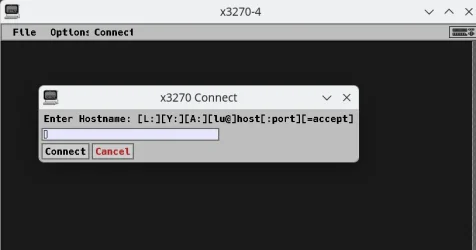
5) from the x3270 emulator connect to 127.0.0.1:3270 (note port must be 3270) It's package x3270 and free - install via your distro's package manager if you haven't installed it.
the connect screen looks like this :
6) Now connected !! press enter until its input ready
7) logon - this logs on to TSO = userid = HERC01 Pw= CUL8TR note you must keep the Hercules (MVS) session AND the terminal active.
8) enjoy your very own IBM mainframe !!!!!!
9)
to shut the whole thing down cleanly simply exit ISPF X in options, - at ready type shutdown followed by logoff
That will exit the terminal x3270 emulator - the Hercules emulator running the mainframe will go through a bit of automatic job closing and then exit itself cleanly. Best to do that rather than just closing screens to avoid directory locks / corruption etc etc.
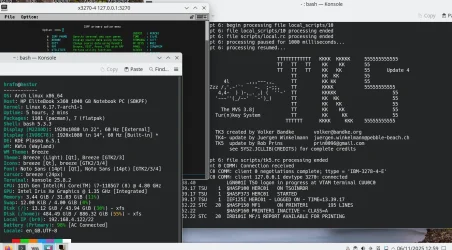
Seems I had a bit of time to waste today - but its quite fun doing bonkers things with PC's.
One thing I forgot -- if you have firewalls - allow the app through it.
Cheers
jimbo
I did this both on native Windows and a Windows VM (W11 PRO Canary latest 25H2 build) - but it's even easier on Linux both as a VM and a physical machine - and it's very fast too (on both).
1) Download the same package as for windows MVS-TK5
2) extract / unzip files into a directory
3) chmod -R +x * to make files in the directory executable
4) run ./mvs and wait until you see the TK5 image as shown in the screenshot. Note you are booting (in the IBM mainframe world it's called IPL - Initial Program Load) which process takes a little bit longer to complete than booting a PC. !!!!
5) from the x3270 emulator connect to 127.0.0.1:3270 (note port must be 3270) It's package x3270 and free - install via your distro's package manager if you haven't installed it.
the connect screen looks like this :
6) Now connected !! press enter until its input ready
7) logon - this logs on to TSO = userid = HERC01 Pw= CUL8TR note you must keep the Hercules (MVS) session AND the terminal active.
8) enjoy your very own IBM mainframe !!!!!!
9)
to shut the whole thing down cleanly simply exit ISPF X in options, - at ready type shutdown followed by logoff
That will exit the terminal x3270 emulator - the Hercules emulator running the mainframe will go through a bit of automatic job closing and then exit itself cleanly. Best to do that rather than just closing screens to avoid directory locks / corruption etc etc.
Seems I had a bit of time to waste today - but its quite fun doing bonkers things with PC's.
One thing I forgot -- if you have firewalls - allow the app through it.
Cheers
jimbo
Last edited:
My Computer
At a glance
Windows XP,11 Linux Fedora Rawhide pre-releas...2 X Intel i7
- OS
- Windows XP,11 Linux Fedora Rawhide pre-release 46
- Computer type
- PC/Desktop
- CPU
- 2 X Intel i7
- Screen Resolution
- 4KUHD X 2






