I'd like to have WINDOWS 7 UI ON WINDOWS 11


win11gio

Member
Member
Local time
8:14 PM
Posts
12
OS
Windows 11
WHEN I SAY I'D LIKE TO I REALLY NEED TO
 

My Computer My Computer

At a glance

Windows 11Intel i5-1235U16 GB SODIMM DDR4 (2x8 GB, 3200)Intel Iris Xe (it's not a GPU but whatever)
OS
Windows 11
Computer type
Laptop
Manufacturer/Model
HP 15s-fq5089nl
CPU
Intel i5-1235U
Motherboard
HP
Memory
16 GB SODIMM DDR4 (2x8 GB, 3200)
Graphics Card(s)
Intel Iris Xe (it's not a GPU but whatever)
Sound Card
Realtek ALC integrated
Monitor(s) Displays
1 laptop display
Screen Resolution
1366x768
Hard Drives
1 TB NVMe SSD
PSU
uhhh... laptop battery?
Case
IT IS A LAPTOP
Cooling
a fan
Keyboard
integrated ANSI Italian keyboard
Mouse
trackpad/external mouse
Internet Speed
5 Mbps 10 Mbps if im lucky
Browser
Chrome
Antivirus
Windows Defender
WHEN I SAY I'D LIKE TO I REALLY NEED TO


Well, you can use Open Shell to get a Win 7 Start Menu.

As for the rest of the Win 11 interface, read through some of these tweaks...


There are many handy tweaking tools. I linked them at the bottom of the Leader Board topic.


For Control Panel... C:\Windows\System32\control.exe ...just make a shortcut from control.exe to someplace like your desktop.

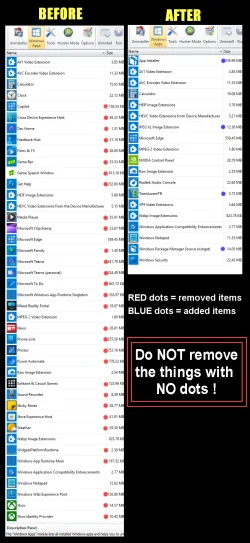
REVO Uninstaller (free) can get rid of tons of bloatware. Make sure to use the "Scan" for leftovers, and delete them too.

00000 REVO Junk Removal.webp


Winaero Tweaker has tons of tweaks that can be enabled or disabled, with just a check box...

00000 Winaero Tweaker.webp


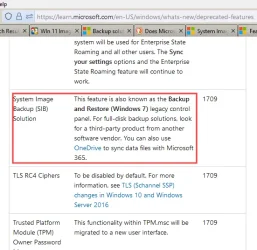
Last but not least... when tweaking Win 11 use 3rd party backup software...


000000 Deprecated Windows Backup.webp
 
Last edited:

My Computers My Computers

  • At a glance

    Win 11 Home ♦♦♦26200.8655 ♦♦♦♦♦♦♦25H2AMD Ryzen 7 3700XG.Skill (F4-3200C14D-16GTZKW)EVGA RTX 2070 (08G-P4-2171-KR)
    OS
    Win 11 Home ♦♦♦26200.8655 ♦♦♦♦♦♦♦25H2
    Computer type
    PC/Desktop
    Manufacturer/Model
    Built by Ghot® [May 2020]
    CPU
    AMD Ryzen 7 3700X
    Motherboard
    Asus Pro WS X570-ACE (BIOS 5302)
    Memory
    G.Skill (F4-3200C14D-16GTZKW)
    Graphics Card(s)
    EVGA RTX 2070 (08G-P4-2171-KR)
    Sound Card
    Realtek ALC1220P / ALC S1220A
    Monitor(s) Displays
    Dell U3011 30"
    Screen Resolution
    2560 x 1600
    Hard Drives
    2x Samsung 860 EVO 500GB,
    WD 4TB Black FZBX - SATA III,
    WD 8TB Black FZBX - SATA III,
    DRW-24B1ST CD/DVD Burner
    PSU
    PC Power & Cooling 750W Quad EPS12V
    Case
    Cooler Master ATCS 840 Tower
    Cooling
    CM Hyper 212 EVO (push/pull)
    Keyboard
    Ducky DK9008 Shine II Blue LED
    Mouse
    Logitech Optical M-100
    Internet Speed
    300/300
    Browser
    Firefox (latest)
    Antivirus
    Bitdefender Total Security
    Other Info
    Speakers: Klipsch Pro Media 2.1
  • At a glance

    Windows XP Pro 32bit w/SP3AMD Athlon 64 X2 5000+ (OC'd @ 3.2Ghz)TWIN2X2048-6400C4DHX (2 x 1GB, DDR2 800)EVGA 256-P2-N758-TR GeForce 8600GT SSC
    Operating System
    Windows XP Pro 32bit w/SP3
    Computer type
    PC/Desktop
    Manufacturer/Model
    Built by Ghot® (not in use)
    CPU
    AMD Athlon 64 X2 5000+ (OC'd @ 3.2Ghz)
    Motherboard
    ASUS M2N32-SLI Deluxe Wireless Edition
    Memory
    TWIN2X2048-6400C4DHX (2 x 1GB, DDR2 800)
    Graphics card(s)
    EVGA 256-P2-N758-TR GeForce 8600GT SSC
    Sound Card
    Onboard
    Monitor(s) Displays
    ViewSonic G90FB Black 19" Professional (CRT)
    Screen Resolution
    up to 2048 x 1536
    Hard Drives
    WD 36GB 10,000rpm Raptor SATA
    Seagate 80GB 7200rpm SATA
    Lite-On LTR-52246S CD/RW
    Lite-On LH-18A1P CD/DVD Burner
    PSU
    PC Power & Cooling Silencer 750 Quad EPS12V
    Case
    Generic Beige case, 80mm fans
    Cooling
    ZALMAN 9500A 92mm CPU Cooler
    Keyboard
    Logitech Classic Keybooard 200
    Mouse
    Logitech Optical M-BT96a
    Internet Speed
    300/300
    Browser
    Firefox 3.x ??
    Antivirus
    Symantec (Norton)
    Other Info
    Still assembled, still runs. Haven't turned it on for 15 years?
  • Great Support
Reactions: OAT

My Computer My Computer

At a glance

Windows 11 Home x64 Version 25H2 Build 26200....
OS
Windows 11 Home x64 Version 25H2 Build 26200.8037
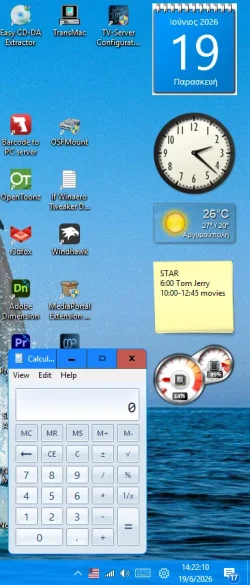
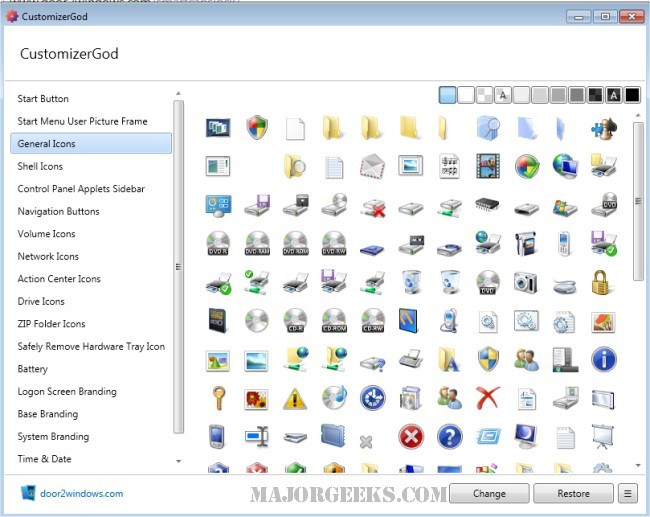
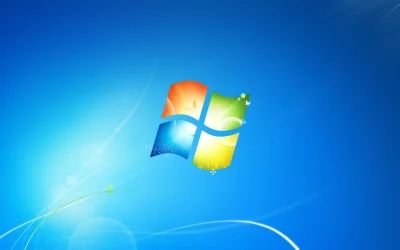
Use Open Shell to get the Windows 7 start menu and you can also replace the default start button with the good old blue Windows orb (attached). See also my post (link below) how to make Classic Explorer Bar from Open Shell work again after upgrading to Windows 11 25H2 build 8117 or higher. Then you can also replace the wallpaper with the standard Windows 7 wallpaper (attached). If you prefer any other wallpaper, then you can copy it from another computer or virtual machine running Windows 7. They all are in folder C:\Windows\Web\Wallpaper To get some of the good old desktop gadgets (not modern widgets) you need 8gadgetpack version 37.0.0 Don't download any newer version, they removed support for old Vista/7 gadgets, very stupid of them! To get Windows 7 system icons you must first extract them from the respective Windows 7 system files with Customizer God and then import them in the equivalent Windows 11 system files with the same software. These cannot be modified directly, you must first copy them to another folder where you have full access, modify them, and then take ownership of the original files and containing folder and grant full access in order to replace them. If you need any details, tell me or you can see my relevant posts in Personalization section. You can even find a patched version of Windows Media Center for Windows 8.1 to install it in Windows 11, if you want to use it. Also thanks to Winaero we have classic Windows games (Solitaire, Mahjong Titans), classic calculator (the modern app is ugly), old Microsoft Paint and many more.

Start_Button.webp
IMG0.webp

System files in Windows 7/8/8.1 and old versions of Windows 10 (up to v1809):
C:\Windows\System32\batmeter.dll for the power and battery icons
C:\Windows\System32\imageres.dll for the folder icons and most other system icons
C:\Windows\System32\pnidui.dll for the network icons
C:\Windows\System32\SndVolSSO.dll for the sound icons
C:\Windows\System32\stobject.dll for the USB safe removal icon

System files in newer Windows 10 and Windows 11:
C:\Windows\SystemResources\batmeter.dll.mun for the power and battery icons
C:\Windows\SystemResources\imageres.dll.mun folder icons and most other system icons
C:\Windows\System32\pnidui.dll for the network icons (only Windows 10 and Windows 11 21H1, 22H2 and 23H2)
C:\Windows\SystemResources\SndVolSSO.dll.mun for the sound icons
C:\Windows\SystemResources\stobject.dll.mun for the USB safe removal icon

All .dll.mun files CANNOT be modified directly or you get an error and mess your system icons. Also to see your custom power/network/sound icons you must first ungroup them with Explorer Patcher. In 24H2 and 25H2 Microsoft removed the system file containing the network icons, so Explorer Patcher provides its own copy:
C:\Program Files\Explorer Patcher\pnidui.dll which can be modified directly. To see the custom network icons you must set taskbar to Windows 10 style in Explorer Patcher settings.


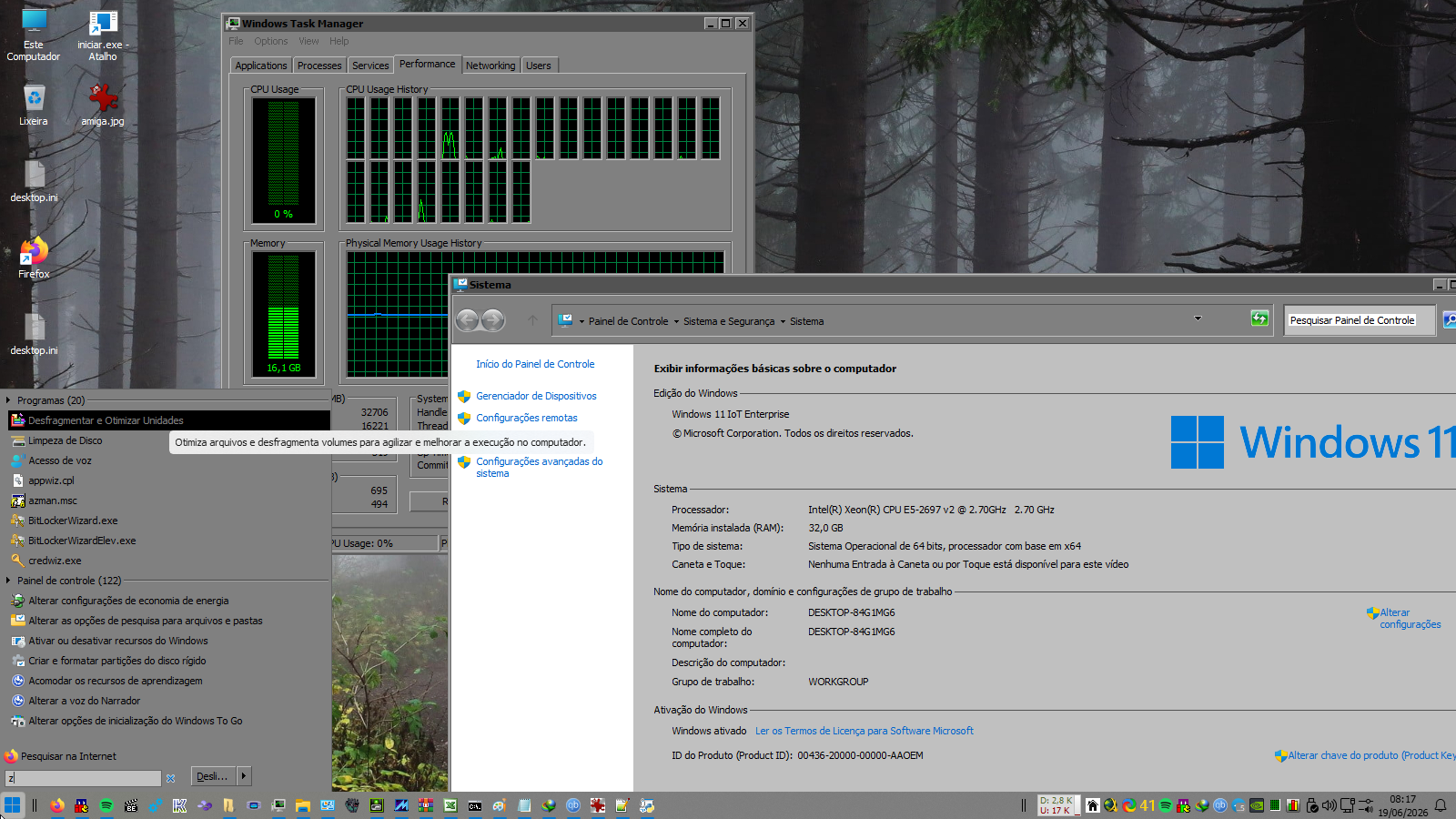
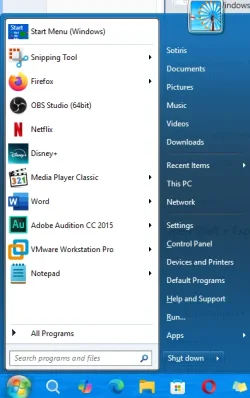
Here are some screenshots, I have even changed the default ugly user account picture with one from Windows 7:
1781868029910.webp 1781868188114.webp
Windows 11 25H2 8655.webp
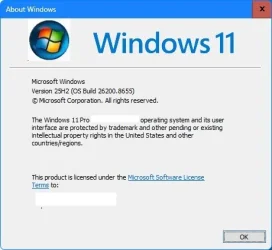
I even replaced the keyboard layout language text (ENG/ΕΛ) with the respective country flag and the flat Windows 10/11 logo with the orb in the About Windows.

 
Last edited:

My Computers My Computers

  • At a glance

    Windows 11 Pro 23H2 (5699), 25H2 (8655)Mobile DualCore Intel Core 2 Duo T7250, 2000 MHz4GBMobile Intel(R) GMA 4500M (Mobile 4 series)
    OS
    Windows 11 Pro 23H2 (5699), 25H2 (8655)
    Computer type
    Laptop
    Manufacturer/Model
    Acer Extensa 5630EZ
    CPU
    Mobile DualCore Intel Core 2 Duo T7250, 2000 MHz
    Motherboard
    Acer Extensa 5630
    Memory
    4GB
    Graphics Card(s)
    Mobile Intel(R) GMA 4500M (Mobile 4 series)
    Sound Card
    Realtek ALC268 @ Intel 82801IB ICH9 - High Definition Audio Controller
    Monitor(s) Displays
    1
    Screen Resolution
    1280x800
    Hard Drives
    Samsung SSD 850 EVO 250GB SATA Device (250 GB, SATA-III)
    Internet Speed
    VDSL 50 Mbps
    Browser
    MICROSOFT EDGE
    Antivirus
    WINDOWS DEFENDER
    Other Info
    Legacy MBR installation, no TPM, no Secure Boot, no WDDM 2.0 graphics drivers, no SSE4.2, cannot get more unsupported ;) This is only my test laptop. I had installed Windows 11 here before upgrading my main PC. For my main PC I use everyday see my 2nd system specs.
  • At a glance

    Windows 11 Pro v25H2 (build 26200.8655)Intel Core-i7 3770 3.40GHz s1155 (3rd generat...2x Kingston Hyper-X Blu 8GB DDR3-1600GIGABYTE GeForce RTX 3050 WINDFORCE OC V2 6GB...
    Operating System
    Windows 11 Pro v25H2 (build 26200.8655)
    Computer type
    PC/Desktop
    Manufacturer/Model
    Custom-built PC
    CPU
    Intel Core-i7 3770 3.40GHz s1155 (3rd generation)
    Motherboard
    Asus P8H61 s1155 ATX
    Memory
    2x Kingston Hyper-X Blu 8GB DDR3-1600
    Graphics card(s)
    GIGABYTE GeForce RTX 3050 WINDFORCE OC V2 6GB (GV-N3050WF2OCV2-6GD)
    Sound Card
    Realtek HD audio (ALC887)
    Monitor(s) Displays
    Sony Bravia KDL-19L4000 19" LCD TV via VGA
    Screen Resolution
    1440x900 32-bit 60Hz
    Hard Drives
    WD Blue SA510 2.5 1000GB SSD as system disk, Western Digital Caviar Purple 4TB SATA III (WD40PURZ) as second
    PSU
    Thermaltake Litepower RGB 550W Full Wired
    Case
    SUPERCASE MIDI-TOWER
    Cooling
    Deepcool Gamma Archer CPU cooler, 1x 8cm fan at the back
    Keyboard
    Mitsumi 101-key PS/2
    Mouse
    Sunnyline OptiEye PS/2
    Internet Speed
    100Mbps
    Browser
    Microsoft Edge, Mozilla Firefox
    Antivirus
    Microsoft Windows Defender
    Other Info
    Legacy BIOS (MBR) installation, no TPM, no Secure Boot, WDDM 3.0 graphics drivers, WEI score 7.4
Open Shell + Explorer Patcher will do the trick
 

My Computer My Computer

At a glance

W11
OS
W11
Computer type
PC/Desktop
Manufacturer/Model
2 HP Desktops, 1 Dell Desktop, 2 Dell XPS Laptops, 1 HP Laptop
Keyboard
Logitech
Mouse
Logitech MX Master 4 & 3
Internet Speed
500 mps
Browser
Firefox
Antivirus
Bitdefender
rM65i1.png
 

My Computer My Computer

At a glance

Windows 11 Iot Enterprise 21h2 22000.3260xeon E5-2697v232gb 8x4gb ddr3 1333 mhzgtx 570 poit of view
OS
Windows 11 Iot Enterprise 21h2 22000.3260
Computer type
PC/Desktop
Manufacturer/Model
Asus
CPU
xeon E5-2697v2
Motherboard
rampage iv extreme
Memory
32gb 8x4gb ddr3 1333 mhz
Graphics Card(s)
gtx 570 poit of view
Sound Card
realtek HD (ALC898)
Monitor(s) Displays
samsung b2030
Screen Resolution
1600x900
Hard Drives
2tb hd 5400 rpm
3tb hd 5400 rpm
1tb nvme pcie 3.0
PSU
hx850w
Keyboard
mtek
Internet Speed
500/250 gpon
Browser
r3dfox 146.0
Antivirus
none
Back
Top Bottom