If Macrium Reflect X is too expensive, what will you switch to?


If Macrium Reflect X is too expensive, what will you switch to?

  • Ashampoo

  • Hasleo

  • Veeam

  • Acronis True Image

  • Paragon

  • Aomei Backupper

  • EaseUS ToDo

  • R-Image

  • Mini Tool Partition Wizard

  • ShadowProtect


Results are only viewable after voting.

My Computers

System One System Two

  • OS
    Windows 11 Professional (25H2)
    Computer type
    Laptop
    Manufacturer/Model
    HP Envy 17-r107na
    CPU
    Intel Core i7-6700HQ @2.6GHz
    Motherboard
    HP
    Memory
    16GB
    Hard Drives
    C: 2TB - SATA SSD - Fanxiang
    Internet Speed
    1GB (Virgin)
  • Operating System
    Server 2025 Datacenter (24H2)
    Computer type
    PC/Desktop
    Manufacturer/Model
    Homebrew
    CPU
    Intel Core i7-6700K @ 4.0GHz
    Motherboard
    MSI
    Memory
    32GB
    Hard Drives
    C: 2TB NVMe SSD - WD_BLACK SN850X HS 2000GB
    D: 2TB SSHD - ST2000DX001-INS164
    E: 2TB SSHD - ST2000DX001-INS164
    Internet Speed
    1GB (Virgin)
    Antivirus
    Defender

My Computers

System One System Two

  • OS
    Windows 11 Pro 25H2 26200.8524
    Computer type
    Laptop
    Manufacturer/Model
    Acemagic LX15PRO
    CPU
    AMD Ryzen 7 5825U with Radeon Graphics
    Memory
    16GB
    Screen Resolution
    1920 x 1080
    Hard Drives
    SSD 2TB
    Internet Speed
    30 Mbps
    Browser
    Brave
    Antivirus
    Webroot Secure Anywhere
    Other Info
    System 3

    Acer Swift SF114-34 laptop
    OS Windows 11 Pro 26200.8524
    CPU Pentium Silver N6000
    RAM 4GB
    SSD Samsung 970 EVO Plus SSD 2TB (an upgrade)
  • Operating System
    Windows 11 Pro 23H2 22631.2506
    Computer type
    Laptop
    Manufacturer/Model
    HP Mini 210-1090NR PC (bought in late 2009!)
    CPU
    Atom N450 1.66GHz
    Memory
    2GB
    Browser
    Brave
    Antivirus
    Webroot
TIP: Once you identify what driver(s) you need, you can simply create a folder on the root of your PE media called $WinPeDriver$ and drop the drivers in there. PE will automatically load those drivers, and the associated devices will work in PE.

I thought that was a function of setup.exe. Has something changed?


Last edited:

My Computers

System One System Two

  • OS
    Win7,Win11
    Computer type
    PC/Desktop
    CPU
    i7-9700
    Motherboard
    gigabyte b365m ds3h
    Memory
    2x16gb 3600mhz
    Monitor(s) Displays
    benq gw2480
    PSU
    bequiet pure power 11 400CM
    Cooling
    cryorig m9i
  • Operating System
    win7,win11
    Computer type
    PC/Desktop
    CPU
    i5-8400
    Motherboard
    gigabyte b365m ds3h
    Memory
    2x8gb 3200
    PSU
    xfx pro 450
DiskGenius Free and then maybe even DiskGenius Pro
 

My Computer

System One

  • OS
    Windows 11 Pro 25H2
    Computer type
    PC/Desktop
    Manufacturer/Model
    Custom
    CPU
    AMD Ryzen 3 3300X 3.8-4.3Ghz Quad core
    Motherboard
    Asus TUF Gaming B550M Plus WIFI
    Memory
    G.Skill FlareX 16Gb 3200Mhz DDR4
    Graphics Card(s)
    Asus Dual RX 6600XT 8Gb
    Sound Card
    Realtek
    Monitor(s) Displays
    Dell U2520D
    Screen Resolution
    2560x1440 @ 60hz
    Hard Drives
    Samsung 970 Pro M.2 512Gb nvme and Samsung 850 Evo 500Gb SSD
    PSU
    Super Flower Leadex III Gold Up ATX 3.1 850W PSU
    Case
    Deepcool CH370 mATX White
    Cooling
    Antec C400 Glacial LED CPU Air Cooler and 3x Arctic F12 PST PWM 120mm fans
    Keyboard
    Ducky One 3 Mist Grey TKL
    Mouse
    Keychron M7 Wireless black 1k edition
    Internet Speed
    FTTP 500Mb down and 50mb up
    Browser
    Vivaldi Standalone
    Antivirus
    Windows Defender
    Other Info
    Macrium Reflect 8.1 Home

My Computers

System One System Two

  • OS
    Win7,Win11
    Computer type
    PC/Desktop
    CPU
    i7-9700
    Motherboard
    gigabyte b365m ds3h
    Memory
    2x16gb 3600mhz
    Monitor(s) Displays
    benq gw2480
    PSU
    bequiet pure power 11 400CM
    Cooling
    cryorig m9i
  • Operating System
    win7,win11
    Computer type
    PC/Desktop
    CPU
    i5-8400
    Motherboard
    gigabyte b365m ds3h
    Memory
    2x8gb 3200
    PSU
    xfx pro 450
The easist surely if you use physical vhdx (or vhd) files -- keep the windows system to say a max size of 80 GB and keep user data else where -- then just save the vhdx (or vhd) file to an external device via even Windows explorer -- cost €0.00, 100% Windows too !!.
Backing up User data is another story - but this method is for backing up the Windows system (OS) and some of the normal applications installed on it such as Office (non subscription model) etc.

To bare metal restore - use any bootable windows install media --> repair system --> command prompt and copy the vhdx file to your original disk, and if you need to re-install the boot loader just run bcdboot.exe -- enough examples on this forum. Typically in admin mode -- cd f:\system32
cd f:
bcdboot F:\windows /s: S /f UEFI where F is the attached vdisk with the windows system on it and S is the efi partition on the original disk. (the f in /f UEFI is not the F: disk !!! but a fixed parameter !!!!)

Cheers
jimbo
 

My Computer

System One

  • OS
    Windows XP,11 Linux Fedora Rawhide pre-release 45
    Computer type
    PC/Desktop
    CPU
    2 X Intel i7
    Screen Resolution
    4KUHD X 2
You could import the macrium files into the ashampoo winpe

or

mount the ashampoo winpe, export the drivers, then install them into the macrium/hasleo winpe
dism++ is easy to use for this
i

I just had to use the boot.wim file created by Ashampoo instead of creating one with Macruim. It already had all my drivers because it has an option during the build process to include 'all drivers. I tested it this morning keyboard and trackpad work.

This has been a know problem with Macruim's software for over 3 years. I expect better from a paid version.
 

My Computer

System One

  • OS
    Windows 11 & Zorin Pro
    Computer type
    Laptop
    Manufacturer/Model
    Asus Rog Strix G16
    CPU
    Intel® Core™ Ultra 9 Processor 275HX 2.7 GHz
    Motherboard
    AsusteK Computer
    Memory
    32 gb
    Graphics Card(s)
    NVIDIA® GeForce RTX™ 5060 Laptop GPU
    Sound Card
    Realtek High Definition Audio
    Monitor(s) Displays
    Laptop 16 inch
    Screen Resolution
    2560 X 1600
    Hard Drives
    Boot: Samsung 9100 NVME 2 TB Microsoft Storage Controller: Standard NVM Express Driver: Microsoft 6/21/2006. No SATA/AHCI on my motherboard or in bios
    Mouse
    Pad
    Browser
    Google Chrome
    Antivirus
    Microsoft
    Other Info
    Printer: HP Color LaserJet MFP M477dw
Has Windows killed Macrium 8?
 

My Computer

System One

  • OS
    windows 11
    Computer type
    PC/Desktop
    Manufacturer/Model
    Antec/Case
    CPU
    Intel i5-10600kf
    Motherboard
    GIGABYTE Z590 UD AC
    Memory
    32gb corsair vengerance pro
    Graphics Card(s)
    AMD RX 6500XT
    Sound Card
    onboard
    Monitor(s) Displays
    40" Hisense
    Hard Drives
    Samsung 850
    Samsung 870
    Seagate 2TB
    PSU
    EVGA GQ 750

My Computer

System One

  • OS
    Windows 10, (also 7, 11, Linux <MINT & ZorinOS>)
    Computer type
    PC/Desktop
    Manufacturer/Model
    HP Z2 G5 Workstation
    CPU
    Intel Core i7-10700
    Motherboard
    HP Model# 8751
    Memory
    32gB (DDR4)
    Graphics Card(s)
    Intel UHD Graphics 630
    Sound Card
    Realtek basic audio
    Monitor(s) Displays
    32" (Viewsonic)
    Screen Resolution
    3840 x 2160
    Hard Drives
    (3) NvME SSDs <(1) PCiE v3>, (1) SATA3 SSD
Thanks for the offer. I did try this earlier but there seem to be many drivers required. I'm happy to use a USB mouse. I don't know why Macrium don't design the GUI so people could use the keyboard to navigate - some fields just can't be reached with TAB and or the cursor keys, so you can't select a specific image to restore. I'll recheck Hasleo and Macrium X today to see what works.

It's not a Macrium Reflect. It's a Windows PE issue. They simply cannot include every critical driver known to mankind. Besides, Macrium allow you to add drivers so why not just add them to your reflect media using the mechanisms that they provide?

As for needing "many drivers", I seriously doubt it
:-)
 

My Computers

System One System Two

  • OS
    Win11 Pro 25H2 (RTM+)
    Computer type
    PC/Desktop
    Manufacturer/Model
    Acemagic
    CPU
    Intel i7-14650HX
    Memory
    32 GB
    Graphics Card(s)
    No GPU - Built-in Intel Graphics
    Sound Card
    Integrated
    Monitor(s) Displays
    Varies as machine will often be moved to locations with different monitors
    Screen Resolution
    Varies
    Hard Drives
    1 x 1TB Gen 4 NVMe SSD
    PSU
    120W Power Brick
    Keyboard
    Corsair K70 Max RGB Magnetic Keyboard
    Mouse
    Logitech MX Master 3
    Internet Speed
    1Gb Up / 1 Gb Down
    Browser
    Edge
    Antivirus
    Windows Defender
  • Operating System
    Win11 Pro 25H2 (RTM+)
    Computer type
    Laptop
    Manufacturer/Model
    Lenovo ThinkBook 13x Gen 2
    CPU
    Intel i7-1255U
    Memory
    16 GB
    Graphics card(s)
    Intel Iris Xe Graphics
    Sound Card
    Realtek® ALC3306-CG codec
    Monitor(s) Displays
    13.3-inch IPS Display
    Screen Resolution
    WQXGA (2560 x 1600)
    Hard Drives
    2 TB 4 x 4 NVMe SSD
    PSU
    USB-C / Thunderbolt 4 Power / Charging
    Keyboard
    Backlit, spill resistant keyboard
    Mouse
    Buttonless Glass Precision Touchpad
    Internet Speed
    1Gb Up / 1Gb Down
    Browser
    Edge
    Antivirus
    Windows Defender
    Other Info
    WiFi 6e / Bluetooth 5.1 / Facial Recognition / Fingerprint Sensor / ToF (Time of Flight) Human Presence Sensor
I thought that was a function of setup.exe. Has something changed?


Setup is based on Win PE so I suppose you are correct in that sense. I wrote my own program that acts like a better version of Ventoy (in my opinion :-) ), and it is based on Windows PE. I use that folder with my boot critical drivers on it all the time with a 100% success rate.
 

My Computers

System One System Two

  • OS
    Win11 Pro 25H2 (RTM+)
    Computer type
    PC/Desktop
    Manufacturer/Model
    Acemagic
    CPU
    Intel i7-14650HX
    Memory
    32 GB
    Graphics Card(s)
    No GPU - Built-in Intel Graphics
    Sound Card
    Integrated
    Monitor(s) Displays
    Varies as machine will often be moved to locations with different monitors
    Screen Resolution
    Varies
    Hard Drives
    1 x 1TB Gen 4 NVMe SSD
    PSU
    120W Power Brick
    Keyboard
    Corsair K70 Max RGB Magnetic Keyboard
    Mouse
    Logitech MX Master 3
    Internet Speed
    1Gb Up / 1 Gb Down
    Browser
    Edge
    Antivirus
    Windows Defender
  • Operating System
    Win11 Pro 25H2 (RTM+)
    Computer type
    Laptop
    Manufacturer/Model
    Lenovo ThinkBook 13x Gen 2
    CPU
    Intel i7-1255U
    Memory
    16 GB
    Graphics card(s)
    Intel Iris Xe Graphics
    Sound Card
    Realtek® ALC3306-CG codec
    Monitor(s) Displays
    13.3-inch IPS Display
    Screen Resolution
    WQXGA (2560 x 1600)
    Hard Drives
    2 TB 4 x 4 NVMe SSD
    PSU
    USB-C / Thunderbolt 4 Power / Charging
    Keyboard
    Backlit, spill resistant keyboard
    Mouse
    Buttonless Glass Precision Touchpad
    Internet Speed
    1Gb Up / 1Gb Down
    Browser
    Edge
    Antivirus
    Windows Defender
    Other Info
    WiFi 6e / Bluetooth 5.1 / Facial Recognition / Fingerprint Sensor / ToF (Time of Flight) Human Presence Sensor
It's not a Macrium Reflect. It's a Windows PE issue. They simply cannot include every critical driver known to mankind. Besides, Macrium allow you to add drivers so why not just add them to your reflect media using the mechanisms that they provide?

As for needing "many drivers", I seriously doubt it
:-)
It is now moot since the latest versions of Hasleo and Macrium find the drivers automatically
 

My Computers

System One System Two

  • OS
    Windows 11 Pro 25H2 26200.8524
    Computer type
    Laptop
    Manufacturer/Model
    Acemagic LX15PRO
    CPU
    AMD Ryzen 7 5825U with Radeon Graphics
    Memory
    16GB
    Screen Resolution
    1920 x 1080
    Hard Drives
    SSD 2TB
    Internet Speed
    30 Mbps
    Browser
    Brave
    Antivirus
    Webroot Secure Anywhere
    Other Info
    System 3

    Acer Swift SF114-34 laptop
    OS Windows 11 Pro 26200.8524
    CPU Pentium Silver N6000
    RAM 4GB
    SSD Samsung 970 EVO Plus SSD 2TB (an upgrade)
  • Operating System
    Windows 11 Pro 23H2 22631.2506
    Computer type
    Laptop
    Manufacturer/Model
    HP Mini 210-1090NR PC (bought in late 2009!)
    CPU
    Atom N450 1.66GHz
    Memory
    2GB
    Browser
    Brave
    Antivirus
    Webroot
It is now moot since the latest versions of Hasleo and Macrium find the drivers automatically

Understood. My workflow is a little different. I setup my recovery disk and use that same disk on about 8 systems. So rather than create a different Reflect boot disk for every system, I do it one time on one machine and add the drivers for mutiple systems on a system where those drivers do not exist.
 

My Computers

System One System Two

  • OS
    Win11 Pro 25H2 (RTM+)
    Computer type
    PC/Desktop
    Manufacturer/Model
    Acemagic
    CPU
    Intel i7-14650HX
    Memory
    32 GB
    Graphics Card(s)
    No GPU - Built-in Intel Graphics
    Sound Card
    Integrated
    Monitor(s) Displays
    Varies as machine will often be moved to locations with different monitors
    Screen Resolution
    Varies
    Hard Drives
    1 x 1TB Gen 4 NVMe SSD
    PSU
    120W Power Brick
    Keyboard
    Corsair K70 Max RGB Magnetic Keyboard
    Mouse
    Logitech MX Master 3
    Internet Speed
    1Gb Up / 1 Gb Down
    Browser
    Edge
    Antivirus
    Windows Defender
  • Operating System
    Win11 Pro 25H2 (RTM+)
    Computer type
    Laptop
    Manufacturer/Model
    Lenovo ThinkBook 13x Gen 2
    CPU
    Intel i7-1255U
    Memory
    16 GB
    Graphics card(s)
    Intel Iris Xe Graphics
    Sound Card
    Realtek® ALC3306-CG codec
    Monitor(s) Displays
    13.3-inch IPS Display
    Screen Resolution
    WQXGA (2560 x 1600)
    Hard Drives
    2 TB 4 x 4 NVMe SSD
    PSU
    USB-C / Thunderbolt 4 Power / Charging
    Keyboard
    Backlit, spill resistant keyboard
    Mouse
    Buttonless Glass Precision Touchpad
    Internet Speed
    1Gb Up / 1Gb Down
    Browser
    Edge
    Antivirus
    Windows Defender
    Other Info
    WiFi 6e / Bluetooth 5.1 / Facial Recognition / Fingerprint Sensor / ToF (Time of Flight) Human Presence Sensor
It is now moot since the latest versions of Hasleo and Macrium find the drivers automatically
Maybe with your PC's but not my main daily driver. The MR8.1 recovery boot drive has no support for wi-f1 6E, and the HBS ED did not include support for my mousepad, keyboard, or any wi-fi.
 

My Computer

System One

  • OS
    Windows 11 Pro
    Computer type
    Laptop
    Manufacturer/Model
    ASUS Zenbook 14 OLED
    CPU
    Intel Core Ultra
    Memory
    16GB
    Graphics Card(s)
    Intel(R) Arc Graphics
    Sound Card
    Realtek High Definition Audio(SST)
    Screen Resolution
    2880 x 1800
    Hard Drives
    500 GB NVMe SSD
    Internet Speed
    1,500Mbps
    Browser
    Firefox, Edge
    Antivirus
    Windows Defender
Setup is based on Win PE so I suppose you are correct in that sense. I wrote my own program that acts like a better version of Ventoy (in my opinion :-) ), and it is based on Windows PE. I use that folder with my boot critical drivers on it all the time with a 100% success rate.
according to MS

The $WinPEDriver$ feature is intended as a method to provide drivers at installation time. However, it's a feature of Setup.exe, and as such isn't invoked until after Setup.exe launches.

Which implies that unless setup.exe is run, the the $WinPEDriver$ folder is ignored.

The winpe downloaded by various programs like macrium does not include setup.exe, neither does winre.wim

I wrote my own program

That explains it. My pe builds include a bit of code that searches for a particular folder and installs any drivers that are in that folder.
 
Last edited:

My Computers

System One System Two

  • OS
    Win7,Win11
    Computer type
    PC/Desktop
    CPU
    i7-9700
    Motherboard
    gigabyte b365m ds3h
    Memory
    2x16gb 3600mhz
    Monitor(s) Displays
    benq gw2480
    PSU
    bequiet pure power 11 400CM
    Cooling
    cryorig m9i
  • Operating System
    win7,win11
    Computer type
    PC/Desktop
    CPU
    i5-8400
    Motherboard
    gigabyte b365m ds3h
    Memory
    2x8gb 3200
    PSU
    xfx pro 450
The $WinPEDriver$ feature is intended as a method to provide drivers at installation time. However, it's a feature of Setup.exe, and as such isn't invoked until after Setup.exe launches.

Hmmm, I guess that I better check my assumptions. I actually do nothing special at least in that regard with my program. However, what I run far more frequently than anything else is indeed Windows setup. Yet, all my stuff like Reflect and other PE based programs work on those systems that need drivers loaded. Nut it is possible that this is because I integrated those drivers in rather than use the $WinPEDriver$ folder.

It's fully possible that I have jumped to a wrong conclusion due to it just working for me. I'll try to test this over the next day or two and report back what I find.

Glad we're having this discussion because if I have this wrong then I have some corrective work to do
:-)

Thanks for your research and posting what you found.

 

My Computers

System One System Two

  • OS
    Win11 Pro 25H2 (RTM+)
    Computer type
    PC/Desktop
    Manufacturer/Model
    Acemagic
    CPU
    Intel i7-14650HX
    Memory
    32 GB
    Graphics Card(s)
    No GPU - Built-in Intel Graphics
    Sound Card
    Integrated
    Monitor(s) Displays
    Varies as machine will often be moved to locations with different monitors
    Screen Resolution
    Varies
    Hard Drives
    1 x 1TB Gen 4 NVMe SSD
    PSU
    120W Power Brick
    Keyboard
    Corsair K70 Max RGB Magnetic Keyboard
    Mouse
    Logitech MX Master 3
    Internet Speed
    1Gb Up / 1 Gb Down
    Browser
    Edge
    Antivirus
    Windows Defender
  • Operating System
    Win11 Pro 25H2 (RTM+)
    Computer type
    Laptop
    Manufacturer/Model
    Lenovo ThinkBook 13x Gen 2
    CPU
    Intel i7-1255U
    Memory
    16 GB
    Graphics card(s)
    Intel Iris Xe Graphics
    Sound Card
    Realtek® ALC3306-CG codec
    Monitor(s) Displays
    13.3-inch IPS Display
    Screen Resolution
    WQXGA (2560 x 1600)
    Hard Drives
    2 TB 4 x 4 NVMe SSD
    PSU
    USB-C / Thunderbolt 4 Power / Charging
    Keyboard
    Backlit, spill resistant keyboard
    Mouse
    Buttonless Glass Precision Touchpad
    Internet Speed
    1Gb Up / 1Gb Down
    Browser
    Edge
    Antivirus
    Windows Defender
    Other Info
    WiFi 6e / Bluetooth 5.1 / Facial Recognition / Fingerprint Sensor / ToF (Time of Flight) Human Presence Sensor
Hmmm, I guess that I better check my assumptions. I actually do nothing special at least in that regard with my program. However, what I run far more frequently than anything else is indeed Windows setup. Yet, all my stuff like Reflect and other PE based programs work on those systems that need drivers loaded. Nut it is possible that this is because I integrated those drivers in rather than use the $WinPEDriver$ folder.

It's fully possible that I have jumped to a wrong conclusion due to it just working for me. I'll try to test this over the next day or two and report back what I find.

Glad we're having this discussion because if I have this wrong then I have some corrective work to do
:-)

Thanks for your research and posting what you found.
Sort of related, my experience about adding drivers to winpe is that the main culprit is nvme drivers.

Graphics drivers are not usually that important usually unless very high resolutions.

Ethernet/Wifi drivers are only needed if backing up over a Lan.

People often over think this by and large.

If you create a winpe usb drive on a pc with an nvme, it will generally work on a pc without an nvme.
 

My Computer

System One

  • OS
    Windows 11 Pro + Win11 Canary VM.
    Computer type
    Laptop
    Manufacturer/Model
    ASUS Zenbook 14
    CPU
    I9 13th gen i9-13900H 2.60 GHZ
    Motherboard
    Yep, Laptop has one.
    Memory
    16 GB soldered
    Graphics Card(s)
    Integrated Intel Iris XE
    Sound Card
    Realtek built in
    Monitor(s) Displays
    laptop OLED screen
    Screen Resolution
    2880x1800 touchscreen
    Hard Drives
    1 TB NVME SSD (only weakness is only one slot)
    PSU
    Internal + 65W thunderbolt USB4 charger
    Case
    Yep, got one
    Cooling
    Stella Artois (UK pint cans - 568 ml) - extra cost.
    Keyboard
    Built in UK keybd
    Mouse
    Bluetooth , wireless dongled, wired
    Internet Speed
    900 mbs (ethernet), wifi 6 typical 350-450 mb/s both up and down
    Browser
    Edge
    Antivirus
    Defender
    Other Info
    TPM 2.0, 2xUSB4 thunderbolt, 1xUsb3 (usb a), 1xUsb-c, hdmi out, 3.5 mm audio out/in combo, ASUS backlit trackpad (inc. switchable number pad)

    Macrium Reflect Home V8
    Office 365 Family (6 users each 1TB onedrive space)
    Hyper-V (a vm runs almost as fast as my older laptop)
People often over think this by and large.
Yep. The conventional wisdom in corporate large-scale Windows rollouts is you only need network and storage drivers to boot, and you can skip the network part if you're not using the network of course.
 

My Computer

System One

  • OS
    Windows 11 Pro 25H2
    Computer type
    PC/Desktop
    Manufacturer/Model
    Intel NUC12WSHi7
    CPU
    12th Gen Core i7-1260P
    Motherboard
    NUC12WSBi7
    Memory
    64 GB Micron PC4-25600
    Graphics Card(s)
    Intel Iris Xe Graphics
    Sound Card
    on-board Realtek HD Audio
    Monitor(s) Displays
    Dell U3219Q
    Screen Resolution
    3840 x 2160
    Hard Drives
    Samsung SSD 990 PRO 1TB
    Crucial MX500 2 TB
    Antivirus
    Microsoft Defender
Hmmm, I guess that I better check my assumptions. I actually do nothing special at least in that regard with my program. However, what I run far more frequently than anything else is indeed Windows setup. Yet, all my stuff like Reflect and other PE based programs work on those systems that need drivers loaded. Nut it is possible that this is because I integrated those drivers in rather than use the $WinPEDriver$ folder.

It's fully possible that I have jumped to a wrong conclusion due to it just working for me. I'll try to test this over the next day or two and report back what I find.

Glad we're having this discussion because if I have this wrong then I have some corrective work to do
:-)

Thanks for your research and posting what you found.

many of the diskimaging pemaking modules will automatically include drivers from your running system

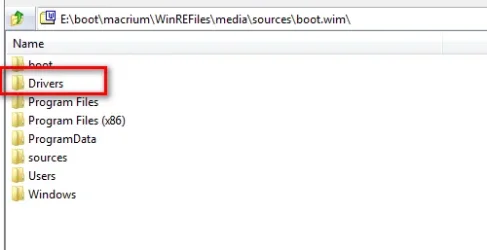
macrium includes a folder called drivers which it attempts to install when macrium program starts in winpe

macrium-winpe-drivers-folder.webp
 

My Computers

System One System Two

  • OS
    Win7,Win11
    Computer type
    PC/Desktop
    CPU
    i7-9700
    Motherboard
    gigabyte b365m ds3h
    Memory
    2x16gb 3600mhz
    Monitor(s) Displays
    benq gw2480
    PSU
    bequiet pure power 11 400CM
    Cooling
    cryorig m9i
  • Operating System
    win7,win11
    Computer type
    PC/Desktop
    CPU
    i5-8400
    Motherboard
    gigabyte b365m ds3h
    Memory
    2x8gb 3200
    PSU
    xfx pro 450
Back
Top Bottom