

23Graham23
Active member
- Local time
- 7:09 AM
- Posts
- 5
- OS
- Windows 11 Pro Insider Preview version 22H
I cannot find the peso sign in my charmap, using any font.
I hit the alt sign and input alt 8369 and instead of the ₱ I get this symbol ▒
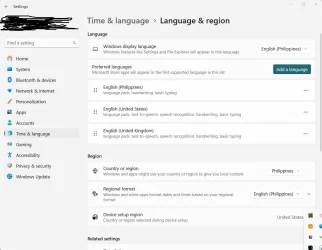
I have changed the settings in my language and region setting without making any difference, when I type alt 156 I get the correct £ character showing as it should, I have also tried some other characters and they seem to be correct (alt 0169 gives me ©)
Does anyone know just WTF is happening???
Oh BTW I just reinstalled Windows 11 using the reset option as the Windows store stopped working correctly (couldn't fix it) and it stopped me from running Flight Simulator. This seems to be a regular occurrence with Windows and seems to be getting worse with each new iteration!
Device name NotepadROG
Processor Intel(R) Core(TM) i9-8950HK CPU @ 2.90GHz (2.90 GHz)
Installed RAM 48.0 GB
Device ID 40C6B54D-85D2-47DD-A5B1-CC4FAC82EB41
Product ID 00330-51471-62031-AAOEM
System type 64-bit operating system, x64-based processor
Pen and touch No pen or touch input is available for this display
Edition Windows 11 Pro
Version 24H2
Installed on 7/21/2025
OS build 26100.4652
Experience Windows Feature Experience Pack 1000.26100.128.0
I just removed rebooted then reinstalled the (English) Philippines language pack then rebooted but alt 8369 still shows ▒ so I'm lost, I haven't looked at the charmap this time, but I know it's going to be exactly the same with the peso sign missing(I set it the first entry and set everything to point to this as the first option).
Still messed up completely!
I hit the alt sign and input alt 8369 and instead of the ₱ I get this symbol ▒
I have changed the settings in my language and region setting without making any difference, when I type alt 156 I get the correct £ character showing as it should, I have also tried some other characters and they seem to be correct (alt 0169 gives me ©)
Does anyone know just WTF is happening???
Oh BTW I just reinstalled Windows 11 using the reset option as the Windows store stopped working correctly (couldn't fix it) and it stopped me from running Flight Simulator. This seems to be a regular occurrence with Windows and seems to be getting worse with each new iteration!
Device name NotepadROG
Processor Intel(R) Core(TM) i9-8950HK CPU @ 2.90GHz (2.90 GHz)
Installed RAM 48.0 GB
Device ID 40C6B54D-85D2-47DD-A5B1-CC4FAC82EB41
Product ID 00330-51471-62031-AAOEM
System type 64-bit operating system, x64-based processor
Pen and touch No pen or touch input is available for this display
Edition Windows 11 Pro
Version 24H2
Installed on 7/21/2025
OS build 26100.4652
Experience Windows Feature Experience Pack 1000.26100.128.0
I just removed rebooted then reinstalled the (English) Philippines language pack then rebooted but alt 8369 still shows ▒ so I'm lost, I haven't looked at the charmap this time, but I know it's going to be exactly the same with the peso sign missing(I set it the first entry and set everything to point to this as the first option).
Still messed up completely!
Attachments
Last edited:
My Computer
At a glance
Windows 11 Pro Insider Preview version 22HIntel(R) Core(TM) i9-8950HK CPU @ 2.90GHz 2.9...48 GBytesNVIDIA GeForce GTX 1080, 8192 MB GDDR5X SDRAM...
- OS
- Windows 11 Pro Insider Preview version 22H
- Computer type
- Laptop
- Manufacturer/Model
- Asus
- CPU
- Intel(R) Core(TM) i9-8950HK CPU @ 2.90GHz 2.90 GHz
- Motherboard
- ASUS G703GI
- Memory
- 48 GBytes
- Graphics Card(s)
- NVIDIA GeForce GTX 1080, 8192 MB GDDR5X SDRAM NVIDIA GeForce GT 750M 8192 MBytes of GDDR5X SDRAM [Micron]
- Sound Card
- NVIDIA GP104: Intel Cannon Lake-H/S - cAVS (Audio, Voice, Speech) [B0]
- Monitor(s) Displays
- 385 x 215 mm, Pixel Clock 426.60 MHz 19"
- Screen Resolution
- 3840 x 2160
- Hard Drives
- CT2000P5PSSD8, 1953.5 GB, NVMe
Lexar 1TB SSD, 976.8 GB, NVMe
ST2000LX001-1RG174, 1953.5 GB, Serial ATA 6Gb/s @ 6Gb/s
- PSU
- 280W 20V 14A inputs (Dual)
- Case
- Laptop
- Cooling
- Asus N550JK heat sink with Sunon fans sitting on a 4 fan laptop cooler
- Keyboard
- Asus LED
- Mouse
- Logitech MX Anywhere 3
- Internet Speed
- Cable PLDT
- Browser
- Firefox
- Antivirus
- Avast






