
Apps Install or Uninstall VBScript Feature in Windows 11

  • Thread starter Thread starter Brink
  • Start date Published: Start date Updated Updated:

VBS_banner.png

This tutorial will show you how to install or uninstall the VBScript optional feature for all users in Windows 11.

A .vbs file is a Virtual Basic script written in the VBScript scripting language. It contains code that can be executed within Windows via the Windows-based script host (Wscript.exe), to perform certain admin and processing functions.

VBScript is a legacy Scripting engine component, and Microsoft does not recommend using this component unless it is really required. Use this component at your own risk, this might contain security vulnerabilities.

Starting with Windows 11 build 25309, you can now uninstall the VBScript feature if wanted.

VBScript is being deprecated. In future releases of Windows, VBScript will be available as a feature on demand before its removal from the operating system.
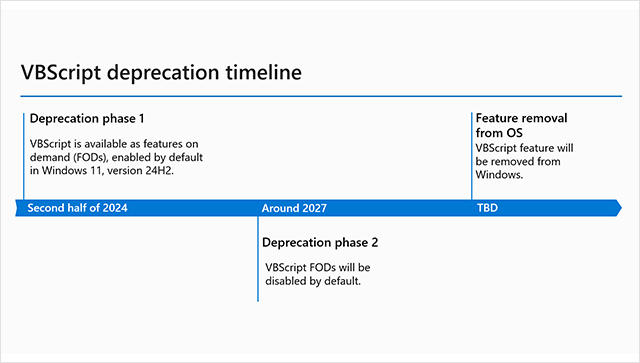


You must be signed in as an administrator to install or uninstall the VBScript optional feature.


Contents

  • Option One: Install or Uninstall VBScript Feature in Settings
  • Option Two: Install or Uninstall VBScript Feature using Command


Option One

Install or Uninstall VBScript Feature in Settings


1 Open Settings (Win+I).

2 Perform one of the available options below: (see screenshots below)
  • Click/tap on Apps on the left side, and click/tap on Optional features on the right side.
  • Click/tap on System on the left side, and click/tap on Optional features on the right side.

VBScript_Settings-1.png
Optional_Features_Settings-1b.png

3 Do step 4 (add) or step 5 (remove) below for what you want.

4 Install VBScript Feature

This is the default setting.


A) Click/tap on the View features button. (see screenshot below)​

VBScript_Settings-3.png

B) Check VBSCRIPT, and click/tap on Next. (see screenshot below)​

VBScript_Settings-4.png

C) Click/tap on Install to confirm. (see screenshot below)​

VBScript_Settings-5.png

D) You can now close Settings if you like.​

5 Uninstall VBScript Feature

A) Under Installed features, click/tap on VBSCRIPT to expand it open. (see screenshot below)​

B) Click/tap on the Uninstall button.​

VBScript_Settings-2.png

C) You can now close Settings if you like.​


Option Two

Install or Uninstall VBScript Feature using Command


1 Open Windows Terminal (Admin), and select Windows PowerShell or Command Prompt.

2 Copy and paste the command below you want to use into Windows Terminal (Admin), and press Enter. (see screenshots below)

Default - Install VBScript Feature​
DISM /Online /Add-Capability /CapabilityName:VBSCRIPT~~~~​

OR​

Uninstall VBScript Feature​
DISM /Online /Remove-Capability /CapabilityName:VBSCRIPT~~~~​

3 When prompted to restart the computer, type Y to restart now.

VBScript_command-2.png

VBScript_command-1.png


That's it,
Shawn Brink


Last edited:
What I have done sar: I have disabled WSH (Windows Scripting Host) on my Windows 10. .js and .vbs are not longer executed and return an error message. IIS however keeps on serving ASP/VBScript as if nothing happened.
 

My Computer My Computer

At a glance

Windows 10
OS
Windows 10
Computer type
PC/Desktop
Manufacturer/Model
Asus
Browser
Chrome
Antivirus
Windows Defender
i'm sorry for spamming... if you would be able to create a default.asp file, including nothing but:
<%
if 1=1 then response.write "hello"
%>
and your browser returns "hello", VBScript is still "around" somewhere in ASP.DLL, or IIS
 

My Computer My Computer

At a glance

Windows 10
OS
Windows 10
Computer type
PC/Desktop
Manufacturer/Model
Asus
Browser
Chrome
Antivirus
Windows Defender
What I have done sar: I have disabled WSH (Windows Scripting Host) on my Windows 10. .js and .vbs are not longer executed and return an error message. IIS however keeps on serving ASP/VBScript as if nothing happened.
That's exactly as expected.

The Windows 11 VBScript uninstall actually removes vbscript.dll.

I don't recall seeing any plans for VBScript to be removed from Windows Server, so this may all be moot for server side code.
 

My Computer My Computer

At a glance

Windows 10/11
OS
Windows 10/11
Computer type
Laptop
Manufacturer/Model
Acer
That's exactly my assumption too.. But MicroSoft announced that VBScript will be totally removed from Windows OS. That includes their servers in my understanding...
 

My Computer My Computer

At a glance

Windows 10
OS
Windows 10
Computer type
PC/Desktop
Manufacturer/Model
Asus
Browser
Chrome
Antivirus
Windows Defender
That's exactly my assumption too.. But MicroSoft announced that VBScript will be totally removed from Windows OS. That includes their servers in my understanding...
Windows Client, not Server
 

My Computer My Computer

At a glance

Windows 11 Enterprise 25H2
OS
Windows 11 Enterprise 25H2
i'm sorry for spamming... if you would be able to create a default.asp file, including nothing but:
<%
if 1=1 then response.write "hello"
%>
and your browser returns "hello", VBScript is still "around" somewhere in ASP.DLL, or IIS
Using Windows 24H2 for the IIS server and VBScript removed via Settings, the result is an HTTP 500 error.

But I don't think you have anything to worry about with Windows Server. I'm sure you'll be able to keep VBScript as long as you need it.
 

My Computer My Computer

At a glance

Windows 10/11
OS
Windows 10/11
Computer type
Laptop
Manufacturer/Model
Acer
The deprecation of VBScript completely disables Classic ASP websites in Microsoft IIS !

It is OK not to use VBScript client-side in web browsers for years, but Classic ASP must remain functional server-side : millions of companies rely on it (about 2 to 5% of the web !!) o_O:scream:

Please help by signing this petition addressed to Microsoft representatives : Cette campagne a besoin de votre soutien
 

My Computer My Computer

At a glance

Windows Server 2019
OS
Windows Server 2019
Computer type
PC/Desktop
Windows Client, not Server
Windows Server will also suffer from this deprecation : first tests on Windows Server 2025 Preview conclude that when the VBScript FOD (Function On Demand) is disabled, Classic ASP is broken and not functional !
 

My Computer My Computer

At a glance

Windows Server 2019
OS
Windows Server 2019
Computer type
PC/Desktop
Back
Top Bottom










