JavaScript is disabled. For a better experience, please enable JavaScript in your browser before proceeding.
You are using an out of date browser. It may not display this or other websites correctly.
You should upgrade or use an
alternative browser .
Intel 13th & 14th Gen CPUs Receive New BIOS To Fix eTVB Microcode Bug, “Default Settings” Guidance For Core i9, i7, i5 Chips To Address Instability
Well-known member
Guru
VIP
Intel's partners have started rolling out the eTVB microcode BIOS fix as it tries to resolve instability issues on the 14th & 13th Gen chips.
wccftech.com
Windows 11 Pro Intel Core i9 12900KF Corsair 64GB DDR5 Vengeance C40 5200Mhz ASUS GeForce RTX 3090 ROG Strix OC 24GB Windows 11 Pro PC/Desktop Custom Build Intel Core i9 12900KF ASUS ROG Maximus Z690 Hero Corsair 64GB DDR5 Vengeance C40 5200Mhz ASUS GeForce RTX 3090 ROG Strix OC 24GB OnBoard Acer Predator XB323UGP 32" QHD G-SYNC-C 144Hz 1MS IPS LED 2560 x 1440 1x Samsung 980 Pro Series Gen4 250GB M.2 NVMe Corsair AX1200i 1200W 80PLUS Titanium Modular Corsair 4000D Black Case w/ Tempered Glass Side Panel Noctua NH-U12A Chromax Black CPU Cooler, 4x Noctua 120mm Fans Logitech MK545 Logitech MX Master 3 Fixed Wireless 150mbps/75mbps Firefox Kaspersky Thrustmaster TS-PC RACER
Semper paratus
Pro User
VIP
I updated the bios on my Asus ProArt Z790 board a couple of weeks ago with the new default settings. That said I've never had any CPU related issues with this build. The big issue I had early on was severe ram problems.
Windows 11 Pro 25H2 Intel Core i9 13900K Corsair Dominator Platinum 64gb 5600MT/s DDR5... Sapphire NITRO+ AMD Radeon RX 7900 XTX Vapor-... Windows 11 Pro 25H2 PC/Desktop Homebuilt Intel Core i9 13900K Asus ProArt Z790 Creator WiFi - Bios 3107 Corsair Dominator Platinum 64gb 5600MT/s DDR5 Dual Channel Sapphire NITRO+ AMD Radeon RX 7900 XTX Vapor-X 24GB External DAC: Cambridge Audio DACMagic200M - Headphone Amp: Topping L50 Panasonic MX950 Mini LED 55" TV 120hz 3840 x 2160 120hz Samsung 980 Pro 2TB (OS) Corsair RM1200x Shift Corsair RGB Smart Case 5000x (white) Corsair iCue H150i Elite Capellix XT Incase Ergonomic USB (Microsoft clone) Logitech MX Master 3S Fibre 900/500 Mbps Microsoft Edge Chromium Bitdefender Total Security AMD Radeon Software & Drivers 26.1.1
Windows 11 Pro 25H2 Intel® Core™ i9-13900H 32GB DDR4-3200 Dual channel *Intel Iris Xᵉ Graphics G7 Windows 11 Pro 25H2 Laptop Asus Vivobook X1605VA Intel® Core™ i9-13900H Asus X1605VA bios 309 32GB DDR4-3200 Dual channel *Intel Iris Xᵉ Graphics G7 Realtek | Intel SST Bluetooth & USB 16.0-inch, WUXGA 16:10 aspect ratio, IPS-level Panel 1920 x 1200 60hz 512GB M.2 NVMe™ PCIe® 3.0 SSD Logitech MX Ergo Trackball Bitdefender Total Security 720p Webcam
Well OK here. I have always had Enhanced TVB disabled. No need to update the BIOS if you are not using it.
Windows 11 Pro Intel Core i9 14900K 5800/4500 P/E 96GB (2x48) G.skill Ripjaws 6800 Asus ROG Strix 4070 Ti OC Windows 11 Pro PC/Desktop DIY Photoshop/Audio/Game/tinker Intel Core i9 14900K 5800/4500 P/E Asus ROG Maximus Z790 Dark Hero 96GB (2x48) G.skill Ripjaws 6800 Asus ROG Strix 4070 Ti OC B&W 606 S3 speakers; Audiolabs 7000a integrated amp; RSL 10S Mk2 sub Eizo CG2730 ColorEdge, ViewSonic VP2768 2560 x 1440 x 2 nvme: WDC SN850X 4TB, SN850 1TB, SK-Hynix 2 TB P41 850W Seasonic Vertex PX-850 FD North XL Mesh, Black Walnut EK Nucleus black 360 AIO w/Phanteks T30 fans; 2 Noctua NF-A14 Chromax ; T30 for memory Keychron Q3 Max TKL w/GMK Redsuns Red Samuri keycaps Logitech G305 wireless gaming 575 Mb/s down | 25 Mb/s up Firefox Defender, Macrium Reflect X Phangkey Amaterasu V2 Desk Mat
Laptop Apple M1 2560x1600 Firefox
Very interesting. I'm having instability issues like bsod and freezes with 14700k on a gigabyte z790 board. I will wait for gigabyte to take their default settings bios out of beta mode and make an update. Lots of different ideas on Reddit for what settings to use as well.
Windows 11 Intel Core i7 processor 14700K Corsair 32GB (2x16GB) CMK32GX5M2E6000C36 Veng... Gigabyte GeForce RTX 4070 Eagle OC V2 12G Windows 11 PC/Desktop Intel Core i7 processor 14700K Gigabyte Z790 AORUS ELITE AX (rev. 1.1) Corsair 32GB (2x16GB) CMK32GX5M2E6000C36 Vengeance CL36 6000MHz DDR5 RAM - Black Gigabyte GeForce RTX 4070 Eagle OC V2 12G Samsung LF24T35 1920 x 1080 pixels Samsung 2TB 990 Pro M.2 NVMe SSD - MZ-V9P2T0BW Corsair 850W RM850x SHIFT 80+ Gold Fully Modular ATX Corsair 4000D Airflow TG Mid Tower ATX Noctua NH-U12S PWM Chromax Black Typhoon Pro MK12 Razer DeathAdder V2 Intel Wi-Fi 6E AX211 160MHz Google Chrome Windows Security
Semper paratus
Pro User
VIP
Lots of different ideas on Reddit for what settings to use as well.
Speaking strictly for myself I always take Reddit with a large grain of salt. Especially when it relates to making changes to UEFI bios settings.
Windows 11 Pro 25H2 Intel Core i9 13900K Corsair Dominator Platinum 64gb 5600MT/s DDR5... Sapphire NITRO+ AMD Radeon RX 7900 XTX Vapor-... Windows 11 Pro 25H2 PC/Desktop Homebuilt Intel Core i9 13900K Asus ProArt Z790 Creator WiFi - Bios 3107 Corsair Dominator Platinum 64gb 5600MT/s DDR5 Dual Channel Sapphire NITRO+ AMD Radeon RX 7900 XTX Vapor-X 24GB External DAC: Cambridge Audio DACMagic200M - Headphone Amp: Topping L50 Panasonic MX950 Mini LED 55" TV 120hz 3840 x 2160 120hz Samsung 980 Pro 2TB (OS) Corsair RM1200x Shift Corsair RGB Smart Case 5000x (white) Corsair iCue H150i Elite Capellix XT Incase Ergonomic USB (Microsoft clone) Logitech MX Master 3S Fibre 900/500 Mbps Microsoft Edge Chromium Bitdefender Total Security AMD Radeon Software & Drivers 26.1.1
Windows 11 Pro 25H2 Intel® Core™ i9-13900H 32GB DDR4-3200 Dual channel *Intel Iris Xᵉ Graphics G7 Windows 11 Pro 25H2 Laptop Asus Vivobook X1605VA Intel® Core™ i9-13900H Asus X1605VA bios 309 32GB DDR4-3200 Dual channel *Intel Iris Xᵉ Graphics G7 Realtek | Intel SST Bluetooth & USB 16.0-inch, WUXGA 16:10 aspect ratio, IPS-level Panel 1920 x 1200 60hz 512GB M.2 NVMe™ PCIe® 3.0 SSD Logitech MX Ergo Trackball Bitdefender Total Security 720p Webcam
Speaking strictly for myself I always take Reddit with a large grain of salt. Especially when it relates to making changes to UEFI bios settings.
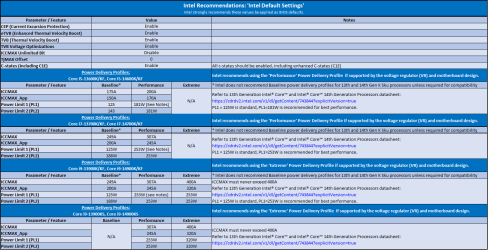
What do you think of the official settings from Intel? I'm thinking of trying them or I could just wait for the beta BIOS to become stable
Thomas_Hannaford_0-1718725426624.png
63.6 KB
· Views: 2
Windows 11 Intel Core i7 processor 14700K Corsair 32GB (2x16GB) CMK32GX5M2E6000C36 Veng... Gigabyte GeForce RTX 4070 Eagle OC V2 12G Windows 11 PC/Desktop Intel Core i7 processor 14700K Gigabyte Z790 AORUS ELITE AX (rev. 1.1) Corsair 32GB (2x16GB) CMK32GX5M2E6000C36 Vengeance CL36 6000MHz DDR5 RAM - Black Gigabyte GeForce RTX 4070 Eagle OC V2 12G Samsung LF24T35 1920 x 1080 pixels Samsung 2TB 990 Pro M.2 NVMe SSD - MZ-V9P2T0BW Corsair 850W RM850x SHIFT 80+ Gold Fully Modular ATX Corsair 4000D Airflow TG Mid Tower ATX Noctua NH-U12S PWM Chromax Black Typhoon Pro MK12 Razer DeathAdder V2 Intel Wi-Fi 6E AX211 160MHz Google Chrome Windows Security
Semper paratus
Pro User
VIP
What do you think of the official settings from Intel? I'm thinking of trying them or I could just wait for the beta BIOS to become stable
I have a 13900k with the Asus mainboard as per my signature below and am using the Extreme settings as recommended by Intel in their chart.
That said my PC was very stable before the recent batch of bios changes implemented by Asus.
Windows 11 Pro 25H2 Intel Core i9 13900K Corsair Dominator Platinum 64gb 5600MT/s DDR5... Sapphire NITRO+ AMD Radeon RX 7900 XTX Vapor-... Windows 11 Pro 25H2 PC/Desktop Homebuilt Intel Core i9 13900K Asus ProArt Z790 Creator WiFi - Bios 3107 Corsair Dominator Platinum 64gb 5600MT/s DDR5 Dual Channel Sapphire NITRO+ AMD Radeon RX 7900 XTX Vapor-X 24GB External DAC: Cambridge Audio DACMagic200M - Headphone Amp: Topping L50 Panasonic MX950 Mini LED 55" TV 120hz 3840 x 2160 120hz Samsung 980 Pro 2TB (OS) Corsair RM1200x Shift Corsair RGB Smart Case 5000x (white) Corsair iCue H150i Elite Capellix XT Incase Ergonomic USB (Microsoft clone) Logitech MX Master 3S Fibre 900/500 Mbps Microsoft Edge Chromium Bitdefender Total Security AMD Radeon Software & Drivers 26.1.1
Windows 11 Pro 25H2 Intel® Core™ i9-13900H 32GB DDR4-3200 Dual channel *Intel Iris Xᵉ Graphics G7 Windows 11 Pro 25H2 Laptop Asus Vivobook X1605VA Intel® Core™ i9-13900H Asus X1605VA bios 309 32GB DDR4-3200 Dual channel *Intel Iris Xᵉ Graphics G7 Realtek | Intel SST Bluetooth & USB 16.0-inch, WUXGA 16:10 aspect ratio, IPS-level Panel 1920 x 1200 60hz 512GB M.2 NVMe™ PCIe® 3.0 SSD Logitech MX Ergo Trackball Bitdefender Total Security 720p Webcam



 wccftech.com


 Apple 13" Macbook Pro 2020 (m1)