
Solved intel Driver comes back for install


Brownyboy70

Well-known member
Member
Local time
4:38 PM
Posts
32
OS
Windows 11 Home Beta 25H2- 11-‎8-‎2026- 26220.8062
Hello members,

I got always a driver ready for install and its a driver from intel, and its already installed weeks ago but it keeps coming, can sombody tell me or help me to fix this so that its stopped in windows update.

Thanks in advance, Brownyboy
 

Attachments
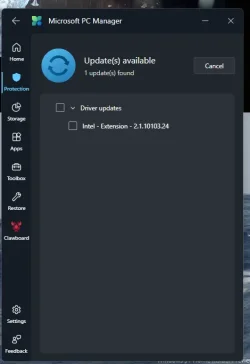
  • driverupdate.webp
    driverupdate.webp
    15.4 KB · Views: 2

My Computer

System One

  • OS
    Windows 11 Home Beta 25H2- 11-‎8-‎2026- 26220.8062
    Computer type
    Laptop
    Manufacturer/Model
    Acer/Aspire 17
    CPU
    13th Gen Intel(R) Core(TM) i7-13620H (2.40 GHz)
    Motherboard
    64-bits besturingssysteem, x64-processor
    Memory
    16 gig
    Graphics Card(s)
    Intel(R) Iris(R) Xe Graphics, NVIDIA Geforce MX450
    Sound Card
    Realtek (R) Audio
    Monitor(s) Displays
    17.3
    Screen Resolution
    1920*1080
    Hard Drives
    Micron_2210_MTFDHBA1T0QFD (SSD) 953,86GB C = 247 D = 705
    Mouse
    m220 logitech
    Internet Speed
    1000 Mbps
    Browser
    Edge chromium
    Antivirus
    Windows Defender, Malwarebytes
You could disable Driver Updates by the trick described in this tutorial:

I don't allow general driver updates via Windows Update Centre (WUC). I use driver updates from the manufacturers of the devices that are concerned. Often the driver updates from WUC are older or are causing problems.

Note: As you can read in the tutorial it may happen that some driver would be updated anyway. Until now I never had that after disabling driver updates.
 

My Computer

System One

  • OS
    Windows 11 Pro 25H2 26200.8457
    Computer type
    PC/Desktop
    Manufacturer/Model
    Build by vendor to my specs
    CPU
    AMD Ryzen 7 5700G
    Motherboard
    MSI PRO B550M-P Gen3
    Memory
    Kingston FURY Beast 2x16GB DIMM DDR4 2666 CL16
    Graphics Card(s)
    MSI GeForce GT 730 2GB LP V1
    Sound Card
    Creative Sound Blaster Audigy FX
    Monitor(s) Displays
    Samsung S24E450F 24"
    Screen Resolution
    1920 x 1080
    Hard Drives
    1. SSD Crucial P5 Plus 500GB PCIe M.2
    2. SSD-SATA Crucial MX500-2TB
    PSU
    Corsair CV650W
    Case
    Cooler Master Silencio S400
    Cooling
    Cooler Master Hyper H412R with Be Quiet Pure Wings 2 PWM BL038 fan
    Keyboard
    Cherry Stream (wired, scissor keys)
    Mouse
    Asus WT465 (wireless)
    Internet Speed
    70 Mbps down / 80 Mbps up
    Browser
    Firefox 130.0
    Antivirus
    F-Secure (Internetprovider version)
    Other Info
    Router: FRITZBox 7490
    Oracle VirtualBox 7 for testing software on Win 10 or 11
Assuming you already updated all your drivers from Acer and you also already verified that Windows is fully updated but this update still keeps returning nevertheless, you could try my batch (.bat) script. It searches for this specific update in Windows Update's available updates, and hides it if found. It's essentially the same as hiding the update with wushowhide.diagcab, but the issue with that is that the tool doesn't always see the update.
Batch:
<# ::
@echo off
"%windir%\System32\WindowsPowerShell\v1.0\powershell.exe" -NoProfile -ExecutionPolicy Bypass -Command ^$fp = '%~dpnx0'; Invoke-Expression ((Get-Content '%~dpnx0') -join [Environment]::NewLine); Elevate
goto :eof
#>
$Command = "`$fp = '$($fp)'; Write-Host 'Processing: ' -ForegroundColor Yellow -NoNewline; Write-Host `$fp; Invoke-Expression ((Get-Content `$fp) -join [Environment]::NewLine); if (`$fp -ne '') { Main }"
function Elevate {
  if (([Security.Principal.WindowsPrincipal][Security.Principal.WindowsIdentity]::GetCurrent()).IsInRole([Security.Principal.WindowsBuiltInRole] "Administrator")) {
    Start-Process "$env:windir\System32\WindowsPowerShell\v1.0\powershell.exe" "-NoProfile -ExecutionPolicy Bypass -Command `"$Command`""
  } else {
    Start-Process "$env:windir\System32\WindowsPowerShell\v1.0\powershell.exe" "-NoProfile -ExecutionPolicy Bypass -Command `"$Command`"" -Verb RunAs
  }
}
function Main {
  if (([Security.Principal.WindowsPrincipal][Security.Principal.WindowsIdentity]::GetCurrent()).IsInRole([Security.Principal.WindowsBuiltInRole] "Administrator")) {
    $Updates = (New-object -ComObject Microsoft.Update.Session).CreateUpdateSearcher().Search("IsInstalled=0 and Type='Driver' and IsHidden=0").Updates
    if ($Updates.Count -gt 0) {
      $Found = ($Updates | Where-Object { $_.Title -eq 'Intel - Extension - 2.1.10103.24' })
      if ($Found.Count -gt 0) {
        $Found | ForEach-Object {
          Write-Host "Found update: " -ForegroundColor Yellow -NoNewline
          Write-Host $_.Title
          $_.IsHidden = 1
        }
      } else { Write-Host "Intel - Extension - 2.1.10103.24 is not available in Windows Update." -ForegroundColor Yellow }
    } else { Write-Host "No driver updates available in Windows Update." -ForegroundColor Yellow }
  } else { Write-Host "Couldn't elevate the script." -ForegroundColor Yellow }
  pause
}
Should you ever want to un-hide the update, then you can
change and IsHidden=0 to and IsHidden=1 and change $_.IsHidden = 1 to $_.IsHidden = 0.
 

My Computers

System One System Two

  • OS
    11 Home
    Computer type
    Laptop
    Manufacturer/Model
    Asus TUF Gaming F16 (2024)
    CPU
    i7 13650HX
    Memory
    16GB DDR5
    Graphics Card(s)
    GeForce RTX 4060 Mobile
    Sound Card
    Eastern Electric MiniMax DAC Supreme; Emotiva UMC-200; Astell & Kern AK240
    Monitor(s) Displays
    Sony Bravia XR-55X90J
    Screen Resolution
    3840×2160
    Hard Drives
    512GB SSD internal
    37TB external
    PSU
    Li-ion
    Cooling
    2× Arc Flow Fans, 4× exhaust vents, 5× heatpipes
    Keyboard
    Logitech K800
    Mouse
    Logitech G402
    Internet Speed
    30Mbit/s up, 500Mbit/s down
    Browser
    FF
    Antivirus
    What's an antivirus?
  • Operating System
    11 Home
    Computer type
    Laptop
    Manufacturer/Model
    Medion S15450
    CPU
    i5 1135G7
    Memory
    16GB DDR4
    Graphics card(s)
    Intel Iris Xe
    Sound Card
    Eastern Electric MiniMax DAC Supreme; Emotiva UMC-200; Astell & Kern AK240
    Monitor(s) Displays
    Sony Bravia XR-55X90J
    Screen Resolution
    3840×2160
    Hard Drives
    2TB SSD internal
    37TB external
    PSU
    Li-ion
    Keyboard
    Logitech K800
    Mouse
    Logitech G402
    Internet Speed
    30Mbit/s up, 500Mbit/s down
    Browser
    FF

Latest Support Threads

Back
Top Bottom



