

Hello, good evening, I need help, my HP Pavilion 15 Gaming is having problems detecting my Nvidia Geforce RTX 1660 TI graphics card, it happened from one moment to the next, I was playing, I turned off the notebook and the next day my graphics card no longer existed, It was connected to the factory Intel UHD card, when I check my Nvidia appears in "hidden" and additionally with an exclamation mark the Intel(R) Pcie controller x16-1901 code 10
"unable to start"
I need help, thanks.
I can't update it, I tried to uninstall it and restart but it still shows that error code.
"unable to start"
I need help, thanks.
I can't update it, I tried to uninstall it and restart but it still shows that error code.
- Windows Build/Version
- 24H2
Attachments
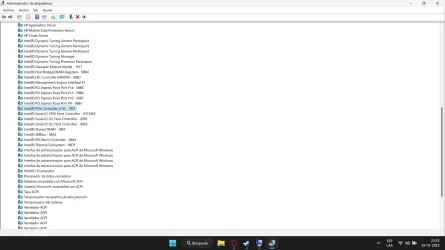
My Computer
At a glance
Windows 11Intel(R) Core(TM) i5-10300H CPU @ 2.50GHz, 2Intel UHD / Nvidia Geforce 1660 TI
- OS
- Windows 11
- Computer type
- Laptop
- Manufacturer/Model
- Notebook HP Pavilion Gaming 15-dk1044la
- CPU
- Intel(R) Core(TM) i5-10300H CPU @ 2.50GHz, 2
- Graphics Card(s)
- Intel UHD / Nvidia Geforce 1660 TI






