Introducing WPA MCP: Early Preview of AI-assisted trace analysis in Windows Performance Analyzer


 Microsoft Dev Blogs:

Windows Performance Analyzer (WPA) is one of the most powerful tools available for understanding system performance on Windows. It helps engineers investigate Event Tracing for Windows (ETW) traces across CPU, memory, disk, networking, scheduling, input, and many other areas of the operating system.

That power also comes with complexity. A single trace can contain a huge amount of data, and finding the right signal often requires knowing which WPA tables to open, which columns matter, how to filter the right time range, and how to connect multiple pieces of evidence into a root cause.

We are working on WPA MCP as an Early Preview feature to make that workflow easier and more approachable.

What is WPA MCP?​

WPA MCP brings GitHub Copilot CLI into the WPA trace-analysis workflow. Instead of starting every investigation by manually navigating graphs and tables, you can ask questions about the trace in natural language. WPA MCP helps GiHub Copilot translate that intent into trace-data exploration, summarize relevant findings, and guide follow-up analysis.

GitHub Copilot can inspect available trace data based on the prompt & identify relevant tables and signals and provide an analysis that helps you decide where to look next.

Why we are building it​

Performance analysis is often bottlenecked by expert knowledge. Experienced WPA users can move quickly, but new or occasional users may not know where to begin. Even experts can spend significant time correlating activity across views before they reach a useful conclusion.

WPA MCP is intended to reduce that friction. It :
  • Start investigations with plain-language questions.
  • Find relevant WPA tables, graphs, and time ranges faster.
  • Identify expensive CPU activity, call stacks, input delays, regressions, and other symptoms.
  • Ask follow-up questions without restarting the investigation.
  • Move from trace exploration to actionable insight more quickly.
An additional advantage is that you can use this for repetitive investigative workflows if your trace contains the same context. Download the latest preview version of WPA with MCP and use AI for trace analysis.

Current Early Preview support​

The current Early Preview release supports GitHub Copilot only. Users need an active GitHub Copilot subscription to use WPA MCP. Other AI assistants, model providers, and MCP clients are not supported in this preview release.

Because this is an Early Preview, the user experience, supported scenarios, setup requirements, and feature behavior may change before general availability.

How it works​

The Early Preview workflow is designed to fit GitHub Copilot CLI into WPA without replacing the existing analysis experience:
  • Open a trace in WPA.
  • Select the GitHub Copilot button in the upper-right corner of the WPA window.
  • Use the Copilot pane to ask a trace-analysis question.
  • Review the generated analysis and supporting signals.
  • Continue with follow-up questions to narrow the investigation.
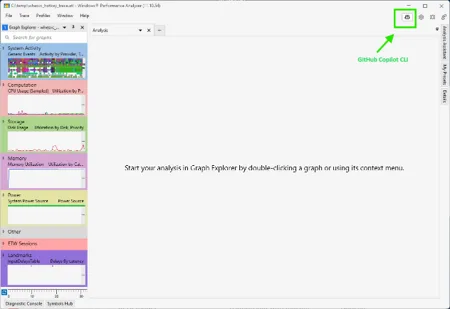
    WPA MCP image
    Initial WPA window with GitHub Copilot CLI highlighted
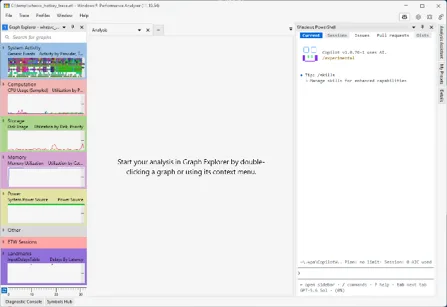
    WPA MCP GitHub image
    WPA window GitHub Copilot CLI window

Example analysis flow​

Start with a detailed prompt that describes the issue, including the observed symptoms, affected time range, and relevant user or system activity. Providing this context helps the LLM focus its investigation and produce a more relevant trace analysis.

Sample prompt below

Analyze this trace and tell me why the machine was slow. Prioritize evidence that explains perceived slowness such as hangs, delayed input response, long ready times, CPU starvation, disk bottlenecks, memory pressure, paging, service contention, and problematic drivers. Use the trace to distinguish between system-wide bottlenecks and activity isolated to a single app or service and create a digestible report based on the insights you received from the trace.

After the initial response, then can continue with more focused questions based on the output.
  • Which processes contributed most to the delay?
  • What call stacks were most expensive during the affected time range?
  • What evidence supports that conclusion OR Which tables supports this conclusion
  • Was the system CPU-bound, blocked on I/O, or waiting on another resource?
This conversational workflow does not remove the need to inspect the trace. Instead, it gives users a faster way to form hypotheses, find relevant evidence, and decide where to focus next.

More examples on Microsoft Docs

Note

As part of responsible AI safeguards, the MCP may request permission to access text or JSON files it generates. This experience will continue to evolve as new features are added.

Settings​

With the release of WPA-MCP, we also have a set of new settings to add more support for the WPA MCP. You can access these Settings from the File Menu or from directly from the startup launcher screen.
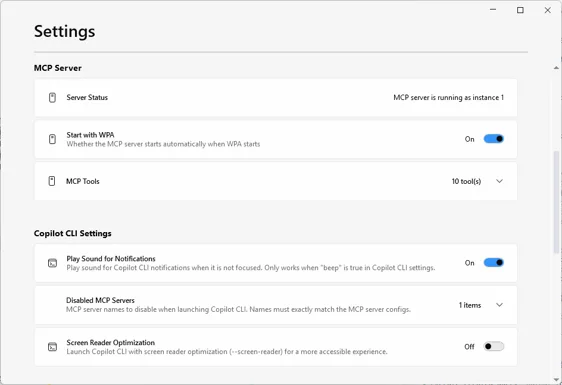
WPA MCP Settings image
WPA MCP Settings

MCP server​

  • Server status – Provide information about the WPA MPC status.
  • Start with WPA – Controls whether WPA MCP starts automatically when GitHub Copilot CLI launches inside WPA. This setting is on by default. If disabled, start the server manually by entering /MCP and selecting WPA-MCP from the list of available MCP servers.
  • MCP tools – Provides a read-only access to the list of tools that WPA MCP uses to query the trace data.

Copilot CLI Settings​

  • Play sound for Notifications – Simple as the title, it plays a sound when GitHub Copilot CLI is not in focus when enabled in the GitHub Copilot CLI settings.
  • Disabled MCP Server – Improve GitHub Copilot CLI startup performance by disabling MCP servers that are not needed for WPA investigations. Since WPA loads Copilot CLI with your configured MCP servers, disabling unused servers reduces startup time and reduce the noise in the context.
  • Screen Reader Optimization – This setting is to provide parity with screen reader optimization settings in GitHub Copilot CLI

Important notes about LLM-generated analysis​

WPA MCP uses large language model capabilities through GitHub Copilot. LLM-generated responses can vary between runs and may be incomplete or incorrect. Users should treat Copilot output as an assistant-generated starting point, not as a final diagnosis.

Before taking action based on a result, users should validate the findings against the underlying WPA trace data. Review referenced tables, graphs, time ranges, processes, threads, and call stacks, and ask follow-up questions when the evidence is unclear.

What we want to learn during Early Preview​

The goal of the Early Preview is to learn where AI assistance provides the most value in real WPA investigations. We are especially interested in feedback on prompt quality, trace-analysis accuracy, useful follow-up workflows, missing scenarios, and places where Copilot should expose more supporting evidence.

This preview is an early step toward making advanced Windows performance diagnostics more accessible, more scalable, and faster for a broader set of WPA users. Please provide feedback using the button besides the GitHub Copilot button or via Feedback Hub (WIN + F) under Settings > Start Menu.

Closing​

WPA MCP is designed to help users spend less time searching through trace data and more time understanding what the trace is telling them. We are excited to share this Early Preview and continue improving the experience with feedback from Windows performance


 Source:

 
Last edited:
Trying this out now with the AI analysing a gnarly shutdown issue on my desktop PC.

Fascinating tech by MS.
 

My Computers My Computers

  • At a glance

    Windows 11 Pro 26H2Intel Core i9 13900KCorsair Dominator Platinum 64gb 5600MT/s DDR5...Sapphire NITRO+ AMD Radeon RX 7900 XTX Vapor-...
    OS
    Windows 11 Pro 26H2
    Computer type
    PC/Desktop
    Manufacturer/Model
    Homebuilt
    CPU
    Intel Core i9 13900K
    Motherboard
    Asus ProArt Z790 Creator WiFi - Bios 3202
    Memory
    Corsair Dominator Platinum 64gb 5600MT/s DDR5 Dual Channel
    Graphics Card(s)
    Sapphire NITRO+ AMD Radeon RX 7900 XTX Vapor-X 24GB
    Sound Card
    External DAC: Cambridge Audio DACMagic200M - Headphone Amps: Topping L70 & SMSL H400
    Monitor(s) Displays
    Samsung S95F OLED 55" TV
    Screen Resolution
    3840 x 2160 120hz
    Hard Drives
    Samsung 980 Pro 2TB (OS)
    Samsung 980 Pro 1TB (Files)
    Lexar NZ790 4TB
    LaCie d2 Professional 6TB external - USB 3.1
    Seagate Expansion 16TB external - USB 3.2
    Seagate One Touch 18TB external HD - USB 3.0
    PSU
    Corsair RM1200x Shift
    Case
    Corsair RGB Smart Case 5000x (white)
    Cooling
    NAUTILUS 360 RS Liquid CPU Cooler
    Keyboard
    Incase Ergonomic USB (Microsoft clone)
    Mouse
    Logitech MX Master 3S
    Internet Speed
    Fibre 900/500 Mbps
    Browser
    Microsoft Edge Chromium
    Antivirus
    Bitdefender Total Security
    Other Info
    AMD Radeon Software & Drivers
    Hasleo Backup Suite
    Dashlane password manager
    Kensington Verimark fingerprint reader
    Logitech Brio 4K webcam
    Orico 10-port powered USB 3.0 hub
  • At a glance

    Windows 11 Pro 25H2Intel® Core™ i9-13900H32GB DDR4-3200 Dual channel*Intel Iris Xᵉ Graphics G7
    Operating System
    Windows 11 Pro 25H2
    Computer type
    Laptop
    Manufacturer/Model
    Asus Vivobook X1605VA
    CPU
    Intel® Core™ i9-13900H
    Motherboard
    Asus X1605VA bios 309
    Memory
    32GB DDR4-3200 Dual channel
    Graphics card(s)
    *Intel Iris Xᵉ Graphics G7
    Sound Card
    Realtek | Intel SST Bluetooth & USB
    Monitor(s) Displays
    16.0-inch, WUXGA 16:10 aspect ratio, IPS-level Panel
    Screen Resolution
    1920 x 1200 60hz
    Hard Drives
    512GB M.2 NVMe™ PCIe® 3.0 SSD
    Mouse
    Logitech MX Ergo Trackball
    Antivirus
    Bitdefender Total Security
    Other Info
    720p Webcam
    WiFi & USB to ethernet
Trying this out now with the AI analysing a gnarly shutdown issue on my desktop PC.

Fascinating tech by MS.
If this feature really works, it might have a negative impact on the total number of posts on this forum :unsure:
 

My Computer My Computer

At a glance

Windows 11 2H25AMD 9900X64 GBAMD 9070 XT
OS
Windows 11 2H25
Computer type
PC/Desktop
Manufacturer/Model
DIY
CPU
AMD 9900X
Motherboard
MSI X870E Carbon
Memory
64 GB
Graphics Card(s)
AMD 9070 XT
Sound Card
built-in
Monitor(s) Displays
Dell 24"
Hard Drives
Sabrent 1 TB NVMe, 4 x SSD (need to check models), 4 x 3.5" HDD, 8-16 TB, all WD
PSU
Seasonic 850
Case
Fractal Design North XL (which I likw)
Cooling
Corsair AIO for CPU, fans for case
Keyboard
Das Keyboard 4
Mouse
Corsair M65 (white)
Internet Speed
1 TB download
Browser
Firefox
Antivirus
Bitdefender
Other Info
Also have Lenovo T14S laptop (me) and Lenovo Slim 71 (wife)
it isn't AI that bluffs it way through things. I'm impressed. I'll share more a bit later. still talking to it and the innards of windows shutdowns in two WPA traces it is analysing.
 

My Computers My Computers

  • At a glance

    Windows 11 Pro 26H2Intel Core i9 13900KCorsair Dominator Platinum 64gb 5600MT/s DDR5...Sapphire NITRO+ AMD Radeon RX 7900 XTX Vapor-...
    OS
    Windows 11 Pro 26H2
    Computer type
    PC/Desktop
    Manufacturer/Model
    Homebuilt
    CPU
    Intel Core i9 13900K
    Motherboard
    Asus ProArt Z790 Creator WiFi - Bios 3202
    Memory
    Corsair Dominator Platinum 64gb 5600MT/s DDR5 Dual Channel
    Graphics Card(s)
    Sapphire NITRO+ AMD Radeon RX 7900 XTX Vapor-X 24GB
    Sound Card
    External DAC: Cambridge Audio DACMagic200M - Headphone Amps: Topping L70 & SMSL H400
    Monitor(s) Displays
    Samsung S95F OLED 55" TV
    Screen Resolution
    3840 x 2160 120hz
    Hard Drives
    Samsung 980 Pro 2TB (OS)
    Samsung 980 Pro 1TB (Files)
    Lexar NZ790 4TB
    LaCie d2 Professional 6TB external - USB 3.1
    Seagate Expansion 16TB external - USB 3.2
    Seagate One Touch 18TB external HD - USB 3.0
    PSU
    Corsair RM1200x Shift
    Case
    Corsair RGB Smart Case 5000x (white)
    Cooling
    NAUTILUS 360 RS Liquid CPU Cooler
    Keyboard
    Incase Ergonomic USB (Microsoft clone)
    Mouse
    Logitech MX Master 3S
    Internet Speed
    Fibre 900/500 Mbps
    Browser
    Microsoft Edge Chromium
    Antivirus
    Bitdefender Total Security
    Other Info
    AMD Radeon Software & Drivers
    Hasleo Backup Suite
    Dashlane password manager
    Kensington Verimark fingerprint reader
    Logitech Brio 4K webcam
    Orico 10-port powered USB 3.0 hub
  • At a glance

    Windows 11 Pro 25H2Intel® Core™ i9-13900H32GB DDR4-3200 Dual channel*Intel Iris Xᵉ Graphics G7
    Operating System
    Windows 11 Pro 25H2
    Computer type
    Laptop
    Manufacturer/Model
    Asus Vivobook X1605VA
    CPU
    Intel® Core™ i9-13900H
    Motherboard
    Asus X1605VA bios 309
    Memory
    32GB DDR4-3200 Dual channel
    Graphics card(s)
    *Intel Iris Xᵉ Graphics G7
    Sound Card
    Realtek | Intel SST Bluetooth & USB
    Monitor(s) Displays
    16.0-inch, WUXGA 16:10 aspect ratio, IPS-level Panel
    Screen Resolution
    1920 x 1200 60hz
    Hard Drives
    512GB M.2 NVMe™ PCIe® 3.0 SSD
    Mouse
    Logitech MX Ergo Trackball
    Antivirus
    Bitdefender Total Security
    Other Info
    720p Webcam
    WiFi & USB to ethernet
this is a capture of the AI running inside the WPA Preview edition!

1785471907673.webp
 

My Computers My Computers

  • At a glance

    Windows 11 Pro 26H2Intel Core i9 13900KCorsair Dominator Platinum 64gb 5600MT/s DDR5...Sapphire NITRO+ AMD Radeon RX 7900 XTX Vapor-...
    OS
    Windows 11 Pro 26H2
    Computer type
    PC/Desktop
    Manufacturer/Model
    Homebuilt
    CPU
    Intel Core i9 13900K
    Motherboard
    Asus ProArt Z790 Creator WiFi - Bios 3202
    Memory
    Corsair Dominator Platinum 64gb 5600MT/s DDR5 Dual Channel
    Graphics Card(s)
    Sapphire NITRO+ AMD Radeon RX 7900 XTX Vapor-X 24GB
    Sound Card
    External DAC: Cambridge Audio DACMagic200M - Headphone Amps: Topping L70 & SMSL H400
    Monitor(s) Displays
    Samsung S95F OLED 55" TV
    Screen Resolution
    3840 x 2160 120hz
    Hard Drives
    Samsung 980 Pro 2TB (OS)
    Samsung 980 Pro 1TB (Files)
    Lexar NZ790 4TB
    LaCie d2 Professional 6TB external - USB 3.1
    Seagate Expansion 16TB external - USB 3.2
    Seagate One Touch 18TB external HD - USB 3.0
    PSU
    Corsair RM1200x Shift
    Case
    Corsair RGB Smart Case 5000x (white)
    Cooling
    NAUTILUS 360 RS Liquid CPU Cooler
    Keyboard
    Incase Ergonomic USB (Microsoft clone)
    Mouse
    Logitech MX Master 3S
    Internet Speed
    Fibre 900/500 Mbps
    Browser
    Microsoft Edge Chromium
    Antivirus
    Bitdefender Total Security
    Other Info
    AMD Radeon Software & Drivers
    Hasleo Backup Suite
    Dashlane password manager
    Kensington Verimark fingerprint reader
    Logitech Brio 4K webcam
    Orico 10-port powered USB 3.0 hub
  • At a glance

    Windows 11 Pro 25H2Intel® Core™ i9-13900H32GB DDR4-3200 Dual channel*Intel Iris Xᵉ Graphics G7
    Operating System
    Windows 11 Pro 25H2
    Computer type
    Laptop
    Manufacturer/Model
    Asus Vivobook X1605VA
    CPU
    Intel® Core™ i9-13900H
    Motherboard
    Asus X1605VA bios 309
    Memory
    32GB DDR4-3200 Dual channel
    Graphics card(s)
    *Intel Iris Xᵉ Graphics G7
    Sound Card
    Realtek | Intel SST Bluetooth & USB
    Monitor(s) Displays
    16.0-inch, WUXGA 16:10 aspect ratio, IPS-level Panel
    Screen Resolution
    1920 x 1200 60hz
    Hard Drives
    512GB M.2 NVMe™ PCIe® 3.0 SSD
    Mouse
    Logitech MX Ergo Trackball
    Antivirus
    Bitdefender Total Security
    Other Info
    720p Webcam
    WiFi & USB to ethernet

Latest Support Threads

Back
Top Bottom