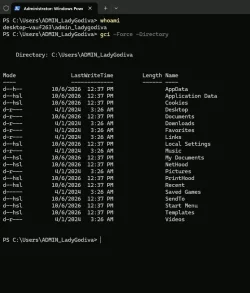
Is the Administrator protection FINALLY has been rolled out? Take a look from the images.


ADMIN_username profile
ADMIN_username account exists temporarily only whilst the relevant elevated task is running.
It is separate from your username account.
So it won't contain the folders-files of your username account or respond to your username account password.


Denis
 
Last edited:

My Computer My Computer

At a glance

Windows 11 Home x64 Version 26H2 Build 26300....
OS
Windows 11 Home x64 Version 26H2 Build 26300.9457
I am running with my local Admin account and what would happen if I open the ADMIN_username profile folder using my Admin Protection credentials? Because when I try to open the ADMIN_username profile folder, it says that I currently do not have Permission to open it unless of course I enter my credentials.

Would I see the same folder and file structure the same way as with my own local Admin User profile folder?

You can browse the contents of the ADMIN_ profile if you want, but it's a regular user profile, just like your real user account's profile. It would almost have to be a normal profile by necessity, so that any processes running under that account would have access to a Desktop, Documents, temp, etc. For example, if some process running under that account says, "I want to write a file to %TEMP%," it goes in the ADMIN_ account's profile, not yours.

It does still exist after the process closes, but there's nothing Earth-shattering in there.

Untitled.webp
 

My Computer My Computer

At a glance

Win11 Ent. 25H2
OS
Win11 Ent. 25H2
So would it be fine to open the ADMIN_user profile folder without causing any security related issues to the Admin Protection feature?
 

My Computer My Computer

At a glance

Windows 11 Pro 22H2
OS
Windows 11 Pro 22H2
What's with the obsession? It's a "dummy account" created purely for sandboxing the token granting process, so it's distinct from your normal identity.

While MS could have created the absolute minimum of folders (like skipping "Music", etc.), it's easier to re-use existing Windows code to create a normal user profile instead of the security team writing their own from scratch.
 

My Computer My Computer

At a glance

Windows 7
OS
Windows 7
So would it be fine to open the ADMIN_user profile folder without causing any security related issues to the Admin Protection feature?

Yeah, if you want to, but I don’t know why you would unless you were looking for a file that got saved there or something.
 

My Computer My Computer

At a glance

Win11 Ent. 25H2
OS
Win11 Ent. 25H2
Yeah, if you want to, but I don’t know why you would unless you were looking for a file that got saved there or something.
If files are actually getting saved there, I don't think its a wise idea. Because the whole point I would think that this ADMIN profile folder can't be touched by malware or even a legitimate file. Because what if malware gets into this ADMIN profile folder then this Administrator Protection wouldn't do no protecting at all. No files should be added in there manually or automatically in that folder.

I thought the whole point of the Administrator Protection was that when a local Admin user account elevates when making system changes or installing applications, then the Administrator Protection creates a temporary Admin token and that temporary Admin token then gets destroyed after the elevation ends along with the ADMIN profile folder.
 
Last edited:

My Computer My Computer

At a glance

Windows 11 Pro 22H2
OS
Windows 11 Pro 22H2
If files are actually getting saved there, I don't think its a wise idea. Because the whole point I would think that this ADMIN profile folder can't be touched by malware or even a legitimate file. Because what if malware gets into this ADMIN profile folder then this Administrator Protection wouldn't do no protecting at all. No files should be added in there manually or automatically in that folder.

I thought the whole point was that when a local Admin user account elevates when making system changes or installing applications, then the Administrator Protection creates a temporary Admin token and that temporary Admin token then gets destroyed after the elevation ends along with the ADMIN profile folder.
Sure, no files should be saved there. But you might have some dumb app that automatically saves to the Documents folder, without asking, for example. That's why this stuff needs to be thoroughly tested in whatever your environment is. You don't see that much anymore like we did in the 90's and 00's, but it still happens.

But no, the admin token goes away, but the profile remains. It should be protected such that only an admin account can get in there, so that's good. I actually haven't checked the ACLs on the ADMIN_ account's folder though.
 

My Computer My Computer

At a glance

Win11 Ent. 25H2
OS
Win11 Ent. 25H2

Latest Support Threads

Back
Top Bottom