
- Local time
- 11:24 AM
- Posts
- 3,250
- OS
- Windows 11 Pro 25H2 (RP channel)
Is there a way (registry change?) that can fix Windows Insider so that it stays on Release Preview?
Had a problem on another PC where it downloaded the latest Dev build even though I didn't change the setting - it was showing Dev instead of RP and I've spent half a day trying to get back to RP. Ended up doing a clean install!
On my Pro install I can set it in the Group policy to now allow anything other than RP - can I do similar with Home?
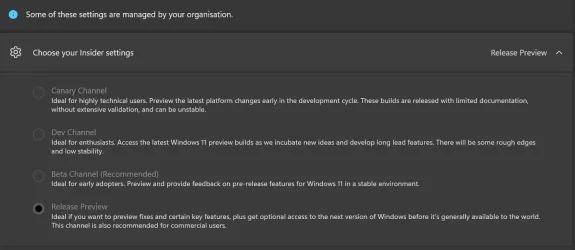
Mine shows like this on Pro as I set it in Group policy (see pic - all Preview channels are greyed out) - I need to get the same on Home. I used the command line thing shown in another post on this forum to install Group policy on Home but the setting has no effect
Had a problem on another PC where it downloaded the latest Dev build even though I didn't change the setting - it was showing Dev instead of RP and I've spent half a day trying to get back to RP. Ended up doing a clean install!
On my Pro install I can set it in the Group policy to now allow anything other than RP - can I do similar with Home?
Mine shows like this on Pro as I set it in Group policy (see pic - all Preview channels are greyed out) - I need to get the same on Home. I used the command line thing shown in another post on this forum to install Group policy on Home but the setting has no effect
- Windows Build/Version
- Windows 11 26200.6713
Attachments
Last edited:
My Computer
At a glance
Windows 11 Pro 25H2 (RP channel)AMD Ryzen 7 9800X3D 8-core64GB Corsair Titanium 6000/CL30MSI Suprim 5080 SOC
- OS
- Windows 11 Pro 25H2 (RP channel)
- Computer type
- PC/Desktop
- Manufacturer/Model
- MSI
- CPU
- AMD Ryzen 7 9800X3D 8-core
- Motherboard
- MEG X870E Godlike
- Memory
- 64GB Corsair Titanium 6000/CL30
- Graphics Card(s)
- MSI Suprim 5080 SOC
- Sound Card
- Soundblaster AE-9
- Monitor(s) Displays
- ASUS TUF Gaming VG289Q
- Screen Resolution
- 3840x2160
- Hard Drives
- Samsung 9100 Pro 4TB (gen 5 x4, system drive/games)
Samsung 990 Pro 2TB
Samsung 980 Pro 2TB
Samsung 870 Evo 4TB
Samsung 870 Evo 2TB
Samsung T9 4TB
- PSU
- Seasonic PX-2200
- Case
- Bequiet! Dark Base Pro 901
- Cooling
- Noctua NH-D15S Chromax black
- Keyboard
- Logitech G915 X (wired)
- Mouse
- Logitech G903 with PowerPlay charger
- Internet Speed
- 900Mb/sec
- Browser
- Microsoft Edge
- Antivirus
- Windows Defender






