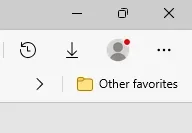
Is there any way to hide the profile button in Edge?


cheaterslick

Well-known member
Power User
Local time
5:50 PM
Posts
1,407
Location
Virginia, USA
OS
Windows 11 Pro 25H2 build: (26200.7623)
I find it annoying having to look at it all the time. Especially when the red dot appears on the icon asking me to log in and sync my data.

Thanks
 

My Computers

System One System Two

  • OS
    Windows 11 Pro 25H2 build: (26200.7623)
    Computer type
    Laptop
    Manufacturer/Model
    Microsoft Surface Pro
    Memory
    32GB
  • Operating System
    Microsoft 25H2 Pro
    Computer type
    Laptop
    Manufacturer/Model
    Dell Pro 14 - PC14250
    CPU
    Intel Core Ultra 7
    Memory
    64GB
    Graphics card(s)
    Intel Integrated Graphics
    Hard Drives
    Micron 1TB SSD
There should be a toggle in Settings/Appearance.
 

My Computers

System One System Two

  • OS
    Windows 11 Pro
    Computer type
    PC/Desktop
    Manufacturer/Model
    ASUS ROG Strix
  • Operating System
    Windows 11 Pro
    Computer type
    Laptop
    Manufacturer/Model
    ASUS VivoBook
Edge > Settings > Appearance # Scroll down to # Customise Toolbar Bar > Show Icon in Title Bar

best of luck, Steve ..
 

My Computers

System One System Two

  • OS
    Debian Trixie KDE Windows 11 Home
    Computer type
    PC/Desktop
    Manufacturer/Model
    HP 24" AiO
    CPU
    Ryzen 7 5825u
    Motherboard
    HP
    Memory
    64GB DDR4 3200
    Graphics Card(s)
    Ryzen 7 5825u
    Sound Card
    RealTek
    Monitor(s) Displays
    24" HP AiO
    Screen Resolution
    1920 x 1080 @60 Hz
    Hard Drives
    1TB WD Blue SN580 M2 SSD Partitioned.
    2x 1TB USB HDD External Backup/Storage.
    PSU
    90W external power brick
    Case
    24" All in One
    Cooling
    Default Air Cooling
    Keyboard
    HP WiFi UK extended
    Mouse
    HP WiFi 3 Button
    Internet Speed
    1GB full fibre
    Browser
    Edge & Firefox
    Antivirus
    AVG Internet Security/Windows Defender
    Other Info
    Mainly Open Source Software
  • Operating System
    Ubuntu 22.04.5 LTS
    Computer type
    Laptop
    Manufacturer/Model
    Dell 13" Latitude 2017
    CPU
    i5 7200u
    Motherboard
    Dell
    Memory
    16GB DDR4
    Graphics card(s)
    Intel
    Sound Card
    Intel
    Monitor(s) Displays
    13" Dell Laptop
    Hard Drives
    250GB Crucial 2.5" SSD
    Mouse
    Generic WiFi 3 button
    Internet Speed
    WiFi only
    Browser
    Firefox
    Antivirus
    ClamAV TK
    Other Info
    Mainly Open Source Software
Edge > Settings > Appearance # Scroll down to # Customise Toolbar Bar > Show Icon in Title Bar

I already did that.

profilebutton.webp

And yet it won't go away with that stupid red dot that I find annoying.

profilebutton2.webp

:(
 

My Computers

System One System Two

  • OS
    Windows 11 Pro 25H2 build: (26200.7623)
    Computer type
    Laptop
    Manufacturer/Model
    Microsoft Surface Pro
    Memory
    32GB
  • Operating System
    Microsoft 25H2 Pro
    Computer type
    Laptop
    Manufacturer/Model
    Dell Pro 14 - PC14250
    CPU
    Intel Core Ultra 7
    Memory
    64GB
    Graphics card(s)
    Intel Integrated Graphics
    Hard Drives
    Micron 1TB SSD
Oh, that will NEVER go away... just like the "Get Started" icon and the "Recommended" section on the Start Menu that I (and many other people, I suspect) never use.

I hardly use Edge but on the rare occasion that I do then I just ignore it, same with the orange dot that occasionally appears on my profile picture at the bottom of the Start Menu. Been ignoring them for a couple of years now.

I do believe there is a way to move that Edge icon to the top left side of the screen instead of the 'default' right but there doesn't seem to be any way to get rid of it at the moment.
 

My Computer

System One

  • OS
    Windows 11 Professional 25H2
    Computer type
    PC/Desktop
    Manufacturer/Model
    Home Built
    CPU
    12th Gen Intel(R) Core(TM) i5-12400F 2.50 GHz
    Motherboard
    Gigabyte B760 DS3H AX DDR4
    Memory
    32GB (4x8GB) Kingston Fury RGB DDR4
    Graphics Card(s)
    NVIDIA GeForce GTX 1650
    Sound Card
    Onboard Sound
    Monitor(s) Displays
    BenQ GL2460 (24 inch - oldie but a goodie)
    Screen Resolution
    1920x1080
    Hard Drives
    Samsung SSD 870 EVO x 2 (250GB and 500GB) plus several external Samsung SSD's.
    PSU
    Corsair HX 750
    Case
    DeepCool
    Cooling
    Stock CPU cooler. 5 case fans (2 front, 2 top and 1 rear)
    Keyboard
    Logitech
    Mouse
    Logitech
    Internet Speed
    500/40 Fibre
    Browser
    Mozilla Firefox and Microsoft Edge
    Antivirus
    Windows Security
Oh, that will NEVER go away... just like the "Get Started" icon and the "Recommended" section on the Start Menu that I (and many other people, I suspect) never use.

I hardly use Edge but on the rare occasion that I do then I just ignore it, same with the orange dot that occasionally appears on my profile picture at the bottom of the Start Menu. Been ignoring them for a couple of years now.

I do believe there is a way to move that Edge icon to the top left side of the screen instead of the 'default' right but there doesn't seem to be any way to get rid of it at the moment.
Bummer. :(

I didn't see tweak for it in Winaero Tweaker so I was hoping there was another way...
 

My Computers

System One System Two

  • OS
    Windows 11 Pro 25H2 build: (26200.7623)
    Computer type
    Laptop
    Manufacturer/Model
    Microsoft Surface Pro
    Memory
    32GB
  • Operating System
    Microsoft 25H2 Pro
    Computer type
    Laptop
    Manufacturer/Model
    Dell Pro 14 - PC14250
    CPU
    Intel Core Ultra 7
    Memory
    64GB
    Graphics card(s)
    Intel Integrated Graphics
    Hard Drives
    Micron 1TB SSD
Back
Top Bottom