Issue with my windows interface color


Lekumar

Member
Local time
2:32 PM
Posts
2
OS
Windows 11
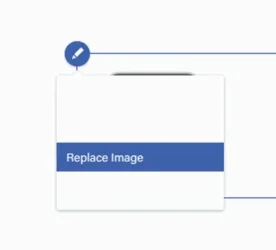
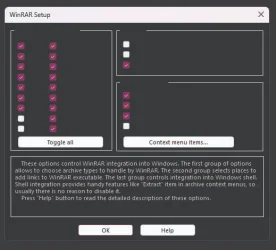
Hi can someone help me please with this issur i have been having since sunday. The drop down menus whether on desktop or on browsers appears as the images attached to this thread... I dont know what cause this problem - i have tried everything changing the settings of the color including uninstall any themes but all in vain. Please can someone help me- thank you🙏

Windows 11
Os 26100.6584
 
Windows Build/Version
26100.6584

Attachments

  • 2_064319.webp
    2_064319.webp
    3.6 KB · Views: 3
  • 1_064305.webp
    1_064305.webp
    18.6 KB · Views: 2

My Computer

System One

  • OS
    Windows 11
    Computer type
    Laptop
    Manufacturer/Model
    Asus
Try these commands one at a time in Powershell followed by a reboot

DISM /Online /Cleanup-Image /CheckHealth

DISM /Online /Cleanup-Image /ScanHealth

DISM /Online /Cleanup-Image /RestoreHealth

DISM /online /Cleanup-Image /StartComponentCleanup

SFC /ScanNow
 

My Computers

System One System Two

  • OS
    Windows 11 Enterprise 25H2 26200 7462
    Computer type
    PC/Desktop
    Manufacturer/Model
    Custom Build
    CPU
    Intel XEON E5-2699 v3
    Motherboard
    ASUS X99-A
    Memory
    64GB Teamgroup UD4-3600
    Graphics Card(s)
    NVIDIA GeForce GTX 1080 Ti
    Sound Card
    Integrated
    Monitor(s) Displays
    ACER X34 Predator
    Screen Resolution
    3440 x 1440
    Hard Drives
    Crucial CT1000P 3P SSD8 1TB
    Crucial CT1000 BX500 SSD 1TB
    PSU
    GameMax Pro
    Case
    Fractal Design
    Cooling
    Corsair H110iGT + 6 140mm Fans
    Keyboard
    Corsair K4
    Mouse
    G-Skill G502
    Internet Speed
    300MBs
    Browser
    Chrome
    Antivirus
    OEM
    Other Info
    ASUS RT-AC87U Router
  • Operating System
    25H2 26200.5074
    Computer type
    Laptop
    Manufacturer/Model
    ASUS X555LA
    Memory
    8GB
    Browser
    Chrome
    Antivirus
    OEM
@Lekumar were you using any 3rd party custom theme patcher or application? I have seen similar with an earlier version of SecureUxTheme. If so, did you restart your machine after uninstall?
 

My Computer

System One

  • OS
    Windows 11 Pro 25H2 26200.7840
    Computer type
    Laptop
    Manufacturer/Model
    Lenovo IdeaPad L340
    CPU
    Intel Core i3-8145U
    Memory
    16GB
    Hard Drives
    500 GB M2 1 TB HDD
    Internet Speed
    400 MB
    Browser
    Chrome | Edge
    Antivirus
    Microsoft Defender | Block unknown executables | Various ASR rules enabled | Smart App Control
Try these commands one at a time in Powershell followed by a reboot

DISM /Online /Cleanup-Image /CheckHealth

DISM /Online /Cleanup-Image /ScanHealth

DISM /Online /Cleanup-Image /RestoreHealth

DISM /online /Cleanup-Image /StartComponentCleanup

SFC /ScanNow

I always felt those were more aimed at Command Prompt.

For Powershell:

Code:
Repair-WindowsImage -Online -CheckHealth

Repair-WindowsImage -Online -ScanHealth

Repair-WindowsImage -Online -RestoreHealth

Repair-WindowsImage -Online -StartComponentCleanup
 

My Computer

System One

  • OS
    Windows 11 Pro
Hi thank you for your reply and help, eventually I found the main issue which was a third party theme "Rectify11" and after uninstalling it, the interface turn back to normal. Thank you again & appreciate your help/support & reply.

Thank you @Rollback_Jockey
@oldschool
@KevTech
 

My Computer

System One

  • OS
    Windows 11
    Computer type
    Laptop
    Manufacturer/Model
    Asus

Latest Support Threads

Back
Top Bottom