Hi, I was using over provisioning with my Samsung 990 Pro and this was fine.
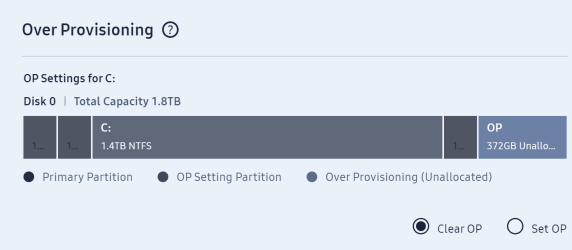
After doing a reinstallation of Windows 11 (so I assume it's reinstalling windows that's caused this) I have just noticed that over provisioning is not set to off and there is 372gb of data set as unallocated.
Does reinstalling windows turn over provisioning off, does anyone know?
This is how it looks:
If I now try to set it back on, it doesn't seem to want to include this space, as shown below:
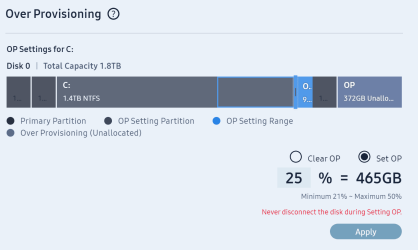
I have just tried to set a new Over Provisioning and the software did you the unallocated space shown but also created a separate one, similar to how the 2nd picture above looks, which just makes up the difference of the unallocated space. So there are 2 partitions of over provisioning.
I then turned it back off (clear op) and it only cleared the newly created partition, which was making up the extra space, but the 372gb unallocated space still remains.
Does anyone know how I will recover this space, can it be done within Samsung Magician?
If reinstalling windows doesn't turn this off, I really don't know how it's turned it's self off, as it was definitely set on.
Regards
James
After doing a reinstallation of Windows 11 (so I assume it's reinstalling windows that's caused this) I have just noticed that over provisioning is not set to off and there is 372gb of data set as unallocated.
Does reinstalling windows turn over provisioning off, does anyone know?
This is how it looks:
If I now try to set it back on, it doesn't seem to want to include this space, as shown below:
I have just tried to set a new Over Provisioning and the software did you the unallocated space shown but also created a separate one, similar to how the 2nd picture above looks, which just makes up the difference of the unallocated space. So there are 2 partitions of over provisioning.
I then turned it back off (clear op) and it only cleared the newly created partition, which was making up the extra space, but the 372gb unallocated space still remains.
Does anyone know how I will recover this space, can it be done within Samsung Magician?
If reinstalling windows doesn't turn this off, I really don't know how it's turned it's self off, as it was definitely set on.
Regards
James
Last edited:
My Computer
At a glance
Windows 11Intel i9 13980HX32GBNVidia Geforce 4070
- OS
- Windows 11
- Computer type
- Laptop
- Manufacturer/Model
- Asus ProArt Studiobook 16 OLED (H7604JI)
- CPU
- Intel i9 13980HX
- Motherboard
- Unknown
- Memory
- 32GB
- Graphics Card(s)
- NVidia Geforce 4070
- Monitor(s) Displays
- 16" Oled
- Hard Drives
- 1TB