RealTek Bluetooth Woes


JosephR

Member
Local time
6:17 PM
Posts
4
Location
Excelsior Springs, MO
OS
Windows 11
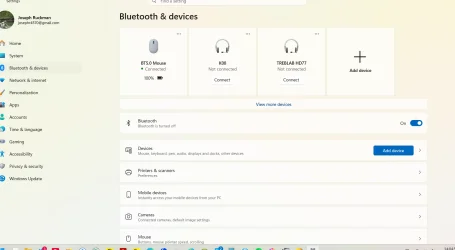
I keep losing the Bluetooth connection on my laptop, which I use primarily for my mouse. I have the MediaTek Bluetooth adapter, and when it initially fails, everything on the Settings screen looks normal including that my mouse is connected, except for the fact that it shows the Bluetooth switch as “on” and yet off the the left is the notice that Bluetooth is turned off. If I go to Device Manager, it will initially show that the adapter is acting normally, but eventually it will fess up and say it’s been disconnected because there is a problem. I click update the driver, and it tells me the latest driver is already installed.

I can recover by uninstalling the MediaTek device and shutting down the laptop - a simple restart doesn’t do it. - but it’s becoming a real PITA.

I have read about going to the manufacturer (HP) and downloading a driver from them, which I’ve done, but it's basically a general update application, and doesn't solve the problem. I've also read about going to Microsoft and downloading a driver from their catalogue, which I've also done, but I’m not enough of a tech guy to actually install it. Maybe a little help in that regard? Or perhaps some other suggestions?
Screenshot 2026-08-30 140505.webp
 

My Computer My Computer

At a glance

Windows 11Intel Core i7-1470016GBDDR5-5600MT/sIntel UHD Graphics
OS
Windows 11
Computer type
PC/Desktop
Manufacturer/Model
HP
CPU
Intel Core i7-14700
Memory
16GBDDR5-5600MT/s
Graphics Card(s)
Intel UHD Graphics
Hard Drives
2TB PCle Gen4 NVMe M.2 SSD
Antivirus
Norton 360
Create a System Restore point.

In Device Manager, uninstall the Mediatek device, including the drivers...reboot, and let Windows re-install it.

Go to the device properties, click on the Power Management tab, and uncheck "Allow the computer to turn off this device..."

If Fast Startup is enabled, disable it.
 

My Computer My Computer

At a glance

Windows 11 Pro 25H2
OS
Windows 11 Pro 25H2
Computer type
Laptop
Manufacturer/Model
Toshiba
I click update the driver, and it tells me the latest driver is already installed.
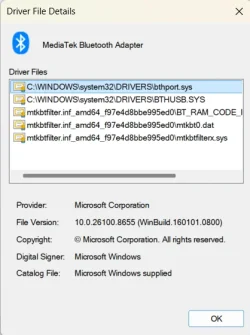
What's the current driver you have installed?
 

My Computers My Computers

  • At a glance

    Windows 11 ProIntel Core Ultra 7 270K PlusOLOy Blade RGB 32GB (2 x 16GB) DDR5 6000 @ 7200Dell RTX 4090
    OS
    Windows 11 Pro
    Computer type
    PC/Desktop
    Manufacturer/Model
    Custom
    CPU
    Intel Core Ultra 7 270K Plus
    Motherboard
    GIGABYTE Z890 AORUS MASTER AI TOP
    Memory
    OLOy Blade RGB 32GB (2 x 16GB) DDR5 6000 @ 7200
    Graphics Card(s)
    Dell RTX 4090
    Sound Card
    onboard, PHILIPS Fidelio X2HR
    Monitor(s) Displays
    MSI MAG 321UPX
    Screen Resolution
    3840x2160
    Hard Drives
    Sabrent 1TB Rocket 4 Plus, Fanxiang S790 2TB
    PSU
    SAMA XP1000W
    Case
    Lian Li V3000 Plus (White)
    Cooling
    Custom water
    Keyboard
    ZUOYA GMK104 Wireless (white with blue switches)
    Mouse
    AJAZZ AJ159 APEX (White)
    Internet Speed
    4Gbps down / 4Gbps up
    Browser
    FireFox / Microsoft Edge
    Antivirus
    Windows Security
    Other Info
    Both CPU and GPU are under custom watercooling with an Alphacool NexXxoS Monsta 480mm radiator handling the nearly 600W+ while gaming.
  • At a glance

    Windows 11 ProAMD Ryzen 7 7800X3D32GB DDR5-6000 @ 6200PNY RTX 5080 OC (removed stock fans and put o...
    Operating System
    Windows 11 Pro
    Computer type
    PC/Desktop
    Manufacturer/Model
    Custom
    CPU
    AMD Ryzen 7 7800X3D
    Motherboard
    GIGABYTE X870 AORUS ELITE WIFI7
    Memory
    32GB DDR5-6000 @ 6200
    Graphics card(s)
    PNY RTX 5080 OC (removed stock fans and put on 140mm case fans)
    Sound Card
    HDMI (Nvidia) → Integra DRX 3.4
    Monitor(s) Displays
    LG C5 65"
    Screen Resolution
    3840x2160
    Hard Drives
    WD PC SN810 2TB
    PSU
    PCCOOLER CPS YS1000
    Case
    Fractal Design Meshify 2 XL (dark tint)
    Cooling
    Custom water
    Keyboard
    NPET K63 2.4G Wireless/Bluetooth 60% Mechanical Keyboard (brown switches)
    Mouse
    FFJ Wireless Gaming Mouse
    Browser
    Microsoft Edge
    Antivirus
    Windows Security

My Computer My Computer

At a glance

Windows 11Intel Core i7-1470016GBDDR5-5600MT/sIntel UHD Graphics
OS
Windows 11
Computer type
PC/Desktop
Manufacturer/Model
HP
CPU
Intel Core i7-14700
Memory
16GBDDR5-5600MT/s
Graphics Card(s)
Intel UHD Graphics
Hard Drives
2TB PCle Gen4 NVMe M.2 SSD
Antivirus
Norton 360
Back
Top Bottom