
Bluetooth Could not Recognize my Bluetooth Speakers


Silkcat

Member
Local time
5:47 PM
Posts
30
OS
Windows 11 Home Version 24H2 OS build 26100.8875
Hello,

I accidentally uninstalled my Logitech Z506 speakers in Settings/Sounds/Device and now I couldn't get it back. When I tried to add a device, it wouldn't show up on the list, it seemed that the Bluetooth couldn't find it. Could someone please tell me how could I connect it back via Bluetooth? All drivers are updated and everything else seems fine.

Any suggestions/comments are much appreciated.

Thank you.
 

My Computer My Computer

At a glance

Windows 11 Home Version 24H2 OS build 26100.8875Intel(R) Core(TM) i5-1035G1 CPU @ 1.00GHz (1....32.0 GBIntel(R) UHD Graphics (128 MB)
OS
Windows 11 Home Version 24H2 OS build 26100.8875
Computer type
Laptop
Manufacturer/Model
Dell Inspiron 3793
CPU
Intel(R) Core(TM) i5-1035G1 CPU @ 1.00GHz (1.19 GHz)
Memory
32.0 GB
Graphics Card(s)
Intel(R) UHD Graphics (128 MB)
Monitor(s) Displays
Internal Dell Display and Dell P2715Q
Screen Resolution
1920 x 1080, 60.13 Hz / 1920 x 1080, 60 Hz
Hard Drives
Seagate ST1000LM035-1RK172
Keyboard
Dell Laptop Keyboard
Mouse
Logitech M705
Browser
Google Chrome, Firefox
Antivirus
AVG, Malwarebytes, SuperAntispyware, CCleaner
Are you sure you have the right model number? According to Logitech the Logitech Z506 only has 3.5mm wired connections. If you want to use it with Bluetooth you need a Bluetooth audio receiver. You plug the speakers into it and then pair the Bluetooth audio receiver with your computer.
To use Bluetooth with 3.5mm wired speakers, you need a Bluetooth audio receiver (RX mode). Plug the adapter into the speaker's 3.5mm aux input, power the adapter via USB or its internal battery, and pair your phone or tablet via Bluetooth to stream audio wirelessly.
 

My Computers My Computers

  • At a glance

    Windows 11 Pro 25H2 (26200.6901)AMD Ryzen 7 6800H with Radeon 680M GPU (486MB...Crucial DDR5-4800 (2400MHz) 32GB (2 x 16GB)NVIDIA RTX 3060 Laptop (6GB RAM)
    OS
    Windows 11 Pro 25H2 (26200.6901)
    Computer type
    Laptop
    Manufacturer/Model
    ASUS TUF Gaming A15 (2022)
    CPU
    AMD Ryzen 7 6800H with Radeon 680M GPU (486MB RAM)
    Memory
    Crucial DDR5-4800 (2400MHz) 32GB (2 x 16GB)
    Graphics Card(s)
    NVIDIA RTX 3060 Laptop (6GB RAM)
    Sound Card
    n/a
    Monitor(s) Displays
    15.6-inch
    Screen Resolution
    1920x1080 300Hz
    Hard Drives
    2 x Samsung 990 Evo Plus (2TB M.2 NVME SSD)
    PSU
    n/a
    Mouse
    Wireless Mouse M510
    Internet Speed
    2100Mbps/300Mbps
    Browser
    Firefox
    Antivirus
    Malwarebytes
  • At a glance

    Windows 11 Pro 25H2 (26200.8246)AMD Ryzen 7 5700X3DG.SKILL Flare X 32GB (2x16GB) DDR4ASUS ROG-STRIX-RTX3060TI-08G-V2-GAMING (RTX 3...
    Operating System
    Windows 11 Pro 25H2 (26200.8246)
    Computer type
    PC/Desktop
    Manufacturer/Model
    Custom build
    CPU
    AMD Ryzen 7 5700X3D
    Motherboard
    ASUS ROG Strix B550-F Gaming WiFi II
    Memory
    G.SKILL Flare X 32GB (2x16GB) DDR4
    Graphics card(s)
    ASUS ROG-STRIX-RTX3060TI-08G-V2-GAMING (RTX 3060-Ti, 8GB RAM)
    Monitor(s) Displays
    Samsung G50D IPS 27"
    Screen Resolution
    1440p/180Hz
    Hard Drives
    SAMSUNG 990 EVO Plus (2TB] M.2 NVME SSD
    SAMSUNG 990 EVO Plus (4TB) M.2 NVME SSD
    PSU
    Corsair RM750x (750 watts)
    Case
    Cooler Master MasterCase 5
    Cooling
    Scythe Mugen 6
    Keyboard
    Logitech K520 (MK540 keyboard/mouse combo)
    Mouse
    Logitech M310 (MK540 keyboard/mouse combo)
    Internet Speed
    2100 Mbps down / 300 Mbps up
    Browser
    Firefox, Edge, Chrome
    Antivirus
    Malwarebytes (Premium)
    Other Info
    ASUS Blu-ray Burner BW-16D1HT (SATA) || Western Digital Easystore 20TB USB 3.0 external hard drive used with Acronis True Image 2025 backup software || HP OfficeJet Pro 6975 Printer/Scanner
Sorry, it should be Z606 which has Bluetooth capability. This is how I used to connect it :

1. Plug the wire with red and white plugs to the back of the speaker.
2. Plus the other end into the headphone jack of the laptop.
3. Bluetooth automatically recognized the speakers and connected.

Now my Bluetooth wouldn't recognize it and it does not show in Settings/Sound/Output Device.

Thank you .
 

My Computer My Computer

At a glance

Windows 11 Home Version 24H2 OS build 26100.8875Intel(R) Core(TM) i5-1035G1 CPU @ 1.00GHz (1....32.0 GBIntel(R) UHD Graphics (128 MB)
OS
Windows 11 Home Version 24H2 OS build 26100.8875
Computer type
Laptop
Manufacturer/Model
Dell Inspiron 3793
CPU
Intel(R) Core(TM) i5-1035G1 CPU @ 1.00GHz (1.19 GHz)
Memory
32.0 GB
Graphics Card(s)
Intel(R) UHD Graphics (128 MB)
Monitor(s) Displays
Internal Dell Display and Dell P2715Q
Screen Resolution
1920 x 1080, 60.13 Hz / 1920 x 1080, 60 Hz
Hard Drives
Seagate ST1000LM035-1RK172
Keyboard
Dell Laptop Keyboard
Mouse
Logitech M705
Browser
Google Chrome, Firefox
Antivirus
AVG, Malwarebytes, SuperAntispyware, CCleaner
Well, I figured out how to use the Aux option instead and it's now connected to my laptop.
 

My Computer My Computer

At a glance

Windows 11 Home Version 24H2 OS build 26100.8875Intel(R) Core(TM) i5-1035G1 CPU @ 1.00GHz (1....32.0 GBIntel(R) UHD Graphics (128 MB)
OS
Windows 11 Home Version 24H2 OS build 26100.8875
Computer type
Laptop
Manufacturer/Model
Dell Inspiron 3793
CPU
Intel(R) Core(TM) i5-1035G1 CPU @ 1.00GHz (1.19 GHz)
Memory
32.0 GB
Graphics Card(s)
Intel(R) UHD Graphics (128 MB)
Monitor(s) Displays
Internal Dell Display and Dell P2715Q
Screen Resolution
1920 x 1080, 60.13 Hz / 1920 x 1080, 60 Hz
Hard Drives
Seagate ST1000LM035-1RK172
Keyboard
Dell Laptop Keyboard
Mouse
Logitech M705
Browser
Google Chrome, Firefox
Antivirus
AVG, Malwarebytes, SuperAntispyware, CCleaner
Have you tried repairing the device according to the manual?

Bluetooth/Bluetooth Pairing: a Short press selects Bluetooth mode b Long press will start Bluetooth pairing mode, LED will quickly blink ‘bt’ on the display
 

My Computer My Computer

At a glance

Windows 11 Pro 25H2i7 12700k64GB DDR5 [CMK64GX5M2B5200C40]MSI 4060 2x Ventus 8G
OS
Windows 11 Pro 25H2
Computer type
PC/Desktop
Manufacturer/Model
DIY
CPU
i7 12700k
Motherboard
7E07vMA [Z790 Pro Max Wifi]
Memory
64GB DDR5 [CMK64GX5M2B5200C40]
Graphics Card(s)
MSI 4060 2x Ventus 8G
Sound Card
Realtek® ALC4080 Codec
Monitor(s) Displays
ASUS VA24DQSB
Screen Resolution
1920x1080 @ 75hz
Hard Drives
Samsung 980 Pro 1TB (OS Drive)
Samsung 980 Pro 2TB (Secondary Drive)
Samsung 980 Pro 1TB (Other)
Samsung 860 Pro 512 (Other)
WD6400AAKS (Other)
PSU
Corsair 850x
Cooling
Noctua NH-D15
Mouse
G502 X Lightspeed
Browser
Chrome, Firefox
Antivirus
Malwarebytes Premium, Defender
Yes, I did many times, it just won't show up on the device list for me to choose. In the past, it'll show up on the list as soon as I turned on the speaker.
 

My Computer My Computer

At a glance

Windows 11 Home Version 24H2 OS build 26100.8875Intel(R) Core(TM) i5-1035G1 CPU @ 1.00GHz (1....32.0 GBIntel(R) UHD Graphics (128 MB)
OS
Windows 11 Home Version 24H2 OS build 26100.8875
Computer type
Laptop
Manufacturer/Model
Dell Inspiron 3793
CPU
Intel(R) Core(TM) i5-1035G1 CPU @ 1.00GHz (1.19 GHz)
Memory
32.0 GB
Graphics Card(s)
Intel(R) UHD Graphics (128 MB)
Monitor(s) Displays
Internal Dell Display and Dell P2715Q
Screen Resolution
1920 x 1080, 60.13 Hz / 1920 x 1080, 60 Hz
Hard Drives
Seagate ST1000LM035-1RK172
Keyboard
Dell Laptop Keyboard
Mouse
Logitech M705
Browser
Google Chrome, Firefox
Antivirus
AVG, Malwarebytes, SuperAntispyware, CCleaner
Yes, I did many times, it just won't show up on the device list for me to choose. In the past, it'll show up on the list as soon as I turned on the speaker.

What shows under System > Sound > All Sound Devices?
 

My Computer My Computer

At a glance

Windows 11 Pro 25H2i7 12700k64GB DDR5 [CMK64GX5M2B5200C40]MSI 4060 2x Ventus 8G
OS
Windows 11 Pro 25H2
Computer type
PC/Desktop
Manufacturer/Model
DIY
CPU
i7 12700k
Motherboard
7E07vMA [Z790 Pro Max Wifi]
Memory
64GB DDR5 [CMK64GX5M2B5200C40]
Graphics Card(s)
MSI 4060 2x Ventus 8G
Sound Card
Realtek® ALC4080 Codec
Monitor(s) Displays
ASUS VA24DQSB
Screen Resolution
1920x1080 @ 75hz
Hard Drives
Samsung 980 Pro 1TB (OS Drive)
Samsung 980 Pro 2TB (Secondary Drive)
Samsung 980 Pro 1TB (Other)
Samsung 860 Pro 512 (Other)
WD6400AAKS (Other)
PSU
Corsair 850x
Cooling
Noctua NH-D15
Mouse
G502 X Lightspeed
Browser
Chrome, Firefox
Antivirus
Malwarebytes Premium, Defender
Something you can try, is open Device Manager, left click a blank space, then select the Action tab then Devices and Printers. It opens the old Devices and Printers page. If the speakers show up there then right click and remove the device. Go back to the modern settings and try to connect again.

If not showing in the old Devices and Printer page click on Add a device tab, top left, see if it picks up the speakers and try to connect.
 

My Computers My Computers

  • At a glance

    Win 11 ProAMD Ryzen™ 7 7730U24GB Dual-Channel DDR4 @ 1596MHz (22-22-22-52)512MB ATI AMD Radeon Graphics (ASUStek Comput...
    OS
    Win 11 Pro
    Computer type
    Laptop
    Manufacturer/Model
    ASUS Vivobook
    CPU
    AMD Ryzen™ 7 7730U
    Motherboard
    M1605YA
    Memory
    24GB Dual-Channel DDR4 @ 1596MHz (22-22-22-52)
    Graphics Card(s)
    512MB ATI AMD Radeon Graphics (ASUStek Computer Inc)
    Monitor(s) Displays
    Generic PnP Monitor (1920x1200@60Hz) - P1 PLUS (1920x1080@59Hz)
    Screen Resolution
    1920 X 1200
    Hard Drives
    953GB Western Digital WD
    PSU
    45 Watts
    Mouse
    Lenovo Bluetooth.
    Internet Speed
    500 Mbps
    Browser
    Edge
    Antivirus
    Defender
  • At a glance

    Windows 11AMD Ryzen 7 5800H / 3.2 GHz32 GB DDR4 SDRAM 3200 MHzNVIDIA GeForce RTX 3060 6 GB GDDR6 SDRAM
    Operating System
    Windows 11
    Computer type
    Laptop
    Manufacturer/Model
    ACER NITRO
    CPU
    AMD Ryzen 7 5800H / 3.2 GHz
    Motherboard
    CZ Scala_CAS (FP6)
    Memory
    32 GB DDR4 SDRAM 3200 MHz
    Graphics card(s)
    NVIDIA GeForce RTX 3060 6 GB GDDR6 SDRAM
    Sound Card
    Realtek Audio. NVIDIA High Definition Audio
    Monitor(s) Displays
    15.6" LED backlight 1920 x 1080 (Full HD) 144 Hz
    Screen Resolution
    1920 x 1080 (Full HD)
    Hard Drives
    Samsung 970 Evo Plus 2TB NVMe M.2
    PSU
    180 Watt, 19.5 V
    Mouse
    Lenovo Bluetooth
    Internet Speed
    500 Mbps
    Browser
    Edge
    Antivirus
    Defender
I did that and the speaker d I didn't show up.
 

My Computer My Computer

At a glance

Windows 11 Home Version 24H2 OS build 26100.8875Intel(R) Core(TM) i5-1035G1 CPU @ 1.00GHz (1....32.0 GBIntel(R) UHD Graphics (128 MB)
OS
Windows 11 Home Version 24H2 OS build 26100.8875
Computer type
Laptop
Manufacturer/Model
Dell Inspiron 3793
CPU
Intel(R) Core(TM) i5-1035G1 CPU @ 1.00GHz (1.19 GHz)
Memory
32.0 GB
Graphics Card(s)
Intel(R) UHD Graphics (128 MB)
Monitor(s) Displays
Internal Dell Display and Dell P2715Q
Screen Resolution
1920 x 1080, 60.13 Hz / 1920 x 1080, 60 Hz
Hard Drives
Seagate ST1000LM035-1RK172
Keyboard
Dell Laptop Keyboard
Mouse
Logitech M705
Browser
Google Chrome, Firefox
Antivirus
AVG, Malwarebytes, SuperAntispyware, CCleaner

My Computer My Computer

At a glance

Windows 11 Home Version 24H2 OS build 26100.8875Intel(R) Core(TM) i5-1035G1 CPU @ 1.00GHz (1....32.0 GBIntel(R) UHD Graphics (128 MB)
OS
Windows 11 Home Version 24H2 OS build 26100.8875
Computer type
Laptop
Manufacturer/Model
Dell Inspiron 3793
CPU
Intel(R) Core(TM) i5-1035G1 CPU @ 1.00GHz (1.19 GHz)
Memory
32.0 GB
Graphics Card(s)
Intel(R) UHD Graphics (128 MB)
Monitor(s) Displays
Internal Dell Display and Dell P2715Q
Screen Resolution
1920 x 1080, 60.13 Hz / 1920 x 1080, 60 Hz
Hard Drives
Seagate ST1000LM035-1RK172
Keyboard
Dell Laptop Keyboard
Mouse
Logitech M705
Browser
Google Chrome, Firefox
Antivirus
AVG, Malwarebytes, SuperAntispyware, CCleaner
If you have Intel Bluetooth
Maybe update to the latest Intel Bluetooth drivers, if you have already, reinstall them as previous Intel Bluetooth drivers had issues with drop outs.

Oh and don't forget to reboot once you have installed the drivers.

 
Last edited:

My Computer My Computer

At a glance

Windows 11 ProIntel Core i9 12900KFCorsair 64GB DDR5 Vengeance C40 5200MhzASUS GeForce RTX 3090 ROG Strix OC 24GB
OS
Windows 11 Pro
Computer type
PC/Desktop
Manufacturer/Model
Custom Build
CPU
Intel Core i9 12900KF
Motherboard
ASUS ROG Maximus Z690 Hero
Memory
Corsair 64GB DDR5 Vengeance C40 5200Mhz
Graphics Card(s)
ASUS GeForce RTX 3090 ROG Strix OC 24GB
Sound Card
OnBoard
Monitor(s) Displays
Acer Predator XB323UGP 32" QHD G-SYNC-C 144Hz 1MS IPS LED
Screen Resolution
2560 x 1440
Hard Drives
1x Samsung 980 Pro Series Gen4 250GB M.2 NVMe
1x Samsung 980 Pro Series Gen4 500GB M.2 NVMe
2x Samsung 980 Pro Series Gen4 2TB M.2 NVMe
PSU
Corsair AX1200i 1200W 80PLUS Titanium Modular
Case
Corsair 4000D Black Case w/ Tempered Glass Side Panel
Cooling
Noctua NH-U12A Chromax Black CPU Cooler, 4x Noctua 120mm Fans
Keyboard
Logitech MK545
Mouse
Logitech MX Master 3
Internet Speed
Fixed Wireless 150mbps/75mbps
Browser
Firefox
Antivirus
Kaspersky
Other Info
Thrustmaster TS-PC RACER
Fanatec CSL Elite Pedals with the Load Cell Kit
Yamaha Amp with Bose Speakers
I accidentally uninstalled my Logitech Z506 speakers in Settings/Sounds/Device and now I couldn't get it back.

I'm trying to understand what you did when you say you "uninstalled" the speakers from the Device panel.
From what I can tell on my OS, you can't actually uninstall devices from there - only disable them.

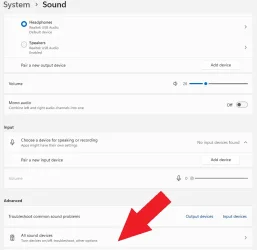
When you disable a device, it is easily re-enabled by clicking the All Sound Devices under the Advanced category shown here.

sound example.webp

This is what a disabled output should look like.

disabled example.webp

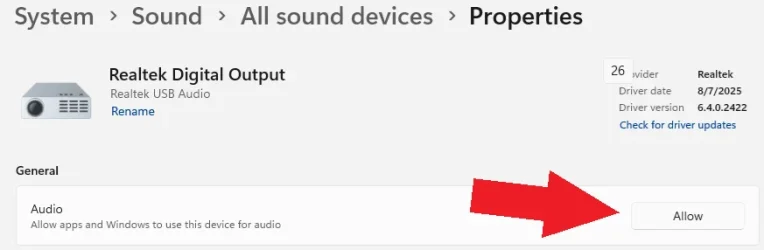
You can re-enable it by clicking on the device, and then pressing Allow.

sound allow.webp
 

My Computer My Computer

At a glance

Windows 11 Pro 25H2i7 12700k64GB DDR5 [CMK64GX5M2B5200C40]MSI 4060 2x Ventus 8G
OS
Windows 11 Pro 25H2
Computer type
PC/Desktop
Manufacturer/Model
DIY
CPU
i7 12700k
Motherboard
7E07vMA [Z790 Pro Max Wifi]
Memory
64GB DDR5 [CMK64GX5M2B5200C40]
Graphics Card(s)
MSI 4060 2x Ventus 8G
Sound Card
Realtek® ALC4080 Codec
Monitor(s) Displays
ASUS VA24DQSB
Screen Resolution
1920x1080 @ 75hz
Hard Drives
Samsung 980 Pro 1TB (OS Drive)
Samsung 980 Pro 2TB (Secondary Drive)
Samsung 980 Pro 1TB (Other)
Samsung 860 Pro 512 (Other)
WD6400AAKS (Other)
PSU
Corsair 850x
Cooling
Noctua NH-D15
Mouse
G502 X Lightspeed
Browser
Chrome, Firefox
Antivirus
Malwarebytes Premium, Defender
If you have Intel Bluetooth
Maybe update to the latest Intel Bluetooth drivers, if you have already, reinstall them as previous Intel Bluetooth drivers had issues with drop outs.

Oh and don't forget to reboot once you have installed the drivers.

All drivers are up-to-date. Thank you.
 

My Computer My Computer

At a glance

Windows 11 Home Version 24H2 OS build 26100.8875Intel(R) Core(TM) i5-1035G1 CPU @ 1.00GHz (1....32.0 GBIntel(R) UHD Graphics (128 MB)
OS
Windows 11 Home Version 24H2 OS build 26100.8875
Computer type
Laptop
Manufacturer/Model
Dell Inspiron 3793
CPU
Intel(R) Core(TM) i5-1035G1 CPU @ 1.00GHz (1.19 GHz)
Memory
32.0 GB
Graphics Card(s)
Intel(R) UHD Graphics (128 MB)
Monitor(s) Displays
Internal Dell Display and Dell P2715Q
Screen Resolution
1920 x 1080, 60.13 Hz / 1920 x 1080, 60 Hz
Hard Drives
Seagate ST1000LM035-1RK172
Keyboard
Dell Laptop Keyboard
Mouse
Logitech M705
Browser
Google Chrome, Firefox
Antivirus
AVG, Malwarebytes, SuperAntispyware, CCleaner
Latest Update: All of a sudden, my Logitech Z606 was connected back to my Bluetooth and it's working properly now. I have no idea why and what changed but glad I got it back working.
 

My Computer My Computer

At a glance

Windows 11 Home Version 24H2 OS build 26100.8875Intel(R) Core(TM) i5-1035G1 CPU @ 1.00GHz (1....32.0 GBIntel(R) UHD Graphics (128 MB)
OS
Windows 11 Home Version 24H2 OS build 26100.8875
Computer type
Laptop
Manufacturer/Model
Dell Inspiron 3793
CPU
Intel(R) Core(TM) i5-1035G1 CPU @ 1.00GHz (1.19 GHz)
Memory
32.0 GB
Graphics Card(s)
Intel(R) UHD Graphics (128 MB)
Monitor(s) Displays
Internal Dell Display and Dell P2715Q
Screen Resolution
1920 x 1080, 60.13 Hz / 1920 x 1080, 60 Hz
Hard Drives
Seagate ST1000LM035-1RK172
Keyboard
Dell Laptop Keyboard
Mouse
Logitech M705
Browser
Google Chrome, Firefox
Antivirus
AVG, Malwarebytes, SuperAntispyware, CCleaner

I'm trying to understand what you did when you say you "uninstalled" the speakers from the Device panel.
From what I can tell on my OS, you can't actually uninstall devices from there - only disable them.

When you disable a device, it is easily re-enabled by clicking the All Sound Devices under the Advanced category shown here.

View attachment 179021

This is what a disabled output should look like.

View attachment 179022

You can re-enable it by clicking on the device, and then pressing Allow.

View attachment 179025
I did that too but no change.
 

My Computer My Computer

At a glance

Windows 11 Home Version 24H2 OS build 26100.8875Intel(R) Core(TM) i5-1035G1 CPU @ 1.00GHz (1....32.0 GBIntel(R) UHD Graphics (128 MB)
OS
Windows 11 Home Version 24H2 OS build 26100.8875
Computer type
Laptop
Manufacturer/Model
Dell Inspiron 3793
CPU
Intel(R) Core(TM) i5-1035G1 CPU @ 1.00GHz (1.19 GHz)
Memory
32.0 GB
Graphics Card(s)
Intel(R) UHD Graphics (128 MB)
Monitor(s) Displays
Internal Dell Display and Dell P2715Q
Screen Resolution
1920 x 1080, 60.13 Hz / 1920 x 1080, 60 Hz
Hard Drives
Seagate ST1000LM035-1RK172
Keyboard
Dell Laptop Keyboard
Mouse
Logitech M705
Browser
Google Chrome, Firefox
Antivirus
AVG, Malwarebytes, SuperAntispyware, CCleaner
I'm trying to understand what you did when you say you "uninstalled" the speakers from the Device panel.
From what I can tell on my OS, you can't actually uninstall devices from there - only disable them.

When you disable a device, it is easily re-enabled by clicking the All Sound Devices under the Advanced category shown here.

View attachment 179021

This is what a disabled output should look like.

View attachment 179022

You can re-enable it by clicking on the device, and then pressing Allow.

View attachment 179025
There was an option to uninstall and I thought that was the same as disable, but it wasn't, it actually removed the device from the list completely.
 

My Computer My Computer

At a glance

Windows 11 Home Version 24H2 OS build 26100.8875Intel(R) Core(TM) i5-1035G1 CPU @ 1.00GHz (1....32.0 GBIntel(R) UHD Graphics (128 MB)
OS
Windows 11 Home Version 24H2 OS build 26100.8875
Computer type
Laptop
Manufacturer/Model
Dell Inspiron 3793
CPU
Intel(R) Core(TM) i5-1035G1 CPU @ 1.00GHz (1.19 GHz)
Memory
32.0 GB
Graphics Card(s)
Intel(R) UHD Graphics (128 MB)
Monitor(s) Displays
Internal Dell Display and Dell P2715Q
Screen Resolution
1920 x 1080, 60.13 Hz / 1920 x 1080, 60 Hz
Hard Drives
Seagate ST1000LM035-1RK172
Keyboard
Dell Laptop Keyboard
Mouse
Logitech M705
Browser
Google Chrome, Firefox
Antivirus
AVG, Malwarebytes, SuperAntispyware, CCleaner

Latest Support Threads

Back
Top Bottom




