
Solved Bluetooth ON-Off toggle disappeared on my GMKtec device


wiganken

Well-known member
Power User
VIP
Local time
3:34 PM
Posts
1,285
Location
UK
OS
Windows 11 Pro
My ASUS laptop (not plugged in) is not affected.
There had been a power cut at about 06:00 but the computer was 99% certain to be off albeit plugged into the power supply. I say 99% because I always switch my device off by 8pm and I don’t think I could have left it on all night.

I tried fixing things by: -
  1. Updating drivers
  2. Ensuring Bluetooth services were running.
  3. sfc /scannow
  4. Dism /Online /Cleanup-Image /AnalyzeComponentStore
  5. Dism /Online /Cleanup-Image /StartComponentCleanup
  6. Dism /online /cleanup-image /scanhealth
  7. Also tried a restore from a Macrium image but no different.
An in-place repair-install fixed it.

I spent over 6 hours to fix it and I still don’t know the cause.

After a restart I created another Full Image using Macrium Reflect so all is okay again.

Question - I haven’t messed about with Bluetooth so is it possible for a power cut to cause corruption in a switched-off device?
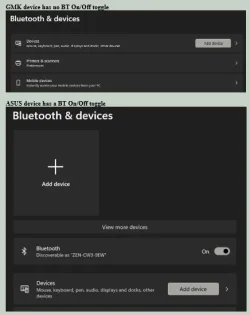
ASUS BT vs GMK BT.webp

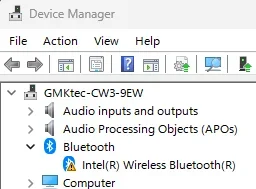
BT Device error.webp

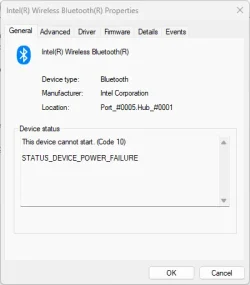
Intel BT cannot start.webp
 
Last edited:

My Computers My Computers

  • At a glance

    Windows 11 ProAMD Ryzen 9 8945HS32GB DDR5 SO-DIMMIntegrated AMD Radeon 780M (4.00 GHz)
    OS
    Windows 11 Pro
    Computer type
    PC/Desktop
    Manufacturer/Model
    GMKtec K11
    CPU
    AMD Ryzen 9 8945HS
    Memory
    32GB DDR5 SO-DIMM
    Graphics Card(s)
    Integrated AMD Radeon 780M (4.00 GHz)
    Monitor(s) Displays
    Benq 2250HM
    Screen Resolution
    1920 x 1080
    Hard Drives
    1 TB PCIe 4.0 NVMe M.2 SSD
  • At a glance

    Windows 11 HomeIntel® Core™ Ultra 7 - 255H processor16 GB LPDDR5 SDRAMIntel Arc 140T onboard graphics
    Operating System
    Windows 11 Home
    Computer type
    Laptop
    Manufacturer/Model
    ASUS Zenbook 14 OLED 14" Laptop - UX3405CA-QL192W
    CPU
    Intel® Core™ Ultra 7 - 255H processor
    Memory
    16 GB LPDDR5 SDRAM
    Graphics card(s)
    Intel Arc 140T onboard graphics
    Screen Resolution
    1920 x 1200 (16:10 WUXGA resolution) OLED Touchscreen
    Hard Drives
    1TB SSD
An in place repair install fixed it.
I haven’t messed about with Bluetooth so is it possible for a power cut to cause corruption in a switched-off device?
It's an electronic device and it's windows so while I would say it's not likely if the device was switched off, I would never say never.
Glad you got it back to working though. Do you use a good surge protector?
  1. Also tried a restore from a Macrium image but no different.
An in place repair install fixed it.

This would indicate to me that there's a good possibility there was an issue with BT adapter even before the Macrium image was made. Since you do not appear to use any BT device, maybe there's been an issue with it for a while.
 

My Computers My Computers

  • At a glance

    Windows 11 Pro 25H2 26200.8875i9-10900 10 core 20 threads32 gbnone-Intel UHD Graphics 630
    OS
    Windows 11 Pro 25H2 26200.8875
    Computer type
    PC/Desktop
    Manufacturer/Model
    Dell Optiplex 7080
    CPU
    i9-10900 10 core 20 threads
    Motherboard
    DELL 0J37VM
    Memory
    32 gb
    Graphics Card(s)
    none-Intel UHD Graphics 630
    Sound Card
    Integrated Realtek
    Monitor(s) Displays
    Benq 27
    Screen Resolution
    2560x1440
    Hard Drives
    2x1tb Solidigm m.2 nvme /External drives 512gb Samsung m.2 sata+2tb Kingston m2.nvme
    PSU
    500w
    Case
    MT
    Cooling
    Dell Premium
    Keyboard
    Logitech wired
    Mouse
    Logitech wireless
    Internet Speed
    so slow I'm too embarrassed to tell
    Browser
    #1 Edge #2 Firefox
    Antivirus
    Defender+MWB Premium
  • At a glance

    Windows 11 Pro 24H2 26200.8875AMD Ryzen 7 6800U32 gbintegrated
    Operating System
    Windows 11 Pro 24H2 26200.8875
    Computer type
    PC/Desktop
    Manufacturer/Model
    Beelink Mini PC SER5
    CPU
    AMD Ryzen 7 6800U
    Memory
    32 gb
    Graphics card(s)
    integrated
    Sound Card
    integrated
    Monitor(s) Displays
    Benq 27
    Screen Resolution
    2560x1440
    Hard Drives
    1TB Crucial nvme
    Keyboard
    Logitech wired
    Mouse
    Logitech wireless
    Internet Speed
    still too embarrassed to tell
    Browser
    Firefox
    Antivirus
    Defender
    Other Info
    System 3 is non compliant Dell 9020 i7-4770/24gb ram Win11 PRO 26200.8875
Do you use a good surge protector?
Thanks for the reply. Yes I use a surge protector and it's showing a green light on it so that indicates it is doing its job.
Since you do not appear to use any BT device, maybe there's been an issue with it for a while.
That's the strange thing. I was only using my Bluetooth speaker the day before and it was fine. That's why I thought the Macrium image restore would bring it back. Weird.
It was Device Manager showing STATUS_DEVICE_POWER_FAILURE that made me suspect it was the 6am power cut related. Just guessing.

At least it's fixed. Thanks for your time.
 

My Computers My Computers

  • At a glance

    Windows 11 ProAMD Ryzen 9 8945HS32GB DDR5 SO-DIMMIntegrated AMD Radeon 780M (4.00 GHz)
    OS
    Windows 11 Pro
    Computer type
    PC/Desktop
    Manufacturer/Model
    GMKtec K11
    CPU
    AMD Ryzen 9 8945HS
    Memory
    32GB DDR5 SO-DIMM
    Graphics Card(s)
    Integrated AMD Radeon 780M (4.00 GHz)
    Monitor(s) Displays
    Benq 2250HM
    Screen Resolution
    1920 x 1080
    Hard Drives
    1 TB PCIe 4.0 NVMe M.2 SSD
  • At a glance

    Windows 11 HomeIntel® Core™ Ultra 7 - 255H processor16 GB LPDDR5 SDRAMIntel Arc 140T onboard graphics
    Operating System
    Windows 11 Home
    Computer type
    Laptop
    Manufacturer/Model
    ASUS Zenbook 14 OLED 14" Laptop - UX3405CA-QL192W
    CPU
    Intel® Core™ Ultra 7 - 255H processor
    Memory
    16 GB LPDDR5 SDRAM
    Graphics card(s)
    Intel Arc 140T onboard graphics
    Screen Resolution
    1920 x 1200 (16:10 WUXGA resolution) OLED Touchscreen
    Hard Drives
    1TB SSD

Latest Support Threads

Back
Top Bottom




