My ASUS laptop (not plugged in) is not affected.
There had been a power cut at about 06:00 but the computer was 99% certain to be off albeit plugged into the power supply. I say 99% because I always switch my device off by 8pm and I don’t think I could have left it on all night.
I tried fixing things a few times by: -
Altogether I spent over 6 hours to fix it and I still don’t know the cause.
After a restart I created another Full Image using Macrium Reflect so all is okay again.
Question - I haven’t messed about with Bluetooth so is it possible for a power cut to cause corruption in a switched-off device?
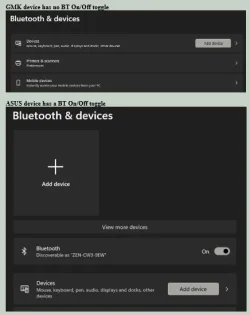
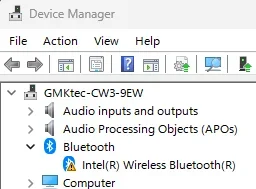
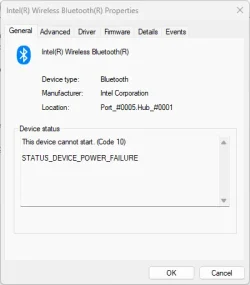
There had been a power cut at about 06:00 but the computer was 99% certain to be off albeit plugged into the power supply. I say 99% because I always switch my device off by 8pm and I don’t think I could have left it on all night.
I tried fixing things a few times by: -
- Updating drivers
- Ensuring Bluetooth services were running.
- sfc /scannow
- Dism /Online /Cleanup-Image /AnalyzeComponentStore
- Dism /Online /Cleanup-Image /StartComponentCleanup
- Dism /online /cleanup-image /scanhealth
- Also tried a restore from a Macrium image but no different.
Altogether I spent over 6 hours to fix it and I still don’t know the cause.
After a restart I created another Full Image using Macrium Reflect so all is okay again.
Question - I haven’t messed about with Bluetooth so is it possible for a power cut to cause corruption in a switched-off device?
My Computers
-
At a glance
Windows 11 ProAMD Ryzen 9 8945HS32GB DDR5 SO-DIMMIntegrated AMD Radeon 780M (4.00 GHz)- OS
- Windows 11 Pro
- Computer type
- PC/Desktop
- Manufacturer/Model
- GMKtec K11
- CPU
- AMD Ryzen 9 8945HS
- Memory
- 32GB DDR5 SO-DIMM
- Graphics Card(s)
- Integrated AMD Radeon 780M (4.00 GHz)
- Monitor(s) Displays
- Benq 2250HM
- Screen Resolution
- 1920 x 1080
- Hard Drives
- 1 TB PCIe 4.0 NVMe M.2 SSD
-
At a glance
Windows 11 HomeIntel® Core™ Ultra 7 - 255H processor16 GB LPDDR5 SDRAMIntel Arc 140T onboard graphics- Operating System
- Windows 11 Home
- Computer type
- Laptop
- Manufacturer/Model
- ASUS Zenbook 14 OLED 14" Laptop - UX3405CA-QL192W
- CPU
- Intel® Core™ Ultra 7 - 255H processor
- Memory
- 16 GB LPDDR5 SDRAM
- Graphics card(s)
- Intel Arc 140T onboard graphics
- Screen Resolution
- 1920 x 1200 (16:10 WUXGA resolution) OLED Touchscreen
- Hard Drives
- 1TB SSD