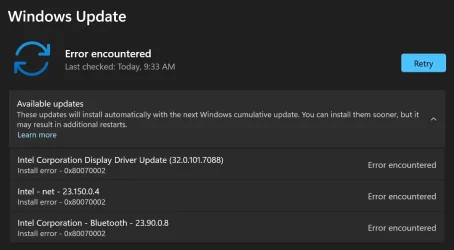
My system is AMD based - it has a Ryzan5 CPU, an AMD video chipset, a RealTek network adapter, and a MediaTek BlueTooth adapter. It does not have any requirement for Intel drivers or software that I am aware of. Nevertheless, Windows Update frequently tells me I need to install the above items.
Sometimes the installation completes OK, but more often I get results like the above image shows. I've not been able to find a way to get around this annoyance. I've read things like "Oh don't bother, Windows loads Intel stuff just because most PC's are Intel based." Is that really the answer? Or is there some way to tell Windows Update to not load things it doesn't use or need?
My Computer
At a glance
Win11 ProAMD Ryzen 5 5500U16 GBRadeon 2100
- OS
- Win11 Pro
- Computer type
- PC/Desktop
- Manufacturer/Model
- BeeLink SER Mini
- CPU
- AMD Ryzen 5 5500U
- Motherboard
- BeeLink SER
- Memory
- 16 GB
- Graphics Card(s)
- Radeon 2100
- Sound Card
- none
- Monitor(s) Displays
- Primary: Phillips 4K; Secondary: LG 4K
- Screen Resolution
- Both 3860 x 2160
- Hard Drives
- C: NVme 500 GB Windows only
D: 128 GB NVme User data + Windows Temp via Junction Link
- PSU
- External
- Case
- Mini
- Cooling
- Internal fan
- Keyboard
- Logitech Wireless Lighted
- Mouse
- Kensington ExpertMouse wireless trackball
- Internet Speed
- 500/500
- Browser
- Brave
- Antivirus
- Windows Defender