Hello,
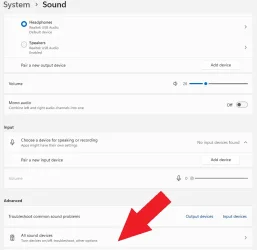
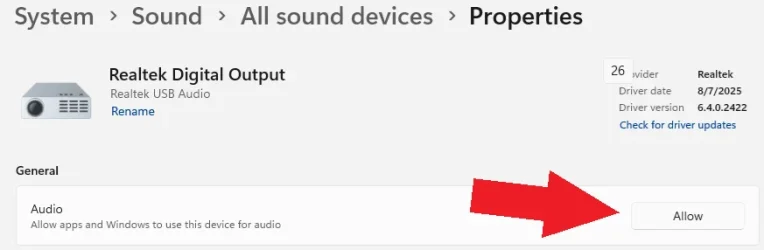
I accidentally uninstalled my Logitech Z506 speakers in Settings/Sounds/Device and now I couldn't get it back. When I tried to add a device, it wouldn't show up on the list, it seemed that the Bluetooth couldn't find it. Could someone please tell me how could I connect it back via Bluetooth? All drivers are updated and everything else seems fine.
Any suggestions/comments are much appreciated.
Thank you.
I accidentally uninstalled my Logitech Z506 speakers in Settings/Sounds/Device and now I couldn't get it back. When I tried to add a device, it wouldn't show up on the list, it seemed that the Bluetooth couldn't find it. Could someone please tell me how could I connect it back via Bluetooth? All drivers are updated and everything else seems fine.
Any suggestions/comments are much appreciated.
Thank you.
My Computer
At a glance
Windows 11 Home Version 24H2 OS build 26100.8875Intel(R) Core(TM) i5-1035G1 CPU @ 1.00GHz (1....32.0 GBIntel(R) UHD Graphics (128 MB)
- OS
- Windows 11 Home Version 24H2 OS build 26100.8875
- Computer type
- Laptop
- Manufacturer/Model
- Dell Inspiron 3793
- CPU
- Intel(R) Core(TM) i5-1035G1 CPU @ 1.00GHz (1.19 GHz)
- Memory
- 32.0 GB
- Graphics Card(s)
- Intel(R) UHD Graphics (128 MB)
- Monitor(s) Displays
- Internal Dell Display and Dell P2715Q
- Screen Resolution
- 1920 x 1080, 60.13 Hz / 1920 x 1080, 60 Hz
- Hard Drives
- Seagate ST1000LM035-1RK172
- Keyboard
- Dell Laptop Keyboard
- Mouse
- Logitech M705
- Browser
- Google Chrome, Firefox
- Antivirus
- AVG, Malwarebytes, SuperAntispyware, CCleaner