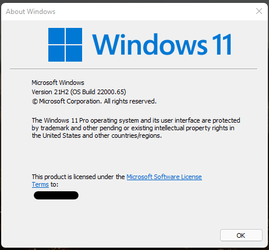
Insider KB5004745 Windows 11 Insider Preview Dev Build 10.0.22000.65 - July 8


UPDATE 7/15: KB5004252 Windows 11 Insider Preview Dev Build 10.0.22000.71 - July 15

Hello Windows Insiders,

We are so excited to have so many of you running the first preview of Windows 11 and we’re busy looking at all your feedback that’s coming in. Today we are releasing an update (Build 22000.65) to everyone in the Dev Channel with a good set of improvements and fixes that will make your Windows 11 experience even better!

Changes and Improvements

  • Start now has a search box to make it easier to find what you’re looking for.
  • Taskbar will now show across multiple monitors which can be enabled via Settings > Personalization > Taskbar.
  • We have updated several system alert dialog boxes such as the alert for when the battery is running low on your laptop or when you change your display settings with the new Windows 11 visual design.
  • The ‘Power mode’ settings are now available on the Power & battery page in Settings.
  • Right clicking the desktop now directly has a Refresh option without needing to click “Show more options”.
  • Right clicking a .ps1 file in File Explorer now directly has a Run with PowerShell options without needing to click “Show more options”.
  • Available snap layouts when using smaller PCs in portrait orientation have been optimized for that posture. You can now choose to snap three apps on top of each other, instead of four quadrants.
  • Based on the collaboration with the most popular GIF provider in China, weshineapp.com, GIF selections are now available for Windows Insiders in China via the emoji panel (WIN + .). If the location is set as China, then GIF data will appear from weshineapp.com.
  • Right-clicking on the volume icon in the taskbar now includes an option to troubleshoot sound problems.

Fixes

  • We fixed a remote code execution exploit in the Windows Print Spooler service, known as “PrintNightmare”, as documented in CVE-2021-34527. For more information, see KB5004945.
  • Taskbar:
    • We fixed an issue where it wasn’t possible to click the Show Desktop button with your mouse at the very edge of the Taskbar.
    • We fixed an issue where the date and time in the Taskbar weren’t reflecting your preferred format.
    • We fixed an issue where the preview window might not display the entire window when hovering over Task View on the Taskbar.
    • We fixed an issue pressing ESC or clicking the desktop wouldn’t dismiss the window of open app preview thumbnails if you set focus to it after pressing WIN + T.
    • We fixed an issue where if you rotate a PC to portrait orientation and back to landscape, it could result in app icons not displaying in the Taskbar despite there being room.
  • Settings:
    • We fixed an issue resulting in Settings failing to launch. If you were impacted in the previous flight, please see here.
    • We fixed a noticeable stutter in the animation when closing Quick Settings and Notification Center by clicking on their respective icons in the taskbar.
    • We fixed an issue where the Quick Settings and Notification Center windows were missing shadows.
    • We fixed an issue where it wasn’t possible to launch Quick Settings by setting keyboard focus to it in the taskbar and pressing the Enter key.
    • We fixed an issue where Quick Settings wouldn’t render correctly if you removed all settings except volume.
    • We fixed an issue that mitigates Focus Assist enabling unexpectedly.
    • We fixed an issue with the animation in the touch keyboard when resizing it in Settings.
    • We fixed an issue where Sign-in Options in Settings had an unexpected checkbox under Facial Recognition with no text.
    • We fixed an issue where the button to disconnect a work or school account in Account Settings wasn’t working.
    • We fixed an issue where Lock screen Settings had a toggle with no text.
    • We fixed an issue where the title of the Advanced Options page under Windows Update in Settings could be missing.
    • We fixed an issue where the “Windows privacy options” at the bottom of Privacy & Security > Search Permissions in Settings wasn’t working.
    • We fixed an issue where the Open Navigation button could become overlapped with other text.
    • We fixed an issue causing Settings to crash when applying a theme under Contrasts.
    • We fixed an issue where parts of Settings were unexpectedly in English for some non-English languages.
  • File Explorer:
    • We fixed an issue resulting in pinning and unpinning apps from Start not working, the command bar in File Explorer disappearing, and the snap layouts unexpectedly not appearing until rebooting your PC.
    • We fixed an issue that could result in the elements of File Explorer’s title bar being unreadable due to low contrast.
    • We fixed an issue where some of the icons in File Explorer’s context menu could be blurry.
    • We fixed an issue where the “see more” menu in File Explorer’s command bar wouldn’t dismiss when you clicked on Options.
    • We fixed an issue that could result in not being able to create a new folder on the desktop.
  • Search:
    • We fixed an issue resulting in Search having grey boxes sometimes instead of app icons.
    • We fixed an issue that could result in Search dropping the first keystroke when pressing the Windows key and starting to type.
    • We fixed an issue where when hovering your mouse over the Search icon on the taskbar, the third recent search would not load and remained blank.
    • We fixed an issue where if you searched for Windows Update, it would open Settings but not navigate to the Windows Update settings page.
  • Widgets:
    • We fixed an issue where system text scaling was scaling all widgets proportionally and could result in cropped widgets.
    • We fixed an issue where when using screen reader/Narrator in widgets it wasn’t properly announcing content sometimes.
    • We fixed an issue where resizing the Money widget could result in the bottom half of it not displaying anything.
  • Other:
    • We fixed a memory leak that was noticeable when using one of the C# printing samples.
    • We fixed an issue causing an error in safe mode saying 0xc0000005 – Unexpected parameters.
    • We fixed two issues that could cause explorer.exe to start crashing in a loop, when the display language was set to Russian or when multiple input methods enabled.
    • We fixed an issue where if you minimize a full screen window and later restore it, there was a chance it could result in a bug check with win32kfull.
    • We fixed an issue resulting in some WSL users seeing “The parameter is incorrect” when opening Windows Terminal.
    • We fixed an issue causing blurry windows in ALT + Tab.
    • We fixed an issue resulting in a flicker in the taskbar when Korean IME users used ALT + Tab.
    • We fixed an issue impacting reliability of displaying the UI when using WIN + Space to switch input methods.
    • We fixed an issue impacting voice typing reliability.
    • We fixed an issue resulting in the “New snip in X seconds” options in Snip & Sketch not working.

Known issues

  • [REMINDER] When upgrading to Windows 11 from Windows 10 or when installing an update to Windows 11, some features may be deprecated or removed. See details here.
  • Start:
    • In some cases, you might be unable to enter text when using Search from Start or the Taskbar. If you experience the issue, press WIN + R on the keyboard to launch the Run dialog box, then close it.
  • Taskbar:
    • The Taskbar will sometimes flicker when switching input methods.
    • Dragging an app icon to rearrange it in the Taskbar will result in the app launching or minimizing.
  • Settings:
    • When launching the Settings app, a brief green flash may appear.
    • When using Quick Settings to modify Accessibility settings, the settings UI may not save the selected state.
  • File Explorer:
    • The new command bar may not appear when “Open folders in a separate process” is enabled under File Explorer Options > View.
    • exe crashes in a loop for Insiders using the Turkish display language when battery charge is at 100%.
    • When right clicking the desktop or File Explorer, the resulting context menu and submenus may appear partially off screen.
  • Search:
    • After clicking the Search icon on the Taskbar, the Search panel may not open. If this occurs, restart the “Windows Explorer” process, and open the search panel again.
    • When you hover your mouse over the Search icon on the Taskbar, recent searches may not be displayed. To work around the issue, restart your PC.
    • Search panel might appear as black and not display any content below the search box.
  • Widgets:
    • Widgets board may appear empty. To work around the issue, you can sign out and then sign back in again.
    • Launching links from the widgets board may not invoke apps to the foreground.
    • When using the Outlook client with a Microsoft account, Calendar, and To Do changes may not sync to the widgets in real time.
    • Widgets may be displayed in the wrong size on external monitors. If you encounter this, you can launch the widgets via touch or WIN + W shortcut on your actual PC display first and then launch on your secondary monitors.
    • After adding multiple widgets quickly from the widgets settings, some of the widgets may not be visible on the board.
  • Store:
    • The install button might not be functional yet in some limited scenarios.
    • Rating and reviews are not available for some apps.
  • Windows Security
    • Device Security is unexpectedly saying “Standard hardware security not supported” for Insiders with supported hardware.
    • “Automatic sample submission” is unexpectedly turned off when you restart your PC.

The Bug Bash has started!

Our first Windows 11 Bug Bash will run from July 7th through July 14th. Throughout the Bug Bash, we’ll be posting Quests in Feedback Hub covering different areas of Windows 11. You can help make Windows better for everyone by trying them out and sending feedback. For more details about sending actionable feedback, please see here.

Important Insider Links

You can check out our Windows Insider Program documentation here, including a list of all the new features and updates released in builds so far. Are you not seeing any of the features listed for this build? Check your Windows Insider Settings to make sure you’re in the Dev Channel. Submit feedback here to let us know if things weren’t working the way you expected.

If you want a complete look at what build is in which Insider channel, head over to Flight Hub. Please note, there will be a slight delay between when a build is flighted and when Flight Hub is updated.

Thanks,
Amanda & Brandon


Source: Announcing Windows 11 Insider Preview Build 22000.65


ISO download: Select language for Cumulative Update for Windows 11 (10.0.22000.65) amd64

 
Last edited:
Mine has been at 69% now over half an hour. Settings app crashed and closed twice guring that time.

View attachment 2351
Mine is still hung @ 69% for 45 minutes now...

...just began restart immediately after I posted...
 

My Computer My Computer

At a glance

Windows 11 Insideri6700HQ12.0 GBIntel HD Graphics 530 + NVIDIA GeForce 940M
OS
Windows 11 Insider
Computer type
PC/Desktop
Manufacturer/Model
Dell 7459 AIO
CPU
i6700HQ
Motherboard
Dell
Memory
12.0 GB
Graphics Card(s)
Intel HD Graphics 530 + NVIDIA GeForce 940M
All done..
 

My Computer My Computer

At a glance

Windows 11 Home() - 25H2 -26220.8894AMD Ryzen 5 5600GG.SKILL Ripjaws V Series 64GB 4x16Nvidia geforce gtx titan x
OS
Windows 11 Home() - 25H2 -26220.8894
Computer type
PC/Desktop
Manufacturer/Model
Banana Junior 5600-G Series
CPU
AMD Ryzen 5 5600G
Motherboard
Asus ROG Strix B550-F
Memory
G.SKILL Ripjaws V Series 64GB 4x16
Graphics Card(s)
Nvidia geforce gtx titan x
Monitor(s) Displays
28" ASUS VP28U 4k
Screen Resolution
4K
Hard Drives
Primary SAMSUNG 970 EVO Plus
PSU
EVGA BQ 700w 80+ Bronze
Case
Zalman i3 NEO
Cooling
ARCTIC Freezer 7 X
Keyboard
Corsair
Mouse
Amazon Generic with Cord
Internet Speed
Download: 295.11 mbps Upload: 65.35 mbps T-Mobile Internet
Browser
Firefox and Edge
Antivirus
MS - Defender
Other Info
Speakers: Klipsch ProMedia 2.1

My Computer My Computer

At a glance

Windows 11 vmwareI9 13950hx128GBNVIDIA 4090
OS
Windows 11 vmware
Computer type
Laptop
Manufacturer/Model
Dell
CPU
I9 13950hx
Memory
128GB
Graphics Card(s)
NVIDIA 4090
Sound Card
Realtek
If theres a problem why is it always at install rather than download stage .?

Suppose I should not have started at 11.30 GMT / 6.30 pm East Coast USA when mega busy
 

My Computers My Computers

  • At a glance

    Windows 11 Pro 25 H2 / Windows 3.11 EmulatorPentium I9 14900K64 GB Corsair Dominator DDR5Sapphire Radeon Pure RX 9060 XT , 16 GB , ARG...
    OS
    Windows 11 Pro 25 H2 / Windows 3.11 Emulator
    Computer type
    PC/Desktop
    Manufacturer/Model
    Self build Dec 2023
    CPU
    Pentium I9 14900K
    Motherboard
    Asus Rog Z790 E Wifi 7
    Memory
    64 GB Corsair Dominator DDR5
    Graphics Card(s)
    Sapphire Radeon Pure RX 9060 XT , 16 GB , ARGB Lighting ,.
    Sound Card
    Realtek Codec ALC 4080 internal + Creative Soundblaster X3 External , when former sometimes a problem
    Monitor(s) Displays
    32" Toshiba PC / TV , Corsair Xeneon Edge 14.5" screen Res : 2560 x 720
    Screen Resolution
    2560 x 1440
    Hard Drives
    4 x Corsair MP 600 Pro 500GB M2 drives ( Main ), + Samsung M2 USB 500GB +Corsair M2 1TB Ext USB+ Hitachi Sata Drive 1TB , 2 x DVD-RW
    PSU
    Corsair 1000 w
    Case
    NZXT Phantom 240 , 5 fans built in system
    Cooling
    Silentium PC Spartan 5 Max
    Keyboard
    Seenda Luminous
    Mouse
    1) Aston Martin DB9 Car , 2) McLaren Yellow P2 car , 3) Seenda Wireless
    Internet Speed
    950 mbps
    Browser
    Edge , Opera , Firefox , Brave, Samsung Browsers .
    Antivirus
    Norton 360 , 10 User
    Other Info
    Asus GT BE 98 Wifi 7 Router
    Pertelian X2040 ,
    Echo Show 8"
    Logitech Z906 5.1 speakers
    Aura Sync various LED's Internal case lighting
  • At a glance

    Windows 11 25H28GB
    Operating System
    Windows 11 25H2
    Computer type
    Laptop
    Manufacturer/Model
    Microsoft Surface Go
    Memory
    8GB
    Hard Drives
    128 GB and 256 GB Micro SD
    Internet Speed
    950 mbps
Update okay, in about 20-25 minutes!

1625785137967.png
1625785109414.png
And yes, it did hung at 69% (not sure for how long) but, after that was quickly.
 

My Computer My Computer

At a glance

Windows 11Intel® Xeon® X5690 3.47GHz Six-CoreG.Skill PC3-12800 1600MHz 24GBNVIDIA GeForce GTX 1050
OS
Windows 11
Computer type
PC/Desktop
Manufacturer/Model
Asus/Custom Build
CPU
Intel® Xeon® X5690 3.47GHz Six-Core
Motherboard
Asus P6T Deluxe v2
Memory
G.Skill PC3-12800 1600MHz 24GB
Graphics Card(s)
NVIDIA GeForce GTX 1050
Sound Card
SoundMAX ADI AD2000B HD Audio
Monitor(s) Displays
Acer T232HL Touch Screen
Screen Resolution
1920 x 1080 @ 60Hz
Hard Drives
6 Crucial MX500 SSD 1TB each.
PSU
Thermaltake Toughpower Gold 850W
Case
Thermaltake Armor VA8000SWA
Cooling
Thermaltake Air Cooling System
Keyboard
Illuminated Multimedia LED Keyboard
Mouse
M16 Dual Mode Illuminated Mouse - Bluetooth / 2.4 GHz Mode
Internet Speed
800 Mbps
Browser
Edge / Opera / Vivaldi / Chrome / Firefox / Brave
Antivirus
Windows Defender Security
View attachment 2334


Source: Announcing Windows 11 Insider Preview Build 22000.65


ISO download: Select language for Cumulative Update for Windows 11 (10.0.22000.65) amd64

I have tried this update,and unfortunately it messed with the start menu/changed the
solid black (no transparency) "I like" to a transparent menu,which had a very erratic function
when I accessed it.I tried to turn on/off the transparency setting,with no effect/I rebooted
still the same.So I uninstalled the KB5004745 update and everything returned to how I
prefer it.Not sure if I like the search box on the start menu,so the ability to disable this
feature would be very appreciated.
While I am at it I do not like the clock and network/audio icons fixed to the taskbar,
I hope this changes so that I can disable them.I would also like to see the ability to
disable the pop-out calendar.For Time and Date,I prefer to have this shortcut
programmed to one of my mouse buttons (win + alt + D) to pop-out the calendar as
required,not be forced to see the calendar every time I want to check the notifications.
That calendar really messed up the notifications panel
Just a few thoughts,that someone might find interesting or even agree with
Cheers /\8
 
I notice that there's a search bar on the top of the start,, I can deal with it but I don't like or need it.
 

My Computer My Computer

At a glance

Windows 11 Home() - 25H2 -26220.8894AMD Ryzen 5 5600GG.SKILL Ripjaws V Series 64GB 4x16Nvidia geforce gtx titan x
OS
Windows 11 Home() - 25H2 -26220.8894
Computer type
PC/Desktop
Manufacturer/Model
Banana Junior 5600-G Series
CPU
AMD Ryzen 5 5600G
Motherboard
Asus ROG Strix B550-F
Memory
G.SKILL Ripjaws V Series 64GB 4x16
Graphics Card(s)
Nvidia geforce gtx titan x
Monitor(s) Displays
28" ASUS VP28U 4k
Screen Resolution
4K
Hard Drives
Primary SAMSUNG 970 EVO Plus
PSU
EVGA BQ 700w 80+ Bronze
Case
Zalman i3 NEO
Cooling
ARCTIC Freezer 7 X
Keyboard
Corsair
Mouse
Amazon Generic with Cord
Internet Speed
Download: 295.11 mbps Upload: 65.35 mbps T-Mobile Internet
Browser
Firefox and Edge
Antivirus
MS - Defender
Other Info
Speakers: Klipsch ProMedia 2.1
Nothing in Explorer has a right-click menu at all. Anyone else experiencing this?
Not quite - the right-click menu was there, but after using it to change permissions on a folder in C:\Windows\Servicing\LCU it no longer worked when right-clicking a second folder there - but it still worked elsewhere. Got it working again by restarting Windows Explorer in Task Manager.
 

My Computers My Computers

  • At a glance

    Windows 11 HomeAMD Athlon Silver 3050U8GBRadeon Graphics
    OS
    Windows 11 Home
    Computer type
    Laptop
    Manufacturer/Model
    Acer Aspire 3 A315-23-R9VY
    CPU
    AMD Athlon Silver 3050U
    Memory
    8GB
    Graphics Card(s)
    Radeon Graphics
    Monitor(s) Displays
    laptop screen
    Screen Resolution
    1366x768 native resolution, up to 2560x1440 with Radeon Virtual Super Resolution
    Hard Drives
    1TB Samsung EVO 870 SSD (from April 2026: 250GB EVO 850)
    Internet Speed
    150 Mbps
    Browser
    Edge, Firefox
    Antivirus
    Defender
    Other Info
    fully 'Windows 11 ready' laptop. Windows 10 C: partition migrated from my old unsupported 'main machine' then upgraded to 11. A test migration ran Insider builds for 2 months. When 11 was released on 5th October 2021 it was re-imaged back to 10 and was offered the upgrade in Windows Update on 20th October. Windows Update offered the 22H2 Feature Update on 20th September 2022. It got the 23H2 Feature Update on 4th November 2023 through Windows Update, 24H2 on 3rd October 2024 through Windows Update by setting the Target Release Version for 24H2, and 25H2 on 30th September 2025 through Windows Update by setting the Target Release Version for 25H2.

    UPDATE - 11 April 2026: due to mechanical deterioration this PC has been retired from active duty. The OS with all software and files has been migrated to my System Seven in 'Other systems' to carry on as my general purpose 'main machine'.

    I've now clean installed 25H2 and used Garlin's scripts to update Secure Boot to CA 2023 and revoke the PCA 2011 certificates. It's new role is to test secure boot issues.
  • At a glance

    Windows 11 ProIntel® Core™ i5-520M8GB(integrated graphics) Intel HD Graphics
    Operating System
    Windows 11 Pro
    Computer type
    Laptop
    Manufacturer/Model
    Dell Latitude E4310
    CPU
    Intel® Core™ i5-520M
    Motherboard
    0T6M8G
    Memory
    8GB
    Graphics card(s)
    (integrated graphics) Intel HD Graphics
    Screen Resolution
    1366x768
    Hard Drives
    500GB Crucial MX500 SSD
    Browser
    Firefox, Edge
    Antivirus
    Defender
    Other Info
    unsupported machine: Legacy bios, MBR, TPM 1.2, upgraded from W10 to W11 using W10/W11 hybrid install media workaround.

    In-place upgrade to 22H2 using ISO and a workaround.
    Feature Update to 23H2 by manually installing the Enablement Package.
    In-place upgrade to 24H2 using hybrid 23H2/24H2 install media.
    Upgraded to 25H2 by Enablement Package.

    Also running Insider Dev, and Canary builds and Windows 10 as native boot .vhdx.
  • My SYSTEM THREE is a Dell Latitude 5410, i7-10610U, 32GB RAM, 512GB NVMe ssd, supported device running Windows 11 Pro.

    My SYSTEM FOUR is a 2-in-1 convertible Lenovo Yoga 11e 20DA, Celeron N2930, 8GB RAM, 256GB ssd. Unsupported device: currently running Win10 Pro, plus Win11 Pro RTM and Insider Dev, Beta, and RP 24H2 as native boot vhdx.

    My SYSTEM FIVE is a Dell Latitude 3190 2-in-1, Pentium Silver N5030, 8GB RAM, 1TB NVMe ssd, supported device running Windows 11 Pro, plus Insider Beta, Dev, and Canary builds (and a few others) as a native boot .vhdx.

    My SYSTEM SIX is a Dell Latitude 5550, Core Ultra 7 165H, 64GB RAM, 1TB NVMe SSD, supported device, Windows 11 Pro 24H2, Hyper-V host machine. Updated to 25H2 on 30th September 2025.

    My SYSTEM SEVEN is a Lenovo Thinkpad T580, Intel Core i7-8650U, 16GB RAM, 512GB NVMe SSD + 2nd 512GB NVMe SSD, a supported device for Windows 11. This is my current general purpose 'main machine'. The installed Windows 11 Home from my System One has been migrated to this machine.
Nope, I did upgrade from Win 10 Dev to Win 11 and do not have the issue you have.
Yes, I can't remember the last time I did a clean install!--it's been years, literally. Upgrading through Windows Update works very, very well (no file corruption that I've seen in the last few years) and I am sure Microsoft knows that the bulk of people moving to new builds and new versions of Windows are going to upgrade as opposed to clean installing--I mean, I've got something on the order of 6TB of programs & data installed and if I only did clean installs then I'd spend every waking minute reinstalling my library of applications and games! That's just ludicrous and no fun at all. I used to make my own ISOs but things have improved so much that I haven't found a need for that in a long while. I don't object to anyone else doing a clean install of every build, I just know their machine is probably hosting that Windows build and nothing much else...;) I keep backups of my C:\ partitions with various builds--I'm now keeping 3 full C:\ partition backups with Macrium Reflect. If there's a problem, it's usually with the build as opposed to any negative result from upgrading through WU. Using MR it takes about 20 minutes to fully restore my last stable build C:\ partition. I think it's much more gratifying to do it this way...but to each his own...;)
 

My Computer My Computer

At a glance

Win11 Experimental Channel for 26H2 buildsAMD R7 7800X3DGSkill 2x16GB @ 6400MT/sXFX 9070 XT SWIFT tri-fan (PCIe5.0)
OS
Win11 Experimental Channel for 26H2 builds
Computer type
PC/Desktop
Manufacturer/Model
a cherry-picked assembly
CPU
AMD R7 7800X3D
Motherboard
MSI x870 Tomahawk Wi-Fi, 8-layer, 2 oz copper, server PCB
Memory
GSkill 2x16GB @ 6400MT/s
Graphics Card(s)
XFX 9070 XT SWIFT tri-fan (PCIe5.0)
Sound Card
Creative Labs G8 USB External Sound device, Gaming DAC, Sound Card & Earphone AMP.. HIGHLY RECOMMENDED, btw. Totally changed my opinion of external USB sound. I like!...;)
Monitor(s) Displays
Philips 42" OLED @ 4k
Screen Resolution
3840x2160
Hard Drives
*Boot: Samsung 980 Pro 2 TB NVMe (PCIe4x4)
*Samsung 980 EVO NVMe 500GB (PCIe 4x4)
*Kingston SNV3S2000G 2TB NVMe (PCIe4x4)
*Samsung 960 EVO 250GB NVMe(PCIe3x2)
*8TB Toshiba x300 HDD
*ST4000DM004 S3 4TB HDD
PSU
Gigabyte 850W Gold, Rev 2
Case
Lian Li Lancool 217, white, with wood trim, very nice looking--tired of black, 5-fans standard
Cooling
Air coutesy Lian Li
Keyboard
Cherry MX 2.0S RGB
Mouse
Razer Basilisk V3 24k DPI
Internet Speed
~950Mbps down and up!
Browser
Firefox x64 DE
Antivirus
Defender
Other Info
Great New system. Exceeds my expectations by quite a bit, btw. I love the USB G8 SoundBlaster, it's quite an improvement over the G6!
Not quite - the right-click menu was there, but after using it to change permissions on a folder in C:\Windows\Servicing\LCU it no longer worked when right-clicking a second folder there - but it still worked elsewhere. Got it working again by restarting Windows Explorer in Task Manager.
Yep--just did that myself...;) Restarting explorer brings the context menu back. Good catch--I hadn't noticed the context menu had fallen away in some places.
 

My Computer My Computer

At a glance

Win11 Experimental Channel for 26H2 buildsAMD R7 7800X3DGSkill 2x16GB @ 6400MT/sXFX 9070 XT SWIFT tri-fan (PCIe5.0)
OS
Win11 Experimental Channel for 26H2 builds
Computer type
PC/Desktop
Manufacturer/Model
a cherry-picked assembly
CPU
AMD R7 7800X3D
Motherboard
MSI x870 Tomahawk Wi-Fi, 8-layer, 2 oz copper, server PCB
Memory
GSkill 2x16GB @ 6400MT/s
Graphics Card(s)
XFX 9070 XT SWIFT tri-fan (PCIe5.0)
Sound Card
Creative Labs G8 USB External Sound device, Gaming DAC, Sound Card & Earphone AMP.. HIGHLY RECOMMENDED, btw. Totally changed my opinion of external USB sound. I like!...;)
Monitor(s) Displays
Philips 42" OLED @ 4k
Screen Resolution
3840x2160
Hard Drives
*Boot: Samsung 980 Pro 2 TB NVMe (PCIe4x4)
*Samsung 980 EVO NVMe 500GB (PCIe 4x4)
*Kingston SNV3S2000G 2TB NVMe (PCIe4x4)
*Samsung 960 EVO 250GB NVMe(PCIe3x2)
*8TB Toshiba x300 HDD
*ST4000DM004 S3 4TB HDD
PSU
Gigabyte 850W Gold, Rev 2
Case
Lian Li Lancool 217, white, with wood trim, very nice looking--tired of black, 5-fans standard
Cooling
Air coutesy Lian Li
Keyboard
Cherry MX 2.0S RGB
Mouse
Razer Basilisk V3 24k DPI
Internet Speed
~950Mbps down and up!
Browser
Firefox x64 DE
Antivirus
Defender
Other Info
Great New system. Exceeds my expectations by quite a bit, btw. I love the USB G8 SoundBlaster, it's quite an improvement over the G6!
Not quite - the right-click menu was there, but after using it to change permissions on a folder in C:\Windows\Servicing\LCU it no longer worked when right-clicking a second folder there - but it still worked elsewhere. Got it working again by restarting Windows Explorer in Task Manager.

I get one successful right click per File Explorer session. After that, if I close the window and open a new one, I get another, single right click before it stops working. I don't have to restart explorer.exe. I've tested this thing pretty thoroughly, and it is 100% reproducible.
 

My Computer My Computer

At a glance

Windows 11 Pro build 22000.65Intel Core i5 7400 @ 3 GHz12 GBIntel HD Graphics 630
OS
Windows 11 Pro build 22000.65
Computer type
PC/Desktop
Manufacturer/Model
HP Pavilion PC 570-p026
CPU
Intel Core i5 7400 @ 3 GHz
Motherboard
HP Model 82F2 (U3E1)
Memory
12 GB
Graphics Card(s)
Intel HD Graphics 630
Sound Card
Realtek High Definition Audio
Monitor(s) Displays
Acer V173
Screen Resolution
1280x1024
Hard Drives
500MB Samsung Evo+ SSD
1TB Western Digital WDC WD10EZEX-60WN4A0 (SATA) 7200 RPM
Internet Speed
300/300 Mbs fiber
Not letting me save my theme.
 

Attachments

  • W11.JPG
    W11.JPG
    25.3 KB · Views: 3
Last edited:

My Computers My Computers

  • At a glance

    Windows 11 ProIntel Core i9 9900XGSkill Trident Z RGB 32GB 3600 16-16-16-36 (F...EVGA RTX 3080 12GB FTW3 Ultra Gaming (12G-P5-...
    OS
    Windows 11 Pro
    Computer type
    PC/Desktop
    Manufacturer/Model
    Skylake Special X299
    CPU
    Intel Core i9 9900X
    Motherboard
    Asus ROG Strix X299-E Gaming II
    Memory
    GSkill Trident Z RGB 32GB 3600 16-16-16-36 (F4-3600C16Q-32GTZR)
    Graphics Card(s)
    EVGA RTX 3080 12GB FTW3 Ultra Gaming (12G-P5-4877-KL)
    Sound Card
    Supreme FX
    Monitor(s) Displays
    Asus PG279Q
    Screen Resolution
    2560 x 1440 165Hz
    Hard Drives
    Samsung 980 Pro 500GB x2, Seagate Barracuda 4TB x2, Western Digital Black 4TB x1
    PSU
    EVGA 1200 P2, EVGA Black Custom Braided Cables
    Case
    Thermaltake View 31 Tempered Glass Limited Edition
    Cooling
    Corsair H115i, Thermal Grizzly Kryonaut
    Keyboard
    Logitech G910 Orion Spark
    Mouse
    Logitech G700s, Asus ROG GX860 Buzzard
    Internet Speed
    Verizon Fios Quantum Gateway 75/75
    Browser
    Edge
    Antivirus
    Windows Defender, Malwarebytes 4.5.2
    Other Info
    Thermaltake Riing Duo 14 x3, Thermaltake Riing Plus 14 x2, Corsair HS70 Pro Wireless Headset
  • At a glance

    Windows 10 ProIntel Core i7 6700KGSkill Trident Z RGB 16GB 3600 16-16-16-36 (F...EVGA GTX 980 Ti SC x2, EVGA Pro SLI Bridge
    Operating System
    Windows 10 Pro
    Computer type
    PC/Desktop
    Manufacturer/Model
    Skylake Special Z170
    CPU
    Intel Core i7 6700K
    Motherboard
    Asus Sabertooth Z170 Mark 1
    Memory
    GSkill Trident Z RGB 16GB 3600 16-16-16-36 (F4-3600C16D-16GTZR)
    Graphics card(s)
    EVGA GTX 980 Ti SC x2, EVGA Pro SLI Bridge
    Sound Card
    Realtek High Definition
    Monitor(s) Displays
    AOC G2460PG
    Screen Resolution
    1920 x 1080 144Hz
    Hard Drives
    Samsung 870 Evo 500GB, Seagate Barracuda 4TB x2
    PSU
    EVGA 1000 P2, EVGA White Custom Braided Cables
    Case
    Corsair Vengeance C70 Gunmetal Black
    Cooling
    Corsair H100i v2, Corsair ML120 x2, Thermal Grizzly Kryonaut
    Keyboard
    Logitech G910 Orion Spectrum
    Mouse
    Logitech G500s
    Internet Speed
    Verizon Fios Quantum Gateway 75/75
    Browser
    Edge
    Antivirus
    Windows Defender, Malwarebytes 4.5.2
    Other Info
    Corsair SP120 x4, LG Blu-ray Drive, Durabrand HT-395 100 Watt Dolby Digital Amp
Yes, I can't remember the last time I did a clean install!--it's been years, literally. Upgrading through Windows Update works very, very well (no file corruption that I've seen in the last few years) and I am sure Microsoft knows that the bulk of people moving to new builds and new versions of Windows are going to upgrade as opposed to clean installing--I mean, I've got something on the order of 6TB of programs & data installed and if I only did clean installs then I'd spend every waking minute reinstalling my library of applications and games! That's just ludicrous and no fun at all. I used to make my own ISOs but things have improved so much that I haven't found a need for that in a long while. I don't object to anyone else doing a clean install of every build, I just know their machine is probably hosting that Windows build and nothing much else...;) I keep backups of my C:\ partitions with various builds--I'm now keeping 3 full C:\ partition backups with Macrium Reflect. If there's a problem, it's usually with the build as opposed to any negative result from upgrading through WU. Using MR it takes about 20 minutes to fully restore my last stable build C:\ partition. I think it's much more gratifying to do it this way...but to each his own...;)
I agree Windows update is very good and like the issue I just had I was able to undo the update and return to where I was before,
I use to use Macrium Reflect a few years back,and I would like to suggest you try Casper (Casper | PC Backup Protection Designed for Rapid Recovery | Future Systems Solutions).
It is a very excellent clone tool /and as you know it is very useful to have an exact boot-able copy of your C: drive,
Casper provides this with no extra setup required.
Everything works, just connect the drive with copy on it or just F12 for the boot menu and boot to the Copy
just remember that it is best to have a (Hot copy) that you keep backed up and this can be updated
in a few minutes/and a (Cold copy) out of the computer,the Cold copy would be your original copy you made.
Just in case anything goes wrong with your (Hot copy,that has never happened to me),
you can keep your copy, backed up either automatically or when you choose
 
Last edited by a moderator:
I just changed the theme on mine and it's working. It did act odd.
 

My Computer My Computer

At a glance

Windows 11 Home() - 25H2 -26220.8894AMD Ryzen 5 5600GG.SKILL Ripjaws V Series 64GB 4x16Nvidia geforce gtx titan x
OS
Windows 11 Home() - 25H2 -26220.8894
Computer type
PC/Desktop
Manufacturer/Model
Banana Junior 5600-G Series
CPU
AMD Ryzen 5 5600G
Motherboard
Asus ROG Strix B550-F
Memory
G.SKILL Ripjaws V Series 64GB 4x16
Graphics Card(s)
Nvidia geforce gtx titan x
Monitor(s) Displays
28" ASUS VP28U 4k
Screen Resolution
4K
Hard Drives
Primary SAMSUNG 970 EVO Plus
PSU
EVGA BQ 700w 80+ Bronze
Case
Zalman i3 NEO
Cooling
ARCTIC Freezer 7 X
Keyboard
Corsair
Mouse
Amazon Generic with Cord
Internet Speed
Download: 295.11 mbps Upload: 65.35 mbps T-Mobile Internet
Browser
Firefox and Edge
Antivirus
MS - Defender
Other Info
Speakers: Klipsch ProMedia 2.1
the registry hack for classic shell doesnt seem to work?
 

My Computer My Computer

At a glance

Windows 11 x64 v23H2 Build 22631.3958
OS
Windows 11 x64 v23H2 Build 22631.3958
Computer type
PC/Desktop
Manufacturer/Model
Acer
I get one successful right click per File Explorer session. After that, if I close the window and open a new one, I get another, single right click before it stops working. I don't have to restart explorer.exe. I've tested this thing pretty thoroughly, and it is 100% reproducible.
It depends on what you select from the right-click menu. I can get unlimited use of right-click+copy, right-click+paste, right-click+open with, and right-click+show more options. But right-click+ Compress to zip, copy as path or Properties are 'once only' options that kill the right-click until File Explorer is closed then reopened.

It's not necessary to restart explorer.exe, just closing File Explorer is enough. In fact, you don't even need to close the current File Explorer window, right-click on any folder in ther Navigation pane and select 'Open in a new window' and you'll get a window where right-click works (until you select one of the 'killer' options from it).
 
Last edited:

My Computers My Computers

  • At a glance

    Windows 11 HomeAMD Athlon Silver 3050U8GBRadeon Graphics
    OS
    Windows 11 Home
    Computer type
    Laptop
    Manufacturer/Model
    Acer Aspire 3 A315-23-R9VY
    CPU
    AMD Athlon Silver 3050U
    Memory
    8GB
    Graphics Card(s)
    Radeon Graphics
    Monitor(s) Displays
    laptop screen
    Screen Resolution
    1366x768 native resolution, up to 2560x1440 with Radeon Virtual Super Resolution
    Hard Drives
    1TB Samsung EVO 870 SSD (from April 2026: 250GB EVO 850)
    Internet Speed
    150 Mbps
    Browser
    Edge, Firefox
    Antivirus
    Defender
    Other Info
    fully 'Windows 11 ready' laptop. Windows 10 C: partition migrated from my old unsupported 'main machine' then upgraded to 11. A test migration ran Insider builds for 2 months. When 11 was released on 5th October 2021 it was re-imaged back to 10 and was offered the upgrade in Windows Update on 20th October. Windows Update offered the 22H2 Feature Update on 20th September 2022. It got the 23H2 Feature Update on 4th November 2023 through Windows Update, 24H2 on 3rd October 2024 through Windows Update by setting the Target Release Version for 24H2, and 25H2 on 30th September 2025 through Windows Update by setting the Target Release Version for 25H2.

    UPDATE - 11 April 2026: due to mechanical deterioration this PC has been retired from active duty. The OS with all software and files has been migrated to my System Seven in 'Other systems' to carry on as my general purpose 'main machine'.

    I've now clean installed 25H2 and used Garlin's scripts to update Secure Boot to CA 2023 and revoke the PCA 2011 certificates. It's new role is to test secure boot issues.
  • At a glance

    Windows 11 ProIntel® Core™ i5-520M8GB(integrated graphics) Intel HD Graphics
    Operating System
    Windows 11 Pro
    Computer type
    Laptop
    Manufacturer/Model
    Dell Latitude E4310
    CPU
    Intel® Core™ i5-520M
    Motherboard
    0T6M8G
    Memory
    8GB
    Graphics card(s)
    (integrated graphics) Intel HD Graphics
    Screen Resolution
    1366x768
    Hard Drives
    500GB Crucial MX500 SSD
    Browser
    Firefox, Edge
    Antivirus
    Defender
    Other Info
    unsupported machine: Legacy bios, MBR, TPM 1.2, upgraded from W10 to W11 using W10/W11 hybrid install media workaround.

    In-place upgrade to 22H2 using ISO and a workaround.
    Feature Update to 23H2 by manually installing the Enablement Package.
    In-place upgrade to 24H2 using hybrid 23H2/24H2 install media.
    Upgraded to 25H2 by Enablement Package.

    Also running Insider Dev, and Canary builds and Windows 10 as native boot .vhdx.
  • My SYSTEM THREE is a Dell Latitude 5410, i7-10610U, 32GB RAM, 512GB NVMe ssd, supported device running Windows 11 Pro.

    My SYSTEM FOUR is a 2-in-1 convertible Lenovo Yoga 11e 20DA, Celeron N2930, 8GB RAM, 256GB ssd. Unsupported device: currently running Win10 Pro, plus Win11 Pro RTM and Insider Dev, Beta, and RP 24H2 as native boot vhdx.

    My SYSTEM FIVE is a Dell Latitude 3190 2-in-1, Pentium Silver N5030, 8GB RAM, 1TB NVMe ssd, supported device running Windows 11 Pro, plus Insider Beta, Dev, and Canary builds (and a few others) as a native boot .vhdx.

    My SYSTEM SIX is a Dell Latitude 5550, Core Ultra 7 165H, 64GB RAM, 1TB NVMe SSD, supported device, Windows 11 Pro 24H2, Hyper-V host machine. Updated to 25H2 on 30th September 2025.

    My SYSTEM SEVEN is a Lenovo Thinkpad T580, Intel Core i7-8650U, 16GB RAM, 512GB NVMe SSD + 2nd 512GB NVMe SSD, a supported device for Windows 11. This is my current general purpose 'main machine'. The installed Windows 11 Home from my System One has been migrated to this machine.
I am amazed!! I ran this update, fully expecting it to fail miserably on my old, incompatible hardware -- and it worked!!

As I said, I am amazed!!
 

My Computer My Computer

At a glance

Windows 11Ryzen 5600X16GBEVGA GT 710
OS
Windows 11
Computer type
PC/Desktop
Manufacturer/Model
Custom built
CPU
Ryzen 5600X
Motherboard
ASRock Steel Legend
Memory
16GB
Graphics Card(s)
EVGA GT 710
Sound Card
None
Monitor(s) Displays
23",24", 19" - flat panels
Screen Resolution
1920x1200
Hard Drives
None - only M.2 SATA and NVMe drives
PSU
750W
Case
Antec
Cooling
stock Wraith cooler
Keyboard
Corsair gaming
Mouse
Logitech M720
Internet Speed
1Gb
the registry hack for classic shell doesnt seem to work?
Someone else noticed that issue and I suspect it's going to happen with each change to 11
 

My Computer My Computer

At a glance

Windows 11 Home() - 25H2 -26220.8894AMD Ryzen 5 5600GG.SKILL Ripjaws V Series 64GB 4x16Nvidia geforce gtx titan x
OS
Windows 11 Home() - 25H2 -26220.8894
Computer type
PC/Desktop
Manufacturer/Model
Banana Junior 5600-G Series
CPU
AMD Ryzen 5 5600G
Motherboard
Asus ROG Strix B550-F
Memory
G.SKILL Ripjaws V Series 64GB 4x16
Graphics Card(s)
Nvidia geforce gtx titan x
Monitor(s) Displays
28" ASUS VP28U 4k
Screen Resolution
4K
Hard Drives
Primary SAMSUNG 970 EVO Plus
PSU
EVGA BQ 700w 80+ Bronze
Case
Zalman i3 NEO
Cooling
ARCTIC Freezer 7 X
Keyboard
Corsair
Mouse
Amazon Generic with Cord
Internet Speed
Download: 295.11 mbps Upload: 65.35 mbps T-Mobile Internet
Browser
Firefox and Edge
Antivirus
MS - Defender
Other Info
Speakers: Klipsch ProMedia 2.1
Someone else noticed that issue and I suspect it's going to happen with each change to 11

i woke up receiving the windows update notice and was so excited....

now my morning is disappointed.

this is clearly a middle-finger to traditional desktop users.

🤬
 

My Computer My Computer

At a glance

Windows 11 x64 v23H2 Build 22631.3958
OS
Windows 11 x64 v23H2 Build 22631.3958
Computer type
PC/Desktop
Manufacturer/Model
Acer
i woke up receiving the windows update notice and was so excited....

now my morning is disappointed.

this is clearly a middle-finger to traditional desktop users.

🤬
I suspect it's going to be fixed some time soon,,,, keep up hope
 

My Computer My Computer

At a glance

Windows 11 Home() - 25H2 -26220.8894AMD Ryzen 5 5600GG.SKILL Ripjaws V Series 64GB 4x16Nvidia geforce gtx titan x
OS
Windows 11 Home() - 25H2 -26220.8894
Computer type
PC/Desktop
Manufacturer/Model
Banana Junior 5600-G Series
CPU
AMD Ryzen 5 5600G
Motherboard
Asus ROG Strix B550-F
Memory
G.SKILL Ripjaws V Series 64GB 4x16
Graphics Card(s)
Nvidia geforce gtx titan x
Monitor(s) Displays
28" ASUS VP28U 4k
Screen Resolution
4K
Hard Drives
Primary SAMSUNG 970 EVO Plus
PSU
EVGA BQ 700w 80+ Bronze
Case
Zalman i3 NEO
Cooling
ARCTIC Freezer 7 X
Keyboard
Corsair
Mouse
Amazon Generic with Cord
Internet Speed
Download: 295.11 mbps Upload: 65.35 mbps T-Mobile Internet
Browser
Firefox and Edge
Antivirus
MS - Defender
Other Info
Speakers: Klipsch ProMedia 2.1
Back
Top Bottom