KB5005189 Windows 11 Insider Preview Dev and Beta Build 10.0.22000.160 - August 19


UPDATE 8/27: KB5005191 Windows 11 Insider Preview Dev and Beta Build 10.0.22000.168 - August 27

Hello Windows Insiders, today we are releasing Windows 11 Insider Preview Build 22000.160 to everyone in the Dev and Beta Channels!

IMPORTANT REMINDER: If you are in the Dev Channel, now would be the right time to consider switching to the Beta Channel if you want to stay on more stabilized builds of Windows 11. For those of you who are new to the Windows Insider Program and flighting of OS updates – check out this article for how flighting works. (We use the term “flighting” for the activity of releasing new OS updates to Insiders.)


ISOs now available​

Today we are releasing the ISOs for Windows 11 Insider Preview Build 22000.132 to our Windows Insider Preview Downloads page. You can use these ISOs to do a clean installation or in-place upgrade.


As you use these ISOs to install Windows 11, you will go through the new Windows 11 setup experience (often referred to as the “out of box experience” or OOBE for short) which is designed to build excitement for Windows 11 right from the moment you first turn on a new Windows 11 PC for the very first time. Based on your feedback, we have added the ability to name your PC during the setup experience too. After running through the setup experience, the Get Started app is a new first run experience app that will help you quickly get setup on a new PC. Try these things out and let us know what you think!

You can now name your device directly within the Windows 11 setup experience (OOBE).

You can now name your device directly within the Windows 11 setup experience (OOBE).

Changes and Improvements​

  • The new Clock app for Windows 11 with Focus Sessions has begun rolling out to Windows Insiders in the Dev Channel. See this blog post for all the details!
  • We have been testing the ability to see estimates for how long a restart for updates would take in places like the power menu under Start, in restart notifications, on the Windows Update Settings page and inside the Windows Update icon that shows up at the lower right of Taskbar. We are making a small adjustment for this feature so that it only shows on PCs with SSDs. If your PC has a standard HDD, you will no longer see estimates. We hope to bring estimates back to PCs with HDDs once we iron out a few more bugs.

Fixes​

  • Taskbar:
    • We fixed an issue where the “location in use” icon was showing in the Taskbar sometimes even though the usage was blocked by your preferences.

Known issues​

  • [REMINDER] When upgrading to Windows 11 from Windows 10 or when installing an update to Windows 11, some features may be deprecated or removed. See details here.
  • We’re investigating an issue where on some devices, when going to Settings > Windows Update > Windows Insider Program, only the “Stop getting preview builds” option is visible. This prevents Insiders from selecting a channel. We have posted a workaround on Answers.
  • [BETA CHANNEL] We’re investigating reports from Insiders in the Beta Channel where after upgrading to Windows 11, they are not seeing the new Taskbar and the Start menu doesn’t work. To workaround this if you are impacted, please try going to Windows Update > Update history, uninstalling the latest cumulative update for Windows, and the reinstall it by checking for updates.
  • We’re working on a fix for an issue that is causing some Surface Pro X devices to bug check with a WHEA_UNCORRECTABLE_ERROR.
  • Start:
    • In some cases, you might be unable to enter text when using Search from Start or the Taskbar. If you experience the issue, press WIN + R on the keyboard to launch the Run dialog box, then close it.
    • System and Windows Terminal is missing when right-clicking on the Start button (WIN + X).
  • Taskbar:
    • The Taskbar will sometimes flicker when switching input methods.
  • Search:
    • After clicking the Search icon on the Taskbar, the Search panel may not open. If this occurs, restart the “Windows Explorer” process, and open the search panel again.
    • Search panel might appear as black and not display any content below the search box.
    • On pen enabled devices, apps may not launch from the Search panel. If you experience this issue, please log out and back in to resolve the issue.
  • Settings:
    • Certain searches using the search box in Settings may crash Settings.
  • Bluetooth:
    • We’re investigating reports from Insiders with paired Bluetooth LE devices that are experiencing an increase in Bluetooth reliability issues and bugchecks after resume from hibernate or when Bluetooth is turned off.
  • Widgets:
    • The widgets board may appear empty. To work around the issue, you can sign out and then sign back in again.
    • Widgets may be displayed in the wrong size on external monitors. If you encounter this, you can launch the widgets via touch or WIN + W shortcut on your actual PC display first and then launch on your secondary monitors.
    • [Family widget] Some users may see a ‘connect a device to see screen time activity’ message even with screen time settings enable.
    • [Family widget] Location information may not be available for some users on iOS.
  • Store:
    • We are working to improve search relevance in the Store including resolving an issue where in some cases the ordering of search results is inaccurate.
    • The install button might not be functional yet in some limited scenarios.
    • Rating and reviews are not available for some apps.
  • Windows Sandbox
    • Within Windows Sandbox, the language input switcher does not launch after clicking the switcher icon on the Taskbar. As a workaround, users can switch their input language via any of the following hardware keyboard shortcuts: Alt + Shift, Ctrl + Shift, or Win + Space (the third option is available only if Sandbox is full-screened).
    • Within Windows Sandbox, the IME context menu does not launch after clicking the IME icon in the Taskbar. As workarounds, users can access the functionalities of the IME context menu with either of following methods:
      • Accessing the IME settings via Settings > Time & language > Language & region > (e.g. Japanese) three dots > Language options > (e.g. Microsoft IME) three dots > Keyboard options.
        • Optionally, you may also enable the IME toolbar, an alternative UI to quickly invoke specific IME functions. Continuing from above, navigate to Keyboard options > Appearance > Use IME toolbar.
      • Using the unique set of hardware keyboard shortcuts associated with each IME-supported language. (See: Japanese IME Shortcuts, Traditional Chinese IME Shortcuts).
    • Localization
      • There is an issue where some Insiders may be some missing translations from their user experience for a small subset of languages running the latest Insider Preview builds. To confirm if you have been impacted, please visit this Answers forum post and follow the steps for remediation.
    • Chat from Microsoft Teams
      • Experience is localized for English (US) only. Additional languages and locales forthcoming.
      • When you make an outgoing call, while you do not hear a ring tone, the user interface shows that the call is getting connected.
      • In a video call, sometimes people videos freeze or display a black image. There is a workaround to this issue, which is to pin the video that freezes and unpin it to fix the problem.
      • When switching between calls, the previous call is not automatically put on hold, so audio and video streams continue on both calls. Be sure to complete a call before taking another.

For developers​

You can download the latest Windows Insider SDK at aka.ms/windowsinsidersdk. The Windows Insider SDK will be continuously flighting with corresponding Windows 11 Insider Preview builds, and the latest Windows Insider SDK for Build 22000.160 is now available.

Important Insider Links​

To learn how we made Windows 11, click here. You can check out our Windows Insider Program documentation here, including a list of all the new features and updates released in builds so far. Are you not seeing any of the features listed for this build? Check your Windows Insider Settings to make sure you’re in the Dev Channel. Submit feedback here to let us know if things weren’t working the way you expected.

If you want a complete look at what build is in which Insider channel, head over to Flight Hub. Please note, there will be a slight delay between when a build is flighted and when Flight Hub is updated.

Thanks,
Amanda & Brandon


Source: Announcing Windows 11 Insider Preview Build 22000.160


UUP Dump:

64-bit Cumulative Update download:
Select language for Cumulative Update for Windows 11 (10.0.22000.160) amd64

ARM64 Cumulative Update download: Select language for Cumulative Update for Windows 11 (10.0.22000.160) arm64


64-bit ISO download: Select language for Windows 11 Insider Preview 10.0.22000.160 (co_release) amd64

ARM64 ISO download: Select language for Windows 11 Insider Preview 10.0.22000.160 (co_release) arm64

 
Last edited:

Did any Dev Insider see their email?

DEV is going to be releasing more frequent so less stable (their words) and will overtake what will be released for RTM.

Apparently a very big build number jump next time

Not sure if I am supposed to post the email here so will not do so.
No email but I'm not shocked if MS does make changes faster
 

My Computer My Computer

At a glance

Windows 11 Home- RP - 26H2 -26300.9550AMD Ryzen 5 5600GG.SKILL Ripjaws V Series 64GB 4x16Nvidia geforce gtx titan x
OS
Windows 11 Home- RP - 26H2 -26300.9550
Computer type
PC/Desktop
Manufacturer/Model
Banana Junior 5600-G Series
CPU
AMD Ryzen 5 5600G
Motherboard
Asus ROG Strix B550-F
Memory
G.SKILL Ripjaws V Series 64GB 4x16
Graphics Card(s)
Nvidia geforce gtx titan x
Monitor(s) Displays
28" ASUS VP28U 4k
Screen Resolution
4K
Hard Drives
Primary SAMSUNG 970 EVO Plus
PSU
EVGA BQ 700w 80+ Bronze
Case
Zalman i3 NEO
Cooling
ARCTIC Freezer 7 X
Keyboard
Corsair
Mouse
Amazon Generic with Cord
Internet Speed
Download: 295.11 mbps Upload: 65.35 mbps T-Mobile Internet
Browser
Firefox and Edge
Antivirus
MS - Defender
Other Info
Speakers: Klipsch ProMedia 2.1

 Yesterday afternoon at Microsoft:


Dev 1: Man, I'm getting tired of all this. It's summer time, the vacation months.

Dev 2: Yeah, but we can't tell the users were gonna slack off.

Dev 1: I know. Let's tell them we're gonna speed up, so we can stay ahead of RTM.

Dev 2: LOL. Yeah, that sounds good. Tell them we're working harder, when we're doing the opposite.

Dev 1: Yeah, lol. They'll probably thank us and not even care about all the bugs.

Dev 2: Yeah lol. Let's have a couple beers and get a few rounds in.

Dev 1: Heck yeah. I'll drive.


Image1.png

Downriver Golf Course - Spokane, Washington​

 
Last edited:

My Computers My Computers

  • At a glance

    Win 11 Home ♦♦♦26300.9550 ♦♦♦♦♦♦♦26H2AMD Ryzen 7 3700XG.Skill (F4-3200C14D-16GTZKW)EVGA RTX 2070 (08G-P4-2171-KR)
    OS
    Win 11 Home ♦♦♦26300.9550 ♦♦♦♦♦♦♦26H2
    Computer type
    PC/Desktop
    Manufacturer/Model
    Built by Ghot® [May 2020]
    CPU
    AMD Ryzen 7 3700X
    Motherboard
    Asus Pro WS X570-ACE (BIOS 5302)
    Memory
    G.Skill (F4-3200C14D-16GTZKW)
    Graphics Card(s)
    EVGA RTX 2070 (08G-P4-2171-KR)
    Sound Card
    Realtek ALC1220P / ALC S1220A
    Monitor(s) Displays
    Dell U3011 30"
    Screen Resolution
    2560 x 1600
    Hard Drives
    2x Samsung 860 EVO 500GB,
    WD 4TB Black FZBX - SATA III,
    WD 8TB Black FZBX - SATA III,
    DRW-24B1ST CD/DVD Burner
    PSU
    PC Power & Cooling 750W Quad EPS12V
    Case
    Cooler Master ATCS 840 Tower
    Cooling
    CM Hyper 212 EVO (push/pull)
    Keyboard
    Ducky DK9008 Shine II Blue LED
    Mouse
    Logitech Optical M-100
    Internet Speed
    300/300
    Browser
    Firefox (latest)
    Antivirus
    Bitdefender Total Security
    Other Info
    Speakers: Klipsch Pro Media 2.1
  • At a glance

    Windows XP Pro 32bit w/SP3AMD Athlon 64 X2 5000+ (OC'd @ 3.2Ghz)TWIN2X2048-6400C4DHX (2 x 1GB, DDR2 800)EVGA 256-P2-N758-TR GeForce 8600GT SSC
    Operating System
    Windows XP Pro 32bit w/SP3
    Computer type
    PC/Desktop
    Manufacturer/Model
    Built by Ghot® (not in use)
    CPU
    AMD Athlon 64 X2 5000+ (OC'd @ 3.2Ghz)
    Motherboard
    ASUS M2N32-SLI Deluxe Wireless Edition
    Memory
    TWIN2X2048-6400C4DHX (2 x 1GB, DDR2 800)
    Graphics card(s)
    EVGA 256-P2-N758-TR GeForce 8600GT SSC
    Sound Card
    Onboard
    Monitor(s) Displays
    ViewSonic G90FB Black 19" Professional (CRT)
    Screen Resolution
    up to 2048 x 1536
    Hard Drives
    WD 36GB 10,000rpm Raptor SATA
    Seagate 80GB 7200rpm SATA
    Lite-On LTR-52246S CD/RW
    Lite-On LH-18A1P CD/DVD Burner
    PSU
    PC Power & Cooling Silencer 750 Quad EPS12V
    Case
    Generic Beige case, 80mm fans
    Cooling
    ZALMAN 9500A 92mm CPU Cooler
    Keyboard
    Logitech Classic Keybooard 200
    Mouse
    Logitech Optical M-BT96a
    Internet Speed
    300/300
    Browser
    Firefox 3.x ??
    Antivirus
    Symantec (Norton)
    Other Info
    Still assembled, still runs. Haven't turned it on for 15 years?
They might have extra staff for 11.
 

My Computers My Computers

  • At a glance

    Windows 11 ProRyzen 9 3900xCorsair Dominator Platinum 32Gb@3600MHzAsus Strix 3080 Ti OC
    OS
    Windows 11 Pro
    Computer type
    PC/Desktop
    Manufacturer/Model
    Self Built
    CPU
    Ryzen 9 3900x
    Motherboard
    Asus Strix x570-E
    Memory
    Corsair Dominator Platinum 32Gb@3600MHz
    Graphics Card(s)
    Asus Strix 3080 Ti OC
    Monitor(s) Displays
    Samsung Odyssey G7 32" Curved Gaming Monitor, IIYAMA XUB2792QSU-W1 27"
    Screen Resolution
    2560x1440@240Hz, 2560x1440@70Hz
    Hard Drives
    Samsung 980 Pro 1 Tb (OS), Samsung 970 Pro 1 Tb (games), Samsung 860 Evo 1Tb (data), Samsung 860 Evo 4 Tb (games), Crucial MX500 1Tb (photos), Synology DS920+ 32 Tb NAS.
    PSU
    Corsair RM850x
    Case
    Corsair Crystal 680x
    Cooling
    Corsair H100i Se Platinum, 8 Corsair QL120/140 fans
    Keyboard
    Corsair K70 RGB Mk 2 SE Rapid Fire
    Mouse
    Corsair M65 Elite
    Internet Speed
    58/12 Mbps
    Browser
    Microsoft Edge
    Antivirus
    Windows Defender + Malwarebytes
    Other Info
    Astro a50 Headset, Samsung Galaxy Tab S3 Tablet.
    Creative T6300 5.1 Speakers. TPM 2.0 Module.
  • At a glance

    Arch Linux KDERyzen 5600xCorsair Vengeance 32Gb@3200MHzGigabyte RTX2070 Super Gaming OC
    Operating System
    Arch Linux KDE
    Computer type
    PC/Desktop
    Manufacturer/Model
    Self Built
    CPU
    Ryzen 5600x
    Motherboard
    Asus Strix B550-E
    Memory
    Corsair Vengeance 32Gb@3200MHz
    Graphics card(s)
    Gigabyte RTX2070 Super Gaming OC
    Sound Card
    Creative Soundblaster AE-5
    Monitor(s) Displays
    Asus Strix XG43VQ 43" Ultrawide
    Screen Resolution
    3840x1200 @ 120Mhz
    Hard Drives
    Aorus Gen 4 NVMe 1 Tb (Windows Insider), Samsung 850 Pro 512Gb (data), Samsung 850 Evo 1Tb (backups), Samsung 860 Evo 2Tb (Home folder), Blu-ray player
    PSU
    Corsair RM750i
    Case
    Fractal Define R6
    Cooling
    Scythe Mugen 5 rev B and Corsair QL fans
    Keyboard
    Corsair K70 RGB MK.2 Low Profile Rapidfire
    Mouse
    Glorious Model D
    Internet Speed
    58/12 Mbps
    Browser
    Microsoft Edge
    Antivirus
    Windows Defender + Malwarebytes
    Other Info
    Corsair Virtuoso Headset
Since when is this back? I just noticed today... haha... happy! :)

1629479622772.png
 

My Computers My Computers

  • At a glance

    Windows 11 ProAMD Ryzen 7 9800X3D32GB DDR5 CL30 Kingston FuryASUS Prime Radeon RX 9060 XT OC Edition 16GB
    OS
    Windows 11 Pro
    Computer type
    PC/Desktop
    CPU
    AMD Ryzen 7 9800X3D
    Motherboard
    MSI PRO B850-P Wifi
    Memory
    32GB DDR5 CL30 Kingston Fury
    Graphics Card(s)
    ASUS Prime Radeon RX 9060 XT OC Edition 16GB
    Monitor(s) Displays
    LG Ultrawide 34" 1440p+ MSI 27" 4K UHD
    Screen Resolution
    3440x1440
    Hard Drives
    Main Boot Drive : 512GB Adata XPG RGB Gen3x4 NVMe M.2 SSD
    PSU
    EVGA 750 Watts 80+ Gold
    Case
    Deepcool Genome II
    Cooling
    Thermalright Burst Assassin 120
    Internet Speed
    FTTH 3Gbps
    Browser
    Chrome
    Antivirus
    "Moderna"
  • At a glance

    Windows 11 Proi7-4790K16GB Corsair Vengeance ProMSI R9 290
    Operating System
    Windows 11 Pro
    Computer type
    PC/Desktop
    CPU
    i7-4790K
    Motherboard
    ASRock Xtreme6 Z97
    Memory
    16GB Corsair Vengeance Pro
    Graphics card(s)
    MSI R9 290
    Monitor(s) Displays
    LG Ultrawide 34"
    Screen Resolution
    3440x1440
    Hard Drives
    500GB Adata SSD (OS Only)
    PSU
    Thermaltake 475 Watts 80 Bronze
    Case
    Thermaltake Commander I Snow Edition
    Cooling
    Deep Cool Archer Air Cooler
    Keyboard
    Armageddon MKA-5R RGB-Hornet
    Mouse
    Logitech G402
    Internet Speed
    1Gbps
    Browser
    Chrome
    Antivirus
    Moderna :)

My Computer My Computer

At a glance

Windows 11 Home- RP - 26H2 -26300.9550AMD Ryzen 5 5600GG.SKILL Ripjaws V Series 64GB 4x16Nvidia geforce gtx titan x
OS
Windows 11 Home- RP - 26H2 -26300.9550
Computer type
PC/Desktop
Manufacturer/Model
Banana Junior 5600-G Series
CPU
AMD Ryzen 5 5600G
Motherboard
Asus ROG Strix B550-F
Memory
G.SKILL Ripjaws V Series 64GB 4x16
Graphics Card(s)
Nvidia geforce gtx titan x
Monitor(s) Displays
28" ASUS VP28U 4k
Screen Resolution
4K
Hard Drives
Primary SAMSUNG 970 EVO Plus
PSU
EVGA BQ 700w 80+ Bronze
Case
Zalman i3 NEO
Cooling
ARCTIC Freezer 7 X
Keyboard
Corsair
Mouse
Amazon Generic with Cord
Internet Speed
Download: 295.11 mbps Upload: 65.35 mbps T-Mobile Internet
Browser
Firefox and Edge
Antivirus
MS - Defender
Other Info
Speakers: Klipsch ProMedia 2.1

My Computer My Computer

At a glance

Windows 11 ProCore i716 GBOn-board Graphics
OS
Windows 11 Pro
Computer type
PC/Desktop
Manufacturer/Model
Paradigit
CPU
Core i7
Motherboard
ASUS PRIME B560M-A
Memory
16 GB
Graphics Card(s)
On-board Graphics
Sound Card
On-Board Sound Card
Monitor(s) Displays
SAMSUNG 27"
Screen Resolution
1920 x1080
Hard Drives
Intel 1GB NVMe SSD
Internet Speed
500 Mb/s
^^ A Day Late and a Dollar Short. ;)
 

My Computer My Computer

At a glance

Windows 10Intel i7-4790k @ 5GHZ32GB Corsair Dominator Platinum 2400Mhz @ 10-...Nvidia RTX 3090FE @ Core 2200 MHZ / Memory 21...
OS
Windows 10
Computer type
PC/Desktop
Manufacturer/Model
Self Built
CPU
Intel i7-4790k @ 5GHZ
Motherboard
Asus Maximus VI Extreme
Memory
32GB Corsair Dominator Platinum 2400Mhz @ 10-12-11-27-1T
Graphics Card(s)
Nvidia RTX 3090FE @ Core 2200 MHZ / Memory 21 GHZ
Sound Card
Creative SoundBlaster ZxR
Monitor(s) Displays
LG 32GN600 (G-Sync Comp)
Screen Resolution
1440p
Hard Drives
C: Primary SSD > Samsung 860 PRO 512GB
G: Gaming SSD > Samsung 860 PRO 1TB
S: Storage SSD > Samsung 860 EVO 4TB x2 (Windows Storage Spaces = 8TB)
X: Ext Backup > IcyBox+WD Red 4TB x4 (Raid 10)
PSU
Corsair AX1600i
Case
NZXT Phantom 630 (Black)
Cooling
Noctua NH-D15S Chromax Black
Keyboard
Logitech G613
Mouse
Logitech G903 LS (Hero)+PowerPlay Wireless Charge Pad
Internet Speed
VM 1Gb/s
Browser
Edge
Antivirus
Eset
installed and no problems so far
 

My Computer My Computer

At a glance

win 11intel core i76GBgeforce GT 650m
OS
win 11
Computer type
Laptop
Manufacturer/Model
samsung series 5
CPU
intel core i7
Memory
6GB
Graphics Card(s)
geforce GT 650m
Monitor(s) Displays
17,3 inches
Screen Resolution
1920x1080
Hard Drives
500gb . 1tb
PSU
2.4ghz

"ISOs now available​

Today we are releasing the ISOs for Windows 11 Insider Preview Build 22000.132 to our Windows Insider Preview Downloads page. You can use these ISOs to do a clean installation or in-place upgrade."

Used the ISO to make a USB stick. Clean installed. There is a new screen between the OneDrive one and the pulsating blue blobs screen. It is downloading new updates during it. Can't remember if that was the behaviour of the UUPdunp ISO.
It also discovered that when I was clean installing version 22000.100. It upgraded to the latest version during the installation.
 

My Computers My Computers

  • At a glance

    Windows 11 ProAMD Ryzen 7 9800X3D32GB DDR5 CL30 Kingston FuryASUS Prime Radeon RX 9060 XT OC Edition 16GB
    OS
    Windows 11 Pro
    Computer type
    PC/Desktop
    CPU
    AMD Ryzen 7 9800X3D
    Motherboard
    MSI PRO B850-P Wifi
    Memory
    32GB DDR5 CL30 Kingston Fury
    Graphics Card(s)
    ASUS Prime Radeon RX 9060 XT OC Edition 16GB
    Monitor(s) Displays
    LG Ultrawide 34" 1440p+ MSI 27" 4K UHD
    Screen Resolution
    3440x1440
    Hard Drives
    Main Boot Drive : 512GB Adata XPG RGB Gen3x4 NVMe M.2 SSD
    PSU
    EVGA 750 Watts 80+ Gold
    Case
    Deepcool Genome II
    Cooling
    Thermalright Burst Assassin 120
    Internet Speed
    FTTH 3Gbps
    Browser
    Chrome
    Antivirus
    "Moderna"
  • At a glance

    Windows 11 Proi7-4790K16GB Corsair Vengeance ProMSI R9 290
    Operating System
    Windows 11 Pro
    Computer type
    PC/Desktop
    CPU
    i7-4790K
    Motherboard
    ASRock Xtreme6 Z97
    Memory
    16GB Corsair Vengeance Pro
    Graphics card(s)
    MSI R9 290
    Monitor(s) Displays
    LG Ultrawide 34"
    Screen Resolution
    3440x1440
    Hard Drives
    500GB Adata SSD (OS Only)
    PSU
    Thermaltake 475 Watts 80 Bronze
    Case
    Thermaltake Commander I Snow Edition
    Cooling
    Deep Cool Archer Air Cooler
    Keyboard
    Armageddon MKA-5R RGB-Hornet
    Mouse
    Logitech G402
    Internet Speed
    1Gbps
    Browser
    Chrome
    Antivirus
    Moderna :)
Why does install.wim exceeed 4GB and not fit on a FAT32 formatted USB flash drive? UEFI specs requires bootable drive to be FAT32. If I format the USB flash drive as FAT32 and then copy all the files, it will fail on install.wim.

It's awkward.

One fix is to split install.wim. split using dism

The basic procedure: mount the ISO. Copy its contents to a folder. Run the dism command, changing the source location to wherever you have located the .wim file, and picking a smaller fragment size than 4700, say, 3800. That'll give you two .swm files.

It may be slightly intimidating to those of us not expert in command line stuff (like me), but it's not difficult.
 

My Computers My Computers

  • At a glance

    Windows 11 26300.9278Amd Threadripper 7970X128GB (4 X 32) G.Skill DDR5 6400 (RDIMM)Gigabyte RTX 4090 OC
    OS
    Windows 11 26300.9278
    Computer type
    PC/Desktop
    Manufacturer/Model
    homebuilt
    CPU
    Amd Threadripper 7970X
    Motherboard
    Gigabyte TRX50 Aero D Rev. 1.0
    Memory
    128GB (4 X 32) G.Skill DDR5 6400 (RDIMM)
    Graphics Card(s)
    Gigabyte RTX 4090 OC
    Sound Card
    none (USB to speakers), Realtek
    Monitor(s) Displays
    Innocn 32" OLED
    Screen Resolution
    3840 X 2160 @ 60Hz
    Hard Drives
    Crucial T700 2TB M.2 NVME SSD
    WD 4TB Blue SATA SSD
    Seagate 18TB IronWolf Pro
    PSU
    BeQuiet! Straight Power 12 1500W
    Case
    Lian Li 011 Dynamic Evo XL
    Cooling
    SilverStone Technology XE360-TR5, with 3 Phanteks T30 fans
    Keyboard
    Cherry KC 500 MX LP (mechanical)
    Mouse
    Logitech M500s (wired)
    Internet Speed
    2000/250 Mbps (down/up)
    Other Info
    xFinity gateway
  • At a glance

    windows 11 26300.9278Intel I9-13900K64GB G.Skill DDR5-6000Gigabyte RTX 3090 ti
    Operating System
    windows 11 26300.9278
    Computer type
    PC/Desktop
    Manufacturer/Model
    homebuilt
    CPU
    Intel I9-13900K
    Motherboard
    Asus RoG Strix Z690-E
    Memory
    64GB G.Skill DDR5-6000
    Graphics card(s)
    Gigabyte RTX 3090 ti
    Sound Card
    built in Realtek
    Monitor(s) Displays
    Philips 27E1N8900 27" OLED
    Screen Resolution
    3840 X 2160 @60Hz
    Hard Drives
    WDC SN850 1TB
    8TB Seagate Ironwolf
    4TB Seagate Ironwolf
    PSU
    eVGA SuperNOVA 1300 GT
    Case
    Lian Li 011 Dynamic Evo
    Cooling
    Corsair iCUE H150i ELITE CAPELLIX Liquid CPU Cooler
    Keyboard
    Cherry Streaming (wired)
    Mouse
    Logitech M500s (wired)
Yes, I don't have big icons anymore as I changed them back to medium but also used custom dpi to 150% on a 3840x2160 UHD 4K 15" laptop touch screen.

I am going to leave the icons on my Taskbar to small size and won't undo the registry tweak, which AFAIK is just to change value data to 0, 1 or 2 depending on the size one wants. Besides, the glitch only affects the notification area (system tray) and doesn't bother me that much, and even less so for being in a Hyper-V VM.

I will see how I am going to deal with that small issue once Win 11 is officially released at the end of this year or beginning of next year. In the meantime, I am almost certain there will be plenty of changes made to Win 11 comparing to the way it is right now. :)
 

My Computer My Computer

At a glance

Windows 10 and Win 11 in VMAMD Ryzen 9 3950X32GBNVIDIA GeForce RTX 2080Ti
OS
Windows 10 and Win 11 in VM
Computer type
PC/Desktop
Manufacturer/Model
Asus ROG Strix GA35DX
CPU
AMD Ryzen 9 3950X
Motherboard
ASUSTek COMPUTER INC.
Memory
32GB
Graphics Card(s)
NVIDIA GeForce RTX 2080Ti
Screen Resolution
1920 x 1080
Browser
Edge
Antivirus
Microsoft Defender
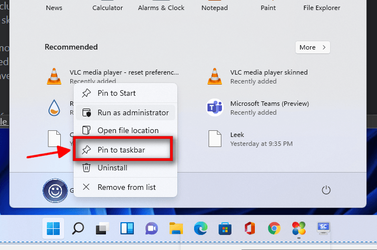
Since when is this back? I just noticed today... haha... happy! :)

View attachment 6021
I've been pinning stuff to the taskbar for the last few Builds. It doesn't exactly take the place of my Quick Launch Bar, but it's helpful at least.
 

My Computers My Computers

  • At a glance

    Windows 11 23H2 22631.2861Intel(R) Core(TM) i7-10700 CPU @ 2.90GHz 2.90...16384 MBytesIntel UHD Graphics 630
    OS
    Windows 11 23H2 22631.2861
    Computer type
    PC/Desktop
    Manufacturer/Model
    HP Envy TE01-1xxx
    CPU
    Intel(R) Core(TM) i7-10700 CPU @ 2.90GHz 2.90 GHz
    Motherboard
    16.0GB Dual-Channel Unknown @ 1463MHz (21-21-21-47)
    Memory
    16384 MBytes
    Graphics Card(s)
    Intel UHD Graphics 630
    Sound Card
    Realtek High Definition Audio
    Monitor(s) Displays
    Monitor 1 - Acer 27" Monitor 2 - Acer 27"
    Screen Resolution
    1920 x 1080
    Hard Drives
    WDC PC SN530 SDBPNPZ-512G-1006 (SSD)
    Seagate ST1000DM003-1SB102
    Seagate BUP Slim SCSI Disk Device (SSD)
    PSU
    HP
    Case
    HP
    Cooling
    Standard
    Keyboard
    Logitech Wave K350
    Mouse
    Logitech M705
    Internet Speed
    500 mbps
    Browser
    Firefox
    Antivirus
    Windows Defender
    Other Info
    That's all Folks!
  • At a glance

    Windows 11Intel Core i7 (10th gen) 1070016 GBIntel UHD Graphics 630
    Operating System
    Windows 11
    Computer type
    PC/Desktop
    Manufacturer/Model
    HP
    CPU
    Intel Core i7 (10th gen) 10700
    Motherboard
    Intel
    Memory
    16 GB
    Graphics card(s)
    Intel UHD Graphics 630
    Sound Card
    Built-in
    Monitor(s) Displays
    Acer 27" & Samsung 24"
    Screen Resolution
    1920 x
    Hard Drives
    SSD (512 GB)
    HDD (1 TB)
    Seagate
    PSU
    Intel i7 10th Generation
    Case
    HP
    Cooling
    HP/Intel?
    Keyboard
    Logitech Wave K350
    Mouse
    Logitech M705
    Internet Speed
    50 mbps
    Browser
    Firefox 90.2
    Antivirus
    Windows Defender
    Other Info
    Headphone/Microphone Combo
    SuperSpeed USB Type-A (4 on front)
    HP 3-in-One Card Readr
    SuperSpeed USB Type-C
    DVD Writer
I've been pinning stuff to the taskbar for the last few Builds. It doesn't exactly take the place of my Quick Launch Bar, but it's helpful at least.
Yeah, I was probably looking for it in a wrong place.
 

My Computers My Computers

  • At a glance

    Windows 11 ProAMD Ryzen 7 9800X3D32GB DDR5 CL30 Kingston FuryASUS Prime Radeon RX 9060 XT OC Edition 16GB
    OS
    Windows 11 Pro
    Computer type
    PC/Desktop
    CPU
    AMD Ryzen 7 9800X3D
    Motherboard
    MSI PRO B850-P Wifi
    Memory
    32GB DDR5 CL30 Kingston Fury
    Graphics Card(s)
    ASUS Prime Radeon RX 9060 XT OC Edition 16GB
    Monitor(s) Displays
    LG Ultrawide 34" 1440p+ MSI 27" 4K UHD
    Screen Resolution
    3440x1440
    Hard Drives
    Main Boot Drive : 512GB Adata XPG RGB Gen3x4 NVMe M.2 SSD
    PSU
    EVGA 750 Watts 80+ Gold
    Case
    Deepcool Genome II
    Cooling
    Thermalright Burst Assassin 120
    Internet Speed
    FTTH 3Gbps
    Browser
    Chrome
    Antivirus
    "Moderna"
  • At a glance

    Windows 11 Proi7-4790K16GB Corsair Vengeance ProMSI R9 290
    Operating System
    Windows 11 Pro
    Computer type
    PC/Desktop
    CPU
    i7-4790K
    Motherboard
    ASRock Xtreme6 Z97
    Memory
    16GB Corsair Vengeance Pro
    Graphics card(s)
    MSI R9 290
    Monitor(s) Displays
    LG Ultrawide 34"
    Screen Resolution
    3440x1440
    Hard Drives
    500GB Adata SSD (OS Only)
    PSU
    Thermaltake 475 Watts 80 Bronze
    Case
    Thermaltake Commander I Snow Edition
    Cooling
    Deep Cool Archer Air Cooler
    Keyboard
    Armageddon MKA-5R RGB-Hornet
    Mouse
    Logitech G402
    Internet Speed
    1Gbps
    Browser
    Chrome
    Antivirus
    Moderna :)

My Computers My Computers

  • At a glance

    Windows 11 Pro 25H2Intel Core i7-10700K16GB (8GB PC4-19200 DDR4 SDRAM x2)NVIDIA GeForce GTX 1050 TI
    OS
    Windows 11 Pro 25H2
    Computer type
    PC/Desktop
    Manufacturer/Model
    PowerSpec B746
    CPU
    Intel Core i7-10700K
    Motherboard
    ASRock Z490 Phantom Gaming 4/ax
    Memory
    16GB (8GB PC4-19200 DDR4 SDRAM x2)
    Graphics Card(s)
    NVIDIA GeForce GTX 1050 TI
    Sound Card
    Realtek Audio
    Monitor(s) Displays
    #1. LG ULTRAWIDE 34" #2. AOC Q32G2WG3 32"
    Screen Resolution
    #1. 3440 X 1440 #2. 1920 x 1080
    Hard Drives
    NVMe WDC WDS100T2B0C-00PXH0 1TB
    Samsung SSD 860 EVO 1TB
    PSU
    750 Watts (62.5A)
    Case
    PowerSpec/Lian Li ATX 205
    Keyboard
    Logitech K270
    Mouse
    Logitech M185
    Browser
    Microsoft Edge and Firefox
    Antivirus
    Webroot SecureAnywhere CE 26.1
  • At a glance

    Windows 11 Canary ChannelIntel Core i5-8400 CPU @ 2.80GHz16 MB DDR 4-2666
    Operating System
    Windows 11 Canary Channel
    Computer type
    PC/Desktop
    Manufacturer/Model
    PowerSpec G156
    CPU
    Intel Core i5-8400 CPU @ 2.80GHz
    Motherboard
    AsusTeK Prime B360M-A
    Memory
    16 MB DDR 4-2666
    Monitor(s) Displays
    23" Speptre HDMI 75Hz
    Screen Resolution
    1920x1080
    Hard Drives
    Samsung 970 EVO 500GB NVMe
    Keyboard
    Logitek K270
    Mouse
    Logitek M185
    Browser
    Firefox, Edge and Edge Canary
    Antivirus
    Windows Defender
It still does not show time. :weary:

capture_08202021_224152.jpg
 

My Computer My Computer

At a glance

Home2FH2CanAMD Ryzen 5 8600G (07/24)2x32GB Kingston FURY DDR5 5600 MHz CL36 @5200...ASROCK Radeon RX 6600 Challenger D 8G @48FPS ...
OS
Home2FH2Can
Computer type
PC/Desktop
CPU
AMD Ryzen 5 8600G (07/24)
Motherboard
ASROCK B650M-HDV/M.2 (07/24) BIOS 4.43 AGESA ComboAM5 1.3.0.1b Patch A (07/26)
Memory
2x32GB Kingston FURY DDR5 5600 MHz CL36 @5200 CL40 (07/24)
Graphics Card(s)
ASROCK Radeon RX 6600 Challenger D 8G @48FPS (08/24)
Sound Card
Creative Sound BlasterX AE-5 Plus (05/24)
Monitor(s) Displays
24" Philips 24M1N3200ZS/00 (05/24)
Screen Resolution
1920×1080@165Hz via DP1.4
Hard Drives
Kingston KC3000 NVMe 2TB (05/24)
ADATA XPG GAMMIX S11 Pro 512GB (07/19)
PSU
Seasonic Core GM 550 Gold (04/24)
Case
Fractal Design Define 7 Mini with 3x Noctua NF-P14s/12@555rpm (04/24)
Cooling
Noctua NH-U12S with Noctua NF-P12 (04/24)
Keyboard
HP Pavilion Wired Keyboard 300 (07/24) + Rabalux 76017 Parker (01/24)
Mouse
Logitech M330 Silent Plus (07/26)
Internet Speed
500/100 Mbps via RouterOS (05/21) & TCP Optimizer
Browser
Edge, Brave for YouTube, LibreWolf for FB
Antivirus
NextDNS blocking 1/3 Traffic
Other Info
Phone: Motorola Moto G86 (02/26)
Backup: Hasleo Backup Suite (PreOS)
Headphones: Sennheiser RS170 (09/10)
Chair: Huzaro Force 4.4 Grey Mesh (05/24)
Notifier: Xiaomi Mi Band 9 Milanese (10/24)
FlexCore USB-C 3.2 Gen 1 (M) to LAN (F) (08/25)
When did it leave?
It wasn't there when I was attempting to use it with Windows 11. I thought it was removed because of the major changes they've done with taskbar. I didn't make a big deal out of it before, but I am just glad it is still there.
 

My Computers My Computers

  • At a glance

    Windows 11 ProAMD Ryzen 7 9800X3D32GB DDR5 CL30 Kingston FuryASUS Prime Radeon RX 9060 XT OC Edition 16GB
    OS
    Windows 11 Pro
    Computer type
    PC/Desktop
    CPU
    AMD Ryzen 7 9800X3D
    Motherboard
    MSI PRO B850-P Wifi
    Memory
    32GB DDR5 CL30 Kingston Fury
    Graphics Card(s)
    ASUS Prime Radeon RX 9060 XT OC Edition 16GB
    Monitor(s) Displays
    LG Ultrawide 34" 1440p+ MSI 27" 4K UHD
    Screen Resolution
    3440x1440
    Hard Drives
    Main Boot Drive : 512GB Adata XPG RGB Gen3x4 NVMe M.2 SSD
    PSU
    EVGA 750 Watts 80+ Gold
    Case
    Deepcool Genome II
    Cooling
    Thermalright Burst Assassin 120
    Internet Speed
    FTTH 3Gbps
    Browser
    Chrome
    Antivirus
    "Moderna"
  • At a glance

    Windows 11 Proi7-4790K16GB Corsair Vengeance ProMSI R9 290
    Operating System
    Windows 11 Pro
    Computer type
    PC/Desktop
    CPU
    i7-4790K
    Motherboard
    ASRock Xtreme6 Z97
    Memory
    16GB Corsair Vengeance Pro
    Graphics card(s)
    MSI R9 290
    Monitor(s) Displays
    LG Ultrawide 34"
    Screen Resolution
    3440x1440
    Hard Drives
    500GB Adata SSD (OS Only)
    PSU
    Thermaltake 475 Watts 80 Bronze
    Case
    Thermaltake Commander I Snow Edition
    Cooling
    Deep Cool Archer Air Cooler
    Keyboard
    Armageddon MKA-5R RGB-Hornet
    Mouse
    Logitech G402
    Internet Speed
    1Gbps
    Browser
    Chrome
    Antivirus
    Moderna :)
Would anyone find the new clock app useful?
 

My Computers My Computers

  • At a glance

    windows 10 & 11AMD Ryzen 7X64GbRadeon RX 480 8Gb
    OS
    windows 10 & 11
    Computer type
    PC/Desktop
    Manufacturer/Model
    iBuyPower (special build)
    CPU
    AMD Ryzen 7X
    Motherboard
    Asus Prime x370 Pro
    Memory
    64Gb
    Graphics Card(s)
    Radeon RX 480 8Gb
    Monitor(s) Displays
    Samsung UHD 27 inch
    Screen Resolution
    UHD
    Hard Drives
    3 Samsung 1 TB SSD each; 1 Samsung PCIe M.2 at 2 TB
  • At a glance

    Windows 11 proAMD 9 5900X32 GbNvidia GeForce RTX 3080 Ti 12 GB GDDR6X
    Operating System
    Windows 11 pro
    Computer type
    PC/Desktop
    Manufacturer/Model
    IBuyPower
    CPU
    AMD 9 5900X
    Motherboard
    Asus x570 ROG Crosshair VIII Dark Hero WI-FI 6E ARGB
    Memory
    32 Gb
    Graphics card(s)
    Nvidia GeForce RTX 3080 Ti 12 GB GDDR6X
    Sound Card
    3D PREMIUM surround sound onboard
    Monitor(s) Displays
    Samsung 32 inch UHD curved monitor
    Screen Resolution
    UHD
    Hard Drives
    Samsung 980 pro 2 tb gen 4 NVMe ssd
    PSU
    850 watt consair RM850X
    Case
    Lian Li LANCOOL ONE tempered glass RGB gaming case
    Cooling
    DEEPCOOL GAMERSTORM RGB 240 mm CASTLE 240EX liquid cooler
    Keyboard
    Ares m.2 gaming keyboard
    Mouse
    Ares m.2 gaming optical mouse
    Internet Speed
    450
    Browser
    Firefox / Edge
    Antivirus
    Windows defender
    Other Info
    With all this gaming rig I am not a gamer!

My Computer My Computer

At a glance

Windows 11 Home- RP - 26H2 -26300.9550AMD Ryzen 5 5600GG.SKILL Ripjaws V Series 64GB 4x16Nvidia geforce gtx titan x
OS
Windows 11 Home- RP - 26H2 -26300.9550
Computer type
PC/Desktop
Manufacturer/Model
Banana Junior 5600-G Series
CPU
AMD Ryzen 5 5600G
Motherboard
Asus ROG Strix B550-F
Memory
G.SKILL Ripjaws V Series 64GB 4x16
Graphics Card(s)
Nvidia geforce gtx titan x
Monitor(s) Displays
28" ASUS VP28U 4k
Screen Resolution
4K
Hard Drives
Primary SAMSUNG 970 EVO Plus
PSU
EVGA BQ 700w 80+ Bronze
Case
Zalman i3 NEO
Cooling
ARCTIC Freezer 7 X
Keyboard
Corsair
Mouse
Amazon Generic with Cord
Internet Speed
Download: 295.11 mbps Upload: 65.35 mbps T-Mobile Internet
Browser
Firefox and Edge
Antivirus
MS - Defender
Other Info
Speakers: Klipsch ProMedia 2.1
Since when is this back? I just noticed today... haha... happy! :)

View attachment 6021
Your screen shot caught my attention. When Win 11 was first installed I seem to remember that the Recommended list showed two across and three down. For the last few releases it only shows two across. Is there a setting to control this?
 

My Computer My Computer

At a glance

Windows 11 ProIntel Core Ultra16GBIntel(R) Arc Graphics
OS
Windows 11 Pro
Computer type
Laptop
Manufacturer/Model
ASUS Zenbook 14 OLED
CPU
Intel Core Ultra
Memory
16GB
Graphics Card(s)
Intel(R) Arc Graphics
Sound Card
Realtek High Definition Audio(SST)
Screen Resolution
2880 x 1800
Hard Drives
500 GB NVMe SSD
Internet Speed
1,500Mbps
Browser
Firefox, Edge
Antivirus
Windows Defender
I guess some will.. I sure wont.

Pretty much. Would uninstall it if I could, but seeing as it doesn't appear to be possible at the moment just going to ignore it for now.
 

My Computer My Computer

At a glance

Windows 11Ryzen 5 5600T-Force Vulcan Z - 32 GB (2x16) @ 3600 MHzSapphire RX 7600
OS
Windows 11
Computer type
PC/Desktop
CPU
Ryzen 5 5600
Motherboard
MSI B550 Tomahawk
Memory
T-Force Vulcan Z - 32 GB (2x16) @ 3600 MHz
Graphics Card(s)
Sapphire RX 7600
Monitor(s) Displays
Sansui ES-G27F2Q
Screen Resolution
2560 x 1440P
Hard Drives
XPG SX8200 240GB M.2 PCIe Gen3x4 NVMe
Samsung 850 EVO 250 GB
Adata SU800 1 TB
WD Black SN750 500GB
PSU
EVGA SuperNOVA 650 G3
Case
Deepcool CK500WH
Cooling
Thermalright Frozen Warframe 240 SE, plus 3 140 MM case fans (2 in front, 1 in rear)
Keyboard
Logitech G213 Prodigy
Mouse
Logitech ERGO M575

Latest Support Threads

Back
Top Bottom