Insider KB5012643 Windows 11 Insider Release Preview Build 22000.651 - April 14


UPDATE 5/19:

Hello Windows Insiders, today we’re releasing Windows 11 Build 22000.651 (KB5012643) to Insiders in the Release Preview Channel who are on Windows 11.

This update includes the following improvements:
  • New! We added improvements for servicing the Secure Boot component of Windows.
  • We fixed an issue that causes the AppX Deployment Service (AppXSvc) to stop working after you install certain MSIX apps.
  • We fixed a race condition that occurs early in the startup process that might cause a stop error.
  • We improved the Autopilot client to process updated Trusted Platform Module (TPM) capabilities that support self-deployment and pre-provisioning scenarios.
  • We changed the timeout for Azure Active Directory (Azure AD) registration from 60 minutes to 90 minutes for hybrid Azure AD-joined Autopilot scenarios. This also addresses a race condition that causes an exception at timeout.
  • We fixed an issue that delays OS startup by approximately 40 minutes.
  • We fixed a memory leak issue that affects Windows systems that are in use 24 hours each day of the week.
  • We fixed an issue that affects the Dynamic Host Configuration Protocol (DHCP) option 119 (Domain Search List) by preventing the use of the connection-specific DNS Suffix Search List.
  • We fixed an issue that affects the Title attribute in Microsoft Ege IE mode.
  • We fixed an issue in which mobile device management (MDM) policies were not allowed on Windows Enterprise editions that were upgraded to Enterprise using Azure AD-joined subscription entitlement.
  • We fixed an issue that might cause video subtitles to be partially cut off.
  • We fixed an issue that incorrectly aligns video subtitles.
  • We fixed an issue that causes Kerberos authentication to fail, and the error is “0xc0030009 (RPC_NT_NULL_REF_POINTER)”. This occurs when a client machine attempts to use the Remote Desktop Protocol (RDP) to connect to another machine while Remote Credential Guard is enabled.
  • We fixed an issue that causes Windows to go into BitLocker recovery after a servicing update.
  • We fixed an issue that prevents retrieval of the Endorsement Key (EK) certificate from the TPM device.
  • We fixed an issue that might fail to copy the security portion of a Group Policy to a machine.
  • We fixed an issue that prevents the instantiation of the Microsoft RDP Client Control, version 11 and higher, inside a Microsoft Foundation Class (MFC) dialog.
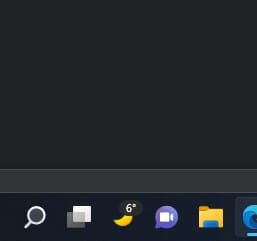
  • We displayed the temperature on top of the weather icon on the taskbar. We displayed the temperature on top of the weather icon on the taskbar if your taskbar is aligned on the left.
  • We fixed an issue that prevents you from using the minimize, maximize, and close buttons on a maximized app window. This issue occurs because the Notification Center keeps the input focus.
  • We fixed an issue that might occur when you use Netdom.exe or the Active Directory Domains and Trusts snap-in to list or modify name suffixes routing. These procedures might fail. The error message is, “Insufficient system resources exist to complete the requested service.” This issue occurs after installing the January 2022 security update on the primary domain controller emulator (PDCe).
  • We fixed an issue that causes the primary domain controller (PDC) of the root domain to generate warning and error events in the System log. This issue occurs when the PDC incorrectly tries to scan outgoing-only trusts.
  • We fixed an issue that occurs when you map a network drive to a Server Message Block version 1 (SMBv1) share. After restarting the OS, you cannot access that network drive.
  • We fixed an issue that affects an SMB multichannel connection and might generate a 13A or C2 error.
  • We fixed an issue that damages a pool when a Client-Side Caching (CSC) cleanup method fails to delete a resource that was created.
  • We fixed an issue that might cause the server to lock up because the nonpaged pool grows and uses up all memory. After a restart, the same issue occurs again when you try to repair the damage.
  • We reduced the overhead of resource contention in high input/output operations per second (IOPS) scenarios that have many threads contending on a single file.
Thanks,
Windows Insider Program Team


Source:


Check Windows Updates


UUP Dump:

64-bit ISO download:
Select language for Upgrade to Windows 11 (22000.651) amd64

ARM64 ISO download: Select language for Upgrade to Windows 11 (22000.651) arm64

 
Last edited:

 

My Computers My Computers

  • At a glance

    Windows 11 Pro for WorkstationsIntel i7-8700K 5 GHz64 GB (4x16GB) G.SKILL TridentZ RGB DDR4 3600...ASUS ROG-STRIX-GTX1080TI-O11G-GAMING (11GB GD...
    OS
    Windows 11 Pro for Workstations
    Computer type
    PC/Desktop
    Manufacturer/Model
    Custom self build
    CPU
    Intel i7-8700K 5 GHz
    Motherboard
    ASUS ROG Maximus XI Formula Z390
    Memory
    64 GB (4x16GB) G.SKILL TridentZ RGB DDR4 3600 MHz (F4-3600C18D-32GTZR)
    Graphics Card(s)
    ASUS ROG-STRIX-GTX1080TI-O11G-GAMING (11GB GDDR5X)
    Sound Card
    Integrated Digital Audio (S/PDIF)
    Monitor(s) Displays
    2 x Samsung Odyssey G75 27"
    Screen Resolution
    2560x1440
    Hard Drives
    1TB Samsung 990 PRO M.2,
    4TB Samsung 990 PRO M.2,
    TerraMaster F8 SSD Plus NAS
    PSU
    Seasonic Prime Titanium 850W
    Case
    Thermaltake Core P3 wall mounted
    Cooling
    Corsair Hydro H115i
    Keyboard
    Amazon Basics Wired Full Keyboard MD005
    Mouse
    Logitech MX Master 4
    Internet Speed
    2 Gbps Download and 100 Mbps Upload
    Browser
    Chrome and Edge
    Antivirus
    Microsoft Defender
    Other Info
    Logitech Z625 speaker system,
    Logitech BRIO 4K Pro webcam,
    HP Color LaserJet Pro MFP M477fdn,
    CyberPower CP1500PFCLCD
    Galaxy S23 Plus phone
  • At a glance

    Windows 11 ProSnapdragon X Elite (12 core) 3.42 GHz16 GB LPDDR5x-7467 MHz
    Operating System
    Windows 11 Pro
    Computer type
    Laptop
    Manufacturer/Model
    Surface Laptop 7 Copilot+ PC
    CPU
    Snapdragon X Elite (12 core) 3.42 GHz
    Memory
    16 GB LPDDR5x-7467 MHz
    Monitor(s) Displays
    15" HDR
    Screen Resolution
    2496 x 1664
    Hard Drives
    1 TB SSD
    Internet Speed
    Wi-Fi 7 and Bluetooth 5.4
    Browser
    Chrome and Edge
    Antivirus
    Microsoft Defender
Just Got a CU bringing the build to 22000.652
 

My Computers My Computers

  • At a glance

    Windows11 Pro 26200.9128Intel Core i9 14900F (24 -Core, 68 MB Total C...32GB DDR5RTX 4080 Super w/610.74
    OS
    Windows11 Pro 26200.9128
    Computer type
    PC/Desktop
    Manufacturer/Model
    Dell Alienware Aurora R16
    CPU
    Intel Core i9 14900F (24 -Core, 68 MB Total Cache)
    Motherboard
    Dell Alienware
    Memory
    32GB DDR5
    Graphics Card(s)
    RTX 4080 Super w/610.74
    Sound Card
    Realtec
    Monitor(s) Displays
    Corsair XENEON 32QHD165
    Screen Resolution
    2560 X 1440
    Hard Drives
    1-2TB Samsung 990 Pro PCIe NVMe M2 SSD
    1-4TB Samsung 990 Pro PCIe NVMe M2 SSD
    PSU
    1000 Watt Platinum Dell
    Case
    Alienware
    Cooling
    Liquid Closed Loop
    Keyboard
    Corsair Strafe RGB
    Mouse
    Logitech MK270 Wireless
    Internet Speed
    100Gb's Down-20 Up
    Browser
    Firefox 153.0.1
    Antivirus
    Defender
    Other Info
    Very Quiet And Fast
    CyberPower UPS CP1500PFCLCD
  • At a glance

    PClinuxOS Mate (2025.7)13th Gen Inter(R) Core(TM) i3-1315U64 GB DDR4 @3200 MHz.Internal
    Operating System
    PClinuxOS Mate (2025.7)
    Computer type
    PC/Desktop
    Manufacturer/Model
    Intel
    CPU
    13th Gen Inter(R) Core(TM) i3-1315U
    Motherboard
    Intel
    Memory
    64 GB DDR4 @3200 MHz.
    Graphics card(s)
    Internal
    Sound Card
    None
    Monitor(s) Displays
    Dell 2419HGCF
    Screen Resolution
    1920 X 1080
    Hard Drives
    SAMSUNG 980 PRO SSD 2TB, PCIe 4.0 M.2 2280
    PSU
    Chicony 30 Watt
    Case
    Small
    Keyboard
    Dell
    Mouse
    Razor
    Internet Speed
    1GB
    Browser
    Slimjet
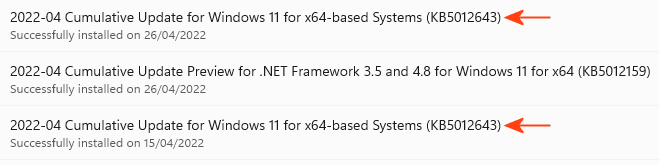
Strange, but this KB5012643 update just installed for the second time.

Windows Update KB5012643 Twice.png

Has anyone else done a "Check for Updates" recently and received this again? :confused:
 

My Computers My Computers

  • At a glance

    Windows 11 ProIntel Core i9-10900XCorsair 64 GB (4 x 16 GB) CMW64GX4M4C3000C15 ...GIGABYTE GeForce GTX 1660 Super Mini ITX 6 GB OC
    OS
    Windows 11 Pro
    Computer type
    PC/Desktop
    Manufacturer/Model
    Stigg's Build
    CPU
    Intel Core i9-10900X
    Motherboard
    GIGABYTE X299X DESIGNARE 10G
    Memory
    Corsair 64 GB (4 x 16 GB) CMW64GX4M4C3000C15 Vengeance RGB Pro 3000Mhz DDR4
    Graphics Card(s)
    GIGABYTE GeForce GTX 1660 Super Mini ITX 6 GB OC
    Sound Card
    Realtek ALC1220
    Monitor(s) Displays
    Samsung 27" FHD LED FreeSync Gaming Monitor (LS27F350FHEXXY)
    Screen Resolution
    1920 x 1080
    Hard Drives
    Samsung 970 Pro Series 1TB M.2 2280 NVMe SSD
    Western Digital Red Pro WD8003FFBX-68B9AN0 8 TB, 7200 RPM, SATA-III
    Western Digital Red Pro WD8003FFBX-68B9AN0 8 TB, 7200 RPM, SATA-III
    PSU
    Corsair HX1200 1200W 80 Plus Platinum
    Case
    Fractal Design Define 7 Black Solid Case
    Cooling
    Noctua NH-D15 Chromax Black
    Keyboard
    Razer Ornata V2
    Mouse
    Razer DeathAdder Essential
    Internet Speed
    FTTN 100Mbps / 40Mbps
    Browser
    Mozilla Firefox
    Antivirus
    N/A
    Other Info
    Logitech BRIO 4k Ultra HD USB-C Webcam
  • At a glance

    Windows 10 ProCore i7-8750HSK Hynix 32 GB (2 x 16 GB) HMA82GS6CJR8N-VK 1...NVIDIA GeForce GTX 1070
    Operating System
    Windows 10 Pro
    Computer type
    Laptop
    Manufacturer/Model
    ASUS ROG Zephyrus M GM501GS
    CPU
    Core i7-8750H
    Motherboard
    Zephyrus M GM501GS
    Memory
    SK Hynix 32 GB (2 x 16 GB) HMA82GS6CJR8N-VK 16 GB DDR4-2666 DDR4 SDRAM
    Graphics card(s)
    NVIDIA GeForce GTX 1070
    Sound Card
    Realtek ALC294
    Monitor(s) Displays
    AU Optronics B156HAN07.1 [15.6" LCD]
    Screen Resolution
    1920 x 1080
    Hard Drives
    Samsung MZVKW512HMJP-00000 512 GB, PCI-E 3.0 x4
    Samsung SSD 860 QVO 4TB 4 TB, SATA-III
    PSU
    N/A
    Case
    N/A
    Cooling
    N/A
    Keyboard
    PC/AT Enhanced PS2 Keyboard (101/102-Key)
    Mouse
    Razer DeathAdder Essential
    Internet Speed
    FTTN 100Mbps / 40Mbps
    Browser
    Mozilla Firefox
    Antivirus
    N/A
    Other Info
    USB2.0 HD UVC Webcam

My Computers My Computers

  • At a glance

    windows 10 & 11AMD Ryzen 7X64GbRadeon RX 480 8Gb
    OS
    windows 10 & 11
    Computer type
    PC/Desktop
    Manufacturer/Model
    iBuyPower (special build)
    CPU
    AMD Ryzen 7X
    Motherboard
    Asus Prime x370 Pro
    Memory
    64Gb
    Graphics Card(s)
    Radeon RX 480 8Gb
    Monitor(s) Displays
    Samsung UHD 27 inch
    Screen Resolution
    UHD
    Hard Drives
    3 Samsung 1 TB SSD each; 1 Samsung PCIe M.2 at 2 TB
  • At a glance

    Windows 11 proAMD 9 5900X32 GbNvidia GeForce RTX 3080 Ti 12 GB GDDR6X
    Operating System
    Windows 11 pro
    Computer type
    PC/Desktop
    Manufacturer/Model
    IBuyPower
    CPU
    AMD 9 5900X
    Motherboard
    Asus x570 ROG Crosshair VIII Dark Hero WI-FI 6E ARGB
    Memory
    32 Gb
    Graphics card(s)
    Nvidia GeForce RTX 3080 Ti 12 GB GDDR6X
    Sound Card
    3D PREMIUM surround sound onboard
    Monitor(s) Displays
    Samsung 32 inch UHD curved monitor
    Screen Resolution
    UHD
    Hard Drives
    Samsung 980 pro 2 tb gen 4 NVMe ssd
    PSU
    850 watt consair RM850X
    Case
    Lian Li LANCOOL ONE tempered glass RGB gaming case
    Cooling
    DEEPCOOL GAMERSTORM RGB 240 mm CASTLE 240EX liquid cooler
    Keyboard
    Ares m.2 gaming keyboard
    Mouse
    Ares m.2 gaming optical mouse
    Internet Speed
    450
    Browser
    Firefox / Edge
    Antivirus
    Windows defender
    Other Info
    With all this gaming rig I am not a gamer!

My Computers My Computers

  • At a glance

    windows 10 & 11AMD Ryzen 7X64GbRadeon RX 480 8Gb
    OS
    windows 10 & 11
    Computer type
    PC/Desktop
    Manufacturer/Model
    iBuyPower (special build)
    CPU
    AMD Ryzen 7X
    Motherboard
    Asus Prime x370 Pro
    Memory
    64Gb
    Graphics Card(s)
    Radeon RX 480 8Gb
    Monitor(s) Displays
    Samsung UHD 27 inch
    Screen Resolution
    UHD
    Hard Drives
    3 Samsung 1 TB SSD each; 1 Samsung PCIe M.2 at 2 TB
  • At a glance

    Windows 11 proAMD 9 5900X32 GbNvidia GeForce RTX 3080 Ti 12 GB GDDR6X
    Operating System
    Windows 11 pro
    Computer type
    PC/Desktop
    Manufacturer/Model
    IBuyPower
    CPU
    AMD 9 5900X
    Motherboard
    Asus x570 ROG Crosshair VIII Dark Hero WI-FI 6E ARGB
    Memory
    32 Gb
    Graphics card(s)
    Nvidia GeForce RTX 3080 Ti 12 GB GDDR6X
    Sound Card
    3D PREMIUM surround sound onboard
    Monitor(s) Displays
    Samsung 32 inch UHD curved monitor
    Screen Resolution
    UHD
    Hard Drives
    Samsung 980 pro 2 tb gen 4 NVMe ssd
    PSU
    850 watt consair RM850X
    Case
    Lian Li LANCOOL ONE tempered glass RGB gaming case
    Cooling
    DEEPCOOL GAMERSTORM RGB 240 mm CASTLE 240EX liquid cooler
    Keyboard
    Ares m.2 gaming keyboard
    Mouse
    Ares m.2 gaming optical mouse
    Internet Speed
    450
    Browser
    Firefox / Edge
    Antivirus
    Windows defender
    Other Info
    With all this gaming rig I am not a gamer!

My Computers My Computers

  • At a glance

    windows 10 & 11AMD Ryzen 7X64GbRadeon RX 480 8Gb
    OS
    windows 10 & 11
    Computer type
    PC/Desktop
    Manufacturer/Model
    iBuyPower (special build)
    CPU
    AMD Ryzen 7X
    Motherboard
    Asus Prime x370 Pro
    Memory
    64Gb
    Graphics Card(s)
    Radeon RX 480 8Gb
    Monitor(s) Displays
    Samsung UHD 27 inch
    Screen Resolution
    UHD
    Hard Drives
    3 Samsung 1 TB SSD each; 1 Samsung PCIe M.2 at 2 TB
  • At a glance

    Windows 11 proAMD 9 5900X32 GbNvidia GeForce RTX 3080 Ti 12 GB GDDR6X
    Operating System
    Windows 11 pro
    Computer type
    PC/Desktop
    Manufacturer/Model
    IBuyPower
    CPU
    AMD 9 5900X
    Motherboard
    Asus x570 ROG Crosshair VIII Dark Hero WI-FI 6E ARGB
    Memory
    32 Gb
    Graphics card(s)
    Nvidia GeForce RTX 3080 Ti 12 GB GDDR6X
    Sound Card
    3D PREMIUM surround sound onboard
    Monitor(s) Displays
    Samsung 32 inch UHD curved monitor
    Screen Resolution
    UHD
    Hard Drives
    Samsung 980 pro 2 tb gen 4 NVMe ssd
    PSU
    850 watt consair RM850X
    Case
    Lian Li LANCOOL ONE tempered glass RGB gaming case
    Cooling
    DEEPCOOL GAMERSTORM RGB 240 mm CASTLE 240EX liquid cooler
    Keyboard
    Ares m.2 gaming keyboard
    Mouse
    Ares m.2 gaming optical mouse
    Internet Speed
    450
    Browser
    Firefox / Edge
    Antivirus
    Windows defender
    Other Info
    With all this gaming rig I am not a gamer!
It does the temperature on my weather on the taskbar now.

2022-04-26_010709.jpg

:)
 
Last edited:

My Computer My Computer

At a glance

Windows 11 Enterprise
OS
Windows 11 Enterprise
It does the temperature on my weather on the taskbar now.

:)
many improvements. See text next to where update installed on UPDATE HISTORY.
 

My Computers My Computers

  • At a glance

    windows 10 & 11AMD Ryzen 7X64GbRadeon RX 480 8Gb
    OS
    windows 10 & 11
    Computer type
    PC/Desktop
    Manufacturer/Model
    iBuyPower (special build)
    CPU
    AMD Ryzen 7X
    Motherboard
    Asus Prime x370 Pro
    Memory
    64Gb
    Graphics Card(s)
    Radeon RX 480 8Gb
    Monitor(s) Displays
    Samsung UHD 27 inch
    Screen Resolution
    UHD
    Hard Drives
    3 Samsung 1 TB SSD each; 1 Samsung PCIe M.2 at 2 TB
  • At a glance

    Windows 11 proAMD 9 5900X32 GbNvidia GeForce RTX 3080 Ti 12 GB GDDR6X
    Operating System
    Windows 11 pro
    Computer type
    PC/Desktop
    Manufacturer/Model
    IBuyPower
    CPU
    AMD 9 5900X
    Motherboard
    Asus x570 ROG Crosshair VIII Dark Hero WI-FI 6E ARGB
    Memory
    32 Gb
    Graphics card(s)
    Nvidia GeForce RTX 3080 Ti 12 GB GDDR6X
    Sound Card
    3D PREMIUM surround sound onboard
    Monitor(s) Displays
    Samsung 32 inch UHD curved monitor
    Screen Resolution
    UHD
    Hard Drives
    Samsung 980 pro 2 tb gen 4 NVMe ssd
    PSU
    850 watt consair RM850X
    Case
    Lian Li LANCOOL ONE tempered glass RGB gaming case
    Cooling
    DEEPCOOL GAMERSTORM RGB 240 mm CASTLE 240EX liquid cooler
    Keyboard
    Ares m.2 gaming keyboard
    Mouse
    Ares m.2 gaming optical mouse
    Internet Speed
    450
    Browser
    Firefox / Edge
    Antivirus
    Windows defender
    Other Info
    With all this gaming rig I am not a gamer!
many improvements. See text next to where update installed on UPDATE HISTORY.
Thanks I see it there. I think it would be better positioned in the bottom right of the taskbar icon not top right as it is now.
 

My Computer My Computer

At a glance

Windows 11 Enterprise
OS
Windows 11 Enterprise
UPDATE:
 

My Computers My Computers

  • At a glance

    Windows 11 Pro for WorkstationsIntel i7-8700K 5 GHz64 GB (4x16GB) G.SKILL TridentZ RGB DDR4 3600...ASUS ROG-STRIX-GTX1080TI-O11G-GAMING (11GB GD...
    OS
    Windows 11 Pro for Workstations
    Computer type
    PC/Desktop
    Manufacturer/Model
    Custom self build
    CPU
    Intel i7-8700K 5 GHz
    Motherboard
    ASUS ROG Maximus XI Formula Z390
    Memory
    64 GB (4x16GB) G.SKILL TridentZ RGB DDR4 3600 MHz (F4-3600C18D-32GTZR)
    Graphics Card(s)
    ASUS ROG-STRIX-GTX1080TI-O11G-GAMING (11GB GDDR5X)
    Sound Card
    Integrated Digital Audio (S/PDIF)
    Monitor(s) Displays
    2 x Samsung Odyssey G75 27"
    Screen Resolution
    2560x1440
    Hard Drives
    1TB Samsung 990 PRO M.2,
    4TB Samsung 990 PRO M.2,
    TerraMaster F8 SSD Plus NAS
    PSU
    Seasonic Prime Titanium 850W
    Case
    Thermaltake Core P3 wall mounted
    Cooling
    Corsair Hydro H115i
    Keyboard
    Amazon Basics Wired Full Keyboard MD005
    Mouse
    Logitech MX Master 4
    Internet Speed
    2 Gbps Download and 100 Mbps Upload
    Browser
    Chrome and Edge
    Antivirus
    Microsoft Defender
    Other Info
    Logitech Z625 speaker system,
    Logitech BRIO 4K Pro webcam,
    HP Color LaserJet Pro MFP M477fdn,
    CyberPower CP1500PFCLCD
    Galaxy S23 Plus phone
  • At a glance

    Windows 11 ProSnapdragon X Elite (12 core) 3.42 GHz16 GB LPDDR5x-7467 MHz
    Operating System
    Windows 11 Pro
    Computer type
    Laptop
    Manufacturer/Model
    Surface Laptop 7 Copilot+ PC
    CPU
    Snapdragon X Elite (12 core) 3.42 GHz
    Memory
    16 GB LPDDR5x-7467 MHz
    Monitor(s) Displays
    15" HDR
    Screen Resolution
    2496 x 1664
    Hard Drives
    1 TB SSD
    Internet Speed
    Wi-Fi 7 and Bluetooth 5.4
    Browser
    Chrome and Edge
    Antivirus
    Microsoft Defender
I like the addition of the temperature on the weather/widget taskbar icon, something that's come from a later build
That was already there on previous builds.
 

My Computer My Computer

At a glance

Windows 11 Pro 25H2Intel I9-9900K64GBNVIDIA RTX 2060
OS
Windows 11 Pro 25H2
Computer type
PC/Desktop
Manufacturer/Model
Dell XPS 8930
CPU
Intel I9-9900K
Memory
64GB
Graphics Card(s)
NVIDIA RTX 2060
Sound Card
NVIDIA High Definition Audio
Monitor(s) Displays
4k Samsung
Screen Resolution
3840 x 2160
Hard Drives
512GB NVMe, ADATA SU 800, 2TB HDD
Strange, but this KB5012643 update just installed for the second time.

View attachment 27675

Has anyone else done a "Check for Updates" recently and received this again? :confused:
Yes, one was for build 22000.651 the second one with the same kb# was for build 22000.652.
 

My Computer My Computer

At a glance

Windows 11 Pro 25H2Intel I9-9900K64GBNVIDIA RTX 2060
OS
Windows 11 Pro 25H2
Computer type
PC/Desktop
Manufacturer/Model
Dell XPS 8930
CPU
Intel I9-9900K
Memory
64GB
Graphics Card(s)
NVIDIA RTX 2060
Sound Card
NVIDIA High Definition Audio
Monitor(s) Displays
4k Samsung
Screen Resolution
3840 x 2160
Hard Drives
512GB NVMe, ADATA SU 800, 2TB HDD
Has anyone on this build recently tried booting into safe mode? When I boot to safe mode I'm getting screen flickering and cannot open anything but Task Manager.
 

My Computer My Computer

At a glance

Windows 11 - Release Preview channelIntel 13900KCorsair Dominator Platinum RGB 32GB DDR5 6000MHzGigabyte 4090 Gaming OC
OS
Windows 11 - Release Preview channel
Computer type
PC/Desktop
Manufacturer/Model
Kol's custom ROG
CPU
Intel 13900K
Motherboard
Asus ROG Maximus Hero Z790
Memory
Corsair Dominator Platinum RGB 32GB DDR5 6000MHz
Graphics Card(s)
Gigabyte 4090 Gaming OC
Sound Card
SoundBlaster X-AE5
Monitor(s) Displays
Dell Alienware AW3821DW
Screen Resolution
3840x1600 144hz
Hard Drives
Samsung 980 Pro 500GB
860 EVO's
Samsung 990 Pro 2TB
External RAID enclosure - 2x Seagate 3TB HDD
PSU
Seasonic Prime Ultra 1300W Platinum
Case
Phanteks Eclipse P600S
Cooling
Custom water cooling. EK Velocity (CPU), EK Quantum Vector2 (GPU), EK Quantum D5 Pump, 360mm radiator in case + 560mm external radiator
Keyboard
Corsair K100
Mouse
Logitech G502X
Antivirus
Windows Defender, VBS
Has anyone on this build recently tried booting into safe mode? When I boot to safe mode I'm getting screen flickering and cannot open anything but Task Manager.
Yes, everyone has reported this with builds 651/652. All mine do, even my Hyper-V virtual machine. You can use CTrl+Alt+Del to bring up the security options screen, then use the Power button there to to do a shut down or restart. Safe Mode with Networking does not have this issue should you need to use Safe Mode.

See post #31 here:
 

My Computers My Computers

  • At a glance

    Windows 11 HomeAMD Athlon Silver 3050U8GBRadeon Graphics
    OS
    Windows 11 Home
    Computer type
    Laptop
    Manufacturer/Model
    Acer Aspire 3 A315-23-R9VY
    CPU
    AMD Athlon Silver 3050U
    Memory
    8GB
    Graphics Card(s)
    Radeon Graphics
    Monitor(s) Displays
    laptop screen
    Screen Resolution
    1366x768 native resolution, up to 2560x1440 with Radeon Virtual Super Resolution
    Hard Drives
    1TB Samsung EVO 870 SSD (from April 2026: 250GB EVO 850)
    Internet Speed
    150 Mbps
    Browser
    Edge, Firefox
    Antivirus
    Defender
    Other Info
    UPDATE - 11 April 2026: due to lid hinges starting to break up this laptop has been retired from active duty. The OS with all software and files has been migrated to my System Seven in 'Other systems' to carry on as my general purpose 'main machine'.

    I've now clean installed 25H2 and used Garlin's scripts to update Secure Boot to CA 2023 and revoke the PCA 2011 certificates. It's new role is to test secure boot issues.

    Info for 2021-2026:
    fully 'Windows 11 ready' laptop. Windows 10 C: partition migrated from my old unsupported 'main machine' then upgraded to 11. A test migration ran Insider builds for 2 months. When 11 was released on 5th October 2021 it was re-imaged back to 10 and was offered the upgrade in Windows Update on 20th October. Windows Update offered the 22H2 Feature Update on 20th September 2022. It got the 23H2 Feature Update on 4th November 2023 through Windows Update, 24H2 on 3rd October 2024 through Windows Update by setting the Target Release Version for 24H2, and 25H2 on 30th September 2025 through Windows Update by setting the Target Release Version for 25H2.
  • At a glance

    Windows 11 ProIntel® Core™ i5-520M8GB(integrated graphics) Intel HD Graphics
    Operating System
    Windows 11 Pro
    Computer type
    Laptop
    Manufacturer/Model
    Dell Latitude E4310
    CPU
    Intel® Core™ i5-520M
    Motherboard
    0T6M8G
    Memory
    8GB
    Graphics card(s)
    (integrated graphics) Intel HD Graphics
    Screen Resolution
    1366x768
    Hard Drives
    500GB Crucial MX500 SSD
    Browser
    Firefox, Edge
    Antivirus
    Defender
    Other Info
    unsupported machine: Legacy bios, MBR, TPM 1.2, upgraded from W10 to W11 using W10/W11 hybrid install media workaround.

    In-place upgrade to 22H2 using ISO and a workaround.
    Feature Update to 23H2 by manually installing the Enablement Package.
    In-place upgrade to 24H2 using hybrid 23H2/24H2 install media.
    Upgraded to 25H2 by Enablement Package.

    Also running Insider Dev, and Canary builds and Windows 10 as native boot .vhdx.
  • My SYSTEM THREE is a Dell Latitude 5410, i7-10610U, 32GB RAM, 512GB NVMe ssd, supported device running Windows 11 Pro.

    My SYSTEM FOUR was a 2-in-1 convertible Lenovo Yoga 11e (1st gen) type 20DA, Celeron N2930, 8GB RAM, 256GB ssd. Unsupported device. This has now been sold. It has been replaced by my System Eight.

    My SYSTEM FIVE is a Dell Latitude 3190 2-in-1, Pentium Silver N5030, 8GB RAM, 1TB NVMe ssd, supported device running Windows 11 Pro, plus Insider Beta, Dev, and Canary builds (and a few others) as a native boot .vhdx.

    My SYSTEM SIX is a Dell Latitude 5550, Core Ultra 7 165H, 64GB RAM, 1TB NVMe SSD, supported device, Windows 11 Pro, Hyper-V host machine. Updated to 25H2 on 30th September 2025.

    My SYSTEM SEVEN is a Lenovo Thinkpad T580, 1920x1080 touchscreen, Intel Core i7-8650U, 16GB RAM, 512GB NVMe SSD + 2nd 512GB NVMe SSD, a supported device for Windows 11. This is my current general purpose 'main machine'. The installed Windows 11 Home from my System One has been migrated to this machine. As its new home has an existing digital licence for Pro I've been able to upgrade the migrated OS from Home to Pro.

    My SYSTEM EIGHT is a 2-in-1 convertible Lenovo Yoga 11e (5th gen) type 20LN, Celeron N4120, 8GB RAM, 512GB NVMe ssd, a supported device for Windows 11. Currently running Windows 11 Pro, plus Insider Dev, Beta, and Canary builds as native boot vhdx.

My Computer My Computer

At a glance

Windows 11 Intel i5 10400 HD630 graphics chipi5-1040012 gbHD630 chipset
OS
Windows 11 Intel i5 10400 HD630 graphics chip
Computer type
PC/Desktop
Manufacturer/Model
HP
CPU
i5-10400
Memory
12 gb
Graphics Card(s)
HD630 chipset
Monitor(s) Displays
LG 24inch
Hard Drives
SSD, external usb drive 1tb for files/backups
Keyboard
wireless Logi
Mouse
ms 4000 wireless mouse
Internet Speed
10meg
Browser
Firefox
Antivirus
Defender
Other Info
Win11 Home 25h2 26200.9168 08/11/2026
MS is 'fixing' this bug silently ? I have not tried doing the CU update just yet.
I can confirm that this issue is fixed now. I have two machines with the 22000.652 update. Until today they couldn't use Safe Mode, and now they can.
 

My Computers My Computers

  • At a glance

    Windows 11 HomeAMD Athlon Silver 3050U8GBRadeon Graphics
    OS
    Windows 11 Home
    Computer type
    Laptop
    Manufacturer/Model
    Acer Aspire 3 A315-23-R9VY
    CPU
    AMD Athlon Silver 3050U
    Memory
    8GB
    Graphics Card(s)
    Radeon Graphics
    Monitor(s) Displays
    laptop screen
    Screen Resolution
    1366x768 native resolution, up to 2560x1440 with Radeon Virtual Super Resolution
    Hard Drives
    1TB Samsung EVO 870 SSD (from April 2026: 250GB EVO 850)
    Internet Speed
    150 Mbps
    Browser
    Edge, Firefox
    Antivirus
    Defender
    Other Info
    UPDATE - 11 April 2026: due to lid hinges starting to break up this laptop has been retired from active duty. The OS with all software and files has been migrated to my System Seven in 'Other systems' to carry on as my general purpose 'main machine'.

    I've now clean installed 25H2 and used Garlin's scripts to update Secure Boot to CA 2023 and revoke the PCA 2011 certificates. It's new role is to test secure boot issues.

    Info for 2021-2026:
    fully 'Windows 11 ready' laptop. Windows 10 C: partition migrated from my old unsupported 'main machine' then upgraded to 11. A test migration ran Insider builds for 2 months. When 11 was released on 5th October 2021 it was re-imaged back to 10 and was offered the upgrade in Windows Update on 20th October. Windows Update offered the 22H2 Feature Update on 20th September 2022. It got the 23H2 Feature Update on 4th November 2023 through Windows Update, 24H2 on 3rd October 2024 through Windows Update by setting the Target Release Version for 24H2, and 25H2 on 30th September 2025 through Windows Update by setting the Target Release Version for 25H2.
  • At a glance

    Windows 11 ProIntel® Core™ i5-520M8GB(integrated graphics) Intel HD Graphics
    Operating System
    Windows 11 Pro
    Computer type
    Laptop
    Manufacturer/Model
    Dell Latitude E4310
    CPU
    Intel® Core™ i5-520M
    Motherboard
    0T6M8G
    Memory
    8GB
    Graphics card(s)
    (integrated graphics) Intel HD Graphics
    Screen Resolution
    1366x768
    Hard Drives
    500GB Crucial MX500 SSD
    Browser
    Firefox, Edge
    Antivirus
    Defender
    Other Info
    unsupported machine: Legacy bios, MBR, TPM 1.2, upgraded from W10 to W11 using W10/W11 hybrid install media workaround.

    In-place upgrade to 22H2 using ISO and a workaround.
    Feature Update to 23H2 by manually installing the Enablement Package.
    In-place upgrade to 24H2 using hybrid 23H2/24H2 install media.
    Upgraded to 25H2 by Enablement Package.

    Also running Insider Dev, and Canary builds and Windows 10 as native boot .vhdx.
  • My SYSTEM THREE is a Dell Latitude 5410, i7-10610U, 32GB RAM, 512GB NVMe ssd, supported device running Windows 11 Pro.

    My SYSTEM FOUR was a 2-in-1 convertible Lenovo Yoga 11e (1st gen) type 20DA, Celeron N2930, 8GB RAM, 256GB ssd. Unsupported device. This has now been sold. It has been replaced by my System Eight.

    My SYSTEM FIVE is a Dell Latitude 3190 2-in-1, Pentium Silver N5030, 8GB RAM, 1TB NVMe ssd, supported device running Windows 11 Pro, plus Insider Beta, Dev, and Canary builds (and a few others) as a native boot .vhdx.

    My SYSTEM SIX is a Dell Latitude 5550, Core Ultra 7 165H, 64GB RAM, 1TB NVMe SSD, supported device, Windows 11 Pro, Hyper-V host machine. Updated to 25H2 on 30th September 2025.

    My SYSTEM SEVEN is a Lenovo Thinkpad T580, 1920x1080 touchscreen, Intel Core i7-8650U, 16GB RAM, 512GB NVMe SSD + 2nd 512GB NVMe SSD, a supported device for Windows 11. This is my current general purpose 'main machine'. The installed Windows 11 Home from my System One has been migrated to this machine. As its new home has an existing digital licence for Pro I've been able to upgrade the migrated OS from Home to Pro.

    My SYSTEM EIGHT is a 2-in-1 convertible Lenovo Yoga 11e (5th gen) type 20LN, Celeron N4120, 8GB RAM, 512GB NVMe ssd, a supported device for Windows 11. Currently running Windows 11 Pro, plus Insider Dev, Beta, and Canary builds as native boot vhdx.
I can confirm that this issue is fixed now. I have two machines with the 22000.652 update. Until today they couldn't use Safe Mode, and now they can.
Yes, Safe Mode is now fixed on 04/30/2022 on my desktop, but still fails on the Lenovo Yoga 920 Laptop. Not sure why the fix got only on the Desktop Dell XPS 8930?
 
Last edited:

My Computer My Computer

At a glance

Windows 11 Pro 25H2Intel I9-9900K64GBNVIDIA RTX 2060
OS
Windows 11 Pro 25H2
Computer type
PC/Desktop
Manufacturer/Model
Dell XPS 8930
CPU
Intel I9-9900K
Memory
64GB
Graphics Card(s)
NVIDIA RTX 2060
Sound Card
NVIDIA High Definition Audio
Monitor(s) Displays
4k Samsung
Screen Resolution
3840 x 2160
Hard Drives
512GB NVMe, ADATA SU 800, 2TB HDD
My power plan seems to be randomly changing to high performance mode on it's own. Anyone else seen this happening?
 

My Computer My Computer

At a glance

Windows 11 - Release Preview channelIntel 13900KCorsair Dominator Platinum RGB 32GB DDR5 6000MHzGigabyte 4090 Gaming OC
OS
Windows 11 - Release Preview channel
Computer type
PC/Desktop
Manufacturer/Model
Kol's custom ROG
CPU
Intel 13900K
Motherboard
Asus ROG Maximus Hero Z790
Memory
Corsair Dominator Platinum RGB 32GB DDR5 6000MHz
Graphics Card(s)
Gigabyte 4090 Gaming OC
Sound Card
SoundBlaster X-AE5
Monitor(s) Displays
Dell Alienware AW3821DW
Screen Resolution
3840x1600 144hz
Hard Drives
Samsung 980 Pro 500GB
860 EVO's
Samsung 990 Pro 2TB
External RAID enclosure - 2x Seagate 3TB HDD
PSU
Seasonic Prime Ultra 1300W Platinum
Case
Phanteks Eclipse P600S
Cooling
Custom water cooling. EK Velocity (CPU), EK Quantum Vector2 (GPU), EK Quantum D5 Pump, 360mm radiator in case + 560mm external radiator
Keyboard
Corsair K100
Mouse
Logitech G502X
Antivirus
Windows Defender, VBS
Yes, Safe Mode is now fixed on 04/30/2022 on my desktop, but still fails on the Lenovo Yoga 920 Laptop. Not sure why the fix got only on the Desktop Dell XPS 8930?
Finally, Safe Mode screen flickering was fixed also on Lenovo Yoga 920 with Build update 22000.675.
 

My Computer My Computer

At a glance

Windows 11 Pro 25H2Intel I9-9900K64GBNVIDIA RTX 2060
OS
Windows 11 Pro 25H2
Computer type
PC/Desktop
Manufacturer/Model
Dell XPS 8930
CPU
Intel I9-9900K
Memory
64GB
Graphics Card(s)
NVIDIA RTX 2060
Sound Card
NVIDIA High Definition Audio
Monitor(s) Displays
4k Samsung
Screen Resolution
3840 x 2160
Hard Drives
512GB NVMe, ADATA SU 800, 2TB HDD
UPDATE:
 

My Computers My Computers

  • At a glance

    Windows 11 Pro for WorkstationsIntel i7-8700K 5 GHz64 GB (4x16GB) G.SKILL TridentZ RGB DDR4 3600...ASUS ROG-STRIX-GTX1080TI-O11G-GAMING (11GB GD...
    OS
    Windows 11 Pro for Workstations
    Computer type
    PC/Desktop
    Manufacturer/Model
    Custom self build
    CPU
    Intel i7-8700K 5 GHz
    Motherboard
    ASUS ROG Maximus XI Formula Z390
    Memory
    64 GB (4x16GB) G.SKILL TridentZ RGB DDR4 3600 MHz (F4-3600C18D-32GTZR)
    Graphics Card(s)
    ASUS ROG-STRIX-GTX1080TI-O11G-GAMING (11GB GDDR5X)
    Sound Card
    Integrated Digital Audio (S/PDIF)
    Monitor(s) Displays
    2 x Samsung Odyssey G75 27"
    Screen Resolution
    2560x1440
    Hard Drives
    1TB Samsung 990 PRO M.2,
    4TB Samsung 990 PRO M.2,
    TerraMaster F8 SSD Plus NAS
    PSU
    Seasonic Prime Titanium 850W
    Case
    Thermaltake Core P3 wall mounted
    Cooling
    Corsair Hydro H115i
    Keyboard
    Amazon Basics Wired Full Keyboard MD005
    Mouse
    Logitech MX Master 4
    Internet Speed
    2 Gbps Download and 100 Mbps Upload
    Browser
    Chrome and Edge
    Antivirus
    Microsoft Defender
    Other Info
    Logitech Z625 speaker system,
    Logitech BRIO 4K Pro webcam,
    HP Color LaserJet Pro MFP M477fdn,
    CyberPower CP1500PFCLCD
    Galaxy S23 Plus phone
  • At a glance

    Windows 11 ProSnapdragon X Elite (12 core) 3.42 GHz16 GB LPDDR5x-7467 MHz
    Operating System
    Windows 11 Pro
    Computer type
    Laptop
    Manufacturer/Model
    Surface Laptop 7 Copilot+ PC
    CPU
    Snapdragon X Elite (12 core) 3.42 GHz
    Memory
    16 GB LPDDR5x-7467 MHz
    Monitor(s) Displays
    15" HDR
    Screen Resolution
    2496 x 1664
    Hard Drives
    1 TB SSD
    Internet Speed
    Wi-Fi 7 and Bluetooth 5.4
    Browser
    Chrome and Edge
    Antivirus
    Microsoft Defender
Back
Top Bottom