Insider KB5014959 Windows 11 Insider Beta Build 22621.290 and 22622.290 - July 5


UPDATE 7/19:


Hello Windows Insiders,

Starting today, we are releasing updates to the Beta Channel that put Windows Insiders into one of two groups similar to what we did back in 2019:
  • A group of Insiders in the Beta Channel will receive Build 22622.xxx updates that will have new features getting rolled out or turned on via an enablement package (KB5015669) like how we release updates for Windows 10 today.
  • A group of Insiders in the Beta Channel will receive Build 22621.xxx updates that will have new features turned off by default.
This approach will help us validate our ability to release updates with features turned off by default. It will also allow us to have greater insight into the impact of enabling new features. By comparing feedback and usage data between Insiders in these two groups, we will get to see if a feature is causing issues with reliability, for example. Based on this insight, it will help us make decisions on whether to make new features available for more Insiders by increasing their rollout or, in some cases, disable a feature to address bugs. The goal is to use the comparison data to ensure the best possible experience as we try out new features and experience with Windows Insiders in the Beta Channel.

The majority of Insiders in the Beta Channel will automatically get the update (Build 22622.xxx). It is important to note that not all features will be immediately turned on with this update as we plan to roll them out and monitor feedback and see how they land before pushing them out to more Insiders.

We realize that Insiders in the Beta Channel will want to choose which update they get. Insiders who land in the group with new features turned off by default (Build 22621.xxxx) can check for updates and choose to install the update that will have features rolling out (Build 22622.xxx).

As part of this transition to using the enablement package, some Insiders who had previous features rolled out to them may see them disappear. If this happens to you, please install the enablement package and they should return shortly. We realize this isn’t ideal, and we are learning how to best adjust our rollouts going forward to minimize disruption in previewing experiences.

This approach is being used for the Beta Channel only and is not indicative of any changes or plans for final feature rollouts. The enablement package artificially increments the build number for the update with new features getting rolled out and turned on to make it easier to differentiate from devices with the update with features off by default . As a reminder, features we try out with Windows Insiders will ship when they are ready and not every feature that we try out in the Beta Channel will ship to general customers.

Today we are releasing Windows 11 Insider Preview Build 22621.290 and Build 22622.290 (KB5014959) to the Beta Channel.
  • Build 22622.290 = New features rolling out.
  • Build 22621.290 = New features off by default.

What’s new in Build 22622.290

Suggested Actions

Windows Insiders can try out a new feature in this build for making everyday tasks quicker in Windows 11 through inline suggested actions. When you copy a date, time, or phone number, Windows will suggest actions relevant to you such as creating calendar events or making phone calls with your favorite apps. This feature is currently only available to Windows Insiders in the U.S., Canada, and Mexico.

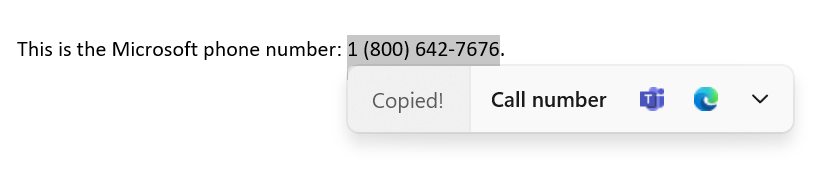
  • On copying a phone number, Windows will pop up an inline light dismissible UI that suggests ways to call the phone number using Teams or other installed apps that offer click-to-dial call functions.

    Inline suggested actions after copying a phone number.
    Inline suggested actions after copying a phone number.
  • On copying a future date and/or time, Windows will pop up an inline light dismissible UI that suggests creating the event using supported calendar apps. Upon user selection of preference, the app is launched with its corresponding calendar event creation page with auto filled date and/or time.

    Inline suggested actions after copying a date or time.
    Inline suggested actions after copying a date or time.
FEEDBACK: Please file feedback in Feedback Hub (WIN + F) under Desktop Environment > Suggested actions on copy.

Bringing OneDrive storage alert and subscription management in Settings

In March, we enhanced the Microsoft 365 subscription management experience in Windows 11 Settings and added the ability to view your payment method on your Microsoft 365 subscription in Accounts within Settings.

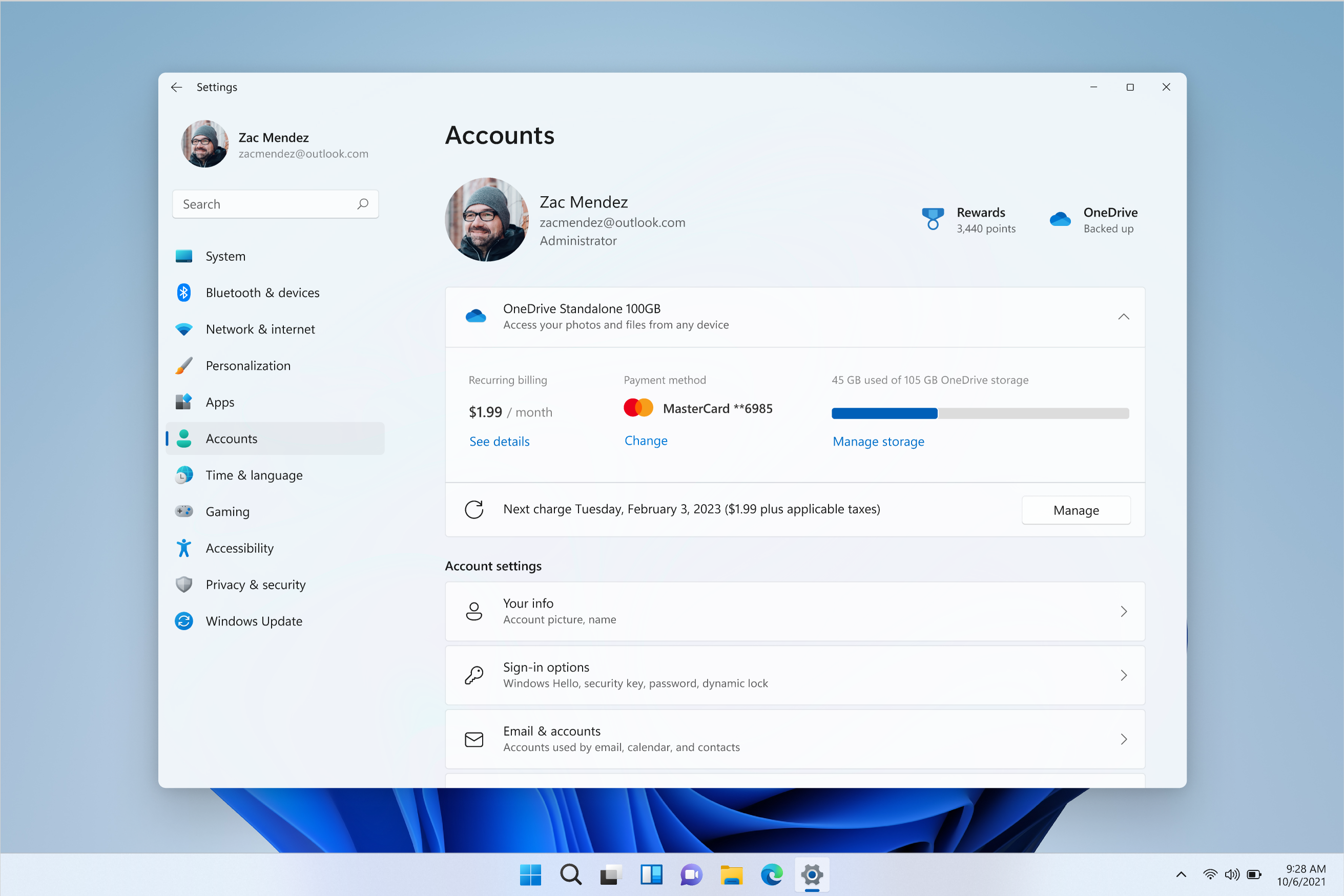
The OneDrive Standalone 100GB subscription management experience is live on Accounts page in Settings.

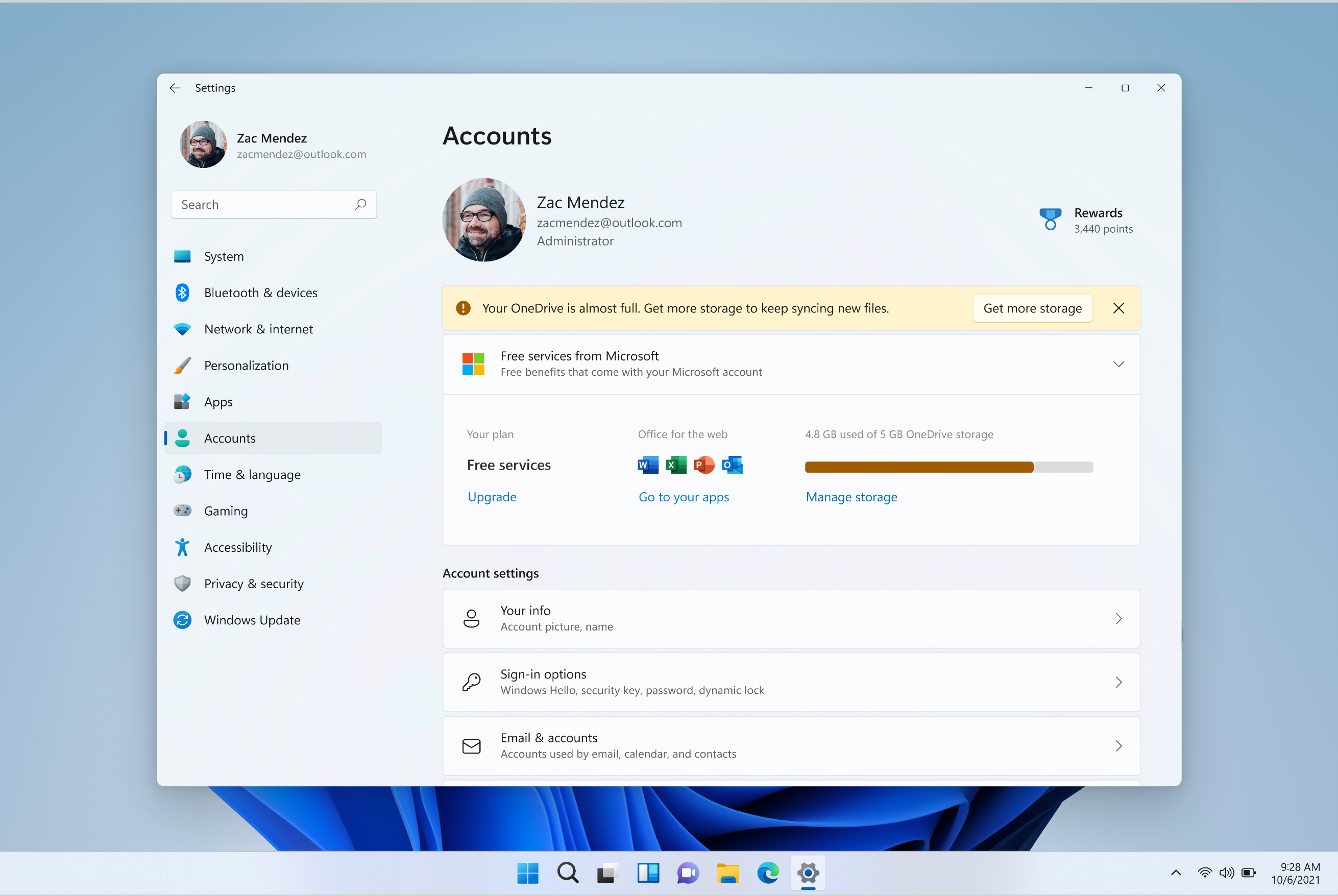
Starting with today’s build, we have begun enabling OneDrive Standalone 100GB subscriptions in the Accounts page within Settings, similar to the Microsoft 365 subscriptions. This will allow you to view your recurring billing, payment method, and OneDrive storage usage within Windows 11. Additionally, if you are close to or above your OneDrive storage limit, you will be informed on the same page.

Banner shown on Account settings page alerting you about your storage usage.

[We are beginning to roll those features out, so the experience isn’t available to all Insiders just yet as we plan to monitor feedback and see how it lands before pushing it out to everyone.]

FEEDBACK: Please file feedback in Feedback Hub (WIN + F) under Settings > Settings Homepage.

Fixes in Build 22622.290

[File Explorer]

  • Middle clicking a folder in the body of File Explorer will now open it in a new tab.
  • The row of tabs should now be included in the keyboard focus cycle when pressing Tab or F6. Once focus is in the tab row, you can use left or right arrow keys to navigate through them.
  • Fixed an issue where the tab order when using CTRL + Tab would be wrong if you’d rearranged the tabs in File Explorer.
  • Made some adjustments for when “Display the full path in title bar” is enabled, to ensure that the folder name is always visible.
  • Fixed a scaling issue which could result in the tabs being unexpectedly large.
  • Right clicking a tab and then clicking somewhere else in File Explorer should dismiss the context menu more reliably now.

Fixes included for BOTH Build 22621.290 & Build 22622.290

This update includes the following improvements:
  • New! We added Server Message Block (SMB) redirector (RDR) specific public File System Control (FSCTL) code FSCTL_LMR_QUERY_INFO.
  • New! We added support for Transport Layer Security (TLS) 1.3 in Windows client and server Lightweight Directory Access Protocol (LDAP) implementations.
  • We updated the Remove-Item cmdlet to properly interact with Microsoft OneDrive folders
  • We enabled the InternetExplorerModeEnableSavePageAs Group Policy. For more information, see Microsoft Edge Browser Policy Documentation.
  • We fixed an issue that causes the Take Photo button to disappear when you use a common file dialog to open the camera.
  • We fixed an issue that prevents devices from receiving an offer from Windows Update for the same extension driver when that extension driver is already installed without the base driver.
  • We fixed an issue that causes install from media (IFM) creation for Active Directory to fail with the error, “2101 JET_errCallbackFailed”.
  • We fixed an issue that occurs when the Active Directory Lightweight Directory Service (LDS) resets the password for userProxy objects. The password reset fails with an error such as, “00000005: SvcErr: DSID-03380C23, problem 5003 (WILL_NOT_PERFORM), data 0”.
  • We enabled the InternetExplorerModeEnableSavePageAs Group Policy. For more information, see Microsoft Edge Browser Policy Documentation.
  • We fixed an issue that occurs when the Active Directory Lightweight Directory Service (AD LDS) resets the password for userProxy objects. When you try to reset someone else’s password and you are authenticated using a simple bind, the password reset fails. The error is like, “00000005: SvcErr: DSID-03380C23, problem 5003 (WILL_NOT_PERFORM), data 0”.
  • We fixed an issue that prevents Microsoft Edge from being available in Windows Sandbox.

Known issues

[General]

  • We’re working on the fix for an issue resulting in a small number of Insiders in the Beta Channel experiencing cyclical crashes in Windows UI components (like explorer.exe), making it appear that the screen is flashing. If you are impacted, running the following command from an elevated PowerShell window should resolve it: Add-AppxPackage -Register -Path C:\Windows\SystemApps\Microsoft.UI.Xaml.CBS_8wekyb3d8bbwe\AppxManifest.xml -DisableDevelopmentMode -ForceApplicationShutdown

[File Explorer]

  • The up arrow is misaligned in File Explorer tabs. This will be fixed in a future update.

About the Beta Channel

The Beta Channel will be the place we preview experiences that are closer to what we will ship to our general customers. Because the Dev and Beta Channels represent parallel development paths from our engineers, there may be cases where features and experiences show up in the Beta Channel first. However, this does not mean every feature we try out in the Beta Channel will ship. We encourage Insiders to read this blog post that outlines the ways we’ll try things out with Insiders in both the Dev and Beta Channels.

Important Insider Links

Thanks,
Amanda & Brandon

Source:

Check Windows Updates


UUP Dump:

64-bit ISO download:


ARM64 ISO download:

 
Last edited:
.....I don't see Suggested Actions.
Where are you located? I won't see them because I'm in the UK. From the release notes in the first post:

"This feature is currently only available to Windows Insiders in the U.S., Canada, and Mexico."
 

My Computers

System One System Two

  • OS
    Windows 11 Home
    Computer type
    Laptop
    Manufacturer/Model
    Acer Aspire 3 A315-23-R9VY
    CPU
    AMD Athlon Silver 3050U
    Memory
    8GB
    Graphics Card(s)
    Radeon Graphics
    Monitor(s) Displays
    laptop screen
    Screen Resolution
    1366x768 native resolution, up to 2560x1440 with Radeon Virtual Super Resolution
    Hard Drives
    1TB Samsung EVO 870 SSD (from April 2026: 250GB EVO 850)
    Internet Speed
    150 Mbps
    Browser
    Edge, Firefox
    Antivirus
    Defender
    Other Info
    fully 'Windows 11 ready' laptop. Windows 10 C: partition migrated from my old unsupported 'main machine' then upgraded to 11. A test migration ran Insider builds for 2 months. When 11 was released on 5th October 2021 it was re-imaged back to 10 and was offered the upgrade in Windows Update on 20th October. Windows Update offered the 22H2 Feature Update on 20th September 2022. It got the 23H2 Feature Update on 4th November 2023 through Windows Update, 24H2 on 3rd October 2024 through Windows Update by setting the Target Release Version for 24H2, and 25H2 on 30th September 2025 through Windows Update by setting the Target Release Version for 25H2.

    UPDATE - 11 April 2026: due to mechanical deterioration this PC has been retired from active duty. The OS with all software and files has been migrated to my System Seven below to carry on as my general purpose 'main machine'.

    My SYSTEM THREE is a Dell Latitude 5410, i7-10610U, 32GB RAM, 512GB NVMe ssd, supported device running Windows 11 Pro.

    My SYSTEM FOUR is a 2-in-1 convertible Lenovo Yoga 11e 20DA, Celeron N2930, 8GB RAM, 256GB ssd. Unsupported device: currently running Win10 Pro, plus Win11 Pro RTM and Insider Dev, Beta, and RP 24H2 as native boot vhdx.

    My SYSTEM FIVE is a Dell Latitude 3190 2-in-1, Pentium Silver N5030, 8GB RAM, 1TB NVMe ssd, supported device running Windows 11 Pro, plus Insider Beta, Dev, and Canary builds (and a few others) as a native boot .vhdx.

    My SYSTEM SIX is a Dell Latitude 5550, Core Ultra 7 165H, 64GB RAM, 1TB NVMe SSD, supported device, Windows 11 Pro 24H2, Hyper-V host machine. Updated to 25H2 on 30th September 2025.

    My SYSTEM SEVEN is a Lenovo Thinkpad T580, Intel Core i7-8650U, 16GB RAM, 512GB NVMe SSD + 2nd 512GB NVMe SSD, a supported device for Windows 11. This is my current general purpose 'main machine'. The installed Windows 11 Home from my System One has been migrated to this machine.
  • Operating System
    Windows 11 Pro
    Computer type
    Laptop
    Manufacturer/Model
    Dell Latitude E4310
    CPU
    Intel® Core™ i5-520M
    Motherboard
    0T6M8G
    Memory
    8GB
    Graphics card(s)
    (integrated graphics) Intel HD Graphics
    Screen Resolution
    1366x768
    Hard Drives
    500GB Crucial MX500 SSD
    Browser
    Firefox, Edge
    Antivirus
    Defender
    Other Info
    unsupported machine: Legacy bios, MBR, TPM 1.2, upgraded from W10 to W11 using W10/W11 hybrid install media workaround. In-place upgrade to 22H2 using ISO and a workaround. Feature Update to 23H2 by manually installing the Enablement Package. In-place upgrade to 24H2 using hybrid 23H2/24H2 install media. Upgraded to 25H2 by Enablement Package. Also running Insider Dev, and Canary builds and Windows 10 as native boot .vhdx.

    My SYSTEM THREE is a Dell Latitude 5410, i7-10610U, 32GB RAM, 512GB NVMe ssd, supported device running Windows 11 Pro.

    My SYSTEM FOUR is a 2-in-1 convertible Lenovo Yoga 11e 20DA, Celeron N2930, 8GB RAM, 256GB ssd. Unsupported device: currently running Win10 Pro, plus Win11 Pro RTM and Insider Dev, Beta, and RP 24H2 as native boot vhdx.

    My SYSTEM FIVE is a Dell Latitude 3190 2-in-1, Pentium Silver N5030, 8GB RAM, 1TB NVMe ssd, supported device running Windows 11 Pro, plus Insider Beta, Dev, and Canary builds (and a few others) as a native boot .vhdx.

    My SYSTEM SIX is a Dell Latitude 5550, Core Ultra 7 165H, 64GB RAM, 1TB NVMe SSD, supported device, Windows 11 Pro 24H2, Hyper-V host machine. Updated to 25H2 on 30th September 2025.

    My SYSTEM SEVEN is a Lenovo Thinkpad T580, Intel Core i7-8650U, 16GB RAM, 512GB NVMe SSD + 2nd 512GB NVMe SSD, a supported device for Windows 11. This is my current general purpose 'main machine'. The installed Windows 11 Home from my System One has been migrated to this machine.
Where are you located? I won't see them because I'm in the UK. From the release notes in the first post:

"This feature is currently only available to Windows Insiders in the U.S., Canada, and Mexico."
Israel.
 

My Computer

System One

  • OS
    26200.8037
    Computer type
    PC/Desktop
    CPU
    i5-11400F
    Motherboard
    Gigabyte
    Memory
    32GB
    Graphics Card(s)
    Geforce GT-1030
    Keyboard
    Logitech K400
    Mouse
    Logitech M720
    Internet Speed
    600 Mb
    Browser
    Edge
Why MSFT wrote :

Fixes included for BOTH Build 22621.290 & Build 22622.290

This update includes the following improvements:
They meant to update 22621.169. But this CU and each CU include all the previous updates.
 

My Computer

System One

  • OS
    26200.8037
    Computer type
    PC/Desktop
    CPU
    i5-11400F
    Motherboard
    Gigabyte
    Memory
    32GB
    Graphics Card(s)
    Geforce GT-1030
    Keyboard
    Logitech K400
    Mouse
    Logitech M720
    Internet Speed
    600 Mb
    Browser
    Edge
The File Explorer tabs reappeared on my desktop pc after about 4 hours (and a couple of reboots).

Re the feature only being available in North America, I'm from New Zealand and it is now working on two Windows 11 devices.
 

My Computers

System One System Two

  • OS
    Windows 11 Pro 25H2
    Computer type
    PC/Desktop
    Manufacturer/Model
    Homebuilt
    CPU
    Intel Core i9 13900K
    Motherboard
    Asus ProArt Z790 Creator WiFi - Bios 3107
    Memory
    Corsair Dominator Platinum 64gb 5600MT/s DDR5 Dual Channel
    Graphics Card(s)
    Sapphire NITRO+ AMD Radeon RX 7900 XTX Vapor-X 24GB
    Sound Card
    External DAC: Cambridge Audio DACMagic200M - Headphone Amp: Topping L50
    Monitor(s) Displays
    Panasonic MX950 Mini LED 55" TV 120hz
    Screen Resolution
    3840 x 2160 120hz
    Hard Drives
    Samsung 980 Pro 2TB (OS)
    Samsung 980 Pro 1TB (Files)
    Lexar NZ790 4TB
    LaCie d2 Professional 6TB external - USB 3.1
    Seagate Expansion 16TB external - USB 3.2
    Seagate One Touch 18TB external HD - USB 3.0
    PSU
    Corsair RM1200x Shift
    Case
    Corsair RGB Smart Case 5000x (white)
    Cooling
    Corsair iCue H150i Elite Capellix XT
    Keyboard
    Incase Ergonomic USB (Microsoft clone)
    Mouse
    Logitech MX Master 3S
    Internet Speed
    Fibre 900/500 Mbps
    Browser
    Microsoft Edge Chromium
    Antivirus
    Bitdefender Total Security
    Other Info
    AMD Radeon Software & Drivers 26.1.1
    Hasleo Backup Suite
    Dashlane password manager
    Kensington Verimark fingerprint reader
    Logitech Brio 4K webcam
    Orico 10-port powered USB 3.0 hub
  • Operating System
    Windows 11 Pro 25H2
    Computer type
    Laptop
    Manufacturer/Model
    Asus Vivobook X1605VA
    CPU
    Intel® Core™ i9-13900H
    Motherboard
    Asus X1605VA bios 309
    Memory
    32GB DDR4-3200 Dual channel
    Graphics card(s)
    *Intel Iris Xᵉ Graphics G7
    Sound Card
    Realtek | Intel SST Bluetooth & USB
    Monitor(s) Displays
    16.0-inch, WUXGA 16:10 aspect ratio, IPS-level Panel
    Screen Resolution
    1920 x 1200 60hz
    Hard Drives
    512GB M.2 NVMe™ PCIe® 3.0 SSD
    Mouse
    Logitech MX Ergo Trackball
    Antivirus
    Bitdefender Total Security
    Other Info
    720p Webcam
    WiFi & USB to ethernet
Re the feature only being available in North America....
Not the Explorer tabs, it's just the new 'suggested actions' feature that's limited to North America.
 

My Computers

System One System Two

  • OS
    Windows 11 Home
    Computer type
    Laptop
    Manufacturer/Model
    Acer Aspire 3 A315-23-R9VY
    CPU
    AMD Athlon Silver 3050U
    Memory
    8GB
    Graphics Card(s)
    Radeon Graphics
    Monitor(s) Displays
    laptop screen
    Screen Resolution
    1366x768 native resolution, up to 2560x1440 with Radeon Virtual Super Resolution
    Hard Drives
    1TB Samsung EVO 870 SSD (from April 2026: 250GB EVO 850)
    Internet Speed
    150 Mbps
    Browser
    Edge, Firefox
    Antivirus
    Defender
    Other Info
    fully 'Windows 11 ready' laptop. Windows 10 C: partition migrated from my old unsupported 'main machine' then upgraded to 11. A test migration ran Insider builds for 2 months. When 11 was released on 5th October 2021 it was re-imaged back to 10 and was offered the upgrade in Windows Update on 20th October. Windows Update offered the 22H2 Feature Update on 20th September 2022. It got the 23H2 Feature Update on 4th November 2023 through Windows Update, 24H2 on 3rd October 2024 through Windows Update by setting the Target Release Version for 24H2, and 25H2 on 30th September 2025 through Windows Update by setting the Target Release Version for 25H2.

    UPDATE - 11 April 2026: due to mechanical deterioration this PC has been retired from active duty. The OS with all software and files has been migrated to my System Seven below to carry on as my general purpose 'main machine'.

    My SYSTEM THREE is a Dell Latitude 5410, i7-10610U, 32GB RAM, 512GB NVMe ssd, supported device running Windows 11 Pro.

    My SYSTEM FOUR is a 2-in-1 convertible Lenovo Yoga 11e 20DA, Celeron N2930, 8GB RAM, 256GB ssd. Unsupported device: currently running Win10 Pro, plus Win11 Pro RTM and Insider Dev, Beta, and RP 24H2 as native boot vhdx.

    My SYSTEM FIVE is a Dell Latitude 3190 2-in-1, Pentium Silver N5030, 8GB RAM, 1TB NVMe ssd, supported device running Windows 11 Pro, plus Insider Beta, Dev, and Canary builds (and a few others) as a native boot .vhdx.

    My SYSTEM SIX is a Dell Latitude 5550, Core Ultra 7 165H, 64GB RAM, 1TB NVMe SSD, supported device, Windows 11 Pro 24H2, Hyper-V host machine. Updated to 25H2 on 30th September 2025.

    My SYSTEM SEVEN is a Lenovo Thinkpad T580, Intel Core i7-8650U, 16GB RAM, 512GB NVMe SSD + 2nd 512GB NVMe SSD, a supported device for Windows 11. This is my current general purpose 'main machine'. The installed Windows 11 Home from my System One has been migrated to this machine.
  • Operating System
    Windows 11 Pro
    Computer type
    Laptop
    Manufacturer/Model
    Dell Latitude E4310
    CPU
    Intel® Core™ i5-520M
    Motherboard
    0T6M8G
    Memory
    8GB
    Graphics card(s)
    (integrated graphics) Intel HD Graphics
    Screen Resolution
    1366x768
    Hard Drives
    500GB Crucial MX500 SSD
    Browser
    Firefox, Edge
    Antivirus
    Defender
    Other Info
    unsupported machine: Legacy bios, MBR, TPM 1.2, upgraded from W10 to W11 using W10/W11 hybrid install media workaround. In-place upgrade to 22H2 using ISO and a workaround. Feature Update to 23H2 by manually installing the Enablement Package. In-place upgrade to 24H2 using hybrid 23H2/24H2 install media. Upgraded to 25H2 by Enablement Package. Also running Insider Dev, and Canary builds and Windows 10 as native boot .vhdx.

    My SYSTEM THREE is a Dell Latitude 5410, i7-10610U, 32GB RAM, 512GB NVMe ssd, supported device running Windows 11 Pro.

    My SYSTEM FOUR is a 2-in-1 convertible Lenovo Yoga 11e 20DA, Celeron N2930, 8GB RAM, 256GB ssd. Unsupported device: currently running Win10 Pro, plus Win11 Pro RTM and Insider Dev, Beta, and RP 24H2 as native boot vhdx.

    My SYSTEM FIVE is a Dell Latitude 3190 2-in-1, Pentium Silver N5030, 8GB RAM, 1TB NVMe ssd, supported device running Windows 11 Pro, plus Insider Beta, Dev, and Canary builds (and a few others) as a native boot .vhdx.

    My SYSTEM SIX is a Dell Latitude 5550, Core Ultra 7 165H, 64GB RAM, 1TB NVMe SSD, supported device, Windows 11 Pro 24H2, Hyper-V host machine. Updated to 25H2 on 30th September 2025.

    My SYSTEM SEVEN is a Lenovo Thinkpad T580, Intel Core i7-8650U, 16GB RAM, 512GB NVMe SSD + 2nd 512GB NVMe SSD, a supported device for Windows 11. This is my current general purpose 'main machine'. The installed Windows 11 Home from my System One has been migrated to this machine.
Not the Explorer tabs, it's just the new 'suggested actions' feature that's limited to North America.
For once, I hope it stays that way. I am quite capable of deciding my own actions. I hope our friends across the Pond bombard MS with negative feedback. We do not need to be patronised by a microchip! This is one feature that will be turned off immediately.
 

My Computer

System One

  • OS
    Windows 11 Pro + Win11 Canary VM.
    Computer type
    Laptop
    Manufacturer/Model
    ASUS Zenbook 14
    CPU
    I9 13th gen i9-13900H 2.60 GHZ
    Motherboard
    Yep, Laptop has one.
    Memory
    16 GB soldered
    Graphics Card(s)
    Integrated Intel Iris XE
    Sound Card
    Realtek built in
    Monitor(s) Displays
    laptop OLED screen
    Screen Resolution
    2880x1800 touchscreen
    Hard Drives
    1 TB NVME SSD (only weakness is only one slot)
    PSU
    Internal + 65W thunderbolt USB4 charger
    Case
    Yep, got one
    Cooling
    Stella Artois (UK pint cans - 568 ml) - extra cost.
    Keyboard
    Built in UK keybd
    Mouse
    Bluetooth , wireless dongled, wired
    Internet Speed
    900 mbs (ethernet), wifi 6 typical 350-450 mb/s both up and down
    Browser
    Edge
    Antivirus
    Defender
    Other Info
    TPM 2.0, 2xUSB4 thunderbolt, 1xUsb3 (usb a), 1xUsb-c, hdmi out, 3.5 mm audio out/in combo, ASUS backlit trackpad (inc. switchable number pad)

    Macrium Reflect Home V8
    Office 365 Family (6 users each 1TB onedrive space)
    Hyper-V (a vm runs almost as fast as my older laptop)
I tried to install 22622.290 over 22621.290 and came up with 22621.105. Thanks to MR I am back to what I started with.
 

My Computers

System One System Two

  • OS
    Windows11 Pro 26200.8524
    Computer type
    PC/Desktop
    Manufacturer/Model
    Dell Alienware Aurora R16
    CPU
    Intel Core i9 14900F (24 -Core, 68 MB Total Cache)
    Motherboard
    Dell Alienware
    Memory
    32GB DDR5
    Graphics Card(s)
    RTX 4080 Super w/581.95
    Sound Card
    Realtec
    Monitor(s) Displays
    Corsair XENEON 32QHD165
    Screen Resolution
    2560 X 1440
    Hard Drives
    1-2TB Samsung 990 Pro PCIe NVMe M2 SSD
    1-4TB Samsung 990 Pro PCIe NVMe M2 SSD
    PSU
    1000 Watt Platinum Dell
    Case
    Alienware
    Cooling
    Liquid Closed Loop
    Keyboard
    Logitech MK270 Wireless Keyboard
    Mouse
    Logitech MK270 Wireless
    Internet Speed
    100Gb's Down-20 Up
    Browser
    Firefox 151.0.2
    Antivirus
    Defender
    Other Info
    Very Quiet And Fast
    CyberPower UPS CP1500PFCLCD
  • Operating System
    PClinuxOS Mate (2025.7)
    Computer type
    PC/Desktop
    Manufacturer/Model
    Intel
    CPU
    13th Gen Inter(R) Core(TM) i3-1315U
    Motherboard
    Intel
    Memory
    64 GB DDR4 @3200 MHz.
    Graphics card(s)
    Internal
    Sound Card
    None
    Monitor(s) Displays
    Dell 2419HGCF
    Screen Resolution
    1920 X 1080
    Hard Drives
    SAMSUNG 980 PRO SSD 2TB, PCIe 4.0 M.2 2280
    PSU
    Chicony 30 Watt
    Case
    Small
    Keyboard
    Dell
    Mouse
    Razor
    Internet Speed
    1GB
    Browser
    Slimjet
I tried to install 22622.290 over 22621.290 and came up with 22621.105. Thanks to MR I am back to what I started with.

It's enablement package file (22KB). It's not should back to 22621.105.
 

My Computer

System One

  • OS
    26200.8037
    Computer type
    PC/Desktop
    CPU
    i5-11400F
    Motherboard
    Gigabyte
    Memory
    32GB
    Graphics Card(s)
    Geforce GT-1030
    Keyboard
    Logitech K400
    Mouse
    Logitech M720
    Internet Speed
    600 Mb
    Browser
    Edge
I went from RP to BETA and it would not install. Error code 0x800f081f. I cheated and downloaded from UUP Dump and installed fine.
 

My Computer

System One

  • OS
    Win 11 Insider Release Preview and Beta channels.
    Computer type
    Laptop
    Manufacturer/Model
    HP ENVY Bought: March 2017
    CPU
    i5 Core [email protected] (Unsupported for Win 11)
    Motherboard
    HP 81AD (U3E1)
    Memory
    12GB
    Graphics Card(s)
    Generic PnP Monitor (1920x1080@60Hz) Intel HD Graphics 620 (HP)
    Sound Card
    Conexant ISST audio
    Monitor(s) Displays
    Generic PnP Monitor
    Screen Resolution
    1536x864 pixels
    Hard Drives
    HGST HTS721010A9E630
    PSU
    Well...PSU you too!! What's this mean?
    Case
    HP ENVY SILVER
    Cooling
    A fan.
    Keyboard
    USA
    Mouse
    Logitec Anywhere 2
    Internet Speed
    Good enough for me! Fast!
    Browser
    Edge/Waterfox
    Antivirus
    Windows Defender
    Other Info
    No 'mo.
It's enablement package file (22KB). It's not should back to 22621.105.
I know but that is what it was, I use The UUP Dump.
 

My Computers

System One System Two

  • OS
    Windows11 Pro 26200.8524
    Computer type
    PC/Desktop
    Manufacturer/Model
    Dell Alienware Aurora R16
    CPU
    Intel Core i9 14900F (24 -Core, 68 MB Total Cache)
    Motherboard
    Dell Alienware
    Memory
    32GB DDR5
    Graphics Card(s)
    RTX 4080 Super w/581.95
    Sound Card
    Realtec
    Monitor(s) Displays
    Corsair XENEON 32QHD165
    Screen Resolution
    2560 X 1440
    Hard Drives
    1-2TB Samsung 990 Pro PCIe NVMe M2 SSD
    1-4TB Samsung 990 Pro PCIe NVMe M2 SSD
    PSU
    1000 Watt Platinum Dell
    Case
    Alienware
    Cooling
    Liquid Closed Loop
    Keyboard
    Logitech MK270 Wireless Keyboard
    Mouse
    Logitech MK270 Wireless
    Internet Speed
    100Gb's Down-20 Up
    Browser
    Firefox 151.0.2
    Antivirus
    Defender
    Other Info
    Very Quiet And Fast
    CyberPower UPS CP1500PFCLCD
  • Operating System
    PClinuxOS Mate (2025.7)
    Computer type
    PC/Desktop
    Manufacturer/Model
    Intel
    CPU
    13th Gen Inter(R) Core(TM) i3-1315U
    Motherboard
    Intel
    Memory
    64 GB DDR4 @3200 MHz.
    Graphics card(s)
    Internal
    Sound Card
    None
    Monitor(s) Displays
    Dell 2419HGCF
    Screen Resolution
    1920 X 1080
    Hard Drives
    SAMSUNG 980 PRO SSD 2TB, PCIe 4.0 M.2 2280
    PSU
    Chicony 30 Watt
    Case
    Small
    Keyboard
    Dell
    Mouse
    Razor
    Internet Speed
    1GB
    Browser
    Slimjet
I went from RP to BETA and it would not install. Error code 0x800f081f. I cheated and downloaded from UUP Dump and installed fine.
Same here and UUP Dump did the trick.
 

My Computers

System One System Two

  • OS
    Windows 11 Pro
    Computer type
    PC/Desktop
    Manufacturer/Model
    Self Built
    CPU
    Intel Core i9 14900k, Intel UHD 770 integrated
    Motherboard
    Gigabyte Z790 Aorus Master X
    Memory
    32gb G.Skill Trident Z5 7200
    Graphics Card(s)
    Gigabyte RTX 4090 Gaming OC
    Sound Card
    EVGA Nu Audio, Razer Kraken V3 Pro, Realtek Onboard
    Monitor(s) Displays
    Dell U4025QW nano IPS monitor, Samsung Odyssey G75F, Wisecoco 12.6" IPS sensor panel
    Screen Resolution
    5120X2160 x 2 1920x515
    Hard Drives
    WD Black SN8100, Samsung 990 Pro x 3, WD BLACK SN850x, WD Black 8tb HD
    PSU
    FSP Hydro PTM Pro 1350w
    Case
    Thermaltake Level 20 XT
    Cooling
    ARCTIC Liquid Freezer III 420 ARGB in push/pull, Antec Prism X 120mm ARGB Fans x 15
    Keyboard
    Razer Blackwidow V4 Pro
    Mouse
    Razer Basilik V3 Pro on Razer Firefly V2 mouse pad.
    Internet Speed
    950 Mbps cable primary, 6Mbps secondary vdsl
    Browser
    Chrome primary, FF-Edge-IE secondary
    Antivirus
    Norton 360 Premium
    Other Info
    I sit on a Libernovo Omni chair.😍 Sound by Fosi Audio DA-2120C pushing Magnat Series 503 bookshelf speakers and a SVS SB-1000 Pro subwoofer.
  • Operating System
    Windows 11 Pro
    Computer type
    Laptop
    Manufacturer/Model
    2023 Acer Predator Helios 18
    CPU
    Intel 14900HX
    Motherboard
    factory
    Memory
    32gb ddr 5 5600
    Graphics card(s)
    Nvidia RTX 4090 mobile
    Sound Card
    onboard
    Monitor(s) Displays
    18" 250hz IPS
    Screen Resolution
    2560X1600
    Hard Drives
    Samsung 9100 Pro, 990 Pro
    PSU
    factory 330W
    Case
    factory
    Cooling
    factory
    Keyboard
    individual key argb
    Mouse
    touchpad
    Internet Speed
    WiFi 7, 2.5gb ethernet
    Browser
    Chrome primary, FF-IE and Edge secondary
    Antivirus
    Norton 360 Premium
    Other Info
    Acer will not allow WD Black SN8100 to function in m.2 slot 0 and Crucial T710 ssd's to function in either slot.
Dang, still no default explorer tabs for me 🙁
1. Open GitHub website.
2. Download the ViveTool-vx.x.x.zip file to enable the new Start menu.
3. Double-click the zip folder to open it with File Explorer.
4. Click the Extract all button.
5. Click the Extract button.
6. Copy the path to the folder.
7. Open Start.
8. Search for Command Prompt, right-click the top result, and select the Run as administrator option.
9. Type the following command to navigate to the ViveTool folder and press Enter:
cd C:\FOLDER\PATH\ViveTool-v0.3.1
In the command, remember to change the path to the folder with your path.
10. Type the following command to enable File Explorer tabs on Windows 11 and press Enter:
vivetool /enable /id:37634385
11. Type the following command to enable File Explorer’s new navigation pane and press Enter:
vivetool /enable /id:36354489
12. Restart the computer.
 

My Computer

System One

  • OS
    windows 11
    Computer type
    PC/Desktop
    Manufacturer/Model
    Generic
    CPU
    AMD Ryzen 5 5600G
    Motherboard
    Gigabyte A520M DS3H AC
    Memory
    16G
    Graphics Card(s)
    AMD Cezzane
1. Open GitHub website.
2. Download the ViveTool-vx.x.x.zip file to enable the new Start menu.
3. Double-click the zip folder to open it with File Explorer.
4. Click the Extract all button.
5. Click the Extract button.
6. Copy the path to the folder.
7. Open Start.
8. Search for Command Prompt, right-click the top result, and select the Run as administrator option.
9. Type the following command to navigate to the ViveTool folder and press Enter:
cd C:\FOLDER\PATH\ViveTool-v0.3.1
In the command, remember to change the path to the folder with your path.
10. Type the following command to enable File Explorer tabs on Windows 11 and press Enter:
vivetool /enable /id:37634385
11. Type the following command to enable File Explorer’s new navigation pane and press Enter:
vivetool /enable /id:36354489
12. Restart the computer.
Thanks Chuckles, I mentioned a bit after that comment that after another reboot mine magically appeared so I'm good for now. Your detailed instructions may be useful for others however so thanks for posting.
 

My Computers

System One System Two

  • OS
    Windows 11 25H2
    Computer type
    Laptop
    Manufacturer/Model
    Alienware 18 Area-51
    CPU
    Intel Core Ultra 9 275HX (24-Core)
    Motherboard
    Alienware
    Memory
    64GB DDR5 6400MT/s
    Graphics Card(s)
    NVIDIA GeForce RTX 5080 and Intel UHD Graphics
    Sound Card
    Onboard, Realtek high-performance Audio chips (ALC3329 & ALC1708))
    Monitor(s) Displays
    300HZ 18-inch QHD 500 nit Comfort View+
    Screen Resolution
    2560 x 1600
    Hard Drives
    2TB NVMe M.2 PCIe Gen 5 SSD
    Case
    Magnesium Alloy
    Cooling
    Advanced Cryo-Tech Quad-Fan Cooling system & large vapor chamber
    Keyboard
    Cherry MX ultra low profile mechanical keyboard with per key AlienFX RGB lighting
    Mouse
    Logitech MX Master 4
    Browser
    Vivaldi (main), Firefox, Chrome, Edge
    Antivirus
    MS Defender and Malwarebytes Free
  • Operating System
    Windows 11 25H2
    Computer type
    Laptop
    Manufacturer/Model
    Microsoft Surface Laptop 7
    CPU
    Qualcomm Snapdragon X Elite (12 Core) ARM based CPU
    Motherboard
    Microsoft Corp.
    Memory
    16GB LPDDR5
    Graphics card(s)
    Qualcomm Adreno X1-85
    Sound Card
    Omnisonic speakers with Dolby Atmos spatial sound
    Monitor(s) Displays
    120 Hz 13.8-inch 600 nit PixelSense Flow touchscreen
    Screen Resolution
    2304x1536
    Hard Drives
    1TB NVMe Gen 4 SSD
    Case
    Anodized Aluminum
    Cooling
    Traditional active cooling fan system
    Keyboard
    Mechanical QWERTY, backlit when in use
    Mouse
    Logitech MX Master 4 and Surface Arc Mouse
    Browser
    Vivaldi (main), Firefox, Chrome, Edge
    Antivirus
    MS Defender and Malwarebytes Free
Explorer Tabs have just magically appeared here!
 

My Computers

System One System Two

  • OS
    Windows 11 22H2 OS Build 22623.1095
    Computer type
    PC/Desktop
    Manufacturer/Model
    Self Build
    CPU
    AMD Ryzen 7 3800X
    Motherboard
    Asus PRIME B350-PLUS
    Memory
    16GB Corsair Vengeance LPX DDR4 @3000Mhz
    Graphics Card(s)
    ASUS - GeForce RTX 3070 Ti 8 GB TUF GAMING OC
    Sound Card
    On Board Realtec
    Monitor(s) Displays
    Acer KA241
    Screen Resolution
    1920 x 1080 @60Hz
    Hard Drives
    240GB PNY CS900 SSD - OS
    2 x 1TB Crucial MX500 SSD
    1 x 500GB Crucial MX300 SSD
    2TB Seagate ST2000DM001-1ER164
    2TB Seagate ST2000DM008-2FR102
    PSU
    750 Watt Corsair TX750 Plus
    Case
    Cooler Master 690 III
    Cooling
    Akasa AK98 5 Case Fans
    Keyboard
    Logitech K270 - wireless
    Mouse
    Logitech - M185 wireless
    Internet Speed
    BT Fibre 75 Mbps
    Browser
    Firefox
    Antivirus
    Windows Defender
    Other Info
    Use hardware KVM to switch monitors on three PCs and software (input director) to use mouse and keyboard on all 4 PCs.
  • Operating System
    Windows 11 Pro 22H2 build 22621.900
    Computer type
    PC/Desktop
    Manufacturer/Model
    Dell Inspiron 3881 - modified with SFX PSU fitted internally
    CPU
    Intel i5 - 10400
    Motherboard
    Dell 032w55 version A00
    Memory
    16GB of HyperX Fury @ 2133 Mhz
    Graphics card(s)
    EVGA 6GB GTX 1060.
    Sound Card
    Builtin
    Monitor(s) Displays
    ACER KA241
    Screen Resolution
    1920x 1080 @60Hz
    Hard Drives
    256GB SK hynix NVMe
    1TB Western Digital WD10EZEX-75WN4A1
    PSU
    Modular 450 Watt Corsair SF450 Platinum ( Mod to replace the Dell 265 Watt PSU)
    Case
    Inspiron Small Desktop
    Cooling
    Dell stock cooler
    Keyboard
    Dell
    Mouse
    Dell
    Internet Speed
    BT Fibre 75 Mbps
    Browser
    Firefox
    Antivirus
    Windows Defender
    Other Info
    Use hardware KVM to switch monitors on three PCs and software (input director) to use mouse and keyboard on all 4 PCs.
My File Explorer tabs just magically appeared this morning too, after 2 days of no tabs! Yay.
 

My Computer

System One

  • OS
    Windows 11
    Computer type
    Laptop
    Manufacturer/Model
    Apple MacBook Pro 16" 2021
    CPU
    Apple M1 Max 10 core/4 CPU assigned to Parallels 17 VM
    Motherboard
    Apple Silicon M1 Max
    Memory
    64GB/24GB assigned to Parallels 17 VM
    Graphics Card(s)
    Apple 32 core GPU
    Sound Card
    Apple
    Monitor(s) Displays
    16.2" Liquid Retina XDR
    Screen Resolution
    3456-by-2234 native resolution at 254 psi
    Hard Drives
    4TB SSD
    PSU
    Apple
    Case
    Apple
    Cooling
    Apple
    Keyboard
    Apple
    Mouse
    N/A; Apple Trackpad
    Internet Speed
    1.2Gb/42Gb
    Browser
    Parallels 17 VM: MS Edge
    Antivirus
    Parallels 17 VM: MS Defender
Unbelievable, my tabs that appeared yesterday are now gone today lol. WTF?
 

My Computers

System One System Two

  • OS
    Windows 11 25H2
    Computer type
    Laptop
    Manufacturer/Model
    Alienware 18 Area-51
    CPU
    Intel Core Ultra 9 275HX (24-Core)
    Motherboard
    Alienware
    Memory
    64GB DDR5 6400MT/s
    Graphics Card(s)
    NVIDIA GeForce RTX 5080 and Intel UHD Graphics
    Sound Card
    Onboard, Realtek high-performance Audio chips (ALC3329 & ALC1708))
    Monitor(s) Displays
    300HZ 18-inch QHD 500 nit Comfort View+
    Screen Resolution
    2560 x 1600
    Hard Drives
    2TB NVMe M.2 PCIe Gen 5 SSD
    Case
    Magnesium Alloy
    Cooling
    Advanced Cryo-Tech Quad-Fan Cooling system & large vapor chamber
    Keyboard
    Cherry MX ultra low profile mechanical keyboard with per key AlienFX RGB lighting
    Mouse
    Logitech MX Master 4
    Browser
    Vivaldi (main), Firefox, Chrome, Edge
    Antivirus
    MS Defender and Malwarebytes Free
  • Operating System
    Windows 11 25H2
    Computer type
    Laptop
    Manufacturer/Model
    Microsoft Surface Laptop 7
    CPU
    Qualcomm Snapdragon X Elite (12 Core) ARM based CPU
    Motherboard
    Microsoft Corp.
    Memory
    16GB LPDDR5
    Graphics card(s)
    Qualcomm Adreno X1-85
    Sound Card
    Omnisonic speakers with Dolby Atmos spatial sound
    Monitor(s) Displays
    120 Hz 13.8-inch 600 nit PixelSense Flow touchscreen
    Screen Resolution
    2304x1536
    Hard Drives
    1TB NVMe Gen 4 SSD
    Case
    Anodized Aluminum
    Cooling
    Traditional active cooling fan system
    Keyboard
    Mechanical QWERTY, backlit when in use
    Mouse
    Logitech MX Master 4 and Surface Arc Mouse
    Browser
    Vivaldi (main), Firefox, Chrome, Edge
    Antivirus
    MS Defender and Malwarebytes Free
just got tabs

1657223207969.png
 

My Computer

System One

  • OS
    Windows 11 Pro 25H2
    Computer type
    PC/Desktop
    CPU
    i7 10700K
    Motherboard
    MSI Z590 Gaming Carbon Wifi
    Memory
    ddr4 16gb
    Graphics Card(s)
    nvidia 1080 8GB
    Screen Resolution
    1920x1080p

My Computers

System One System Two

  • OS
    Windows 11 25H2
    Computer type
    Laptop
    Manufacturer/Model
    Alienware 18 Area-51
    CPU
    Intel Core Ultra 9 275HX (24-Core)
    Motherboard
    Alienware
    Memory
    64GB DDR5 6400MT/s
    Graphics Card(s)
    NVIDIA GeForce RTX 5080 and Intel UHD Graphics
    Sound Card
    Onboard, Realtek high-performance Audio chips (ALC3329 & ALC1708))
    Monitor(s) Displays
    300HZ 18-inch QHD 500 nit Comfort View+
    Screen Resolution
    2560 x 1600
    Hard Drives
    2TB NVMe M.2 PCIe Gen 5 SSD
    Case
    Magnesium Alloy
    Cooling
    Advanced Cryo-Tech Quad-Fan Cooling system & large vapor chamber
    Keyboard
    Cherry MX ultra low profile mechanical keyboard with per key AlienFX RGB lighting
    Mouse
    Logitech MX Master 4
    Browser
    Vivaldi (main), Firefox, Chrome, Edge
    Antivirus
    MS Defender and Malwarebytes Free
  • Operating System
    Windows 11 25H2
    Computer type
    Laptop
    Manufacturer/Model
    Microsoft Surface Laptop 7
    CPU
    Qualcomm Snapdragon X Elite (12 Core) ARM based CPU
    Motherboard
    Microsoft Corp.
    Memory
    16GB LPDDR5
    Graphics card(s)
    Qualcomm Adreno X1-85
    Sound Card
    Omnisonic speakers with Dolby Atmos spatial sound
    Monitor(s) Displays
    120 Hz 13.8-inch 600 nit PixelSense Flow touchscreen
    Screen Resolution
    2304x1536
    Hard Drives
    1TB NVMe Gen 4 SSD
    Case
    Anodized Aluminum
    Cooling
    Traditional active cooling fan system
    Keyboard
    Mechanical QWERTY, backlit when in use
    Mouse
    Logitech MX Master 4 and Surface Arc Mouse
    Browser
    Vivaldi (main), Firefox, Chrome, Edge
    Antivirus
    MS Defender and Malwarebytes Free
Well, the explorer tab craziness continues on my 22622.290. After the tabs disappeared all day yesterday despite multiple reboots this morning after rebooting the tabs are back yet again, go figure. I wonder how long this time?
 

My Computers

System One System Two

  • OS
    Windows 11 25H2
    Computer type
    Laptop
    Manufacturer/Model
    Alienware 18 Area-51
    CPU
    Intel Core Ultra 9 275HX (24-Core)
    Motherboard
    Alienware
    Memory
    64GB DDR5 6400MT/s
    Graphics Card(s)
    NVIDIA GeForce RTX 5080 and Intel UHD Graphics
    Sound Card
    Onboard, Realtek high-performance Audio chips (ALC3329 & ALC1708))
    Monitor(s) Displays
    300HZ 18-inch QHD 500 nit Comfort View+
    Screen Resolution
    2560 x 1600
    Hard Drives
    2TB NVMe M.2 PCIe Gen 5 SSD
    Case
    Magnesium Alloy
    Cooling
    Advanced Cryo-Tech Quad-Fan Cooling system & large vapor chamber
    Keyboard
    Cherry MX ultra low profile mechanical keyboard with per key AlienFX RGB lighting
    Mouse
    Logitech MX Master 4
    Browser
    Vivaldi (main), Firefox, Chrome, Edge
    Antivirus
    MS Defender and Malwarebytes Free
  • Operating System
    Windows 11 25H2
    Computer type
    Laptop
    Manufacturer/Model
    Microsoft Surface Laptop 7
    CPU
    Qualcomm Snapdragon X Elite (12 Core) ARM based CPU
    Motherboard
    Microsoft Corp.
    Memory
    16GB LPDDR5
    Graphics card(s)
    Qualcomm Adreno X1-85
    Sound Card
    Omnisonic speakers with Dolby Atmos spatial sound
    Monitor(s) Displays
    120 Hz 13.8-inch 600 nit PixelSense Flow touchscreen
    Screen Resolution
    2304x1536
    Hard Drives
    1TB NVMe Gen 4 SSD
    Case
    Anodized Aluminum
    Cooling
    Traditional active cooling fan system
    Keyboard
    Mechanical QWERTY, backlit when in use
    Mouse
    Logitech MX Master 4 and Surface Arc Mouse
    Browser
    Vivaldi (main), Firefox, Chrome, Edge
    Antivirus
    MS Defender and Malwarebytes Free
Back
Top Bottom