Insider KB5017390 Windows 11 Insider Beta Build 22621.598 and 22622.598 - Sept. 12


UPDATE 9/21:


Hello Windows Insiders, today we are releasing Windows 11 Insider Preview Build 22621.598 and Build 22622.598 (KB5017390) to the Beta Channel.
  • Build 22622.598 = New features rolling out.
  • Build 22621.598 = New features off by default.
As a reminder, Insiders who landed in the group with new features turned off by default (Build 22621.xxxx) can check for updates and choose to install the update that will have features rolling out (Build 22622.xxx).

Changes and Improvements in Build 22622.598

[Settings]

  • For the time being, you will no longer be able to uninstall apps with inter-dependencies (e.g., Steam and gaming apps running on Steam) or repair Win32 apps under Settings > Apps > Installed apps. You will still be able to modify and uninstall Win32 apps without inter-dependencies.

Fixes in Build 22622.598

[File Explorer]

  • Fixed an issue leading to a small set of Insiders with “launch folder windows in a separate process” not being able to launch File Explorer in the last two flights due to an explorer.exe crash.
  • Fixed an issue where you couldn’t interact with the top part of File Explorer (with the address bar) when File Explorer was full screen (F11).
  • Fixed an issue where command bar items like copy, paste, and empty recycle bin may unexpectedly not be enabled when they should be.

Fixes for BOTH Build 22621.598 & Build 22622.598

  • We fixed an issue that creates a duplicate print queue. Because of this, the original print queue stops working.
  • We fixed an issue that affects Roaming User Profiles. After you sign in or sign out, some of your settings are not restored.

Known issues

[General]

  • [NEW] Clicking the network icon on the Lock screen does not work and will crash the Lock screen and may require you to reboot to login. After logging in, you can switch between wireless networks as needed.

About the Beta Channel

The Beta Channel will be the place we preview experiences that are closer to what we will ship to our general customers. Because the Dev and Beta Channels represent parallel development paths from our engineers, there may be cases where features and experiences show up in the Beta Channel first. However, this does not mean every feature we try out in the Beta Channel will ship. We encourage Insiders to read this blog post that outlines the ways we’ll try things out with Insiders in both the Dev and Beta Channels.

Important Insider Links

Thanks,
Amanda & Brandon

Source:

Check Windows Updates


UUP Dump:

64-bit ISO download:



ARM64 ISO download:

 
Last edited:

My Computer My Computer

At a glance

Windows 11i-7 10700k 3.832gb DDR4 3200RX 580
OS
Windows 11
Computer type
PC/Desktop
Manufacturer/Model
Asus
CPU
i-7 10700k 3.8
Motherboard
PRIME Z-490 A
Memory
32gb DDR4 3200
Graphics Card(s)
RX 580
Monitor(s) Displays
1
Screen Resolution
2560x1440
PSU
750
Keyboard
Corsair K95 RGB PLATINUM XT Mechanical Gaming Keyboard
Mouse
G502 HERO
As usual, I have just got around to installing the update which downloaded two days ago. 22622.598 has installed painlessly as they usually do for me.
 

My Computers My Computers

  • At a glance

    W11 pro betaAthlon 3000G16Gb Crucial DDR4 2400onboard cpu
    OS
    W11 pro beta
    Computer type
    PC/Desktop
    Manufacturer/Model
    home built
    CPU
    Athlon 3000G
    Motherboard
    Asrock A320M-HDV r4.0
    Memory
    16Gb Crucial DDR4 2400
    Graphics Card(s)
    onboard cpu
    Sound Card
    onboard
    Monitor(s) Displays
    LG 22EA53
    Screen Resolution
    1920 x 1080
    Hard Drives
    WD black SN750 M2 500Gb
    PSU
    500W Seasonic core 80+gold non modular
    Case
    Fractal Design Define R2
    Cooling
    front 2 x 120mm rear 100mm stock psu
    Internet Speed
    135/20
    Browser
    Firefox and edge
    Antivirus
    Windows Security and free Malwarebytes
  • At a glance

    W11 pro 64 beta (from W10 pro system builder ...Ryzen 7 5700G4 x 8Gb Corsair Vengeance LPX 3000 DDR4onboard cpu
    Operating System
    W11 pro 64 beta (from W10 pro system builder pack)
    Computer type
    PC/Desktop
    Manufacturer/Model
    homebuilt
    CPU
    Ryzen 7 5700G
    Motherboard
    MSI B450 tomahawk max II
    Memory
    4 x 8Gb Corsair Vengeance LPX 3000 DDR4
    Graphics card(s)
    onboard cpu
    Sound Card
    motherboard
    Monitor(s) Displays
    AOC 27
    Screen Resolution
    2560 x 1440
    Hard Drives
    WD 1Tb Black M2 SN850X on Asus hyper M2 X16 max V2 card
    PSU
    Be Quiet 400 semi modular 80+gold
    Case
    Coolermaster Silencio 650
    Cooling
    140mm front, 120 rear Akasa Vegas Chroma AM
    Internet Speed
    135/20
    Browser
    edge/Firefox
    Antivirus
    WD plus Malwarebytes free
As usual, I have just got around to installing the update which downloaded two days ago. 22622.598 has installed painlessly as they usually do for me.
Yes but i just registered for insider and was having problems downloading because i was downloading my game at the same time and this was a big game
 

My Computer My Computer

At a glance

Windows 11i-7 10700k 3.832gb DDR4 3200RX 580
OS
Windows 11
Computer type
PC/Desktop
Manufacturer/Model
Asus
CPU
i-7 10700k 3.8
Motherboard
PRIME Z-490 A
Memory
32gb DDR4 3200
Graphics Card(s)
RX 580
Monitor(s) Displays
1
Screen Resolution
2560x1440
PSU
750
Keyboard
Corsair K95 RGB PLATINUM XT Mechanical Gaming Keyboard
Mouse
G502 HERO
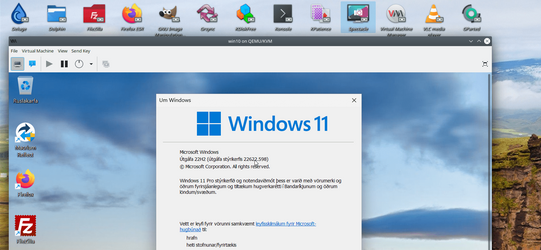
haven't broken this build yet: Office Pro 2021, photoshop etc all working on a VM.

I installed this one from the ISO at UUPDUMP.

Screenshot_20220917_122254.png

Will convert to physical and test on Real hardware.


Cheers
jimbo
 

My Computer My Computer

At a glance

Windows XP,11 Linux Fedora Rawhide pre-releas...2 X Intel i7
OS
Windows XP,11 Linux Fedora Rawhide pre-release 45
Computer type
PC/Desktop
CPU
2 X Intel i7
Screen Resolution
4KUHD X 2
I got a problem with this version 22622.598 and my HP Color Laserjet Pro MFP M479fdw. I can print with it most of the time, but not scan anymore. "The PC and the printer can't establish two-way communication" it says. When looking at it in controlpanel or HP's software, I can't see how much ink is left, and scanning does not start, unless I do it directly on the printer itself. I have tried to uninstall the software/driver, and reinstall it, with a lot of trouble. I had to find the IP-address in my router, as the software could not "see" the printer automatic. But when I wrote the IP-address, it installed. But still no two-way connection. Ideas?
 

My Computer My Computer

At a glance

Windows 11Core i5 14600KCorsair Vengeance DDR5-5600 - 32GB - CL36MSI RTX 3090 GamerX Trio
OS
Windows 11
Computer type
PC/Desktop
Manufacturer/Model
Homebuild
CPU
Core i5 14600K
Motherboard
ASUS PRIME z790-A WiFi
Memory
Corsair Vengeance DDR5-5600 - 32GB - CL36
Graphics Card(s)
MSI RTX 3090 GamerX Trio
Sound Card
SoundBlaster AE5
Monitor(s) Displays
ASUS ROG PG32UQ
Screen Resolution
3840x2160p
Hard Drives
Samsung 970 EVO NVMe 500Gbyte
Adata XPG GAMMIX S11 Pro 1Tbyte
Adata XPG GAMMIX S11 Pro 2Tbyte
Hitachi 8Tbyte HDD
PSU
RIOTORO Enigma G2 PSU 850W 80+ Gold FM
Case
Fractal R5 Black Edition
Cooling
Noctua NH15D
Keyboard
Logitech G915 LightSpeed
Mouse
Logitecg G900 LightSpeed
Internet Speed
1000/1000
Browser
Chrome
Antivirus
BitDefender
Other Info
Mostly build for gaming.
I got a problem with this version 22622.598 and my HP Color Laserjet Pro MFP M479fdw. I can print with it most of the time, but not scan anymore. "The PC and the printer can't establish two-way communication" it says. When looking at it in controlpanel or HP's software, I can't see how much ink is left, and scanning does not start, unless I do it directly on the printer itself. I have tried to uninstall the software/driver, and reinstall it, with a lot of trouble. I had to find the IP-address in my router, as the software could not "see" the printer automatic. But when I wrote the IP-address, it installed. But still no two-way connection. Ideas?
Are you using HP Smart? I have an HP Office Jet Pro 8030, and I have discovered recently that HP Smart is the best method of controlling the printer. Also, be sure to install and uninstall your printer from "Devices and Printers" as I have found simply doing it the old way In Win10 & 11 is problematical. I am able to scan & print and everything else direct from the Devices & Printers installed default-printer icon.
 

My Computer My Computer

At a glance

Win11 Experimental Channel for 26H2 buildsAMD R7 7800X3DGSkill 2x16GB @ 6400MT/sXFX 9070 XT SWIFT tri-fan (PCIe5.0)
OS
Win11 Experimental Channel for 26H2 builds
Computer type
PC/Desktop
Manufacturer/Model
a cherry-picked assembly
CPU
AMD R7 7800X3D
Motherboard
MSI x870 Tomahawk Wi-Fi, 8-layer, 2 oz copper, server PCB
Memory
GSkill 2x16GB @ 6400MT/s
Graphics Card(s)
XFX 9070 XT SWIFT tri-fan (PCIe5.0)
Sound Card
Creative Labs G8 USB External Sound device, Gaming DAC, Sound Card & Earphone AMP.. HIGHLY RECOMMENDED, btw. Totally changed my opinion of external USB sound. I like!...;)
Monitor(s) Displays
Philips 42" OLED @ 4k
Screen Resolution
3840x2160
Hard Drives
*Boot: Samsung 980 Pro 2 TB NVMe (PCIe4x4)
*Samsung 980 EVO NVMe 500GB (PCIe 4x4)
*Kingston SNV3S2000G 2TB NVMe (PCIe4x4)
*Samsung 960 EVO 250GB NVMe(PCIe3x2)
*8TB Toshiba x300 HDD
*ST4000DM004 S3 4TB HDD
PSU
Gigabyte 850W Gold, Rev 2
Case
Lian Li Lancool 217, white, with wood trim, very nice looking--tired of black, 5-fans standard
Cooling
Air coutesy Lian Li
Keyboard
Cherry MX 2.0S RGB
Mouse
Razer Basilisk V3 24k DPI
Internet Speed
~950Mbps down and up!
Browser
Firefox x64 DE
Antivirus
Defender
Other Info
Great New system. Exceeds my expectations by quite a bit, btw. I love the USB G8 SoundBlaster, it's quite an improvement over the G6!
Hi folks
This build seems to have a load of "Ms debugging stuff" probably removed. As a VM this build runs remarkably quickly -- on previous builds I had fan on laptop going bonkers and laptop getting quite hot. This build seems to run as it should be with the laptop getting hardly warm at all - and this is an older laptop too that in native mode wouldn't "officially" be able to run W11 -- cpu -- i5 intel 6th gen.

Cheers
jimbo
 

My Computer My Computer

At a glance

Windows XP,11 Linux Fedora Rawhide pre-releas...2 X Intel i7
OS
Windows XP,11 Linux Fedora Rawhide pre-release 45
Computer type
PC/Desktop
CPU
2 X Intel i7
Screen Resolution
4KUHD X 2
Hi folks
This build seems to have a load of "Ms debugging stuff" probably removed. As a VM this build runs remarkably quickly -- on previous builds I had fan on laptop going bonkers and laptop getting quite hot. This build seems to run as it should be with the laptop getting hardly warm at all - and this is an older laptop too that in native mode wouldn't "officially" be able to run W11 -- cpu -- i5 intel 6th gen.

Cheers
jimbo
That might be the reason for the faster hibernating when turning off the stationary gamer-PC 😊.

Are you using HP Smart? I have an HP Office Jet Pro 8030, and I have discovered recently that HP Smart is the best method of controlling the printer. Also, be sure to install and uninstall your printer from "Devices and Printers" as I have found simply doing it the old way In Win10 & 11 is problematical. I am able to scan & print and everything else direct from the Devices & Printers installed default-printer icon.
No, I'm not using the HP-app. If you don't mean the HP-app, then I don't know what "HP Smart" is? 🥴 I don't like the app, as it forces you to make an account at HP just to print or scan.
 

My Computer My Computer

At a glance

Windows 11Core i5 14600KCorsair Vengeance DDR5-5600 - 32GB - CL36MSI RTX 3090 GamerX Trio
OS
Windows 11
Computer type
PC/Desktop
Manufacturer/Model
Homebuild
CPU
Core i5 14600K
Motherboard
ASUS PRIME z790-A WiFi
Memory
Corsair Vengeance DDR5-5600 - 32GB - CL36
Graphics Card(s)
MSI RTX 3090 GamerX Trio
Sound Card
SoundBlaster AE5
Monitor(s) Displays
ASUS ROG PG32UQ
Screen Resolution
3840x2160p
Hard Drives
Samsung 970 EVO NVMe 500Gbyte
Adata XPG GAMMIX S11 Pro 1Tbyte
Adata XPG GAMMIX S11 Pro 2Tbyte
Hitachi 8Tbyte HDD
PSU
RIOTORO Enigma G2 PSU 850W 80+ Gold FM
Case
Fractal R5 Black Edition
Cooling
Noctua NH15D
Keyboard
Logitech G915 LightSpeed
Mouse
Logitecg G900 LightSpeed
Internet Speed
1000/1000
Browser
Chrome
Antivirus
BitDefender
Other Info
Mostly build for gaming.
No, I'm not using the HP-app. If you don't mean the HP-app, then I don't know what "HP Smart" is? 🥴 I don't like the app, as it forces you to make an account at HP just to print or scan.

Looks like HP is doing everything these days through HP Smart. I've also had trouble getting the drivers to configure outside of the program. I use Instant Ink and save a ton of money, so I have an account.
 

My Computer My Computer

At a glance

Win11 Experimental Channel for 26H2 buildsAMD R7 7800X3DGSkill 2x16GB @ 6400MT/sXFX 9070 XT SWIFT tri-fan (PCIe5.0)
OS
Win11 Experimental Channel for 26H2 builds
Computer type
PC/Desktop
Manufacturer/Model
a cherry-picked assembly
CPU
AMD R7 7800X3D
Motherboard
MSI x870 Tomahawk Wi-Fi, 8-layer, 2 oz copper, server PCB
Memory
GSkill 2x16GB @ 6400MT/s
Graphics Card(s)
XFX 9070 XT SWIFT tri-fan (PCIe5.0)
Sound Card
Creative Labs G8 USB External Sound device, Gaming DAC, Sound Card & Earphone AMP.. HIGHLY RECOMMENDED, btw. Totally changed my opinion of external USB sound. I like!...;)
Monitor(s) Displays
Philips 42" OLED @ 4k
Screen Resolution
3840x2160
Hard Drives
*Boot: Samsung 980 Pro 2 TB NVMe (PCIe4x4)
*Samsung 980 EVO NVMe 500GB (PCIe 4x4)
*Kingston SNV3S2000G 2TB NVMe (PCIe4x4)
*Samsung 960 EVO 250GB NVMe(PCIe3x2)
*8TB Toshiba x300 HDD
*ST4000DM004 S3 4TB HDD
PSU
Gigabyte 850W Gold, Rev 2
Case
Lian Li Lancool 217, white, with wood trim, very nice looking--tired of black, 5-fans standard
Cooling
Air coutesy Lian Li
Keyboard
Cherry MX 2.0S RGB
Mouse
Razer Basilisk V3 24k DPI
Internet Speed
~950Mbps down and up!
Browser
Firefox x64 DE
Antivirus
Defender
Other Info
Great New system. Exceeds my expectations by quite a bit, btw. I love the USB G8 SoundBlaster, it's quite an improvement over the G6!

Looks like HP is doing everything these days through HP Smart. I've also had trouble getting the drivers to configure outside of the program. I use Instant Ink and save a ton of money, so I have an account.
Ok, but I don't like the idea that I have to log in to HP to print or scan my personally papers.
 

My Computer My Computer

At a glance

Windows 11Core i5 14600KCorsair Vengeance DDR5-5600 - 32GB - CL36MSI RTX 3090 GamerX Trio
OS
Windows 11
Computer type
PC/Desktop
Manufacturer/Model
Homebuild
CPU
Core i5 14600K
Motherboard
ASUS PRIME z790-A WiFi
Memory
Corsair Vengeance DDR5-5600 - 32GB - CL36
Graphics Card(s)
MSI RTX 3090 GamerX Trio
Sound Card
SoundBlaster AE5
Monitor(s) Displays
ASUS ROG PG32UQ
Screen Resolution
3840x2160p
Hard Drives
Samsung 970 EVO NVMe 500Gbyte
Adata XPG GAMMIX S11 Pro 1Tbyte
Adata XPG GAMMIX S11 Pro 2Tbyte
Hitachi 8Tbyte HDD
PSU
RIOTORO Enigma G2 PSU 850W 80+ Gold FM
Case
Fractal R5 Black Edition
Cooling
Noctua NH15D
Keyboard
Logitech G915 LightSpeed
Mouse
Logitecg G900 LightSpeed
Internet Speed
1000/1000
Browser
Chrome
Antivirus
BitDefender
Other Info
Mostly build for gaming.
Ok, but I don't like the idea that I have to log in to HP to print or scan my personally papers.
Well, you don't have to log in, necessarily, IIRC...;) I just checked mine, and it only asks me to log in after running the HP Smart program when I hit the "look for supplies" button--then it asks me to log in. If I just want to check the status of the local/network printer, print, or scan, etc. I don't have to log in to the account. Just wanted to pass along that HP Smart seems HP's preferred way of initializing the printer and installing the driver, etc. these days, and I think it's much better than the older HP printer interfaces.

You could also use HP Print & scan doctor, to see if that will help you, if you don't want to use the HP Smart program. Hope you get it worked out...;)
 

My Computer My Computer

At a glance

Win11 Experimental Channel for 26H2 buildsAMD R7 7800X3DGSkill 2x16GB @ 6400MT/sXFX 9070 XT SWIFT tri-fan (PCIe5.0)
OS
Win11 Experimental Channel for 26H2 builds
Computer type
PC/Desktop
Manufacturer/Model
a cherry-picked assembly
CPU
AMD R7 7800X3D
Motherboard
MSI x870 Tomahawk Wi-Fi, 8-layer, 2 oz copper, server PCB
Memory
GSkill 2x16GB @ 6400MT/s
Graphics Card(s)
XFX 9070 XT SWIFT tri-fan (PCIe5.0)
Sound Card
Creative Labs G8 USB External Sound device, Gaming DAC, Sound Card & Earphone AMP.. HIGHLY RECOMMENDED, btw. Totally changed my opinion of external USB sound. I like!...;)
Monitor(s) Displays
Philips 42" OLED @ 4k
Screen Resolution
3840x2160
Hard Drives
*Boot: Samsung 980 Pro 2 TB NVMe (PCIe4x4)
*Samsung 980 EVO NVMe 500GB (PCIe 4x4)
*Kingston SNV3S2000G 2TB NVMe (PCIe4x4)
*Samsung 960 EVO 250GB NVMe(PCIe3x2)
*8TB Toshiba x300 HDD
*ST4000DM004 S3 4TB HDD
PSU
Gigabyte 850W Gold, Rev 2
Case
Lian Li Lancool 217, white, with wood trim, very nice looking--tired of black, 5-fans standard
Cooling
Air coutesy Lian Li
Keyboard
Cherry MX 2.0S RGB
Mouse
Razer Basilisk V3 24k DPI
Internet Speed
~950Mbps down and up!
Browser
Firefox x64 DE
Antivirus
Defender
Other Info
Great New system. Exceeds my expectations by quite a bit, btw. I love the USB G8 SoundBlaster, it's quite an improvement over the G6!
I discovered a problem with FF and 22H2 Beta and have reported it to bugzilla.mozilla.org. FF will freeze for a short period of time when Ctrl-x is performed in some text fields, like this Reply box. The CPU spikes during freeze, and will continue for longer depending on number of active tabs. If also happens when trying to copy credentials from a Bitwarden site.
This freeze does not happen on a standard Win 11 PC.
 

My Computer My Computer

At a glance

Windows 11 ProIntel Core Ultra16GBIntel(R) Arc Graphics
OS
Windows 11 Pro
Computer type
Laptop
Manufacturer/Model
ASUS Zenbook 14 OLED
CPU
Intel Core Ultra
Memory
16GB
Graphics Card(s)
Intel(R) Arc Graphics
Sound Card
Realtek High Definition Audio(SST)
Screen Resolution
2880 x 1800
Hard Drives
500 GB NVMe SSD
Internet Speed
1,500Mbps
Browser
Firefox, Edge
Antivirus
Windows Defender

Looks like HP is doing everything these days through HP Smart. I've also had trouble getting the drivers to configure outside of the program. I use Instant Ink and save a ton of money, so I have an account.
I got rid of HP Smart and my little HP Envy prints and scans just fine. You do have to log into the printer itself to do firmware checks and such though.
 

My Computers My Computers

  • At a glance

    Win 11 Pro (25H2 RP)Intel(R) Core(TM) i5-9300H CPU @ 2.40GHz 2.40...32GBNvidia GeForce GTX 1650, Intel UHD 630
    OS
    Win 11 Pro (25H2 RP)
    Computer type
    Laptop
    Manufacturer/Model
    Acer AN515-54
    CPU
    Intel(R) Core(TM) i5-9300H CPU @ 2.40GHz 2.40 GHz
    Memory
    32GB
    Graphics Card(s)
    Nvidia GeForce GTX 1650, Intel UHD 630
    Monitor(s) Displays
    Acer CB272D
    Screen Resolution
    1920x1080
    Hard Drives
    256GB and 1T SSD
    Internet Speed
    500MB
    Browser
    Edge (Stable)
    Antivirus
    Microsoft Defender
  • At a glance

    Win 11 Pro (RP)Intel(R) Core(TM) Ultra 9 275HX (2.70 GHz)32GB DDR5-5600NVIDIA® GeForce RTX™ 5060 8GB
    Operating System
    Win 11 Pro (RP)
    Computer type
    Laptop
    Manufacturer/Model
    Lenovo Legion 5 16IAX10 - Type 83NX
    CPU
    Intel(R) Core(TM) Ultra 9 275HX (2.70 GHz)
    Memory
    32GB DDR5-5600
    Graphics card(s)
    NVIDIA® GeForce RTX™ 5060 8GB
    Monitor(s) Displays
    Acer CB272D
    Screen Resolution
    1920x1080 75Hz
    Hard Drives
    WD Green SN3000 (2TB)
    Samsung Portable T5 (2TB)
    Keyboard
    Logi MX Keys
    Mouse
    Logi MX Anywhere 3
    Internet Speed
    500MB
    Browser
    Edge
    Antivirus
    MS Defender
Well, you don't have to log in, necessarily, IIRC...:wink: I just checked mine, and it only asks me to log in after running the HP Smart program when I hit the "look for supplies" button--then it asks me to log in. If I just want to check the status of the local/network printer, print, or scan, etc. I don't have to log in to the account. Just wanted to pass along that HP Smart seems HP's preferred way of initializing the printer and installing the driver, etc. these days, and I think it's much better than the older HP printer interfaces.

You could also use HP Print & scan doctor, to see if that will help you, if you don't want to use the HP Smart program. Hope you get it worked out...:wink:
Okay, now I got it to work. HP Smart allowed me to download HPEasyStart_14_5_6.exe to install my M479fdw, without making an account 😁. Hmm, maybe I should look into this HP Smart more.
Thank you for your help 🛟
 

My Computer My Computer

At a glance

Windows 11Core i5 14600KCorsair Vengeance DDR5-5600 - 32GB - CL36MSI RTX 3090 GamerX Trio
OS
Windows 11
Computer type
PC/Desktop
Manufacturer/Model
Homebuild
CPU
Core i5 14600K
Motherboard
ASUS PRIME z790-A WiFi
Memory
Corsair Vengeance DDR5-5600 - 32GB - CL36
Graphics Card(s)
MSI RTX 3090 GamerX Trio
Sound Card
SoundBlaster AE5
Monitor(s) Displays
ASUS ROG PG32UQ
Screen Resolution
3840x2160p
Hard Drives
Samsung 970 EVO NVMe 500Gbyte
Adata XPG GAMMIX S11 Pro 1Tbyte
Adata XPG GAMMIX S11 Pro 2Tbyte
Hitachi 8Tbyte HDD
PSU
RIOTORO Enigma G2 PSU 850W 80+ Gold FM
Case
Fractal R5 Black Edition
Cooling
Noctua NH15D
Keyboard
Logitech G915 LightSpeed
Mouse
Logitecg G900 LightSpeed
Internet Speed
1000/1000
Browser
Chrome
Antivirus
BitDefender
Other Info
Mostly build for gaming.
I got rid of HP Smart and my little HP Envy prints and scans just fine. You do have to log into the printer itself to do firmware checks and such though.
I like Smart because it's a small footprint, and sure, you can print/scan fine through other applications as long as the driver is installed. But I need to access the printer, as you mention, regularly.
 

My Computer My Computer

At a glance

Win11 Experimental Channel for 26H2 buildsAMD R7 7800X3DGSkill 2x16GB @ 6400MT/sXFX 9070 XT SWIFT tri-fan (PCIe5.0)
OS
Win11 Experimental Channel for 26H2 builds
Computer type
PC/Desktop
Manufacturer/Model
a cherry-picked assembly
CPU
AMD R7 7800X3D
Motherboard
MSI x870 Tomahawk Wi-Fi, 8-layer, 2 oz copper, server PCB
Memory
GSkill 2x16GB @ 6400MT/s
Graphics Card(s)
XFX 9070 XT SWIFT tri-fan (PCIe5.0)
Sound Card
Creative Labs G8 USB External Sound device, Gaming DAC, Sound Card & Earphone AMP.. HIGHLY RECOMMENDED, btw. Totally changed my opinion of external USB sound. I like!...;)
Monitor(s) Displays
Philips 42" OLED @ 4k
Screen Resolution
3840x2160
Hard Drives
*Boot: Samsung 980 Pro 2 TB NVMe (PCIe4x4)
*Samsung 980 EVO NVMe 500GB (PCIe 4x4)
*Kingston SNV3S2000G 2TB NVMe (PCIe4x4)
*Samsung 960 EVO 250GB NVMe(PCIe3x2)
*8TB Toshiba x300 HDD
*ST4000DM004 S3 4TB HDD
PSU
Gigabyte 850W Gold, Rev 2
Case
Lian Li Lancool 217, white, with wood trim, very nice looking--tired of black, 5-fans standard
Cooling
Air coutesy Lian Li
Keyboard
Cherry MX 2.0S RGB
Mouse
Razer Basilisk V3 24k DPI
Internet Speed
~950Mbps down and up!
Browser
Firefox x64 DE
Antivirus
Defender
Other Info
Great New system. Exceeds my expectations by quite a bit, btw. I love the USB G8 SoundBlaster, it's quite an improvement over the G6!
I like Smart because it's a small footprint, and sure, you can print/scan fine through other applications as long as the driver is installed. But I need to access the printer, as you mention, regularly.
To be fair, where I do find HP Smart very useful is on my iPhone 8 and my Samsung Galaxy tablet....
 

My Computers My Computers

  • At a glance

    Win 11 Pro (25H2 RP)Intel(R) Core(TM) i5-9300H CPU @ 2.40GHz 2.40...32GBNvidia GeForce GTX 1650, Intel UHD 630
    OS
    Win 11 Pro (25H2 RP)
    Computer type
    Laptop
    Manufacturer/Model
    Acer AN515-54
    CPU
    Intel(R) Core(TM) i5-9300H CPU @ 2.40GHz 2.40 GHz
    Memory
    32GB
    Graphics Card(s)
    Nvidia GeForce GTX 1650, Intel UHD 630
    Monitor(s) Displays
    Acer CB272D
    Screen Resolution
    1920x1080
    Hard Drives
    256GB and 1T SSD
    Internet Speed
    500MB
    Browser
    Edge (Stable)
    Antivirus
    Microsoft Defender
  • At a glance

    Win 11 Pro (RP)Intel(R) Core(TM) Ultra 9 275HX (2.70 GHz)32GB DDR5-5600NVIDIA® GeForce RTX™ 5060 8GB
    Operating System
    Win 11 Pro (RP)
    Computer type
    Laptop
    Manufacturer/Model
    Lenovo Legion 5 16IAX10 - Type 83NX
    CPU
    Intel(R) Core(TM) Ultra 9 275HX (2.70 GHz)
    Memory
    32GB DDR5-5600
    Graphics card(s)
    NVIDIA® GeForce RTX™ 5060 8GB
    Monitor(s) Displays
    Acer CB272D
    Screen Resolution
    1920x1080 75Hz
    Hard Drives
    WD Green SN3000 (2TB)
    Samsung Portable T5 (2TB)
    Keyboard
    Logi MX Keys
    Mouse
    Logi MX Anywhere 3
    Internet Speed
    500MB
    Browser
    Edge
    Antivirus
    MS Defender
HP smart is in the windows and google play store so I would surmise that other platform's stores should offer it the same way.
 

My Computers My Computers

  • At a glance

    Windows 11 ProIntel Core i9 14900k, Intel UHD 770 integrated32gb G.Skill Trident Z5 7200Gigabyte RTX 4090 Gaming OC
    OS
    Windows 11 Pro
    Computer type
    PC/Desktop
    Manufacturer/Model
    Self Built
    CPU
    Intel Core i9 14900k, Intel UHD 770 integrated
    Motherboard
    Gigabyte Z790 Aorus Master X
    Memory
    32gb G.Skill Trident Z5 7200
    Graphics Card(s)
    Gigabyte RTX 4090 Gaming OC
    Sound Card
    EVGA Nu Audio, Razer Kraken V3 Pro, Realtek Onboard
    Monitor(s) Displays
    Dell U4025QW nano IPS monitor, Samsung Odyssey G75F, Wisecoco 12.6" IPS sensor panel
    Screen Resolution
    5120X2160 x 2 1920x515
    Hard Drives
    WD Black SN8100, Samsung 990 Pro x 3, WD BLACK SN850x, WD Black 8tb HD
    PSU
    FSP Hydro PTM Pro 1350w
    Case
    Thermaltake Level 20 XT
    Cooling
    ARCTIC Liquid Freezer III 420 ARGB in push/pull, Antec Prism X 120mm ARGB Fans x 15
    Keyboard
    Razer Blackwidow V4 Pro
    Mouse
    Razer Basilik V3 Pro on Razer Firefly V2 mouse pad.
    Internet Speed
    950 Mbps cable primary, 6Mbps secondary vdsl
    Browser
    Chrome primary, FF-Edge-IE secondary
    Antivirus
    Norton 360 Premium
    Other Info
    I sit on a Libernovo Omni chair.😍 Sound by Fosi Audio DA-2120C pushing Magnat Series 503 bookshelf speakers and a SVS SB-1000 Pro subwoofer.
  • At a glance

    Windows 11 ProIntel 14900HX32gb ddr 5 5600Nvidia RTX 4090 mobile
    Operating System
    Windows 11 Pro
    Computer type
    Laptop
    Manufacturer/Model
    2023 Acer Predator Helios 18
    CPU
    Intel 14900HX
    Motherboard
    factory
    Memory
    32gb ddr 5 5600
    Graphics card(s)
    Nvidia RTX 4090 mobile
    Sound Card
    onboard
    Monitor(s) Displays
    18" 250hz IPS
    Screen Resolution
    2560X1600
    Hard Drives
    Samsung 9100 Pro, 990 Pro
    PSU
    factory 330W
    Case
    factory
    Cooling
    factory
    Keyboard
    individual key argb
    Mouse
    touchpad
    Internet Speed
    WiFi 7, 2.5gb ethernet
    Browser
    Chrome primary, FF-IE and Edge secondary
    Antivirus
    Norton 360 Premium
    Other Info
    Acer will not allow WD Black SN8100 to function in m.2 slot 0 and Crucial T710 ssd's to function in either slot.
 

My Computers My Computers

  • At a glance

    Windows 11 Pro for WorkstationsIntel i7-8700K 5 GHz64 GB (4x16GB) G.SKILL TridentZ RGB DDR4 3600...ASUS ROG-STRIX-GTX1080TI-O11G-GAMING (11GB GD...
    OS
    Windows 11 Pro for Workstations
    Computer type
    PC/Desktop
    Manufacturer/Model
    Custom self build
    CPU
    Intel i7-8700K 5 GHz
    Motherboard
    ASUS ROG Maximus XI Formula Z390
    Memory
    64 GB (4x16GB) G.SKILL TridentZ RGB DDR4 3600 MHz (F4-3600C18D-32GTZR)
    Graphics Card(s)
    ASUS ROG-STRIX-GTX1080TI-O11G-GAMING (11GB GDDR5X)
    Sound Card
    Integrated Digital Audio (S/PDIF)
    Monitor(s) Displays
    2 x Samsung Odyssey G75 27"
    Screen Resolution
    2560x1440
    Hard Drives
    1TB Samsung 990 PRO M.2,
    4TB Samsung 990 PRO M.2,
    TerraMaster F8 SSD Plus NAS
    PSU
    Seasonic Prime Titanium 850W
    Case
    Thermaltake Core P3 wall mounted
    Cooling
    Corsair Hydro H115i
    Keyboard
    Amazon Basics Wired Full Keyboard MD005
    Mouse
    Logitech MX Master 4
    Internet Speed
    2 Gbps Download and 100 Mbps Upload
    Browser
    Chrome and Edge
    Antivirus
    Microsoft Defender
    Other Info
    Logitech Z625 speaker system,
    Logitech BRIO 4K Pro webcam,
    HP Color LaserJet Pro MFP M477fdn,
    CyberPower CP1500PFCLCD
    Galaxy S23 Plus phone
  • At a glance

    Windows 11 ProSnapdragon X Elite (12 core) 3.42 GHz16 GB LPDDR5x-7467 MHz
    Operating System
    Windows 11 Pro
    Computer type
    Laptop
    Manufacturer/Model
    Surface Laptop 7 Copilot+ PC
    CPU
    Snapdragon X Elite (12 core) 3.42 GHz
    Memory
    16 GB LPDDR5x-7467 MHz
    Monitor(s) Displays
    15" HDR
    Screen Resolution
    2496 x 1664
    Hard Drives
    1 TB SSD
    Internet Speed
    Wi-Fi 7 and Bluetooth 5.4
    Browser
    Chrome and Edge
    Antivirus
    Microsoft Defender

Latest Support Threads

Back
Top Bottom