Insider KB5017846 Windows 11 Insider Beta Build 22621.590 and 22622.590 - Sept. 1


UPDATE 9/12:

Hello Windows Insiders, today we are releasing Windows 11 Insider Preview Build 22621.590 and Build 22622.590 (KB5017846) to the Beta Channel.
  • Build 22622.590 = New features rolling out.
  • Build 22621.590 = New features off by default.
As a reminder, Insiders who landed in the group with new features turned off by default (Build 22621.xxxx) can check for updates and choose to install the update that will have features rolling out (Build 22622.xxx).

Fixes in Build 22622.590

[General]

  • We fixed the issue causing Control Panel to not launch from the Start menu, Search or if pinned to the taskbar in the previous flight.
  • As a result of feedback from Windows Insiders, we have disabled the ability to share a local file directly to OneDrive using the built-in Windows share window that first began rolling out to Windows Insiders in the Dev Channel with Build 22622.436. We hope to bring this feature back in the future after further refinement of the experience. As we’ve mentioned previously, features we try out in the Dev or Beta Channels may not always ship.

[File Explorer]

  • Fixed an issue causing a small percentage of Insiders to experience repeated explorer.exe crashes after attempting to access certain folders on their systems in the previous Beta Channel build.
  • As a one-time change to help people find their folders with the navigation pane updates, if the default folders pinned to File Explorer’s navigation pane had been unpinned, they will be re-pinned after upgrading.
  • Fixed a recent issue where if File Explorer was open when you switched between light and dark mode, you could end up with some unreadable text / UI showing the wrong color.
  • Fixed an issue where the New / Sort / View / etc buttons in the command bar could become noticeably clipped vertically after increasing your text scaling in Accessibility Settings.
  • The search box background should no longer unexpectedly have a dark background sometimes when you’re using light mode.
  • If you move keyboard focus to the tab row (using F6), pressing the arrow keys to move keyboard focus within the row will now include setting focus to the close button within the tab.
  • If File Explorer is maximized and the taskbar is set to autohide, hovering your mouse on the bottom of the screen should now actually bring up the taskbar.
  • Fixed a memory leak which was happening when closing File Explorer windows.
  • Fixed a GDI objects leak when resizing the navigation pane in File Explorer, which could potentially lead to content in File Explorer not rendering correctly over time for Insiders who resized the navigation pane frequently.

[Taskbar]

  • The taskbar overflow flyout should now follow your accent colour like the rest of the taskbar does when “Show accent color on Start and taskbar” is enabled under Settings > Personalization > Colors.
  • The apps in the taskbar overflow flyout should now be in the correct order when using an Arabic or Hebrew display language.
  • When the taskbar is center aligned and full, the widgets entry point will now collapse to a shorter width to give you a little more room on the taskbar.
  • Fixed a couple of issues related to the taskbar overflow which could lead to sporadic explorer.exe crashes.

Fixes for BOTH Build 22621.590 & Build 22622.590

  • We fixed an issue that affects cldflt.sys. A bugcheck occurs when it is used with Microsoft OneDrive.
  • We fixed an issue that affects robocopy. Robocopy fails to set a file to the right modified time when using the /IS

Known issues

[General]

  • We’re looking into reports that audio stopped working for some Insiders in recent Beta Channel builds.

[File Explorer]

  • [NEW We’re investigating reports that a small set of Insiders with “launch folder windows in a separate process” are unable to open File Explorer after last week’s flight. This issue is unrelated to the issue with accessing certain folders in the same flight, which is fixed in this week’s flight.
  • [NEW] We’re working on the fix for an issue where command bar items like copy, paste, and empty recycle bin may unexpectedly not be enabled when they should be.

About the Beta Channel

The Beta Channel will be the place we preview experiences that are closer to what we will ship to our general customers. Because the Dev and Beta Channels represent parallel development paths from our engineers, there may be cases where features and experiences show up in the Beta Channel first. However, this does not mean every feature we try out in the Beta Channel will ship. We encourage Insiders to read this blog post that outlines the ways we’ll try things out with Insiders in both the Dev and Beta Channels.

Important Insider Links

Thanks,
Amanda & Brandon

Source:

Check Windows Updates


UUP Dump:

64-bit ISO download:


ARM64 ISO download:

 
Last edited:
Done. All good (so far!).
 

My Computers My Computers

  • At a glance

    windows 11 25H2I5-85008GB
    OS
    windows 11 25H2
    Computer type
    PC/Desktop
    Manufacturer/Model
    Dell Optiplex 3060
    CPU
    I5-8500
    Motherboard
    Dell
    Memory
    8GB
    Monitor(s) Displays
    2 x Dell 24 inch
    Screen Resolution
    2560 x 1440
    Hard Drives
    250GB NVMe SSD, 2x 250 GB SSD
    PSU
    Intel(R) Core(TM) i5-8500 CPU @ 3.00GHz 3.00 GHz
    Mouse
    Logitech M310t
    Internet Speed
    100/20
    Browser
    Edge
    Antivirus
    Win Defender
  • At a glance

    Win 11 25H2I5-6300U8GBFHD
    Operating System
    Win 11 25H2
    Computer type
    Laptop
    Manufacturer/Model
    HP Elitebook 840 G3
    CPU
    I5-6300U
    Memory
    8GB
    Graphics card(s)
    FHD
    Hard Drives
    256 SSD
    Internet Speed
    100/20
    Browser
    Edge
Getting this on all 3 of my machines -

  • [NEW] We’re working on the fix for an issue where command bar items like copy, paste, and empty recycle bin may unexpectedly not be enabled when they should be.
I only seem to get this with the recycle bin, if you open the recycle bin, the normal items don't appear on the command bar, but if you click on the Recycle bin in the Navigation panel, then the items appear.
 

My Computers My Computers

  • At a glance

    Windows 11 25H2Intel i9 14900KF64GB Corsair Vengeance RGBMSI 4090 Suprim X
    OS
    Windows 11 25H2
    Computer type
    PC/Desktop
    Manufacturer/Model
    Custom Built
    CPU
    Intel i9 14900KF
    Motherboard
    ASUS Z790 ProArt Creator WiFi
    Memory
    64GB Corsair Vengeance RGB
    Graphics Card(s)
    MSI 4090 Suprim X
    Sound Card
    Onboard
    Monitor(s) Displays
    1 x Asus 24". 1 x Asus 32"
    Screen Resolution
    1920 x 1080 & 2560 x 1440
    Hard Drives
    Multiple
    PSU
    Corsair 1200HX
    Case
    Corsair 7000D RGB
    Cooling
    Corsair H150I Capellix XT
    Keyboard
    Corsair K70 RGB PRO
    Mouse
    Corsair M55 RGB Pro
    Internet Speed
    1000Mbps
    Browser
    Edge
    Antivirus
    Windows Default
  • At a glance

    Windows 11 25H2Intel i7 6800K32GB DDR4 (Corsair)ASUS GTX 1080ti
    Operating System
    Windows 11 25H2
    Computer type
    PC/Desktop
    Manufacturer/Model
    Custom Built
    CPU
    Intel i7 6800K
    Motherboard
    ASUS Z99 Deluxe
    Memory
    32GB DDR4 (Corsair)
    Graphics card(s)
    ASUS GTX 1080ti
    Sound Card
    Onboard
    Monitor(s) Displays
    1x Viewsonic 24" 1x LG 19"
    Screen Resolution
    1920 x 1080 & 1600 x 900
    Hard Drives
    3 x SATA SSD
    PSU
    650W Gigabyte Bronze
    Case
    Coolermaster HAF-X
    Cooling
    Noctua NH-15 Chroma black
    Keyboard
    Generic RGB
    Mouse
    Microsoft Basic
    Internet Speed
    1000Mbps
    Browser
    Edge
    Antivirus
    Windows Default
Getting this on all 3 of my machines -

  • [NEW] We’re working on the fix for an issue where command bar items like copy, paste, and empty recycle bin may unexpectedly not be enabled when they should be.

I see that too, here I get only copy option; all the other ones are grayed out. 🤣

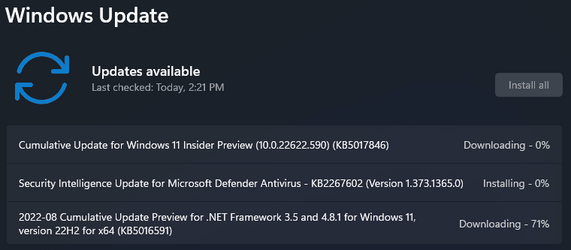
1662065101826.png
 

My Computer My Computer

At a glance

Windows 11 Pro 25H2Intel I9-9900K64GBNVIDIA RTX 2060
OS
Windows 11 Pro 25H2
Computer type
PC/Desktop
Manufacturer/Model
Dell XPS 8930
CPU
Intel I9-9900K
Memory
64GB
Graphics Card(s)
NVIDIA RTX 2060
Sound Card
NVIDIA High Definition Audio
Monitor(s) Displays
4k Samsung
Screen Resolution
3840 x 2160
Hard Drives
512GB NVMe, ADATA SU 800, 2TB HDD
On it...

1662067407558.png

And .NET too!
 

My Computer My Computer

At a glance

Windows 11Intel® Xeon® X5690 3.47GHz Six-CoreG.Skill PC3-12800 1600MHz 24GBNVIDIA GeForce GTX 1050
OS
Windows 11
Computer type
PC/Desktop
Manufacturer/Model
Asus/Custom Build
CPU
Intel® Xeon® X5690 3.47GHz Six-Core
Motherboard
Asus P6T Deluxe v2
Memory
G.Skill PC3-12800 1600MHz 24GB
Graphics Card(s)
NVIDIA GeForce GTX 1050
Sound Card
SoundMAX ADI AD2000B HD Audio
Monitor(s) Displays
Acer T232HL Touch Screen
Screen Resolution
1920 x 1080 @ 60Hz
Hard Drives
6 Crucial MX500 SSD 1TB each.
PSU
Thermaltake Toughpower Gold 850W
Case
Thermaltake Armor VA8000SWA
Cooling
Thermaltake Air Cooling System
Keyboard
Illuminated Multimedia LED Keyboard
Mouse
M16 Dual Mode Illuminated Mouse - Bluetooth / 2.4 GHz Mode
Internet Speed
800 Mbps
Browser
Edge / Opera / Vivaldi / Chrome / Firefox / Brave
Antivirus
Windows Defender Security
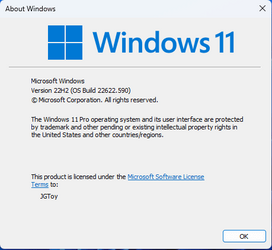
Installation completed okay...

1662068929148.png

Nothing noticeable yet!
 

My Computer My Computer

At a glance

Windows 11Intel® Xeon® X5690 3.47GHz Six-CoreG.Skill PC3-12800 1600MHz 24GBNVIDIA GeForce GTX 1050
OS
Windows 11
Computer type
PC/Desktop
Manufacturer/Model
Asus/Custom Build
CPU
Intel® Xeon® X5690 3.47GHz Six-Core
Motherboard
Asus P6T Deluxe v2
Memory
G.Skill PC3-12800 1600MHz 24GB
Graphics Card(s)
NVIDIA GeForce GTX 1050
Sound Card
SoundMAX ADI AD2000B HD Audio
Monitor(s) Displays
Acer T232HL Touch Screen
Screen Resolution
1920 x 1080 @ 60Hz
Hard Drives
6 Crucial MX500 SSD 1TB each.
PSU
Thermaltake Toughpower Gold 850W
Case
Thermaltake Armor VA8000SWA
Cooling
Thermaltake Air Cooling System
Keyboard
Illuminated Multimedia LED Keyboard
Mouse
M16 Dual Mode Illuminated Mouse - Bluetooth / 2.4 GHz Mode
Internet Speed
800 Mbps
Browser
Edge / Opera / Vivaldi / Chrome / Firefox / Brave
Antivirus
Windows Defender Security
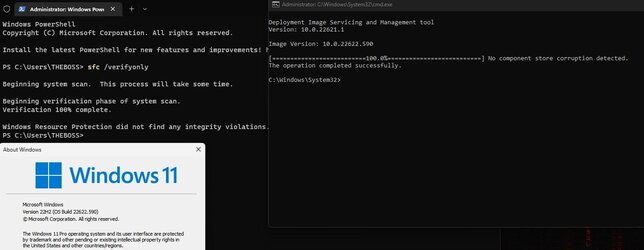
All is good and fine and without any issues.. I just made the switch from Windows 10 to 11 2 weeks ago by upgrading it... I have never seen any kinds of issues related to upgrading from 10 to 11. Even eventviewer is so happy and smiling ☺
1662069509532.jpeg
 

My Computer My Computer

At a glance

Win11 Insider[Always the latest Dev/Beta rele...AMD Ryzen 7 4800H with Radeon GraphicsG.SKILL [Samsung Die] DRR4 - 3200Mhz CL18 (18...nVidia GTX 1660ti GDDR6 6GB(90W) 2.02Ghz Core...
OS
Win11 Insider[Always the latest Dev/Beta releases]
Computer type
Laptop
Manufacturer/Model
Asus TUF Gaming FA506IU Laptop
CPU
AMD Ryzen 7 4800H with Radeon Graphics
Motherboard
AMD K17.6 FCH, AMD K17.6 IMC
Memory
G.SKILL [Samsung Die] DRR4 - 3200Mhz CL18 (18-19-19-36) - 32GB(16GBx2)
Graphics Card(s)
nVidia GTX 1660ti GDDR6 6GB(90W) 2.02Ghz Core & +548Mhz Mem-OC'ed [VBIOS Unlocked]
Sound Card
Realtek ALC256 @ AMD K17.6
Monitor(s) Displays
LM156LF-2F03 144HZ with Adaptive SYNC
Screen Resolution
1920x1080 - 144Hz
Hard Drives
WDC PC SN530 SDBPNPZ-256G-1002 + SHGP31-500GM-2 + ST1000LM035-1RK172 + Samsung SSD 870 QVO 1TB 1000.2 GB
PSU
ASUS Power Brick 180W
Case
Laptop Case with Dual Fan
Cooling
Dual Fans Design with Self-Cleaning Cooling
Keyboard
Asus Aura RGB with Overstroke technology
Mouse
ROG SICA Gaming Mouse
Internet Speed
100Mbps FiberOptic [100 Mbps Down - 50 Mbps Up]
Browser
Chrome/Firefox/Tor
Antivirus
Symantec Endpoint Protection with Windows Defender (Active Mode) + Custom DNS Server
Other Info
CPU with -15 Curve Optimizer all cores and -50 Cure optimizer on iGPU
BCLK OC to 101.6Mhz
Benchmark Scores:-
CineBench R23 Single core:- 1290 points
CineBench R23 Multi core:- 11111 points
Updated ok (y)
 

My Computers My Computers

  • At a glance

    Win 11 Pro 25H2 Beta 26220.8925AMD Ryzen 7 5700UCrucial 64GB DDR4 SDRAM PC4-25600AMD Radeon Vega Graphics 1.80 GHz - Adrenalin...
    OS
    Win 11 Pro 25H2 Beta 26220.8925
    Computer type
    PC/Desktop
    Manufacturer/Model
    Asus MiniPC PN51-E1
    CPU
    AMD Ryzen 7 5700U
    Motherboard
    Asus PN51-E1 - Bios Version 0505
    Memory
    Crucial 64GB DDR4 SDRAM PC4-25600
    Graphics Card(s)
    AMD Radeon Vega Graphics 1.80 GHz - Adrenalin Edition 23.9.2
    Sound Card
    USB to Sound Blaster Live (24bit External) to Firestone DAC to Event Studio Monitors
    Monitor(s) Displays
    Gigabyte 27" 165 hertz
    Screen Resolution
    2560 x 1440
    Hard Drives
    Samsung SSD 970 EVO Plus 2TB PCIE NVME
    PSU
    65 Watt
    Case
    Asus Mini
    Cooling
    Air
    Keyboard
    Logitech K810
    Mouse
    Logitech MX Master 2S
    Internet Speed
    Telstra Modem Wifi - NBN 50/18
    Browser
    Firefox
    Antivirus
    Microsoft
    Other Info
    This replaced my Linux Notebook. I've used Windows since V2, tried various Linux distros but Windows continues to win for me.
  • At a glance

    Win 11 Home 26H2 26300.8935Core i7-7700HQ @2.8 Ghz16.0 GBNVIDIA GeForce GTX 1060 (6 GB)
    Operating System
    Win 11 Home 26H2 26300.8935
    Computer type
    Laptop
    Manufacturer/Model
    Resistance
    CPU
    Core i7-7700HQ @2.8 Ghz
    Motherboard
    Resistance
    Memory
    16.0 GB
    Graphics card(s)
    NVIDIA GeForce GTX 1060 (6 GB)
    Screen Resolution
    4k
    Hard Drives
    1.8tb
Sometimes flightsigning gets turned off and you have to turn it on again, then reset to Beta on Insider menu.
To turn on - run following as admin .bat command file


Code:
bcdedit /set flightsigning on

bcdedit /set {bootmgr} flightsigning on

pause
I went into Insider site and turned on flightsigning -- the site recognizes that I am an Inisider. Still nothing. This is true for BETA and for RP. I have DEV build on same computers (two of them), both of which have the newest download installed but still NOTHING from the BETA or RP sites/builds. Don't know what happened?????
 

My Computers My Computers

  • At a glance

    windows 10 & 11AMD Ryzen 7X64GbRadeon RX 480 8Gb
    OS
    windows 10 & 11
    Computer type
    PC/Desktop
    Manufacturer/Model
    iBuyPower (special build)
    CPU
    AMD Ryzen 7X
    Motherboard
    Asus Prime x370 Pro
    Memory
    64Gb
    Graphics Card(s)
    Radeon RX 480 8Gb
    Monitor(s) Displays
    Samsung UHD 27 inch
    Screen Resolution
    UHD
    Hard Drives
    3 Samsung 1 TB SSD each; 1 Samsung PCIe M.2 at 2 TB
  • At a glance

    Windows 11 proAMD 9 5900X32 GbNvidia GeForce RTX 3080 Ti 12 GB GDDR6X
    Operating System
    Windows 11 pro
    Computer type
    PC/Desktop
    Manufacturer/Model
    IBuyPower
    CPU
    AMD 9 5900X
    Motherboard
    Asus x570 ROG Crosshair VIII Dark Hero WI-FI 6E ARGB
    Memory
    32 Gb
    Graphics card(s)
    Nvidia GeForce RTX 3080 Ti 12 GB GDDR6X
    Sound Card
    3D PREMIUM surround sound onboard
    Monitor(s) Displays
    Samsung 32 inch UHD curved monitor
    Screen Resolution
    UHD
    Hard Drives
    Samsung 980 pro 2 tb gen 4 NVMe ssd
    PSU
    850 watt consair RM850X
    Case
    Lian Li LANCOOL ONE tempered glass RGB gaming case
    Cooling
    DEEPCOOL GAMERSTORM RGB 240 mm CASTLE 240EX liquid cooler
    Keyboard
    Ares m.2 gaming keyboard
    Mouse
    Ares m.2 gaming optical mouse
    Internet Speed
    450
    Browser
    Firefox / Edge
    Antivirus
    Windows defender
    Other Info
    With all this gaming rig I am not a gamer!
The update installed successfully. Everything is fine.:D
 

My Computer My Computer

At a glance

Windows 11 Pro Experimental (Future Platforms)16GB DDR3 1600MhzSapphire Amd Radeon RX 550 4GB GDDR5
OS
Windows 11 Pro Experimental (Future Platforms)
Computer type
PC/Desktop
Memory
16GB DDR3 1600Mhz
Graphics Card(s)
Sapphire Amd Radeon RX 550 4GB GDDR5
Browser
Opera/Brave/Microsoft Edge Beta/Mozilla Firefox
Antivirus
Norton 360
If I click on the Plus icon to the right of a tab, it then flashes white before the new tab opens.

This has been reported many times on the Feedback hub, some reports are over 3 month old
I'm not getting the flashing white, either, and I'm on dark theme. It might just be specific to some systems?
 

My Computers My Computers

  • At a glance

    Windows 11 Pro 25H2 RP channelRyzen 9 5900XCorsair Vengeance RGB PRO 64GB (2x32GB) DDR4 ...ASUS GeForce RTX 4070 Super OC 12GB DDR6 / ZO...
    OS
    Windows 11 Pro 25H2 RP channel
    Computer type
    PC/Desktop
    Manufacturer/Model
    Home built
    CPU
    Ryzen 9 5900X
    Motherboard
    MSI MPG X570S Edge Max WiFi
    Memory
    Corsair Vengeance RGB PRO 64GB (2x32GB) DDR4 3600 (PC4-28800) C18
    Graphics Card(s)
    ASUS GeForce RTX 4070 Super OC 12GB DDR6 / ZOTAC RTX 3060 Twin Edge OC 12GB GDDR6
    Sound Card
    Proprietary on MB / FiiO K5Pro DAC
    Monitor(s) Displays
    ViewSonic XG2530 25"/Benq XL2411P 24"/ ASUS VA24DQSB) 23.8"
    Screen Resolution
    1920x1080 240Hz/144Hz/60Hz (based on monitor setup above)
    Hard Drives
    SK hynix Gold P31 1TB PCIe NVMe Gen3 M.2 2280 Internal SSD
    ADATA XPG SX8200 Pro 1TB
    Samsung SSD 860 EVO 1TB 2.5 Inch SATA III Internal SSD
    PSU
    Corsair RM1000e
    Case
    Phanteks Enthoo Pro Full Tower Chassis with Window
    Cooling
    Corsair iCUE H60i RGB PRO XT Liquid CPU Cooler
    Keyboard
    Corsair K70
    Mouse
    Logitech MX Master 3
    Internet Speed
    ~950Mb/s download / ~700Mb/s upload
    Browser
    Edge (Chromium)
    Antivirus
    Norton 360
  • At a glance

    Windows 11 ProRyzen 7 3700X32MB DDR4I forget, but it's old. I can't see the need ...
    Operating System
    Windows 11 Pro
    Computer type
    PC/Desktop
    Manufacturer/Model
    Home Built
    CPU
    Ryzen 7 3700X
    Motherboard
    MSI B550 Gaming GEN3 Gaming Motherboard
    Memory
    32MB DDR4
    Graphics card(s)
    I forget, but it's old. I can't see the need to upgrade it.
    Sound Card
    Propietary
    Monitor(s) Displays
    ACER LED 24" (dual monitor setup)
    Screen Resolution
    1920X1080
    Hard Drives
    1TB Samsung SSD 3.5"
    Case
    Corsair
    Cooling
    Stock
    Keyboard
    Logitech
    Mouse
    Logitech
    Internet Speed
    ~750Mb/s download / ~750Mb/s upload
    Browser
    Edge
    Antivirus
    Defender and Malware Bytes
  • ASUS Vivobook 16X, 16" WUXGA(1920x1200) Business Laptop Computer, AMD Ryzen 7, 16GB DDR4 RAM, 1TB SSD, Windows 11 Pro, Wi-Fi 6, USB-C, Full-Sized Keyboard, Webcam, HDMI
This one is even more broken than any of the other recent builds.

Ms store is AWOL, can't browse for anything in the store -- get message You need a new app to open this ms-store link Get same message on trying to open windows security dashboard.

So I can't install this one clean. It does work when installed via Windows UPDATE but it's a bit ropy f you can't do a clean install. None of the 94,327 suggestions or more on google work, !!! and that's ignoring the imbeciles who suggest "open the app" and go to settings to fix it -- .

So I'm almost tempted to stick with W10 until we get W12 !!! -- at least it works and clean installs when required.

Cheers
jimbo
 

My Computer My Computer

At a glance

Windows XP,11 Linux Fedora Rawhide pre-releas...2 X Intel i7
OS
Windows XP,11 Linux Fedora Rawhide pre-release 45
Computer type
PC/Desktop
CPU
2 X Intel i7
Screen Resolution
4KUHD X 2
This one is even more broken than any of the other recent builds.

Ms store is AWOL, can't browse for anything in the store -- get message You need a new app to open this ms-store link Get same message on trying to open windows security dashboard.

So I can't install this one clean. It does work when installed via Windows UPDATE but it's a bit ropy f you can't do a clean install. None of the 94,327 suggestions or more on google work, !!! and that's ignoring the imbeciles who suggest "open the app" and go to settings to fix it -- .

So I'm almost tempted to stick with W10 until we get W12 !!! -- at least it works and clean installs when required.

Cheers
jimbo
deskmodder.de is your friend

download https://github.com/abbodi1406/WHD/raw/master/scripts/W10UI_10.23.zip extract it, in folder put ssu, cab and psf files from link below and start cmd script press 0 to start update

 
Last edited:

My Computer My Computer

At a glance

Windows 114770k16 gb Kingston2070 super
OS
Windows 11
Computer type
PC/Desktop
Manufacturer/Model
-
CPU
4770k
Motherboard
Asus Maximus Formula VI
Memory
16 gb Kingston
Graphics Card(s)
2070 super
deskmodder.de is your friend

download https://github.com/abbodi1406/WHD/raw/master/scripts/W10UI_10.23.zip extract it, in folder put ssu, cab and psf files from link below and start cmd script press 0 to start update

Thanks for the link .

I'll try it -- (I can speak German so no probs there ) -- "Alles in Ordnung !!" and see what happens. I'm still going to keep a reference W10 system though for all sorts of reasons.

I'm waiting hopefully for some decent bargains on "Black Friday" this year to get some new hardware as sellers will want to unload inventory while people still have some money left. Friend in London is saying (hopefully in jest) next time you visit can you bring some food parcels. I'm sure it's not that bad but Sterling is really under the cosh these days so it might be cheaper to source hardware from GB - almost at parity with 1 EUR !!. Great if you can pay in EUR or USD.

Also note that export of this type of material ("Educational" is exempt from UK VAT, and most jurisdictions don't charge much or any import duties on "Educational Material".

Cheers
jimbo
 

My Computer My Computer

At a glance

Windows XP,11 Linux Fedora Rawhide pre-releas...2 X Intel i7
OS
Windows XP,11 Linux Fedora Rawhide pre-release 45
Computer type
PC/Desktop
CPU
2 X Intel i7
Screen Resolution
4KUHD X 2
I'm not getting the flashing white, either, and I'm on dark theme. It might just be specific to some systems?

I only get it if I open a new empty tab with +. If I open it by middle clicking or by the "right-click -> open in a new tab", I don;t.
 

My Computers My Computers

  • At a glance

    Windows 11 ProIntel Core i9 14900K 5800/4500 P/E all core96GB (2x48) G.skill Ripjaws 6800 MT/s DDR5Asus ROG Strix 4070 Ti OC
    OS
    Windows 11 Pro
    Computer type
    PC/Desktop
    Manufacturer/Model
    DIY Photoshop/Audio/Game/tinker
    CPU
    Intel Core i9 14900K 5800/4500 P/E all core
    Motherboard
    Asus ROG Maximus Z790 Dark Hero
    Memory
    96GB (2x48) G.skill Ripjaws 6800 MT/s DDR5
    Graphics Card(s)
    Asus ROG Strix 4070 Ti OC
    Sound Card
    Bowers & Wilkins 606 S3 speakers; Audiolabs 7000a integrated amp; RSL 10S Mk2 sub; Creative Pebble Pro Minimilist
    Monitor(s) Displays
    Eizo CG2730 ColorEdge, ViewSonic VP2768, i1 Display Pro calibration puck
    Screen Resolution
    2560 x 1440p x 2
    Hard Drives
    WDC SN850X 4TB nvme, SN850 1TB nvme, SK-Hynix 2 TB P41 nvme,. Sabrent USB-C DS-SC5B 5-bay docking station: 6TB WDC Black, 6TB Ironwolf Pro; 2x 2TB WDC Black HDD
    PSU
    850W Seasonic Vertex PX-850 ATX 3.0/PCI-E 5.0
    Case
    Fractal Design North XL Mesh, Black Walnut
    Cooling
    EK Nucleus black 360 AIO w/Phanteks T30-120 fans, 2 Noctua NF-A14 Chromax case fan, 1 T30-120 fan cooling memory
    Keyboard
    Keychron Q3 Max TKL with custom GMK Redsuns Red Samuri keycaps, TX Stabs
    Mouse
    Logitech G305 wireless gaming
    Internet Speed
    575 Mb/s down | 25 Mb/s up
    Browser
    Firefox
    Antivirus
    Defender, Macrium Reflect X
    Other Info
    Phangkey Amaterasu V2 Desk Mat
  • At a glance

    Apple M1
    Computer type
    Laptop
    Manufacturer/Model
    💻 Apple 13" Macbook Pro 2020 (m1)
    CPU
    Apple M1
    Screen Resolution
    2560x1600
    Browser
    Firefox
I only get it if I open a new empty tab with +. If I open it by middle clicking or by the "right-click -> open in a new tab", I don;t.
I opened some tabs with the plus but didn't get it. I'm sure they'll fix it eventually. It's probably more of an annoyance than anything.
 

My Computers My Computers

  • At a glance

    Windows 11 Pro 25H2 RP channelRyzen 9 5900XCorsair Vengeance RGB PRO 64GB (2x32GB) DDR4 ...ASUS GeForce RTX 4070 Super OC 12GB DDR6 / ZO...
    OS
    Windows 11 Pro 25H2 RP channel
    Computer type
    PC/Desktop
    Manufacturer/Model
    Home built
    CPU
    Ryzen 9 5900X
    Motherboard
    MSI MPG X570S Edge Max WiFi
    Memory
    Corsair Vengeance RGB PRO 64GB (2x32GB) DDR4 3600 (PC4-28800) C18
    Graphics Card(s)
    ASUS GeForce RTX 4070 Super OC 12GB DDR6 / ZOTAC RTX 3060 Twin Edge OC 12GB GDDR6
    Sound Card
    Proprietary on MB / FiiO K5Pro DAC
    Monitor(s) Displays
    ViewSonic XG2530 25"/Benq XL2411P 24"/ ASUS VA24DQSB) 23.8"
    Screen Resolution
    1920x1080 240Hz/144Hz/60Hz (based on monitor setup above)
    Hard Drives
    SK hynix Gold P31 1TB PCIe NVMe Gen3 M.2 2280 Internal SSD
    ADATA XPG SX8200 Pro 1TB
    Samsung SSD 860 EVO 1TB 2.5 Inch SATA III Internal SSD
    PSU
    Corsair RM1000e
    Case
    Phanteks Enthoo Pro Full Tower Chassis with Window
    Cooling
    Corsair iCUE H60i RGB PRO XT Liquid CPU Cooler
    Keyboard
    Corsair K70
    Mouse
    Logitech MX Master 3
    Internet Speed
    ~950Mb/s download / ~700Mb/s upload
    Browser
    Edge (Chromium)
    Antivirus
    Norton 360
  • At a glance

    Windows 11 ProRyzen 7 3700X32MB DDR4I forget, but it's old. I can't see the need ...
    Operating System
    Windows 11 Pro
    Computer type
    PC/Desktop
    Manufacturer/Model
    Home Built
    CPU
    Ryzen 7 3700X
    Motherboard
    MSI B550 Gaming GEN3 Gaming Motherboard
    Memory
    32MB DDR4
    Graphics card(s)
    I forget, but it's old. I can't see the need to upgrade it.
    Sound Card
    Propietary
    Monitor(s) Displays
    ACER LED 24" (dual monitor setup)
    Screen Resolution
    1920X1080
    Hard Drives
    1TB Samsung SSD 3.5"
    Case
    Corsair
    Cooling
    Stock
    Keyboard
    Logitech
    Mouse
    Logitech
    Internet Speed
    ~750Mb/s download / ~750Mb/s upload
    Browser
    Edge
    Antivirus
    Defender and Malware Bytes
  • ASUS Vivobook 16X, 16" WUXGA(1920x1200) Business Laptop Computer, AMD Ryzen 7, 16GB DDR4 RAM, 1TB SSD, Windows 11 Pro, Wi-Fi 6, USB-C, Full-Sized Keyboard, Webcam, HDMI
I opened some tabs with the plus but didn't get it. I'm sure they'll fix it eventually. It's probably more of an annoyance than anything.
Yes, in my case it doesn't bother me, I don't use the + often.
 

My Computers My Computers

  • At a glance

    Windows 11 ProIntel Core i9 14900K 5800/4500 P/E all core96GB (2x48) G.skill Ripjaws 6800 MT/s DDR5Asus ROG Strix 4070 Ti OC
    OS
    Windows 11 Pro
    Computer type
    PC/Desktop
    Manufacturer/Model
    DIY Photoshop/Audio/Game/tinker
    CPU
    Intel Core i9 14900K 5800/4500 P/E all core
    Motherboard
    Asus ROG Maximus Z790 Dark Hero
    Memory
    96GB (2x48) G.skill Ripjaws 6800 MT/s DDR5
    Graphics Card(s)
    Asus ROG Strix 4070 Ti OC
    Sound Card
    Bowers & Wilkins 606 S3 speakers; Audiolabs 7000a integrated amp; RSL 10S Mk2 sub; Creative Pebble Pro Minimilist
    Monitor(s) Displays
    Eizo CG2730 ColorEdge, ViewSonic VP2768, i1 Display Pro calibration puck
    Screen Resolution
    2560 x 1440p x 2
    Hard Drives
    WDC SN850X 4TB nvme, SN850 1TB nvme, SK-Hynix 2 TB P41 nvme,. Sabrent USB-C DS-SC5B 5-bay docking station: 6TB WDC Black, 6TB Ironwolf Pro; 2x 2TB WDC Black HDD
    PSU
    850W Seasonic Vertex PX-850 ATX 3.0/PCI-E 5.0
    Case
    Fractal Design North XL Mesh, Black Walnut
    Cooling
    EK Nucleus black 360 AIO w/Phanteks T30-120 fans, 2 Noctua NF-A14 Chromax case fan, 1 T30-120 fan cooling memory
    Keyboard
    Keychron Q3 Max TKL with custom GMK Redsuns Red Samuri keycaps, TX Stabs
    Mouse
    Logitech G305 wireless gaming
    Internet Speed
    575 Mb/s down | 25 Mb/s up
    Browser
    Firefox
    Antivirus
    Defender, Macrium Reflect X
    Other Info
    Phangkey Amaterasu V2 Desk Mat
  • At a glance

    Apple M1
    Computer type
    Laptop
    Manufacturer/Model
    💻 Apple 13" Macbook Pro 2020 (m1)

    CPU
    Apple M1
    Screen Resolution
    2560x1600
    Browser
    Firefox
Updated fine, but 22622.590 features non-opening system icons, as did 22622.586....here's what I posted on the hub:

...Desktop system icons such as, "This PC" "Programs & Features" "control panel" "Windows tools" and others...refused to open after the CU bringing the .586 build to .590. Tried to alleviate with SFC /scannow & DISM restorehealth commands, but to no avail. Would not open the icons either by context menu "open" or by left dbl click--directories were inaccessible via the desktop GUI. Directories/Folders were accessible via Command Prompt or power shell. But that was it--I manually opened "control.exe Folders" and reset them, turned off "open in separate process"--all to no avail. So that's it--I spent an hour trying to open them up--wasn't going to happen. Uninstalled 22622.590 CU and reverted to 22622.575 and normal desktop icon function was immediately restored. Last two CUs for Beta channel caused the identical problems that only uninstalling them corrected. I thought sure that .590 would have fixed the problems with .586, so it was disappointing. Hard to figure them messing up such basic GUI desktop function that had been working properly up to .586 and later.
 

My Computer My Computer

At a glance

Win11 Experimental Channel for 26H2 buildsAMD R7 7800X3DGSkill 2x16GB @ 6400MT/sXFX 9070 XT SWIFT tri-fan (PCIe5.0)
OS
Win11 Experimental Channel for 26H2 builds
Computer type
PC/Desktop
Manufacturer/Model
a cherry-picked assembly
CPU
AMD R7 7800X3D
Motherboard
MSI x870 Tomahawk Wi-Fi, 8-layer, 2 oz copper, server PCB
Memory
GSkill 2x16GB @ 6400MT/s
Graphics Card(s)
XFX 9070 XT SWIFT tri-fan (PCIe5.0)
Sound Card
Creative Labs G8 USB External Sound device, Gaming DAC, Sound Card & Earphone AMP.. HIGHLY RECOMMENDED, btw. Totally changed my opinion of external USB sound. I like!...;)
Monitor(s) Displays
Philips 42" OLED @ 4k
Screen Resolution
3840x2160
Hard Drives
*Boot: Samsung 980 Pro 2 TB NVMe (PCIe4x4)
*Samsung 980 EVO NVMe 500GB (PCIe 4x4)
*Kingston SNV3S2000G 2TB NVMe (PCIe4x4)
*Samsung 960 EVO 250GB NVMe(PCIe3x2)
*8TB Toshiba x300 HDD
*ST4000DM004 S3 4TB HDD
PSU
Gigabyte 850W Gold, Rev 2
Case
Lian Li Lancool 217, white, with wood trim, very nice looking--tired of black, 5-fans standard
Cooling
Air coutesy Lian Li
Keyboard
Cherry MX 2.0S RGB
Mouse
Razer Basilisk V3 24k DPI
Internet Speed
~950Mbps down and up!
Browser
Firefox x64 DE
Antivirus
Defender
Other Info
Great New system. Exceeds my expectations by quite a bit, btw. I love the USB G8 SoundBlaster, it's quite an improvement over the G6!

My Computers My Computers

  • At a glance

    Windows 11 22H2 OS Build 22623.1095AMD Ryzen 7 3800X16GB Corsair Vengeance LPX DDR4 @3000MhzASUS - GeForce RTX 3070 Ti 8 GB TUF GAMING OC
    OS
    Windows 11 22H2 OS Build 22623.1095
    Computer type
    PC/Desktop
    Manufacturer/Model
    Self Build
    CPU
    AMD Ryzen 7 3800X
    Motherboard
    Asus PRIME B350-PLUS
    Memory
    16GB Corsair Vengeance LPX DDR4 @3000Mhz
    Graphics Card(s)
    ASUS - GeForce RTX 3070 Ti 8 GB TUF GAMING OC
    Sound Card
    On Board Realtec
    Monitor(s) Displays
    Acer KA241
    Screen Resolution
    1920 x 1080 @60Hz
    Hard Drives
    240GB PNY CS900 SSD - OS
    2 x 1TB Crucial MX500 SSD
    1 x 500GB Crucial MX300 SSD
    2TB Seagate ST2000DM001-1ER164
    2TB Seagate ST2000DM008-2FR102
    PSU
    750 Watt Corsair TX750 Plus
    Case
    Cooler Master 690 III
    Cooling
    Akasa AK98 5 Case Fans
    Keyboard
    Logitech K270 - wireless
    Mouse
    Logitech - M185 wireless
    Internet Speed
    BT Fibre 75 Mbps
    Browser
    Firefox
    Antivirus
    Windows Defender
    Other Info
    Use hardware KVM to switch monitors on three PCs and software (input director) to use mouse and keyboard on all 4 PCs.
  • At a glance

    Windows 11 Pro 22H2 build 22621.900Intel i5 - 1040016GB of HyperX Fury @ 2133 MhzEVGA 6GB GTX 1060.
    Operating System
    Windows 11 Pro 22H2 build 22621.900
    Computer type
    PC/Desktop
    Manufacturer/Model
    Dell Inspiron 3881 - modified with SFX PSU fitted internally
    CPU
    Intel i5 - 10400
    Motherboard
    Dell 032w55 version A00
    Memory
    16GB of HyperX Fury @ 2133 Mhz
    Graphics card(s)
    EVGA 6GB GTX 1060.
    Sound Card
    Builtin
    Monitor(s) Displays
    ACER KA241
    Screen Resolution
    1920x 1080 @60Hz
    Hard Drives
    256GB SK hynix NVMe
    1TB Western Digital WD10EZEX-75WN4A1
    PSU
    Modular 450 Watt Corsair SF450 Platinum ( Mod to replace the Dell 265 Watt PSU)
    Case
    Inspiron Small Desktop
    Cooling
    Dell stock cooler
    Keyboard
    Dell
    Mouse
    Dell
    Internet Speed
    BT Fibre 75 Mbps
    Browser
    Firefox
    Antivirus
    Windows Defender
    Other Info
    Use hardware KVM to switch monitors on three PCs and software (input director) to use mouse and keyboard on all 4 PCs.
This is not new to this beta but maybe Windows 11 in general.
The CPU load when comparing external apps like AIDA64, HWInfo and Task Manager doesn't match.
I've tried to see if enabling/disabling c-states/hyper-threading etc makes a difference but it doesn't.
Is this a known issue?
 

My Computer My Computer

At a glance

Windows 11i9-9900KGigabyte RTX3080
OS
Windows 11
Computer type
PC/Desktop
CPU
i9-9900K
Motherboard
ASUS ROG MAXIMUS CODE XI
Graphics Card(s)
Gigabyte RTX3080
This is not new to this beta but maybe Windows 11 in general.
The CPU load when comparing external apps like AIDA64, HWInfo and Task Manager doesn't match.
I've tried to see if enabling/disabling c-states/hyper-threading etc makes a difference but it doesn't.
Is this a known issue?
It's normal for the Task Manager CPU usage to read higher then the third party apps by like 20% or so. Task manager uses a different metric for their measurement.
 

My Computers My Computers

  • At a glance

    Windows 11 25H2Intel Core Ultra 9 275HX (24-Core)64GB DDR5 6400MT/sNVIDIA GeForce RTX 5080 and Intel UHD Graphics
    OS
    Windows 11 25H2
    Computer type
    Laptop
    Manufacturer/Model
    Alienware 18 Area-51
    CPU
    Intel Core Ultra 9 275HX (24-Core)
    Motherboard
    Alienware
    Memory
    64GB DDR5 6400MT/s
    Graphics Card(s)
    NVIDIA GeForce RTX 5080 and Intel UHD Graphics
    Sound Card
    Onboard, Realtek high-performance Audio chips (ALC3329 & ALC1708))
    Monitor(s) Displays
    300HZ 18-inch QHD 500 nit Comfort View+
    Screen Resolution
    2560 x 1600
    Hard Drives
    2TB NVMe M.2 PCIe Gen 5 SSD
    Case
    Magnesium Alloy
    Cooling
    Advanced Cryo-Tech Quad-Fan Cooling system & large vapor chamber
    Keyboard
    Cherry MX ultra low profile mechanical keyboard with per key AlienFX RGB lighting
    Mouse
    Logitech MX Master 4
    Browser
    Vivaldi (main), Firefox, Chrome, Edge
    Antivirus
    MS Defender and Malwarebytes Free
  • At a glance

    Windows 11 25H2Qualcomm Snapdragon X Elite (12 Core) ARM bas...16GB LPDDR5Qualcomm Adreno X1-85
    Operating System
    Windows 11 25H2
    Computer type
    Laptop
    Manufacturer/Model
    Microsoft Surface Laptop 7
    CPU
    Qualcomm Snapdragon X Elite (12 Core) ARM based CPU
    Motherboard
    Microsoft Corp.
    Memory
    16GB LPDDR5
    Graphics card(s)
    Qualcomm Adreno X1-85
    Sound Card
    Omnisonic speakers with Dolby Atmos spatial sound
    Monitor(s) Displays
    120 Hz 13.8-inch 600 nit PixelSense Flow touchscreen
    Screen Resolution
    2304x1536
    Hard Drives
    1TB NVMe Gen 4 SSD
    Case
    Anodized Aluminum
    Cooling
    Traditional active cooling fan system
    Keyboard
    Mechanical QWERTY, backlit when in use
    Mouse
    Logitech MX Master 4 and Surface Arc Mouse
    Browser
    Vivaldi (main), Firefox, Chrome, Edge
    Antivirus
    MS Defender and Malwarebytes Free
Back
Top Bottom