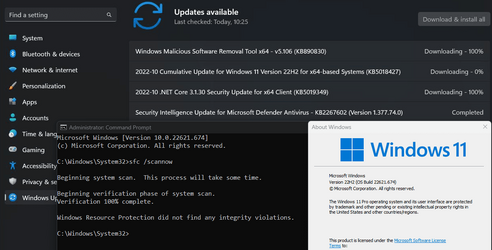
Win Update KB5018427 Cumulative Update for Windows 11 Build 22621.674 (22H2) - Oct. 11


UPDATE 10/18:


October 11, 2022 - KB5018427 (OS Build 22621.674)​


For information about Windows update terminology, see the article about the types of Windows updates and the monthly quality update types. For an overview of Windows 11, version 22H2, see its update history page.

Note Follow @WindowsUpdate to find out when new content is published to the Windows release health dashboard.

Highlights​

  • We address security issues for your Windows operating system.

Improvements​

This security update includes improvements that were a part of update KB5017389 (released September 30, 2022). Key changes in this release include:
  • This update contains miscellaneous security improvements to internal OS functionality. No additional issues were documented for this release.
If you installed earlier updates, only the new updates contained in this package will be downloaded and installed on your device.

For more information about security vulnerabilities, please refer to the Security Update Guide website and the October 2022 Security Updates.

Windows 11 servicing stack update - 22000.378​

This update makes quality improvements to the servicing stack, which is the component that installs Windows updates. Servicing stack updates (SSU) ensure that you have a robust and reliable servicing stack so that your devices can receive and install Microsoft updates.

Known issues in this update​

Applies toSymptomWorkaround
IT adminsUsing provisioning packages on Windows 11, version 22H2 (also called Windows 11 2022 Update) might not work as expected. Windows might only be partially configured, and the Out Of Box Experience might not finish or might restart unexpectedly. Provisioning packages are .PPKG files which are used to help configure new devices for use on business or school networks. Provisioning packages which are applied during initial setup are most likely to be impacted by this issue. For more information on provisioning packages, please see Provisioning packages for Windows.

Note Provisioning Windows devices using Windows Autopilot is not affected by this issue.

Windows devices used by consumers in their home or small offices are not likely to be affected by this issue.
If you can provision the Windows device before upgrading to Windows 11, version 22H2, this will prevent the issue.

We are presently investigating and will provide an update in an upcoming release.
IT adminsCopying large multiple gigabyte (GB) files might take longer than expected to finish on Windows 11, version 22H2. You are more likely to experience this issue copying files to Windows 11, version 22H2 from a network share via Server Message Block (SMB) but local file copy might also be affected.Windows devices used by consumers in their home or small offices are not likely to be affected by this issue.To mitigate this issue, you can use file copy tools that do not use cache manager (buffered I/O). This can be done by using the built-in command-line tools listed below:

robocopy \\someserver\someshare c:\somefolder somefile.img /J

or

xcopy \\someserver\someshare c:\somefolder /J

We are working on a resolution and will provide an update in an upcoming release.
All usersOn October 5, 2022, the Jordanian government made an official announcement ending the winter-time Daylight Saving Time (DST) time zone change. Starting at 12:00 a.m. Friday, October 28, 2022, the official time will not advance by an hour and will permanently shift to the UTC + 3 time zone.

The impact of this change is as follows:
  1. Clocks will not be advanced by an hour at 12:00 a.m. on October 28, 2022 for the Jordan time zone.
  2. The Jordan time zone will permanently shift to the UTC + 3 time zone.
Symptoms if no update is installed and the workaround is not used on devices in the Jordan time zone on October 28, 2022 or later:
  • Time shown in Windows and apps will not be correct.
  • Apps and cloud services which use date and time for integral functions, such as Microsoft Teams and Microsoft Outlook, notifications and scheduling of meetings might be 60 minutes off.
  • Automation using date and time, such as Scheduled tasks, might not run at the expected time.
  • Timestamp on transactions, files, and logs will be 60 minutes off.
  • Operations that rely on time-dependent protocols such as Kerberos might cause authentication failures when attempting to logon or access resources.
  • Windows devices and apps outside of Jordan might also be affected if they are connecting to servers or devices in Jordan or if they are scheduling or attending meetings taking place in Jordan from another location or time zone. Windows devices outside of Jordan should not use the workaround, as it would change their local time on the device.
This issue is addressed in KB5018496. This update will not install automatically. To apply this update, you can check for updates and select the optional preview to download and install.

If you cannot install this update, you can mitigate this issue on devices in Jordan by doing either of the following on October 28, 2022:
  • Select the Windows logo key, type "Date and time", and select Date and time settings. From the Date & time settings page, toggle Adjust for daylight saving time automatically to Off.
  • Go to Control Panel > Clock and Region > Date and Time > Change time zone and uncheck the option for “Automatically adjust clock for Daylight Saving Time”.
Important: We recommend using ONLY the above workaround to mitigate the issue with time created by the new Daylight Savings Time in Jordan. We do NOT recommend using any other workaround, as they can create inconsistent results and might create serious issues if done incorrectly.
IT adminsAfter this and later updates are installed, domain join operations might be unsuccessful and error "0xaac (2732): NERR_AccountReuseBlockedByPolicy" occurs. Additionally, text stating "An account with the same name exists in Active Directory. Re-using the account was blocked by security policy" might be displayed.

Affected scenarios include some domain join or re-imaging operations where a computer account was created or pre-staged by a different identity than the identity used to join or re-join the computer to the domain.

For more information about this issue, see KB5020276 - Netjoin: Domain join hardening changes.

Note Consumer Desktop editions of Windows are unlikely to experience this issue.
We have added guidance to KB5020276 and are evaluating whether optimizations can be made in a future Windows Update. This guidance will be updated as soon as those changes are released.

How to get this update​

Before installing this update

Microsoft combines the latest servicing stack update (SSU) for your operating system with the latest cumulative update (LCU). For general information about SSUs, see Servicing stack updates and Servicing Stack Updates (SSU): Frequently Asked Questions.

Install this update

Release ChannelAvailableNext Step
Windows Update and Microsoft UpdateYesNone. This update will be downloaded and installed automatically from Windows Update.
Windows Update for BusinessYesNone. This update will be downloaded and installed automatically from Windows Update in accordance with configured policies.
Microsoft Update CatalogYesTo get the standalone package for this update, go to the Microsoft Update Catalog website.
Windows Server Update Services (WSUS)YesThis update will automatically sync with WSUS if you configure Products and Classifications as follows:
Product: Windows 11
Classification: Security Updates

If you want to remove the LCU

To remove the LCU after installing the combined SSU and LCU package, use the DISM/Remove-Package command line option with the LCU package name as the argument. You can find the package name by using this command: DISM /online /get-packages.

Running Windows Update Standalone Installer (wusa.exe) with the /uninstall switch on the combined package will not work because the combined package contains the SSU. You cannot remove the SSU from the system after installation.

File information

For a list of the files that are provided in this update, download the file information for cumulative update 5018427.

For a list of the files that are provided in the servicing stack update, download the file information for the SSU - version 22621.378.

Source:

Check Windows Updates

Direct download links for KB5018427 MSU file from Microsoft Update Catalog:

[fa]fas fa-download[/fa] Download KB5018427 MSU for Windows 11 v22H2 64-bit (x64) - 242.6 MB

[fa]fas fa-download[/fa] Download KB5018427 MSU for Windows 11 v22H2 ARM64 - 323.3 MB


UUP Dump:

64-bit ISO download:
Select language for Windows 11, version 22H2 (22621.674) amd64

ARM64 ISO download: Select language for Windows 11, version 22H2 (22621.674) arm64

 
Last edited:

All done here ! It was quick, maybe 3 minutes !!

Chuck
 

My Computer

System One

  • OS
    Windows11 23H2 (OS Build 22631.2428)
    Computer type
    PC/Desktop
    Manufacturer/Model
    HP HP ENVY TE01
    CPU
    2.90 gigahertz Intel Core i7-10700
    Motherboard
    Board: HP 8767 A (SMVB)
    Memory
    16214 Megabytes Usable Installed Memor
    Hard Drives
    1511.52 Gigabytes Usable Hard Drive Capacity
    1418.15 Gigabytes Hard Drive Free Space
    Keyboard
    Logitech wireless
    Mouse
    M 185 wireless
    Internet Speed
    12 ms Jitter 8 ms Download 10.5 Mbps Upload 1.7
    Browser
    Edge & FF
    Antivirus
    Windows Defender
1665521313896.png
 

My Computers

System One System Two

  • OS
    Win 11 Pro 25H2 26200.8524
    Computer type
    PC/Desktop
    Manufacturer/Model
    Self Built
    CPU
    Intel® Core™ i7-14700K
    Motherboard
    ASUS TUF Z690-PLUS WIFI BIOS 4505 11/29/25
    Memory
    G.SKILL Ripjaws S5 Series 64GB (2 x 32GB) DDR5
    Graphics Card(s)
    ASUS GeForce RTX 4070 Super 12GB
    Sound Card
    Sound Blaster AE-5 Plus
    Monitor(s) Displays
    ASUS TUF Gaming 27" 2K HDR Gaming
    Screen Resolution
    2560 x 1440
    Hard Drives
    Samsung 990 Pro 1TB NVMe (Win 11 25H2)
    SK hynix P41 500GB NVMe 25H2 DEV/Games
    SK hynix P41 2TB NVMe (x3)
    Crucial P3 Plus 4TB
    PSU
    Corsair RM850x Shift
    Case
    Antec Dark Phantom DP502 FLUX
    Cooling
    Corsair Nautilus 360 RS AIO
    Keyboard
    Logitech MK 320
    Mouse
    Razer Basilisk V3
    Internet Speed
    350Mbs
    Browser
    Firefox
    Antivirus
    Winows Security
    Other Info
    MR 8.1 Home

    System 3 Specs
    Win 11 Pro 25H2 26200.8524
    ASUS PRIME Z370-P II BIOS 3004 7/12/21
    Intel Core i7-8700 CPU @ 3.20GHz
    32GB DDR4 RAM (4x8)
    iGPU Intel UHD Graphics 630
  • Operating System
    Win 11 Pro 25H2 26200.8524
    Computer type
    PC/Desktop
    Manufacturer/Model
    Self Built
    CPU
    Intel Core i7-11700F
    Motherboard
    Asus TUF Gaming Z590 Plus WiFi (BIOS 2803)
    Memory
    64 GB DDR4
    Graphics card(s)
    MSI GeForce RTX 3060 Ventus 2X 12GB
    Sound Card
    SoundBlaster Audigy Fx V2
    Monitor(s) Displays
    Samsung F27T350
    Screen Resolution
    1920x1080
    Hard Drives
    Samsung 980 Pro 1TB
    Samsung 970 EVO Plus 2TB
    Samsung 870 EVO 500GB SSD
    PSU
    Corsair HX750
    Case
    Cougar MX330-G Window
    Cooling
    Thermalright Frozen Edge 240 Black AIO
    Internet Speed
    350Mbps
    Browser
    Firefox
    Antivirus
    Windows Security
1665521725216.png


Updated to Build 22621.674. No problems so far.
 

My Computer

System One

  • OS
    Windows 11 Pro
    Computer type
    Laptop
    Manufacturer/Model
    Asus
    CPU
    Intel® Core™ i5-1035G1 CPU @ 1.00GHz
    Memory
    8 GB
    Graphics Card(s)
    NVIDIA® Intel® UHD Graphics
    Monitor(s) Displays
    15.6" LED-backlit FHD
    Screen Resolution
    1920x1080
    Hard Drives
    INTEL SSDPEKNW 512GB
    Keyboard
    Logitech Wireless
    Mouse
    Logitech Wirelss
    Internet Speed
    850 Mbps
    Browser
    Chrome, Edge
    Antivirus
    Malwarebytes Premium, Windows Defender
Done, no issues.
inver 2022-10-11_22h17_45.png
 

My Computers

System One System Two

  • OS
    Windows 11 Pro 64-bits 25H2 26200-7922
    Computer type
    PC/Desktop
    Manufacturer/Model
    Custom self built
    CPU
    AMD Ryzen 3 3200G with Radeon Vega Graphics 3.60 GHz
    Motherboard
    MSI B350 PC MATE
    Memory
    32,00 GB TeamGroup DDR4-2667
    Graphics Card(s)
    Nvidia GeForce GT 730 & Radeon™ Vega 8 Graphics
    Sound Card
    nVIDIA GK208 HDMI/DP High Definition Audio Controller
    Monitor(s) Displays
    AOC 27"
    Screen Resolution
    3840x2160
    Hard Drives
    SSD Team Group T-Force Cardea Zero Z440 1TB Gen4 M.2 NVMe (5000/4400MB/s), SSD Team Group CX2 512GB SATA III (530/470MB/s) and 2x Seagate 1TB BarraCuda 64MB 7200rpm SATA III 3.5 - ST1000DM010
    PSU
    LC-Power 650W V2.3
    Case
    ATX Nox Hummer ZS
    Cooling
    No cooling
    Keyboard
    Logitech K220
    Mouse
    Logitech
    Internet Speed
    1000/200
    Browser
    Firefox 148.0
    Antivirus
    Windows Defender
    Other Info
    Optical Drive ASUS DRW-24D5MT
  • Operating System
    Windows 11 Pro 64-bits 25H2 26200-7922
    Computer type
    Laptop
    Manufacturer/Model
    Dell Latitude 5400
    CPU
    Intel Core i5-8365U
    Motherboard
    Dell 03WM4C - Intel Cannon Lake-U PCH-LP Premium
    Memory
    16 GB
    Graphics card(s)
    Intel UHD Graphics 620 - Whiskey Lake-U GT2
    Sound Card
    Intel Cannon Lake-LP - cAVS (Audio, Voice, Speech) [D0]
    Monitor(s) Displays
    Dell NV14N4F
    Screen Resolution
    1920 x 1080
    Hard Drives
    Micron 2200S NVMe 256 GB
    PSU
    Dell X7XY03
    Internet Speed
    1000 Mbps / 200 MBps
    Browser
    Firefox 148.0
    Antivirus
    Microsoft Windows Defender
Just applied to all 3 production level Windows 11 22H2 machines. Fortunately, no RDP problems apparent yet, either. That's been interesting, on the Dev Channel versions of late...
Cheers!
=Ed=
 

My Computers

System One System Two

  • OS
    Windows 11
    Computer type
    Laptop
    Manufacturer/Model
    Lenovo X380 Yoga
    CPU
    i7-8650U (8th Gen/Kaby Lake)
    Motherboard
    20LH000MUS (U3E1)
    Memory
    16 GB
    Graphics Card(s)
    Intel UHD Graphics 620
    Sound Card
    Integrated Conexant SmartAudio HD
    Monitor(s) Displays
    FlexView Display
    Screen Resolution
    1920x1080
    Hard Drives
    Toshiba 1 TB PCIe x3 NVMe SSD
    external 5TB Seagate USB-C attached HDD
    PSU
    Lenovo integrated 65W power brick
    Case
    Laptop
    Cooling
    Laptop
    Keyboard
    Integrated Lenovo ThinkPad keyboard
    Mouse
    touchscreen, touchpad
    Internet Speed
    GbE (Spectrum/Charter)
    Browser
    all of em
    Antivirus
    Defender
    Other Info
    Purchased early 2019 as Windows Insider test PC
  • Operating System
    Windows 11
    Computer type
    PC/Desktop
    Manufacturer/Model
    DIY
    CPU
    Ryzen 5800X
    Motherboard
    Asrock B550 Extreme4
    Memory
    128 GB (4x32 DDR5-5600)
    Graphics card(s)
    NVIDIA 3070Ti
    Sound Card
    built-in
    Monitor(s) Displays
    2xDell 2707
    Screen Resolution
    1980x1200
    Hard Drives
    2XNVMe, multiple HDDs from 3 to 12 TB
    PSU
    Seasonic 650
    Case
    NZXT Flo 6
    Cooling
    dual-fan air cooler
    Keyboard
    Logitech Wave
    Mouse
    Logitech Logi
    Internet Speed
    GbE
    Browser
    all of 'em
    Antivirus
    Defender
    Other Info
    temperamental UEFI
Completed on both pcs. Both seemed fine until I ran DISM.exe /Online /Cleanup-image /Restorehealth. That failed to complete, sticking at 62.3%.
sfc /scannow was fine on one machine, and found errors which it fixed on the other.
I ran the windows update troubleshooter, and on both pcs it found problems with the BITS system, which it corrected. dism then ran normally.

Seems odd that both my pcs should have the same issue.

John
 

My Computers

System One System Two

  • OS
    Linux Mint (22.3) and Windows 11
    Computer type
    PC/Desktop
    Manufacturer/Model
    Home built
    CPU
    Ryzen 3900x
    Motherboard
    Gigabyte Aorus Master x570 rel 1.0
    Memory
    32GB (2x16) @ 3600 MHz Corsair Vengeance LPX
    Graphics Card(s)
    Asus Geforce RTX 5060 Ti Dual OC 16 GB
    Sound Card
    No separate sound card.
    Monitor(s) Displays
    Dell U2718Q
    Screen Resolution
    3840x2160
    Hard Drives
    1TB WD-Black SN850; 1TB Samsung Sata 850 Evo; 4 TB WD Blue Sata SA510 2.5''; 4TB Samsung Sata SSD 870 EVO 2.5".
    PSU
    Be Quiet Dark Power Pro 11 750W
    Case
    Lian Li PC-8FIB
    Cooling
    CPU: Noctua NH-U12A; Case: BeQuiet + Lian Li fans.
    Keyboard
    Steelseries Apex 7 brown keys.
    Mouse
    Logitech (wired) G403
    Internet Speed
    940 Mb/s down; 105 Mb/s up
    Browser
    Firefox
    Other Info
    Pioneer blu-ray optical drive.
  • Operating System
    Windows 11 Home (ARM version) (latest update)
    Computer type
    Laptop
    Manufacturer/Model
    Samsung Galaxy Book4 Edge 14" Copilot+ PC
    CPU
    Qualcomm Snapdragon X Elite X1E-80-100
    Memory
    16 GB LPDDR5
    Graphics card(s)
    Qualcomm Adreno
    Monitor(s) Displays
    Touch screen 14" AMOLED monitor
    Screen Resolution
    2880x1800
    Hard Drives
    512 GB eUFS
    Internet Speed
    930 Mb/s (Wifi)
    Browser
    Firefox
    Antivirus
    Eset Internet Security
    Other Info
    NPU Qualcomm Hexagon
Installed without issue so far here.
 

My Computer

System One

  • OS
    Windows 11 Pro 24H2
    Computer type
    PC/Desktop
    Manufacturer/Model
    MinisForum / UM790-Pro
    CPU
    AMD Ryzen™ 9 7940HS Processor, 8 Cores/16 Threads
    Motherboard
    MinisForum
    Memory
    32Gb DDR5 5600MHz SODIMM
    Graphics Card(s)
    Integrated AMD Radeon 780M
    Sound Card
    Onboard
    Monitor(s) Displays
    LG 32" 4K
    Screen Resolution
    3840 X 2160
    Hard Drives
    1 Gb WD - Black SN850X PCIe Gen4 NVMe SSD
    1 Gb Kingston OMPGP41024Q-A0 Gen4 NVMe SSD
    Keyboard
    Logitech K800
    Mouse
    Logitech MX Master 3
I installed on all 3 Laptops using Windows Update, with no problems.
 

My Computer

System One

  • OS
    Windows 11 Pro
    Computer type
    Laptop
    Manufacturer/Model
    HP/Envy-17T
    CPU
    Intel Core i7 @ 1.80GHz
    Motherboard
    HP - 8485 (U3E1)
    Memory
    16gb
    Graphics Card(s)
    Intel UHD Graphics 620 and NVIDIA GeForce MX150
    Sound Card
    Realtek High Definition Audio / Intel Display Audio / NVIDIA Virtual Audio Device (Wave Extensible) (WDM)
    Monitor(s) Displays
    Generic PnP Monitor on Intel UHD Graphics 620
    Screen Resolution
    1536x864 pixels
    Hard Drives
    KBG30ZMV256G TOSHIBA (SSD)
    ST1000LM049-2GH172 (SSD)
    PSU
    HP Standard
    Cooling
    HP CoolSense
    Keyboard
    Standard PS/2 Keyboard
    Mouse
    Anker
    Internet Speed
    95Mbps
    Browser
    FireFox
    Antivirus
    WebRoot
KB5018427 installed fast, no issues. Ran DISM online + SFC /scannow OK. Now on build 22621.674
 

My Computers

System One System Two

  • OS
    Windows 11 Home 25H2 build: 26200.8524
    Computer type
    Laptop
    Manufacturer/Model
    Acer Swift A.I SF14-51T
    CPU
    Intel(R) Core(TM) Ultra 7 258V, 2200 Mhz, 8 Cores
    Motherboard
    Icefish_LNV, Version V1.15
    Memory
    32 GB LPDDR5X (soldered)
    Graphics Card(s)
    Intel(R) Arc(TM) 140V GPU (16GB)
    Sound Card
    RealTek + Intel Smart Sound
    Monitor(s) Displays
    14" IPS WUXGA
    Screen Resolution
    1920x1200x60Hz
    Hard Drives
    Micron_2550_MTFDKBA1T0TGE, NVMe Gen4, 1TB
    PSU
    45W USB-C GaN charger
    Case
    Full aluminum body
    Cooling
    1 fan
    Keyboard
    US with Backlight
    Mouse
    Precision Trackpad
    Internet Speed
    25 Mb/s 5G
    Browser
    Edge
    Antivirus
    Windows Defender
    Other Info
    BIOS Version/Date Insyde Corp. V1.15, 8/28/2025, Windows Hello IR camera with Facial recognition. Secure Boot 2026 KEK key installed
  • Operating System
    Windows 11 Home 25H2 build: 26200.8524
    Computer type
    Laptop
    Manufacturer/Model
    Asus Vivobook K3502Z S15 15" OLED
    CPU
    Intel 12th Gen. i7 12700H, 14 cores, 2.3 GHz (24M Cache, up to 4.7 GHz, 6P+8E cores)
    Motherboard
    Alder Lake-H, 1700-4700 MHz clock rate
    Memory
    8GB LPDDR4 on board + 8GB LPDDR4 3200 MHz in Dual Channel.
    Graphics card(s)
    Intel Iris Xe supports up to 4096 x 2304 @ 120Hz
    Sound Card
    Harman Kardon - DTS
    Monitor(s) Displays
    OLED 15.6inch 2.8K (2880 x 1620)
    Screen Resolution
    16:9 aspect ratio 0.2ms response time 120Hz refresh rate, 550nits
    Hard Drives
    512GB M.2 NVMe Gen4 PCIe 4.0 SSD, Micron_2450_MTFDKBA512TFK
    PSU
    90-Watt USB charger (Thunderbolt4)
    Case
    Metal lid, plastic case
    Cooling
    1 fan
    Keyboard
    With adjustable backlight
    Mouse
    Precision Trackpad
    Internet Speed
    ISP provides 15 mb/s WIFI LTE (4G), laptop WIFI 6 adapter.
    Browser
    Edge
    Antivirus
    Windows Defender
    Other Info
    BIOS American Megatrends International, LLC. 10.1.2.312, 13/03/2024. Network adapter: Intel Wi-Fi 6E AX211 160 MHz, Secure Boot 2026 KEK key installed
After updating, I am getting some odd errors in event viewer. "Microsoft-Windows-ModernDeployment-Diagnostics-Provider/ManagementService 1010" and "NDIS Miniport Microsoft Wi-Fi Direct Virtual Adapter #2, {0c58e921-e3e7-4a19-85ef-8de41f6af6dd}, had event Fatal error: The miniport has failed a power transition to operational power 10317". Odd!
 

My Computer

System One

  • OS
    Windows 11 25H2 Home
    Computer type
    Laptop
    Manufacturer/Model
    HP ENVY Laptop 17m-ch1xxx
    CPU
    11th Generation Intel Core i7
    Memory
    12GB
    Monitor(s) Displays
    17.3” FHD Display
In addition, all of my machines required a DISM RestoreHealth .... Btw, what happened to the LCU folder in 22H2 ? Is is still used elsewhere?

I get the impression that some configurations of the 22H2 build are not compatible, or different compared with the default "template" from which the SFC command checks and rebuilds the Windows system. Because even with the errors left on my computer, Windows is still 100% functional. So maybe the SFC command itself should be updated for allowing all 22H2 changes to be described as non-corrupt?
 

My Computers

System One System Two

  • OS
    Windows 11 Pro
    Computer type
    PC/Desktop
    Manufacturer/Model
    Sharkoon SGC1 - RGB
    CPU
    Intel® Core™ i9-10940X - 14 Cores
    Motherboard
    Asus Prime X299-A II
    Memory
    Kingston HyperX Fury RGB 64GB DDR4-3200
    Graphics Card(s)
    NVIDIA RTX 3060 Ti 8GB
    Monitor(s) Displays
    LG Ultra HD
    Screen Resolution
    3840 x 2160
    Hard Drives
    SSD 4000GB Samsung 870 QVO SSD 500GB Crucial MX500 PSSD 2T Samsung T7 SCSI
    PSU
    850W Cooler Master
    Case
    Sharkoon SGC1 - RGB
    Cooling
    Cooler Master H412R
    Keyboard
    Corsair Vengeance-K70-RGB
    Mouse
    CONTUS Gaming Mouse
    Internet Speed
    1000/1000 (Mbps)
    Browser
    Chrome
    Antivirus
    Windows Defender
    Other Info
    CPU: Intel Core i9-10940X (Cascade Lake-X, L1)
    3300 MHz (33.00x100.0) @ 1183 MHz (12.00x98.6)
    Motherboard: ASUS PRIME X299-A II
    BIOS: 2001, 11/06/2024
    Chipset: Intel X299 (Kaby Lake)
    Memory: 65536 MBytes @ 1190 MHz, 17-17-17-39
    - 16384 MB PC25600 DDR4 SDRAM - Kingston KHX3200C16D4/16GX
    - 16384 MB PC25600 DDR4 SDRAM - Kingston KHX3200C16D4/16GX
    - 16384 MB PC25600 DDR4 SDRAM - Kingston KHX3200C16D4/16GX
    - 16384 MB PC25600 DDR4 SDRAM - Kingston KHX3200C16D4/16GX
    Graphics: NVIDIA GeForce RTX 3060 Ti
    NVIDIA GeForce RTX 3060 Ti, 8192 MB GDDR6 SDRAM
    Drive: CT500MX500SSD1, 488.4 GB, Serial ATA 6Gb/s @ 6Gb/s
    Drive: Samsung SSD 870 QVO 4TB, 3907.0 GB, Serial ATA 6Gb/s @ 6Gb/s
    Drive: Samsung SSD 860 QVO 4TB, 3907.0 GB, Serial ATA 6Gb/s @ 6Gb/s <-> USB
    Drive: Samsung SSD 860 EVO 4TB, 3907.0 GB, Serial ATA 6Gb/s @ 6Gb/s <-> USB
    Drive: Samsung Portable SSD T7, 1953.5 GB, NVMe
    Drive: Samsung Portable SSD T9, 3907.0 GB, NVMe
    Sound: Intel Kaby Lake - High Definition Audio / cAVS (Audio, Voice, Speech) [A0]
    Sound: NVIDIA GA104 - High Definition Audio Controller
    Network: Intel Ethernet Connection I219-V
    OS: Microsoft Windows 11 Professional (x64) Build 26200.8524 (25H2)


    MY THIRD DESKTOP SYSTEM
    ===================
    Computer: PCSpecialist Amd Trx50
    CPU: AMD Ryzen Threadripper 9980X (Shimada Peak, SHP-C1)
    3200 MHz (32.00x100.0) @ 2481 MHz (24.86x99.8)
    Motherboard: ASUS Pro WS TRX50-SAGE WIFI
    BIOS: 1203, 07/18/2025
    Chipset: AMD TRX50 (Promontory PROM21L.1)
    Memory: 262144 MBytes @ 3200 MHz, 52-52-52-103
    - 65536 MB PC51200 DDR5 SDRAM - Kingston 9965844-002.A01G
    - 65536 MB PC51200 DDR5 SDRAM - Kingston 9965844-002.A01G
    - 65536 MB PC51200 DDR5 SDRAM - Kingston 9965844-002.A01G
    - 65536 MB PC51200 DDR5 SDRAM - Kingston 9965844-002.A01G
    Graphics: Palit GeForce RTX 5080
    NVIDIA GeForce RTX 5080, 16303 MB GDDR7 SDRAM
    Drive: Samsung SSD 9100 PRO 4TB, 3907.0 GB, NVMe
    Drive: Corsair MP600 PRO NH, 7814.0 GB, NVMe
    Drive: CT2000T705SSD3, 1953.5 GB, NVMe
    Sound: NVIDIA GB203 - High Definition Audio Controller
    Sound: AMD Stones/Breithorn - HD Audio Controller (AZ)
    Network: Aquantia/Marvell AQC113 FastLinQ Edge 10Gbit Network Adapter
    Network: Intel Ethernet Controller I226-LM
    OS: Microsoft Windows 11 Professional (x64) Build 26200.8524 (25H2)
  • Operating System
    Windows 11 Pro
    Computer type
    PC/Desktop
    Manufacturer/Model
    MSI Intel
    CPU
    Intel® Core™ i5-12600KF - 10 Cores
    Motherboard
    MSI Pro B660M-G DDR4
    Memory
    RAIDER GAMING 64GB DDR4-3200
    Graphics card(s)
    MSI GeForce RTX 4060 Ventus 2X Black 8G OC
    Monitor(s) Displays
    Odyssey G70NC
    Screen Resolution
    3840 x 2160, 120 Hz - (HDR)
    Hard Drives
    MSI Spatium M371 500GB + 7x SSD 4TB
    PSU
    550 Watt MSI
    Case
    MSI MAG Forge 112R
    Cooling
    Watercooling MSI MAG CoreLiquid 240R V2 Black
    Internet Speed
    1000/1000 (Mbps)
    Browser
    Brave
    Antivirus
    Windows Defender
    Other Info
    Computer: MSI MS-7D45
    CPU: Intel Core i5-12600KF (Alder Lake-S 640, C0)
    3700 MHz (37.00x100.0) @ 798 MHz (8.00x99.8)
    Motherboard: MSI PRO B660M-G DDR4 (MS-7D45)
    BIOS: 1.O0, 08/07/2025
    Chipset: Intel B660 (Alder Lake-S PCH)
    Memory: 65536 MBytes @ 1596 MHz, 22-22-22-52
    - 32768 MB PC25600 DDR4 SDRAM - Crucial Technology CT32G4DFD832A.C16FF
    - 32768 MB PC25600 DDR4 SDRAM - Crucial Technology CT32G4DFD832A.C16FF
    Graphics: MSI RTX 4060 Ventus 2X Black OC
    NVIDIA GeForce RTX 4060, 8188 MB GDDR6 SDRAM
    Drive: MSI M371 500GB, 488.4 GB, NVMe
    Drive: Samsung SSD 870 QVO 8TB, 7814.0 GB, Serial ATA 6Gb/s @ 6Gb/s <-> USB
    Drive: Samsung SSD 870 QVO 8TB, 7814.0 GB, Serial ATA 6Gb/s @ 6Gb/s <-> USB
    Drive: Samsung Portable SSD T9, 3907.0 GB, NVMe
    Drive: Samsung Portable SSD T9, 3907.0 GB, NVMe
    Sound: Intel Alder Lake-S PCH - cAVS (Audio, Voice, Speech)
    Sound: NVIDIA AD106 - High Definition Audio Controller
    Network: RealTek Semiconductor RTL8125 Gaming 2.5GbE Family Ethernet Controller
    OS: Microsoft Windows 11 Professional (x64) Build 26200.8524 (25H2)
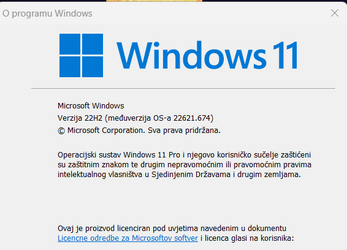
Updated to Build 22621.674
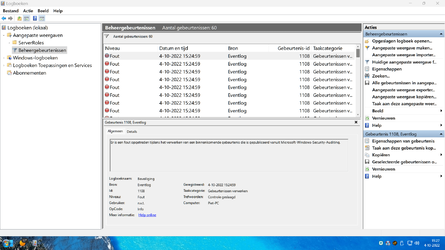
Still not fixed.................

HOW (??) to get rid of these annoying id=1108 !! :unsure:

Eventviewer.png
 

My Computer

System One

  • OS
    Windows11 Pro 25H2
    Computer type
    PC/Desktop
    Manufacturer/Model
    Asus
    CPU
    i7
    Motherboard
    z97k
    Memory
    32GB
    Graphics Card(s)
    nVidia
    Sound Card
    Realtek
    Hard Drives
    3
    Cooling
    air
    Browser
    Edge
    Antivirus
    ESET
I also noticed about 90 of these 1108 event error split between the two points when the .674 and .647 were being installed. None before and none after. Taking it as a non-issue with something not available during the install.
 

My Computer

System One

  • OS
    Windows 11 Pro
    Computer type
    Laptop
    Manufacturer/Model
    ASUS Zenbook 14 OLED
    CPU
    Intel Core Ultra
    Memory
    16GB
    Graphics Card(s)
    Intel(R) Arc Graphics
    Sound Card
    Realtek High Definition Audio(SST)
    Screen Resolution
    2880 x 1800
    Hard Drives
    500 GB NVMe SSD
    Internet Speed
    1,500Mbps
    Browser
    Firefox, Edge
    Antivirus
    Windows Defender
" Taking it as a non-issue ".......... thats not an option , we have to get rid of this nonsense !
Its eating your SSD .........
 

My Computer

System One

  • OS
    Windows11 Pro 25H2
    Computer type
    PC/Desktop
    Manufacturer/Model
    Asus
    CPU
    i7
    Motherboard
    z97k
    Memory
    32GB
    Graphics Card(s)
    nVidia
    Sound Card
    Realtek
    Hard Drives
    3
    Cooling
    air
    Browser
    Edge
    Antivirus
    ESET
Did anyone else notice that, with this build (I think it was ok in previous builds) the ability to jump to the desktop by clicking on the thin vertical black line at the rightmost edge of the taskbar? In my case, the "line" is just not there anymore. I miss it, it was a handy feature.
 

My Computer

System One

  • OS
    Windows 11
    Computer type
    Laptop
    Manufacturer/Model
    MSI
    CPU
    Intel i7-10750H CPU @2.60 GHz, 2592 MHz, 6 cores
    Memory
    32GB
Did anyone else notice that, with this build (I think it was ok in previous builds) the ability to jump to the desktop by clicking on the thin vertical black line at the rightmost edge of the taskbar? In my case, the "line" is just not there anymore. I miss it, it was a handy feature.
I still have this
 

My Computer

System One

  • OS
    Windows 11 Pro 25H2 (RP channel)
    Computer type
    PC/Desktop
    Manufacturer/Model
    MSI
    CPU
    AMD Ryzen 7 9800X3D 8-core
    Motherboard
    MEG X870E Godlike
    Memory
    64GB Corsair Titanium 6000/CL30
    Graphics Card(s)
    MSI Suprim 5080 SOC
    Sound Card
    Soundblaster AE-9
    Monitor(s) Displays
    ASUS TUF Gaming VG289Q
    Screen Resolution
    3840x2160
    Hard Drives
    Samsung 9100 Pro 4TB (gen 5 x4, system drive/games)
    Samsung 990 Pro 2TB
    Samsung 980 Pro 2TB
    Samsung 870 Evo 4TB
    Samsung 870 Evo 2TB
    Samsung T9 4TB
    PSU
    Seasonic PX-2200
    Case
    Bequiet! Dark Base Pro 901
    Cooling
    Noctua NH-D15S Chromax black
    Keyboard
    Logitech G915 X (wired)
    Mouse
    Logitech G903 with PowerPlay charger
    Internet Speed
    900Mb/sec
    Browser
    Microsoft Edge
    Antivirus
    Windows Defender
Did anyone else notice that, with this build (I think it was ok in previous builds) the ability to jump to the desktop by clicking on the thin vertical black line at the rightmost edge of the taskbar? In my case, the "line" is just not there anymore. I miss it, it was a handy feature.
If you don't get "Show Desktop" when you hover at bottom right, then check Settings, Personalization, Taskbar, Taskbar behaviours, Select the far corner of the taskbar to show the desktop.


My Computer

System One

  • OS
    Windows 11
    Computer type
    Laptop
Did anyone else notice that, with this build (I think it was ok in previous builds) the ability to jump to the desktop by clicking on the thin vertical black line at the rightmost edge of the taskbar? In my case, the "line" is just not there anymore. I miss it, it was a handy feature.
I still have it. I think there's a settings option to turn it off/on though.
 

My Computers

System One System Two

  • OS
    Win 11 Pro (25H2 RP)
    Computer type
    Laptop
    Manufacturer/Model
    Acer AN515-54
    CPU
    Intel(R) Core(TM) i5-9300H CPU @ 2.40GHz 2.40 GHz
    Memory
    32GB
    Graphics Card(s)
    Nvidia GeForce GTX 1650, Intel UHD 630
    Monitor(s) Displays
    Acer CB272D
    Screen Resolution
    1920x1080
    Hard Drives
    256GB and 1T SSD
    Internet Speed
    500MB
    Browser
    Edge (Stable)
    Antivirus
    Microsoft Defender
  • Operating System
    Win 11 Pro (RP)
    Computer type
    Laptop
    Manufacturer/Model
    Lenovo Legion 5 16IAX10 - Type 83NX
    CPU
    Intel(R) Core(TM) Ultra 9 275HX (2.70 GHz)
    Memory
    32GB DDR5-5600
    Graphics card(s)
    NVIDIA® GeForce RTX™ 5060 8GB
    Monitor(s) Displays
    Acer CB272D
    Screen Resolution
    1920x1080 75Hz
    Hard Drives
    WD Green SN3000 (2TB)
    Samsung Portable T5 (2TB)
    Keyboard
    Logi MX Keys
    Mouse
    Logi MX Anywhere 3
    Internet Speed
    500MB
    Browser
    Edge
    Antivirus
    MS Defender
I still have it. I think there's a settings option to turn it off/on though.
Right-Click on the Taskbar.
Choose Taskbar Settings.
Scroll down and choose Taskbar Behaviors.
Scroll down to the bottom and put a checkmark in...
Select the far corner of the Taskbar to show the desktop.
 

My Computers

System One System Two

  • OS
    Windows 11 Pro
    Computer type
    Laptop
    Manufacturer/Model
    Dell XPS 16 DA16260
    CPU
    Intel Series 3 Core Ultra X9 388H
    Memory
    64GB LPDDR5x 9600 MT/s
    Graphics Card(s)
    Intel Arc graphics B390 Panther Lake
    Monitor(s) Displays
    16" 3.2K Tandem OLED Infinity Edge
    Screen Resolution
    3200 x 2000 16:10 236 PPI
    Hard Drives
    1 Terabyte M.2 PCIe NVMe SSD
    Case
    Black Anodized Aluminum
    Cooling
    Vapor Chamber Cooling
    Mouse
    None
    Internet Speed
    942 Mbps Netgear Mesh + 2 Satellites
    Browser
    Microsoft Edge (Chromium)
    Antivirus
    Windows Security (Defender)
    Other Info
    NPU delivering 67 TOPS
    Microsoft 365 subscription
    Microsoft OneDrive 1TB Cloud
    Microsoft Visual Studio
    Microsoft Visual Studio Code
    Microsoft Sysinternals Suite
    Microsoft BitLocker
    Microsoft Copilot
    Dell Support Assist
    Dell Command | Update
    Macrium Reflect X subscription
    1Password Password Manager
    Amazon Kindle for PC
    Lightroom/Photoshop subscription
    Interactive Brokers Trader Workstation
  • Operating System
    Windows 11 Pro
    Computer type
    Laptop
    Manufacturer/Model
    Microsoft Surface Laptop 7
    CPU
    Snapdragon® X Elite (12 Core) with Hexagon NPU delivering 45 TOPS
    Memory
    32GB LPDDR5x 8448 MT/s
    Graphics card(s)
    Integrated Adreno GPU
    Sound Card
    Omnisonic speakers with Dolby Atmos spatial sound
    Monitor(s) Displays
    13.8″ PixelSense Flow touchscreen 120 Hz 600 NIT
    Screen Resolution
    2304 × 1536 (201 PPI), 3:2 aspect ratio
    Hard Drives
    1 TB PCIe NVMe Gen 4 SSD
    Case
    Black Anodized Aluminum
    Cooling
    Vapor Chamber Cooling
    Mouse
    None
    Internet Speed
    942 Mbps Netgear Mesh + 2 Satellites
    Browser
    Microsoft Edge (Chromium)
    Antivirus
    Windows Security (Defender)
    Other Info
    Microsoft 365 subscription (Office)
    Microsoft OneDrive 1TB Cloud
    Microsoft Visual Studio 2026
    Microsoft Visual Studio Code
    Interactive Brokers Trader Workstation
    Lightroom/Photoshop subscription
    1Password Password Manager
    Microsoft Sysinternals
    Amazon Kindle for PC
    Microsoft BitLocker
    Microsoft Copilot
Back
Top Bottom